
Enthusiast II
May 24, 2024

Fixing the library error code 913 for Windows users!

  • May 24, 2024
  • 91 replies
  • 18114 views

So a big thanks also to “helpingiskind” @HelpingIsKind 

So as far as windows users go, sorry not sure about iOS users here, but the crucial things after updating the windows app for W10+, you need to turn on “Advanced Sharing” in windows, and make sure that your music library whether it’s stored on a NAS or just an ext usb drive, or internal drive is added to your library. So this is the example that helpingiskind gave:

Please right-click on the Music Folder > Properties > Advanced Sharing > Add Sonos Wireless HiFi System to Read/Write:
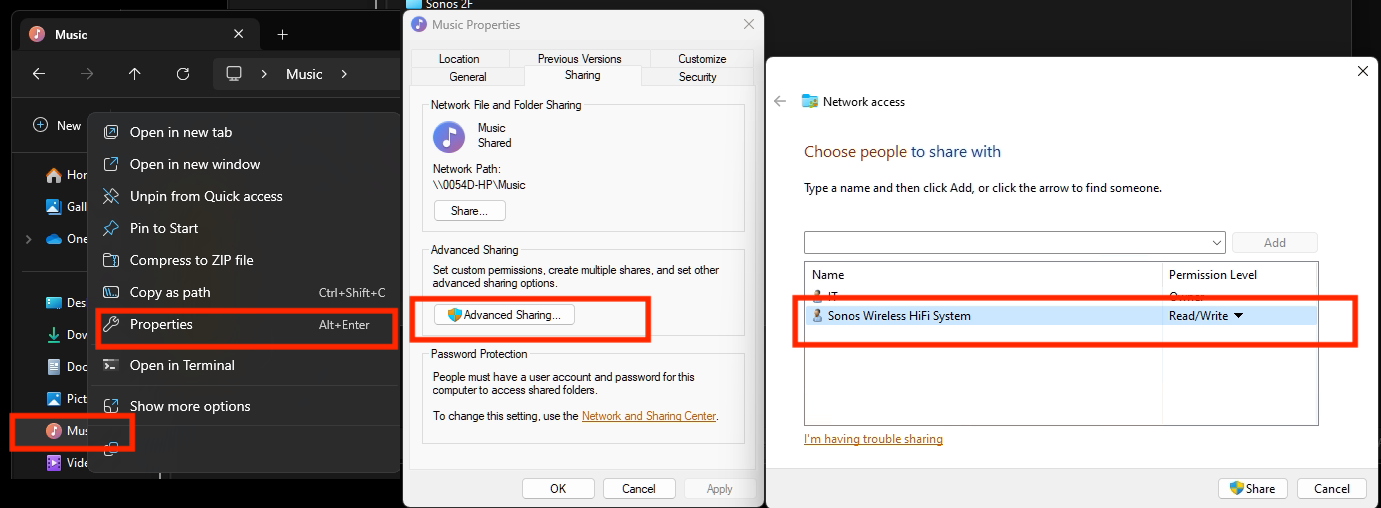
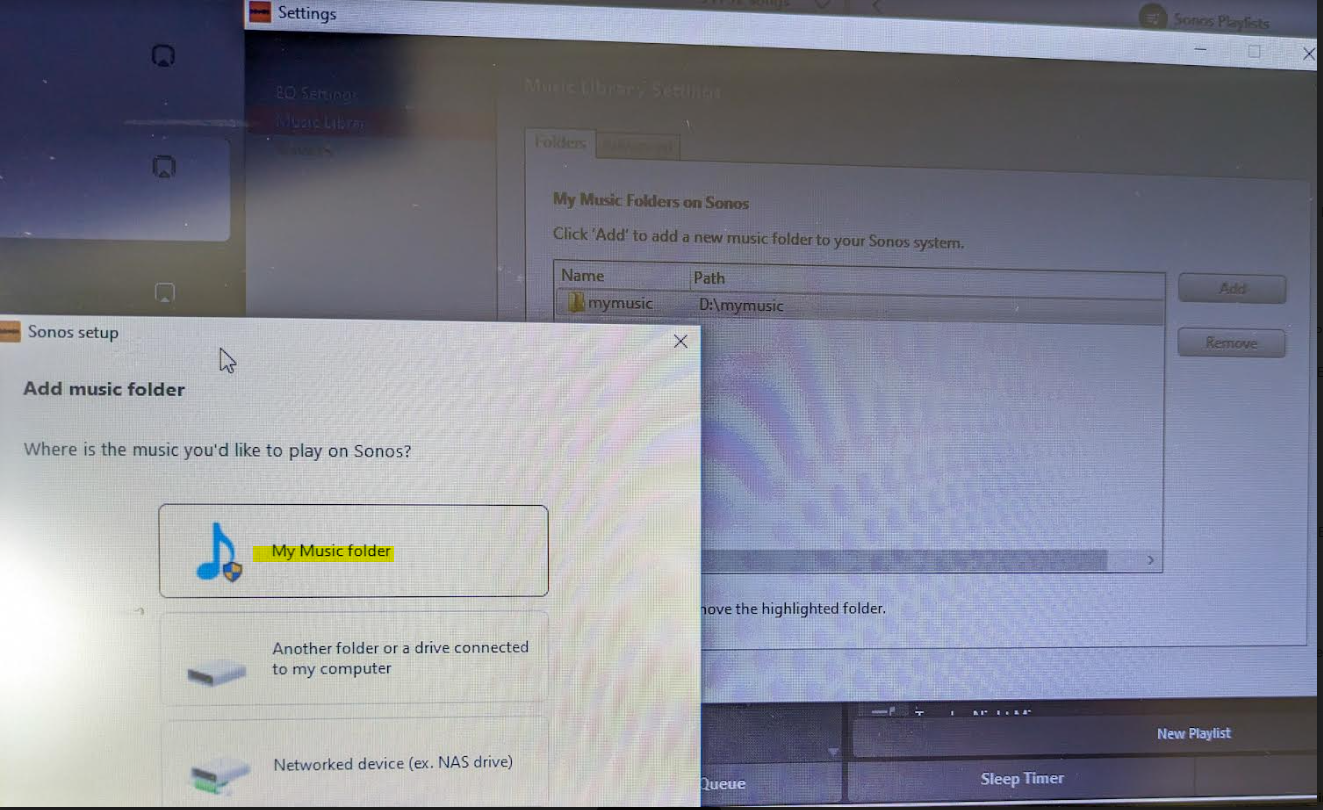
Then go to Sonos settings on your laptop and add “My Music folder” and it will sync.


Because the android app is terrible, I rolled back to the version 78 and found the .apk for that and then the app works like it’s used to and marries to the W10 controller app nicely….which has also caused the update issues along with the apps for android/apple to be very annoying!


Good luck and lets hope the next update from Sonos makes things nice n easy for everyone..

Hope this helps everyone and thanks to everyone elses ideas across this forum!


This topic has been closed for further comments. You can use the search bar to find a similar topic, or create a new one by clicking Create Topic at the top of the page.

91 replies

Lyricist I
May 25, 2024

Let me just add.  I’m having the same Error 913 issue on my Sonos system (Apple devices) - can’t get to any of my music files.  I do not subscribe to any streaming music services.  I tried calling Friday afternoon, and waited for over a half hour with no one picking up.  When I called back Friday evening, it said my wait was “60 minutes,” which I’m guessing really meant … “talk to you some other day.”  Now it’s Saturday morning on a holiday weekend - meaning that no one will likely be around “voice”-wise for the next half week.  So much for entertaining guests with my great Sonos system.  Chat is also not available.  I see some suggestions for Windows systems but nothing for Apple systems here, so I guess I’ll just have to wait.  What a cluster****.  I hate updates.


Enthusiast I
May 25, 2024

@Aikigrl From what I read in other threads while I was trying to get mine to work, I’m pretty sure Sonos stopped supporting SMB1 with the updates because of the security problems. 

Lyricist I
May 25, 2024

For Apple users, this fellow has it figured out.  I followed his instructions, and it’s working!  Click on the link (or image) below.


Lyricist III
May 25, 2024

According to Sonos support, the reason for this breakage is that they have, without warning, ended support for http and SMBv1 protocols for accessing network drives, out of a supposed concern for our security. Your network share must use SMBv2 or SMBv3 protocol. This is something you would adjust on the device which is doing the sharing. If, as in my case, this is not a Windows system, the proposed fix for Windows PCs will not be useful even if you are using the Windows application. So for instance, in my case, since my music is on a flash drive plugged into a Netgear router, I would go to the router administration page in my browser (192.168.1.1 in my case) and see whether there’s a way to select the SMB version level.

Lyricist III
May 25, 2024

@Aikigrl From what I read in other threads while I was trying to get mine to work, I’m pretty sure Sonos stopped supporting SMB1 with the updates because of the security problems. 

Cool - thanks for that info. That would explain why my previous forced SMBv1 share suddenly stopped working. Any info on any software update for older Sonos speakers that will let us keep the lights on?

Lyricist III
May 25, 2024

@Chlorine I already have SMBv2 enabled on my PC build but my controller is still crapping out trying to connect to my ext drive whether connected to my PC or to my router. I have already enabled Samba and specifically SMBv2 on my router.

I am out of ideas. Have anyone got their ext drives working?

Trending Lyricist I
May 25, 2024

Patrick Spence is the current CEO of Sonos. His email is ceo@sonos.com. I have emailed him directly in the past about stuff and gotten a response. My suggestion is to flood is inbox with complaints about this crap.

Lyricist III
May 25, 2024

@dpcook I’d rather not dox anyone but I also don’t want to throw out my sound bar or my Play1 which are still working fantastically when the software is not busted… These b@st@rds are really expensive downunder...

Trending Lyricist I
May 25, 2024

Aikigrl, honestly, I do not feel like this is doxing. Patrick is the man in charge and there are thousands of people upset about this situation. His software people screwed the pooch on this upgrade and if he doesn’t know. which is quite possible, he should definitely be informed.

My perspective is this… My system worked exactly how I wanted it to. Then I did an upgrade and it stopped working. I do not feel that it is my job to sit on a help line for 2+ hours to sort out the issue. My rate is >$200/hour. Is Sonos going to reimburse me for that time? Maybe give me $400 credit towards my next purchase because I have to waste my time on this? I think not.

BTW, his email address is listed on their website so it is not that I am stalking him or anything along those lines.

Lyricist III
May 25, 2024

@dpcook Fair enough if the email address is publicly available. I am the same as you - I like to set and forget, and hope the damn thing continues to work until the sun explodes.

I was very upset last night when I found that I could not play a damn thing on my system after spending days months ago to get the system to work after I updated to windows 11. Looks like I am back on setting my PC to NOT sleep once more.