
Contributor I
October 26, 2022
Answered

Controller update fails on macOS Ventura 13.0

I just updated to macOS Ventura 13.0.  The next day the Sonos Controller said I had an update.  Pressing the “Update Now” button started the update process normally.

After asking for my Admin credentials, I get an error saying “Sonos Update failed.  An unexpected error occurred.  Please try again.”
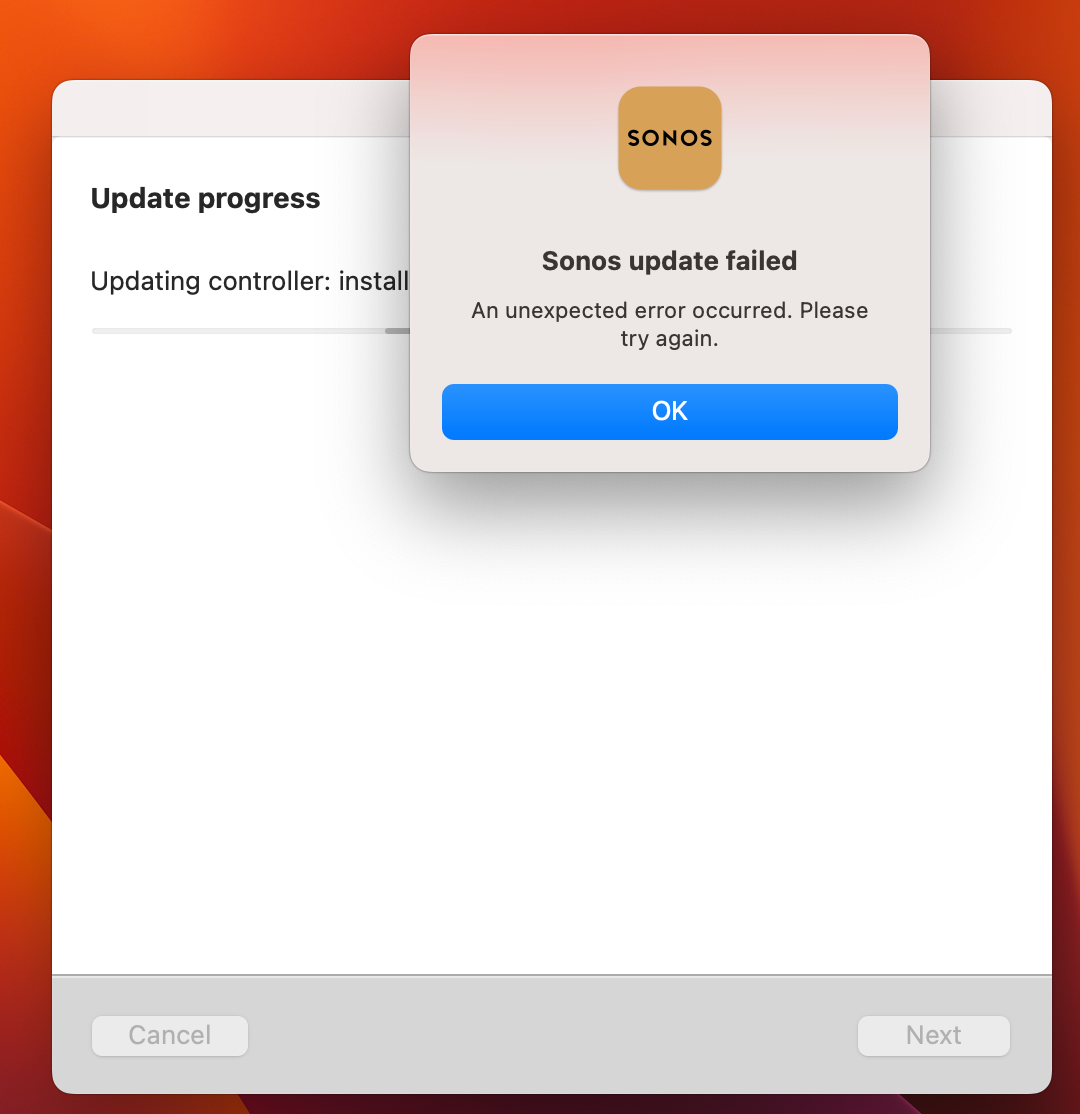
 

Is anyone else seeing this?

Dave


Info:

Sonos Controller for Mac

Version: 14.14

Sonos: OS S2

Build: 69123100

This topic has been closed for further comments. You can use the search bar to find a similar topic, or create a new one by clicking Create Topic at the top of the page.
Corry P
Corry PAnswer
Sonos Staff
October 26, 2022

Hi @Sperl & @hatchua 

Welcome to the Sonos Community!

We are aware of an issue whereby the Sonos Desktop Controller app on macOS 13 Ventura is unable to update itself.

If you do not already have app version 14.18 on your Mac, and if you are prompted to update, please take one of the following steps:

  • If you are not using a music library shared from the Mac, please uninstall the controller, download the newest version from https://support.sonos.com/s/downloads and install it.
  • If you are currently using a music library shared from the Mac you should skip the update and use the controller in limited compatibility mode for the time being.

Thanks for posting, and I hope this helps.


Edit: Edited for clarity

"Common sense is the collection of prejudices acquired by age eighteen." - Albert Einstein

28 replies

Airgetlam
October 26, 2022

I’ve updated my Mac, but I’ve no need to update my controller.

A couple of suggestions, which may or may not be useful.

Have you tried a reboot of your Mac?

Have you tried simply renaming the file temporarily (don’t want to trash it yet), and downloaded a new version from the Sonos website, and installed it? If it doesn’t work, you can delete the downloaded file, and name the old file back to the correct name. 

Bruce
Lyricist I
October 26, 2022

Same problem here. I think there’s a new security setting. Not sure which one it is or how to allow it. 

SperlAuthor
Contributor I
October 26, 2022

Thanks for the suggestions.  A reboot did not work.

I am sure I could grab the most recent version of the Controller from the Sonos website, but I wanted to point out a larger problem that the Sonos macOS team might need to address.

Corry P
Corry PAnswer
Sonos Staff
October 26, 2022

Hi @Sperl & @hatchua 

Welcome to the Sonos Community!

We are aware of an issue whereby the Sonos Desktop Controller app on macOS 13 Ventura is unable to update itself.

If you do not already have app version 14.18 on your Mac, and if you are prompted to update, please take one of the following steps:

  • If you are not using a music library shared from the Mac, please uninstall the controller, download the newest version from https://support.sonos.com/s/downloads and install it.
  • If you are currently using a music library shared from the Mac you should skip the update and use the controller in limited compatibility mode for the time being.

Thanks for posting, and I hope this helps.


Edit: Edited for clarity

"Common sense is the collection of prejudices acquired by age eighteen." - Albert Einstein
SperlAuthor
Contributor I
October 26, 2022

Corry,

So is it safe to say if you have macOS Controller 14.18, we are good to go in the future.  If you have an earlier version then update from the web site.  Correct?


Corry P
Sonos Staff
October 26, 2022

Hi @Sperl 

That’s correct, yes. I’ll edit my post a little. Thanks!

"Common sense is the collection of prejudices acquired by age eighteen." - Albert Einstein
SperlAuthor
Contributor I
October 26, 2022

Confirmed.  Thanks!

Lyricist II
November 16, 2022

I’m confused, @Corry P.  I realize it’s three weeks later, but...

“If you do not already have app version 14.18 on your Mac”

What do you do if you already have Sonos.app version 14.18 and the update fails this way?


Version: 14.18

Sonos OS: S2

Build: 70134112

Smilja
November 16, 2022

@Jim32, Uninstall the app, reboot the Mac, afterwards download a fresh .dmg file from here.

»And the world is like an apple whirling silently in space, Like the circles that you find in the windmills of your mind.« (›Windmills Of Your Mind‹ [1967]. Music by Michel Legrand ; English lyrics written by Alan & Marilyn Bergman)
Trending Lyricist I
November 16, 2022

If I uninstall and then reinstall, won’t that cause issues with all of my customizations, music services, home library, Sonos playlists, etc.?

--BKIV