
Contributor I
June 15, 2024
Question

Amazon Music no longer working

  • June 15, 2024
  • 180 replies
  • 10169 views

I am hoping that someone can assist with a major problem I have and this is not yet another 'new app problem'.

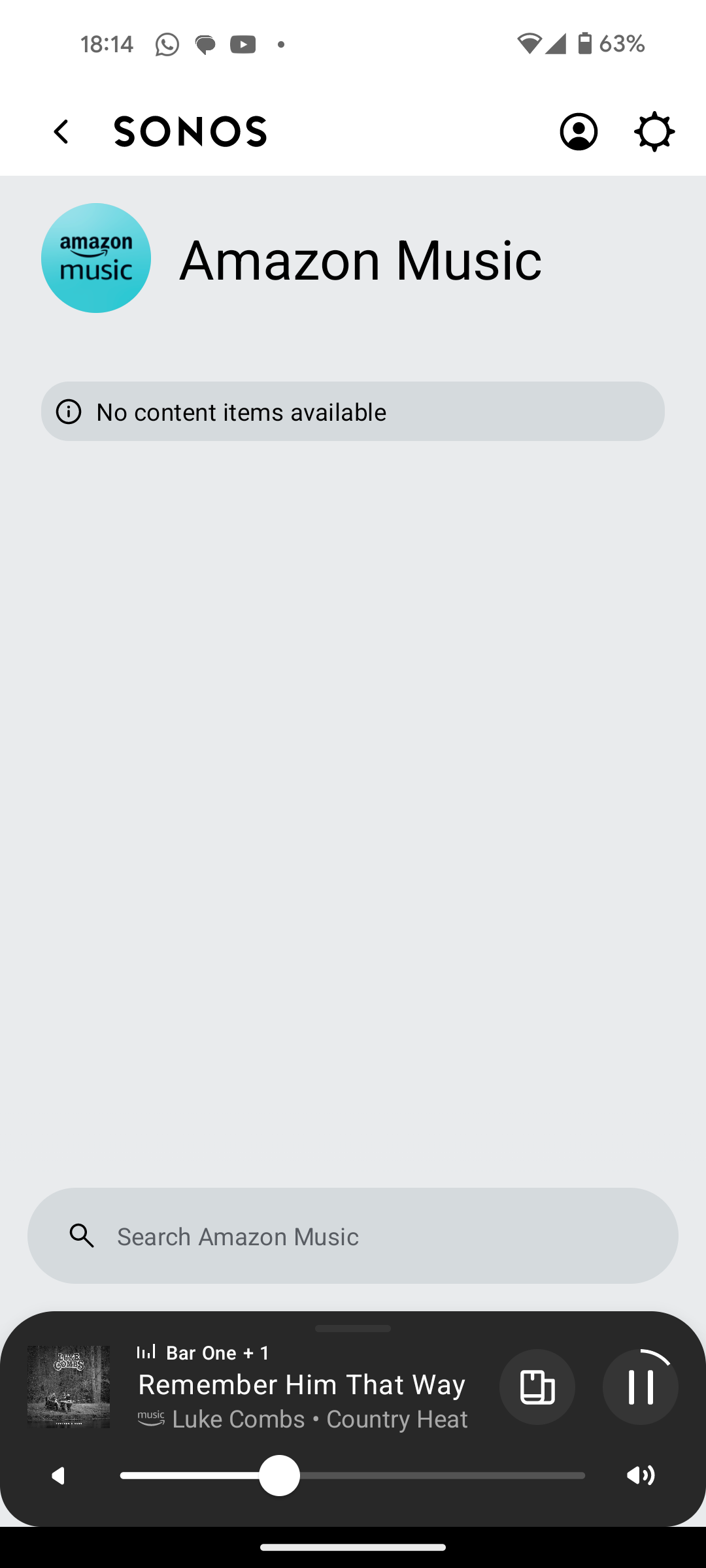
I have Amazon Music Unlimited connected to my (extensive) Sonos system. With the latest app update it has basically stopped working leaving me with limited misic. Behaviour is odd however mostly it just doesn't work and I get errors saying there is a problem with Amazon. However, every so often it does at least list some music, e.g a playlist. When I try to play it, it may work or skip a number of songs before finding one that plays. After that it will stop. If a speaker already had a music queue, you can hit play on the speaker and it works but stops after maybe 3 songs.

I have tried:

- uninstalling and reinstalling Sonos app

- re authorising Amazon Music

- other devices (same behaviour)

- contacting Sonos support (have an incident number but have to phone next week - will update if I find out more as I have sent diagnostics).

I attach screen shots as examples. I also have a video of it wildly skipping songs but don't seem to be able to upload.

Note other services work. Sonos Radio and Calm. Plus Amazon Music App itself works sweetly.

Help. I currently have a very expensive, unusable system.

Thanks


This topic has been closed for further comments. You can use the search bar to find a similar topic, or create a new one by clicking Create Topic at the top of the page.

180 replies

Lyricist I
August 27, 2024

I’ve just discovered this issue online - I’ve been having trouble for months with music stopping half way through a track which is infuriating. I even switched from Sonos One to Sonos Beam.

Music that I have purchased from Amazon music just stops half way through a track (after about 2 or 3 tracks), doesn’t even skip to next track.  After changing speakers I thought it must have been a corrupt track or something (I’m not technically minded), and changed my playlists around to exclude a particular album I thought was the issue, but now I realise it’s not just me. 

I only use this sonos speaker when I’m working and cannot stop what i’m doing to check exactly what track or for any error messages, when am able to check on the sonos app on my android phone there are no errors and it appears as if its playing normally.

Any advice welcome before I ditch my Sonos system completely as currently it’s not fit for purpose.  Many thanks,

Corry P
Sonos Staff
August 27, 2024

Hi@furacaopr 

Thanks for that info - I’ll pass your diagnostics on to a colleague for further investigation, seeing as your internet connection is not likely to be the source of what I saw.

Regarding the connection type for the Beam, you could try ensuring it is the STP root bridge for the network - go to http://<IP_address_of_Beam>:1400/advconfig and set FirstZP to Enable, then hit Submit. Reboot the Beam afterwards. Only do this for an ethernet connection, however.

If you want to submit a feature request, please create a new thread for it - this one is a bit long in the tooth for having it here.

I hope this helps.

"Common sense is the collection of prejudices acquired by age eighteen." - Albert Einstein
Prodigy III
August 27, 2024

Hi @Corry P, I disconnected the cable from the Beam and connected the same cable to a 10-year-old laptop, so it's not the best in terms or processing power:

  • High Bandwidth
  • Low latency
  • Low Jitter
  • No Packet Loss


Prodigy III
August 27, 2024

I have already connected the Beam to Wi-Fi on 2.4Ghz. So, I just went have a look:

Let me try on WiFi, submit diags and then I'll go back to Ethernet and set FirstZP to enabled as you'd mentioned

Corry P
Sonos Staff
August 27, 2024

Hi @MoPac 

I agree that the message could be worded better, but it is usually indicative of interference - if local EM interference is so bad that the data arriving at the speaker is corrupted, that is the message you will see. Basically, the speaker fails to decompress the incoming feed into meaningful output - why this actually happens, the speaker (or rather, the module in the firmware whose specific purpose it is to “unzip” compressed data) has no real idea.

I suspect that the text of the error message may even pre-date streaming services and therefore was intended to be seen when playing Music Library - as a customer may be responsible for the encoding of locally stored tracks, it may have been a sensible error message to see at some point. It could indeed do with refresh - you will not find me arguing that point!

I hope this helps.

"Common sense is the collection of prejudices acquired by age eighteen." - Albert Einstein
Prodigy III
August 27, 2024

Same issues on WiFi. New diags submitted.

MoPac
Headliner III
August 27, 2024

Corry P:

 Help me understand this better.  I have read in the past that music streaming does not require a 5GHz connection.  So it seems that 2.4GHz would be enough.  I have had no connection issues here where the Xfinity router + one extender does band steering.  At times though I wish it presented two SSIDs with the same name but one 2.4 & one 5.  The wall penetration advantage of 2.4 seems to make more sense yet Xfinity has, for some speakers, assigned 5GHz.

 One example of this steering is with the Move stereo setup when I’m on the deck.  The SNR readings are 35 & 41 when connected with 5GHz.  No dropouts but would 2.4GHz give me a stronger signal… rhetorical question.

 In our old house there were two SSIDs shown.  I connected every audio system to 2.4 and never had any issues.  The systems were a mix of various manufacturers.  Of course all IP Addresses were reserved.

Prodigy III
August 27, 2024

Hi @Corry P,

I re-wired the Beam, but left the radio on. I went to http://<IP_address_of_Beam>:1400/advconfig, set FirstZP to enable and rebotted the Beam. I checked again http://<IP_address_of_Beam>:1400/advconfig, but FirstZP always shows as disabled.

The track skipping continues. New diags ending with 404 submitted.

Trending Lyricist I
August 27, 2024

I have been having similar issues since weekend. Sonos support said it was wifi interference but it's been working for nearly 3 years and nothing has changed with the setup. 

My issue slightly different, I choose song or album in sonos from amazon music, it plays for 10 seconds and audio stops. Still looks to be playing in app. Sometimes then jumps to next song. Sonos radio plays absolutely fine through all three speakers without interruption. 

Clearly a new issue between sonos and amazon, but everyone has been blaming everyone else. Even have a sky engineer coming out because sonos said it was wifi interference.

I have also put all three speakers in the same room next to router so it can't be blamed on physical interference. 

Lyricist I
August 27, 2024

Same issue here, live in the UK. Amazon Music Unlimited doesn’t work. I’ve updated the app to no effect.

Getting really bored and frustrated with this. I only have the one music streaming service and to be frank, if it doesn’t play on the speakers then the system is useless to me.