
Contributor I
June 15, 2024
Question

Amazon Music no longer working

  • June 15, 2024
  • 180 replies
  • 10167 views

I am hoping that someone can assist with a major problem I have and this is not yet another 'new app problem'.

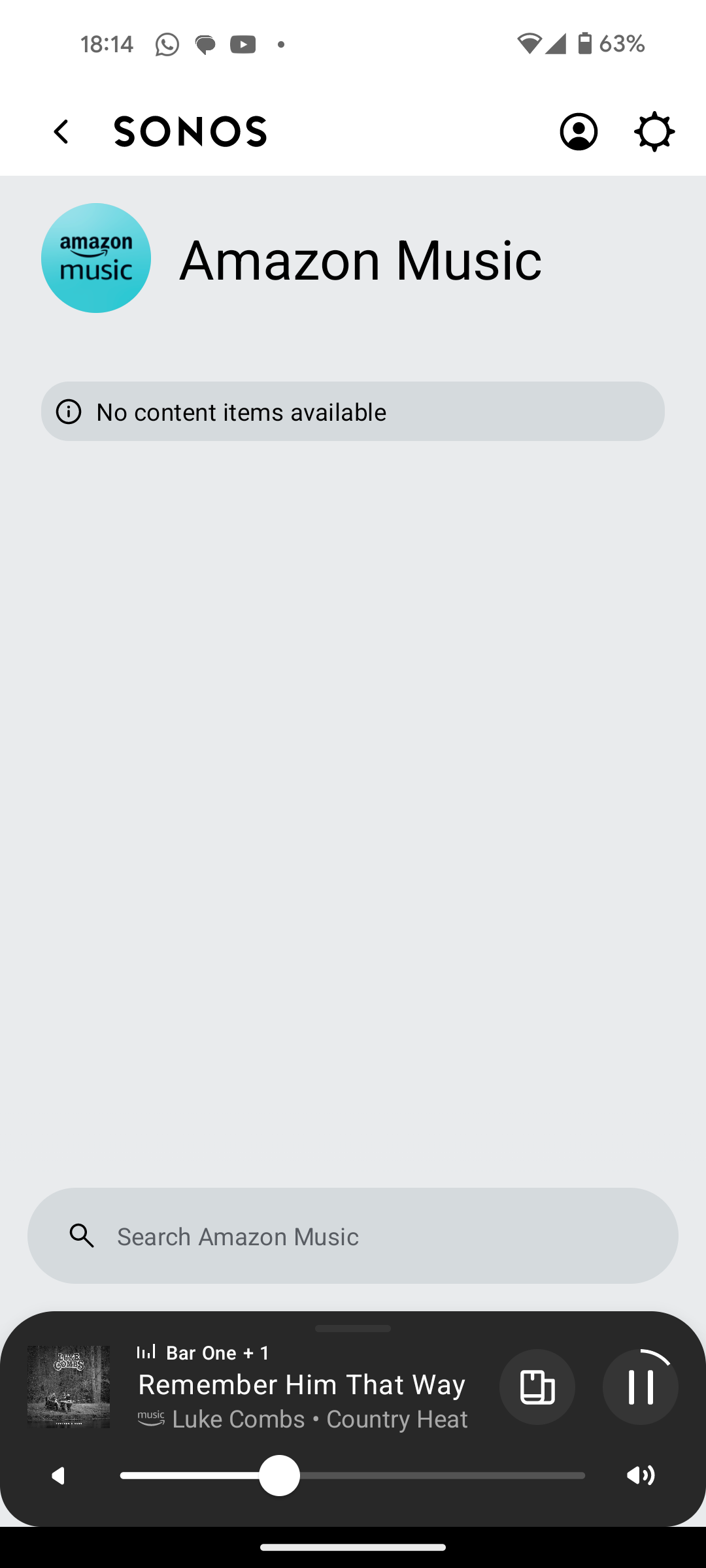
I have Amazon Music Unlimited connected to my (extensive) Sonos system. With the latest app update it has basically stopped working leaving me with limited misic. Behaviour is odd however mostly it just doesn't work and I get errors saying there is a problem with Amazon. However, every so often it does at least list some music, e.g a playlist. When I try to play it, it may work or skip a number of songs before finding one that plays. After that it will stop. If a speaker already had a music queue, you can hit play on the speaker and it works but stops after maybe 3 songs.

I have tried:

- uninstalling and reinstalling Sonos app

- re authorising Amazon Music

- other devices (same behaviour)

- contacting Sonos support (have an incident number but have to phone next week - will update if I find out more as I have sent diagnostics).

I attach screen shots as examples. I also have a video of it wildly skipping songs but don't seem to be able to upload.

Note other services work. Sonos Radio and Calm. Plus Amazon Music App itself works sweetly.

Help. I currently have a very expensive, unusable system.

Thanks


This topic has been closed for further comments. You can use the search bar to find a similar topic, or create a new one by clicking Create Topic at the top of the page.

180 replies

Trending Lyricist I
June 30, 2024

It is shared with SMB and worked perfectly until the latest software upgrade. I'm not saying the library isn't visible, I'm saying there is no option in the app to add a music library!

Ken_Griffiths
June 30, 2024

It is shared with SMB and worked perfectly until the latest software upgrade. I'm not saying the library isn't visible, I'm saying there is no option in the app to add a music library!

If it was there previously using SMBv2 in your S2 App, you should not need to add it🤔?… I did not need to add my library here, but anyway it’s mentioned in the second link in my previous post, that you can add a library using the Windows App. That is available from the Sonos download site here:

https://support.sonos.com/en-us/downloads

Trending Lyricist I
June 30, 2024

Thanks.  There is absolutely no doubt that the music library is not showing in the new app and neither is there any doubt that there is no option to add one. I've looked in every setting and in the option to add a service. 

I will check my laptop when I get chance.

Ken_Griffiths
June 30, 2024

Thanks.  There is absolutely no doubt that the music library is not showing in the new app and neither is there any doubt that there is no option to add one. I've looked in every setting and in the option to add a service. 

I will check my laptop when I get chance.

It’s in my Sonos App following the May ‘24 update - see the attached from my iPad controller this time, but if you have not got it, then the only way to add it at the moment is the Windows App.

The new Sonos app is due to get the option to add a library later in July - see this App future feature updates link: 

https://support.sonos.com/en-us/article/the-new-sonos-app-and-future-feature-updates

Enthusiast II
June 30, 2024

Interesting. I can see and use Amazon as per usual, see recently played and Sonos favs. However, my ipad doesn't show album art on large pane, only thumbnails for tracks and albums under artist.

On android, very poor performance Sonos favs, recents just disappear after 10 secs of loading. No album art whatsoever, but can see library and after a long wait, the menu for artists etc loads.

As can't update library on NAS, can't add any purchased music as the update library feature doesn't exist.

I' ve not updated the Windows app on my laptop as it gives me the chance to edit queues, and importantly, clear queues which is important as if I start something on iOS abd them move to android or vice versa, it just doesn't show what is currently playing at all. 

Interested to see whether android operation will catch up with iOS. 


Ken_Griffiths
June 30, 2024

Interesting. I can see and use Amazon as per usual, see recently played and Sonos favs. However, my ipad doesn't show album art on large pane, only thumbnails for tracks and albums under artist.

On android, very poor performance Sonos favs, recents just disappear after 10 secs of loading. No album art whatsoever, but can see library and after a long wait, the menu for artists etc loads.

As can't update library on NAS, can't add any purchased music as the update library feature doesn't exist.

I' ve not updated the Windows app on my laptop as it gives me the chance to edit queues, and importantly, clear queues which is important as if I start something on iOS abd them move to android or vice versa, it just doesn't show what is currently playing at all. 

Interested to see whether android operation will catch up with iOS. 


If you browse, or search, the Amazon music service, you can pin things to the Home Screen or Sonos Favorites, such as an Artist, Playlists, Albums etc. that’s perhaps what you’re seeing too. A lot though was imported from the S2 App when I first updated, same thing with the local library too.

Trending Lyricist I
July 1, 2024

Well that was a waste of time. The Windows app insisted it needed updating but then refused to do so, failing with the dreaded 1101 error even though the system is working perfectly and the Android app says the speakers are all up to date and working. 

I'll quit while I'm ahead at least a little. Voice control via Alexa works fine. I'll just have to forget my own playlists for a while.

Ken_Griffiths
July 1, 2024

Well that was a waste of time. The Windows app insisted it needed updating but then refused to do so, failing with the dreaded 1101 error even though the system is working perfectly and the Android app says the speakers are all up to date and working. 

I'll quit while I'm ahead at least a little. Voice control via Alexa works fine. I'll just have to forget my own playlists for a while.

The latest Windows App is here…

https://support.sonos.com/en-us/downloads

Perhaps ensure the Sonos Library Service isn’t running when updating.

Trending Lyricist I
July 1, 2024

The Windows update worked, thanks. However all of playlists have gone and my music library still doesn't show up on my phone app.

This is what I get on my app

Doesn't matter how long I leave the app open, the blanks never fill in.

Ken_Griffiths
July 1, 2024

Perhaps something on your controller is blocking the connection - do you have anything running in the background or on the network that may be blocking connections? Let me go get my Android tablet and I’ll just see if that’s working as I have not tried it recently. I’ll post back.