
Contributor I
June 15, 2024
Question

Amazon Music no longer working

  • June 15, 2024
  • 180 replies
  • 10169 views

I am hoping that someone can assist with a major problem I have and this is not yet another 'new app problem'.

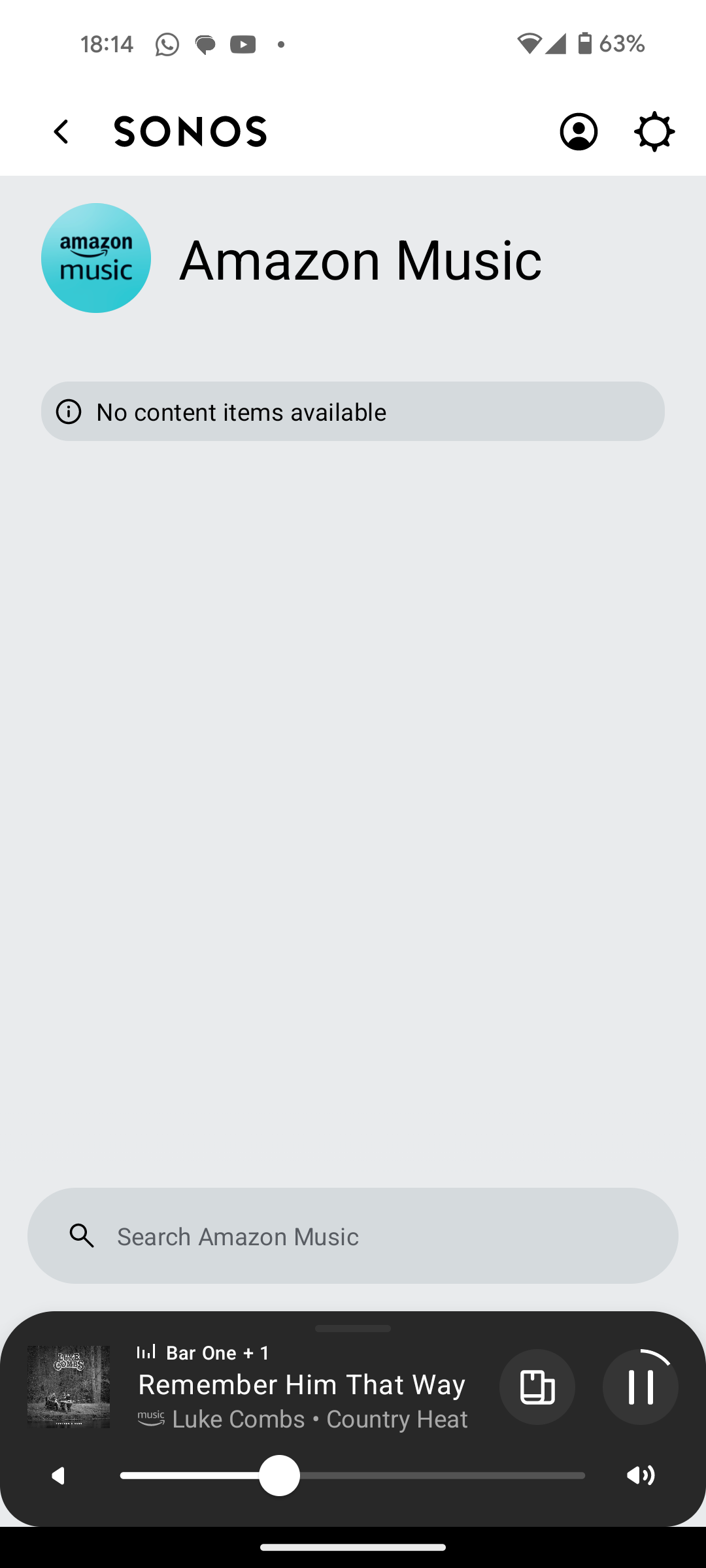
I have Amazon Music Unlimited connected to my (extensive) Sonos system. With the latest app update it has basically stopped working leaving me with limited misic. Behaviour is odd however mostly it just doesn't work and I get errors saying there is a problem with Amazon. However, every so often it does at least list some music, e.g a playlist. When I try to play it, it may work or skip a number of songs before finding one that plays. After that it will stop. If a speaker already had a music queue, you can hit play on the speaker and it works but stops after maybe 3 songs.

I have tried:

- uninstalling and reinstalling Sonos app

- re authorising Amazon Music

- other devices (same behaviour)

- contacting Sonos support (have an incident number but have to phone next week - will update if I find out more as I have sent diagnostics).

I attach screen shots as examples. I also have a video of it wildly skipping songs but don't seem to be able to upload.

Note other services work. Sonos Radio and Calm. Plus Amazon Music App itself works sweetly.

Help. I currently have a very expensive, unusable system.

Thanks


This topic has been closed for further comments. You can use the search bar to find a similar topic, or create a new one by clicking Create Topic at the top of the page.

180 replies

Trending Lyricist I
August 28, 2024

I found this solution works great. I had to go into the Alexa app. Go to “More” icon at the bottom right 

  • go to skills and games
  • go to the bottom of screen Tap “Your Skills”
  • Locate “Sonos” icon & Disable skill
  • Go back thru your skills to re-enable Sonos. 
    this fixed my one song and done and the non responsive BS without Amazon saying it s cable issue or a Sonos issue and Sonos from saying it’s an Alexa or Amazon issue. 
     
  • YOU DO NOT HAVE TO REAET SPEAKERS TO FACTORY RESET OR UNPLUG OR DANCE IN CIRCLES CHANTING. 
  • LET ME KNOW IF THIS HELPED YOU— what a party BUZZ KILL AY?

Thanks. I don't use the alexa app though 

Corry P
Sonos Staff
August 28, 2024

Hi @furacaopr 

Looking at the diagnostic you sent while your Beam was not connected to ethernet, we noticed that your other room is using 5GHz to connect. Would you mind reverting back to that configuration and giving Amazon Music a test in that room? Please submit a support diagnostic again if you hear any playback issues. Thanks.


edit: changed Apple to Amazon

"Common sense is the collection of prejudices acquired by age eighteen." - Albert Einstein
Prodigy III
August 28, 2024

Hi @furacaopr 

Looking at the diagnostic you sent while your Beam was not connected to ethernet, we noticed that your other room is using 5GHz to connect. Would you mind reverting back to that configuration and giving Apple Music a test in that room? Please submit a support diagnostic again if you hear any playback issues. Thanks.

Amazon Music, right? I'm doing that now and I'll get back to you soon.

Corry P
Sonos Staff
August 28, 2024

Hi @furacaopr 

Yes, sorry. Thanks!

"Common sense is the collection of prejudices acquired by age eighteen." - Albert Einstein
Prodigy III
August 28, 2024

@Corry P, I've just had the issue on my Play:1. Diagnostics ending on 018 submitted.

Corry P
Sonos Staff
August 28, 2024

Thanks @furacaopr!

"Common sense is the collection of prejudices acquired by age eighteen." - Albert Einstein
Prodigy III
August 28, 2024

@Corry P , it happened again when playing an Album now. It went from track #1 to track #3, skipping #2. Diagnostics ending on 680.

Ken_Griffiths
August 28, 2024

My own experience was different and the Windows App goes through the playlist okay, but admittedly it’s slow and struggles a bit on my old windows PC, but it doesn’t ‘skip’ tracks - I find the old controller a bit sluggish - the PC is wired to the LAN in my case. I did a bit of a recording attached using the same ‘UK Hits’ playlist I referred to yesterday (sorry the quality isn’t good, but best I could achieve to allow it to be posted here).

Corry P
Sonos Staff
August 28, 2024

Hi @furacaopr 

To be clear to everyone else, I am not saying that the following applies to anyone other than @furacaopr - I am not making sweeping statements about the issue you are all reporting (though the fact that we cannot reproduce does say something, I suppose).

In your case, @furacaopr, we’re still thinking it’s due to something local. Regardless of ethernet, 2.4 Ghz or 5Ghz, and regardless of which speaker you use, we are seeing connection problems to Amazon that result in the dropouts you hear. In addition, we are unable to recreate the issue in our own testing. The speakers are reporting multiple attempts to reduce the bitrate of the incoming feed in order to improve things for you, but this is not working.

Do you see any issues when streaming video, or during any other intensive use of your internet connection?

Would you mind - please feel free to say “no” as it will be a bit of work - factory resetting your standalone speaker and adding it to a hotspot from a phone/tablet? Please be aware that you would need two devices - one to run the Sonos app, and one to provide the hotspot. We’d really like to see the behaviour when using a different internet connection. The process would be as follows:

  • Factory reset the speaker
  • Start a hotspot on device 2 (We’ll call your device with the Sonos app that you’ve been using device 1)
  • Connect device 1 to device 2’s hotspot
  • Open the Sonos app on device 1
  • When the app can’t find a system, opt to create a new one
  • Setup the speaker
  • Add Amazon Music and test playback
  • Submit a support diagnostic
  • And to get back to current config, reset the speaker again, disconnect device 1 from hotspot and set speaker up on WiFi.

Thanks.


"Common sense is the collection of prejudices acquired by age eighteen." - Albert Einstein
Prodigy III
August 28, 2024

Sure, will do. No other issues when streaming video, downloading large files, playing PS4 online, etc. No issues when listening to Sonos Radio as well.