
Contributor I
June 15, 2024
Question

Amazon Music no longer working

  • June 15, 2024
  • 180 replies
  • 10169 views

I am hoping that someone can assist with a major problem I have and this is not yet another 'new app problem'.

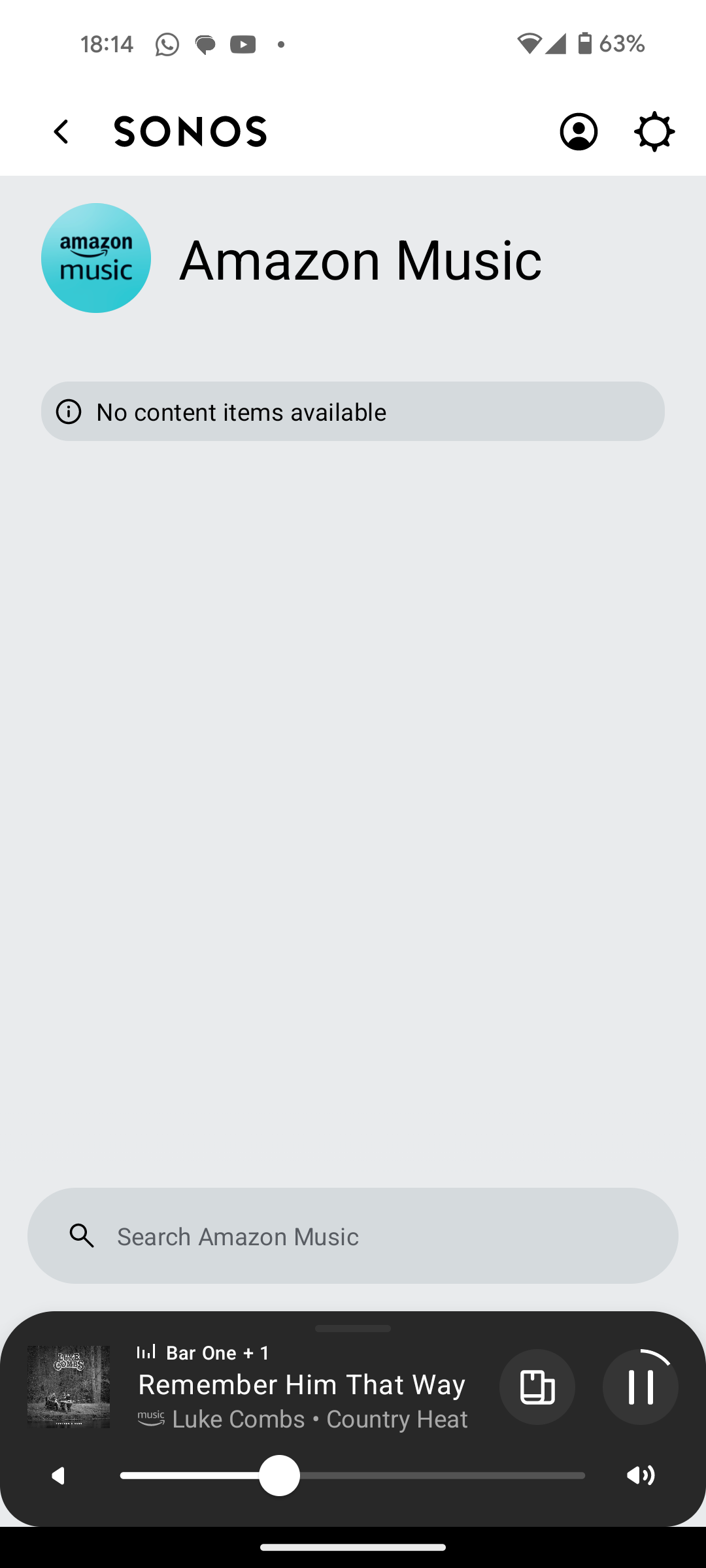
I have Amazon Music Unlimited connected to my (extensive) Sonos system. With the latest app update it has basically stopped working leaving me with limited misic. Behaviour is odd however mostly it just doesn't work and I get errors saying there is a problem with Amazon. However, every so often it does at least list some music, e.g a playlist. When I try to play it, it may work or skip a number of songs before finding one that plays. After that it will stop. If a speaker already had a music queue, you can hit play on the speaker and it works but stops after maybe 3 songs.

I have tried:

- uninstalling and reinstalling Sonos app

- re authorising Amazon Music

- other devices (same behaviour)

- contacting Sonos support (have an incident number but have to phone next week - will update if I find out more as I have sent diagnostics).

I attach screen shots as examples. I also have a video of it wildly skipping songs but don't seem to be able to upload.

Note other services work. Sonos Radio and Calm. Plus Amazon Music App itself works sweetly.

Help. I currently have a very expensive, unusable system.

Thanks


This topic has been closed for further comments. You can use the search bar to find a similar topic, or create a new one by clicking Create Topic at the top of the page.

180 replies

Corry P
Sonos Staff
August 28, 2024

Hi @furacaopr 

Thanks again for trying those steps, and for the new diagnostics and videos.

I’m still seeing something very similar - the speaker is failing to get more than 50% of it’s buffer filled despite being ethernet-wired, and when you hear an issue, that is the buffer running out completely. I’ve passed the diagnostics and videos to an engineer colleague for further investigation.

"Common sense is the collection of prejudices acquired by age eighteen." - Albert Einstein
Trending Lyricist I
August 28, 2024

Update to to my issue if anyone at sonos is following, tried the windows app this morning. Exactly the same issue with amazon music only.


Corry P
Sonos Staff
August 28, 2024

Hi @MoPac  

Corry P:

 Help me understand this better.  I have read in the past that music streaming does not require a 5GHz connection.  So it seems that 2.4GHz would be enough.

Yes. Though, as the quality of the music increases and as the number of speakers playing increases, the total can get on the high side of what 2.4GHz can handle. If there is interference too, or just heavy congestion, you may find 2.4Ghz isn’t enough.

I have had no connection issues here where the Xfinity router + one extender does band steering.  At times though I wish it presented two SSIDs with the same name but one 2.4 & one 5.

This is usually configurable in the router’s settings. It’s usually called something like band separation or band splitting. But yes - if you had separate SSIDs (broadcasted network name) and Sonos only had the credentials for one, you would be forcing Sonos to use that band. Note that Home Theatre primaries (sound-bars and Amp) do not connect to 5GHz WiFi, though they do have a 5GHz radio - they reserve it for communicating with satellite speakers.

 The wall penetration advantage of 2.4 seems to make more sense yet Xfinity has, for some speakers, assigned 5GHz.

It’s a negotiation. The speakers will select the best (fastest) network they can, but if the signal is too low for use, they will seek alternatives. This usually ends up being 2.4GHz.

 One example of this steering is with the Move stereo setup when I’m on the deck.  The SNR readings are 35 & 41 when connected with 5GHz.  No dropouts but would 2.4GHz give me a stronger signal… rhetorical question.

Probably, yes. If the 5GHz signal is too weak, however, they will switch.

 In our old house there were two SSIDs shown.  I connected every audio system to 2.4 and never had any issues.  The systems were a mix of various manufacturers.  Of course all IP Addresses were reserved.

Have a look at your router’s manual - I would be surprised if you couldn’t separate the bands, but I don’t think it is entirely unheard of.

I hope this helps.

"Common sense is the collection of prejudices acquired by age eighteen." - Albert Einstein
Corry P
Sonos Staff
August 28, 2024

Hi All,

There seems to be quite a few people responding here, but none are providing the info requested:

Please follow these steps if you are still experiencing this issue:

  1. Recreate the issue in whichever way you can.
  2. Immediately submit a support diagnostic afterwards.
  3. In your own time, come back here and post the following:
    • Verify that you have submitted a diagnostic (please do not share the given number)
    • What exactly it was that you were trying to search/play
    • Your location (country is detail enough)
    • The current OS, Make and Model of your device (e.g. Samsung Galaxy S23 Android 12)
    • The version number displayed in the Amazon app (if you have it installed)
    • If clearing the cache for the Amazon app helps matters at all (please try the steps on this page, especially the highlighted part)

I look forward to hearing back from you all.

If you are experiencing issue with playback of Amazon Music on your Sonos system, please provide the above information so we can assist. Thank you.

"Common sense is the collection of prejudices acquired by age eighteen." - Albert Einstein
Trending Lyricist I
August 28, 2024

Hi All,

There seems to be quite a few people responding here, but none are providing the info requested:

Please follow these steps if you are still experiencing this issue:

  1. Recreate the issue in whichever way you can.
  2. Immediately submit a support diagnostic afterwards.
  3. In your own time, come back here and post the following:
    • Verify that you have submitted a diagnostic (please do not share the given number)
    • What exactly it was that you were trying to search/play
    • Your location (country is detail enough)
    • The current OS, Make and Model of your device (e.g. Samsung Galaxy S23 Android 12)
    • The version number displayed in the Amazon app (if you have it installed)
    • If clearing the cache for the Amazon app helps matters at all (please try the steps on this page, especially the highlighted part)

I look forward to hearing back from you all.

If you are experiencing issue with playback of Amazon Music on your Sonos system, please provide the above information so we can assist. Thank you.

Submitted a diagnostic

Trying to play houdini eminem but has happened with every album I have tried over four days. Sometimes search error comes up. Sometimes it plays for a seconds and audio goes. When skipping to next track audio will also go straight away and it most cases then skips to the following track which Sometimes plays for a couple of second, often doesn't do anything.

United kingdom

Samsung flip 6 latest Android version. Also happened through windows controller windows 11 and partners s23.

Amazon version 24.15.1

Tried lots of things over the last few days, clearing cache, reinstalling and reauthorising both amazon music and sonos apps. Moved all the speakers into one room. 


Corry P
Sonos Staff
August 28, 2024

Hi @Sammo123 

Thanks for the diagnostic - although you use a different email here than for your Sonos system, I was able to find it. I’ll forward it to my colleague.

"Common sense is the collection of prejudices acquired by age eighteen." - Albert Einstein
Trending Lyricist I
August 28, 2024

Hi @Sammo123 

Thanks for the diagnostic - although you use a different email here than for your Sonos system, I was able to find it. I’ll forward it to my colleague.

Ah thanks. I think it was set up in my wife's name. Appreciate it! 

Just thought it was a bit odd that it suddenly started happening on weekend and sonos thought it was wifi interference. 

FYI I have a sky engineer coming out, but have been explicity told that with the newer Sky wifi max router , you are unable to change the router settings above and beyond the wifi name and password like you used to be able to. So the suggestions sonos support gave to try like manual fixing of a wifi channel appears to no longer be option.  I cant see how this is the issue, but worth you guys knowing as I'm sure you'll have other customers using sky broadband.

Corry P
Sonos Staff
August 28, 2024

Hi @Sammo123 

I too live in the UK, and although I am not familiar with the newer Sky router, I can confidently say that all free routers in the UK leave a lot to be desired - any time a company is handing out tech and not asking for money for it, it’s going to be cheap. Remember that - as far as I know - none of the ISP companies actually make their own equipment - they will pay someone else to do so. Someone who needs to make a profit off the ISP in question. The routers are as cheap as can be while still claiming strong WiFi performance (for the TV ads). 

A quick Google search found the following statement from Sky: “We recommend using a Sky Wi-Fi router, but if you have a router that you're particularly attached to and you want to keep using, or have an existing Home Wi-Fi solution that you're happy with then no worries. Sky Broadband will work with most routers, though some may not be compatible or could be tricky to set up.” Source.

My point is that even when having Sky as your ISP, you are not forced to use their router. If you get one of your own to use instead, I do not recommend spending less than about £60. Personally, I got a TP-Link Archer C6 and am happy with it (a recommendation of my own and not of Sonos’, to be clear) - it has served me well with both a Virgin Media connection, and now a Hyperoptic one.

For this particular issue, however, I am now inclined to believe that it is not due to local conditions (like your router). I should get confirmation soon.

I hope this helps.


"Common sense is the collection of prejudices acquired by age eighteen." - Albert Einstein
Trending Lyricist I
August 28, 2024

Hi @Sammo123 

I too live in the UK, and although I am not familiar with the newer Sky router, I can confidently say that all free routers in the UK leave a lot to be desired - any time a company is handing out tech and not asking for money for it, it’s going to be cheap. Remember that - as far as I know - none of the ISP companies actually make their own equipment - they will pay someone else to do so. Someone who needs to make a profit off the ISP in question. The routers are as cheap as can be while still claiming strong WiFi performance (for the TV ads). 

A quick Google search found the following statement from Sky: “We recommend using a Sky Wi-Fi router, but if you have a router that you're particularly attached to and you want to keep using, or have an existing Home Wi-Fi solution that you're happy with then no worries. Sky Broadband will work with most routers, though some may not be compatible or could be tricky to set up.” Source.

My point is that even when having Sky as your ISP, you are not forced to use their router. If you get one of your own to use instead, I do not recommend spending less than about £60. Personally, I got a TP-Link Archer C6 and am happy with it (a recommendation of my own and not of Sonos’, to be clear) - it has served me well with both a Virgin Media connection, and now a Hyperoptic one.

For this particular issue, however, I am now inclined to believe that it is not due to local conditions (like your router). I should get confirmation soon.

I hope this helps.


Legend thanks.

Lyricist I
August 28, 2024

I found this solution works great. I had to go into the Alexa app. Go to “More” icon at the bottom right 

  • go to skills and games
  • go to the bottom of screen Tap “Your Skills”
  • Locate “Sonos” icon & Disable skill
  • Go back thru your skills to re-enable Sonos. 
    this fixed my one song and done and the non responsive BS without Amazon saying it s cable issue or a Sonos issue and Sonos from saying it’s an Alexa or Amazon issue. 
     
  • YOU DO NOT HAVE TO REAET SPEAKERS TO FACTORY RESET OR UNPLUG OR DANCE IN CIRCLES CHANTING. 
  • LET ME KNOW IF THIS HELPED YOU— what a party BUZZ KILL AY?