
Contributor I
June 15, 2024
Question

Amazon Music no longer working

  • June 15, 2024
  • 180 replies
  • 10169 views

I am hoping that someone can assist with a major problem I have and this is not yet another 'new app problem'.

I have Amazon Music Unlimited connected to my (extensive) Sonos system. With the latest app update it has basically stopped working leaving me with limited misic. Behaviour is odd however mostly it just doesn't work and I get errors saying there is a problem with Amazon. However, every so often it does at least list some music, e.g a playlist. When I try to play it, it may work or skip a number of songs before finding one that plays. After that it will stop. If a speaker already had a music queue, you can hit play on the speaker and it works but stops after maybe 3 songs.

I have tried:

- uninstalling and reinstalling Sonos app

- re authorising Amazon Music

- other devices (same behaviour)

- contacting Sonos support (have an incident number but have to phone next week - will update if I find out more as I have sent diagnostics).

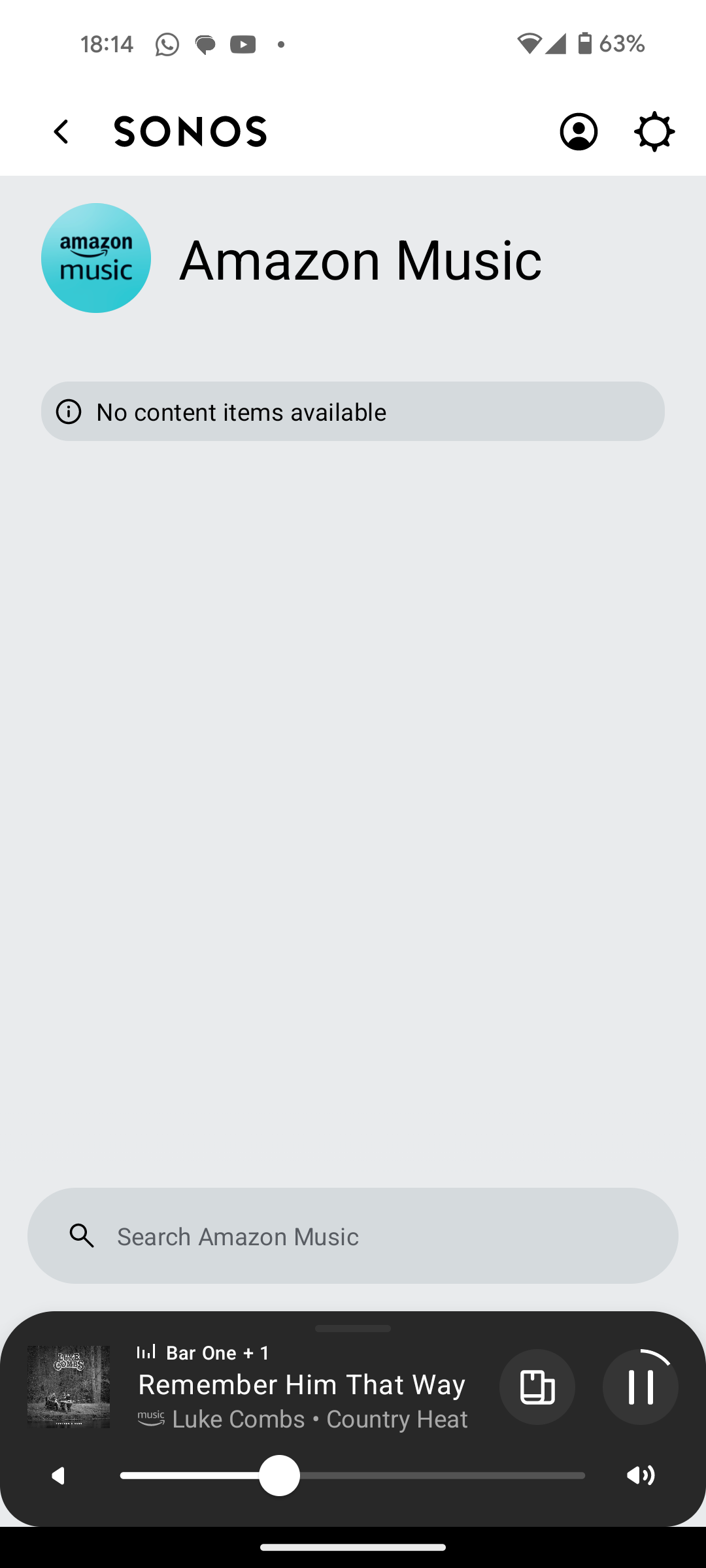
I attach screen shots as examples. I also have a video of it wildly skipping songs but don't seem to be able to upload.

Note other services work. Sonos Radio and Calm. Plus Amazon Music App itself works sweetly.

Help. I currently have a very expensive, unusable system.

Thanks


This topic has been closed for further comments. You can use the search bar to find a similar topic, or create a new one by clicking Create Topic at the top of the page.

180 replies

Prodigy III
August 27, 2024

I've just 

IDoes that also skip tracks if you just leave the playlist playing? Is it the same on say a standalone speaker rather than a Home Theatre setup (if you’re able to perhaps easily test that too?)

Yes, it skip tracks if I leave the Station or the Playlist playing

Yes, I've just tested and the same happens on my Play:1 in another room

Ken_Griffiths
August 27, 2024

I've just 

IDoes that also skip tracks if you just leave the playlist playing? Is it the same on say a standalone speaker rather than a Home Theatre setup (if you’re able to perhaps easily test that too?)

Yes, it skip tracks if I leave the Station or the Playlist playing

Yes, I've just tested and the same happens on my Play:1 in another room

Okay so it’s likely not a fault with the Sonos hardware if the issue still happens on your Play:1… it was just a thought anyway.

I’m not sure what it could be - maybe the Staff will glean more from your diagnostic reports.

sigh
Prodigy II
August 27, 2024

If there is a playback queue and the speaker is unable to retrieve the next song in X amount of time it will skip to the next item in the queue until it reaches one it can play. So even without actually clicking next/previous or selecting a different item, the speaker firmware has logic to skip if an item can’t be played.
If the Radio Station is actually a playlist style, rather than a continuous stream, it can suffer the same behaviour.

If it is an issue within Amazon, it could well be regional. Amazon like most streaming providers use a global network of local endpoints devices connect to around the world to retrieve streams.

Prodigy III
August 28, 2024

Yes, @sigh, that's what I think. I believe Amazon uses AWS and I don't know how AWS works, but I have a good idea about Data Centers. My speculative theory is that they have clusters of servers streaming to their Sonos integration to different regions (let's say Eastern North America). If one or more of these servers are misconfigured / down / defective (I don't know) and others are fine, depending on the server assigned to stream a track to a player, one can have random issues with their tracks, like in this case.

Ken_Griffiths
August 28, 2024

I thought the 5 second delay seen earlier, when hitting ‘skip’ might perhaps be important here aswell, as I don’t have that delay.

I’ve just tried a (different) Amazon playlist and switched from the iPad to an older iPhone XR controller to see what happens there - I aimed to skip when a track reached 7 seconds and it always skips without any significant delay and certainly it’s not a 5 second delay after hitting the ‘skip’ button … and it doesn’t bypass any tracks in the playlist.

Might there be some kind of interference locally causing the players to skip, perhaps.? Although I’m not sure why that might happen when a device is wired?

I still think it might be best to let the Sonos Staff look at the diagnostic reports to see if they may show something to help pinpoint the matter.

sigh
Prodigy II
August 28, 2024

Over the past few days I’ve be doing some tests with nas, qobuz and apple music as sources.

App response delays would vary between source and content type (lossy vs cd lossless vs hires lossless) and speaker/grouping. Apple seemed the slowest, both for searching and track selection. Qobuz was around a 2 second delay before the app showing it started even though you could hear it and the speakers were on ethernet.

There are so many places between the device and the AWS storage the file comes from, that it’s difficult to compare unless in a similar geographic region.

UK users will connect to a different place to European users who will have different endpoints depending where they are in Europe. The US is likely to be split and served from east coast and west coast, The APAC region will be different again.

Unless it is a global level issue at AWS it’s unlikely anyone in a different part of the world could replicate it easily even if it is an Amazon side error.

Hopefully Sonos will record why the track was skipped so can assist. It could be anything from server not found to stream too slow, to error returned from AWS amongst various other reasons.

Trending Lyricist I
August 28, 2024

When listening to One Kiss, note the click on Next Track at 0:06 of the song. It immediately stopped playing on the speaker, but showed in the app until 0:10. Then, Beautifull Things briefly shows up and skips to Want This Beer, which starts playing on the speaker.

The Windows app running on my PC shows the error message when skipping a song.

This sounds a lot more like the problems I have had


press250
Prodigy III
August 28, 2024

UK users will connect to a different place to European users who will have different endpoints depending where they are in Europe. The US is likely to be split and served from east coast and west coast, The APAC region will be different again.

Hey @sigh, AWS regions for your enjoyment …

https://aws.amazon.com/about-aws/global-infrastructure/regions_az/

Lyricist I
August 28, 2024

I am hoping that someone can assist with a major problem I have and this is not yet another 'new app problem'.

I have Amazon Music Unlimited connected to my (extensive) Sonos system. With the latest app update it has basically stopped working leaving me with limited misic. Behaviour is odd however mostly it just doesn't work and I get errors saying there is a problem with Amazon. However, every so often it does at least list some music, e.g a playlist. When I try to play it, it may work or skip a number of songs before finding one that plays. After that it will stop. If a speaker already had a music queue, you can hit play on the speaker and it works but stops after maybe 3 songs.

I have tried:

- uninstalling and reinstalling Sonos app

- re authorising Amazon Music

- other devices (same behaviour)

- contacting Sonos support (have an incident number but have to phone next week - will update if I find out more as I have sent diagnostics).

I attach screen shots as examples. I also have a video of it wildly skipping songs but don't seem to be able to upload.

Note other services work. Sonos Radio and Calm. Plus Amazon Music App itself works sweetly.

Help. I currently have a very expensive, unusable system.

Thanks


I think I have cracked one code on this  — go into the  Alexa app and go to your skills  locate the Sonos skill and disable the skill  go back to your skills in that app and locate the Sonos app icon again and enable the skill  resolves my issues  


Same issue here, live in the UK. Amazon Music Unlimited doesn’t work. I’ve updated the app to no effect.

Getting really bored and frustrated with this. I only have the one music streaming service and to be frank, if it doesn’t play on the speakers then the system is useless to me.

I’m in the UK too - it’s working (so far) here. I just picked the UK Hits playlist, just at random, and it’s still playing okay - I’m on track 4 ‘Birds of a Feather’ as I type this. No issues seen at the moment. I’ll let it carry on for a while and see what happens.

You can let it play the first few seconds of each song and then click the Next Track button. It'd be a faster way to check whether the same issue happens with you or not. 

In response to @Mr WB888’s comment, I was just letting the AM service play - I was just seeing if it will play the first dozen, or so, tracks from that chosen playlist, without issue. It’s been okay anyhow. I’m on track 12 and will stop it there. What are you seeing then @furacaopr, is your playback stopping too, or is it a different issue?

It's not stopping. It's skipping a few songs, but not always the same ones. Completely random


Trending Lyricist I
August 28, 2024

Too to my issue if anyone ar sonos is following, tried the windows app this morning. Exactly the same issue with amazon music only.