
Collaborator II
October 13, 2025

Albums have suddenly started to behave strangely.

  • October 13, 2025
  • 141 replies
  • 3295 views

Hello all, I hope someone can help me.

I noticed the other day that a few albums in my library had suddenly split into multiple albums. At first I thought there may have been an update that had changed the way certain albums were tagged. I did some rudimentary checks on the album tags (I use Tag & Rename) but couldn't see any issues. However on further examination I noticed that the multiple of the albums had the same track in them see images below.

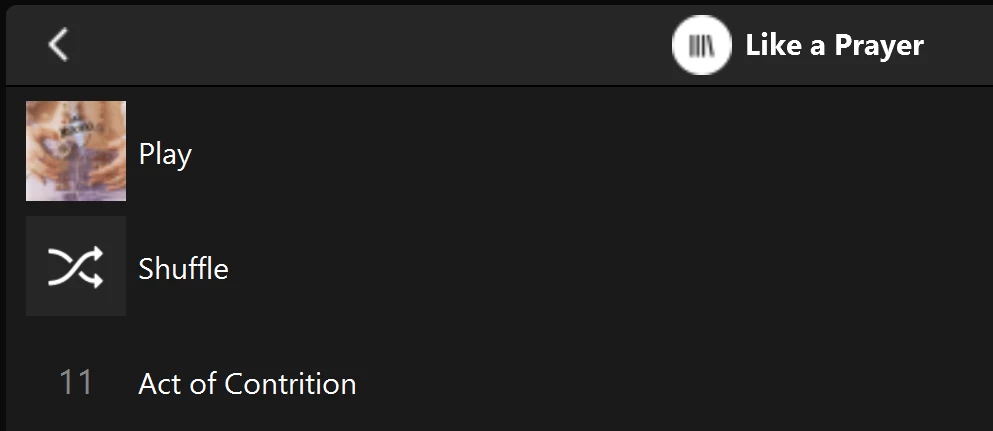
Multiple of one album.
Only one track (The same track) showing in both albums

You can see that a look into the folder for this album shows 11 tracks. 
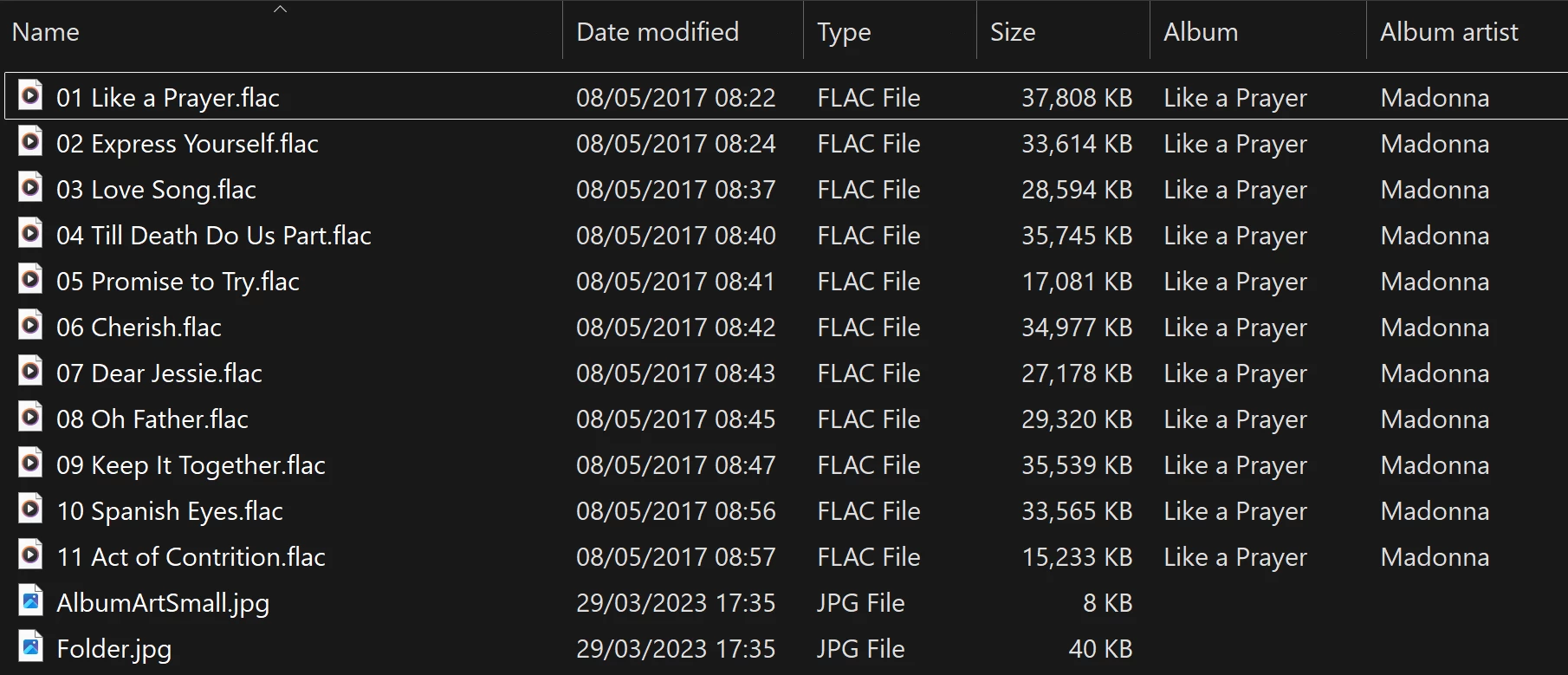
View into the folder for album

Doing a re-scan of the library does not fix the issue. But I have found that by adding a new album to my library fixes the issue after a re-scan. However I have noticed that adding a new album can correct one problem but then suddenly another suddenly is inflicted with the same issue.

So I am very confused as why adding one album can suddenly cause this issue with other completely unrelated albums. Sorry to have rambled on.

Any thoughts anyone? 

Anthony

141 replies

Contributor I
February 22, 2026

I recently discovered this issue with my library and have been investigating. I’ve not managed to solve or understand the issue but I have found that if I rename the file from ‘<track no.> <track name>’ to ‘<track no.> - <track name>’ and re-index the problem album is corrected….. however the problem moves to another album. Very weird. Though I’ve now hit an album where I cannot fix regardless of how I rename them.

Trending Lyricist I
February 22, 2026

I recently discovered this issue with my library and have been investigating. I’ve not managed to solve or understand the issue but I have found that if I rename the file from ‘<track no.> <track name>’ to ‘<track no.> - <track name>’ and re-index the problem album is corrected….. however the problem moves to another album. Very weird. Though I’ve now hit an album where I cannot fix regardless of how I rename them.


I have found that when you add albums that the results can change. Both my beethoven and Hilliard Ensemble now show correctly (see above before picture.) However, other albums are now showing up incorrectly that were correct before. 

Anthony_6Author
Collaborator II
February 22, 2026

I recently discovered this issue with my library and have been investigating. I’ve not managed to solve or understand the issue but I have found that if I rename the file from ‘<track no.> <track name>’ to ‘<track no.> - <track name>’ and re-index the problem album is corrected….. however the problem moves to another album. Very weird. Though I’ve now hit an album where I cannot fix regardless of how I rename them.

Hi, this is a problem that Sonos are aware of. I will say that it's being a bit of a struggle to get Sonos to get involved. While they are now involved they seem fixed on it being a metadata issue. No matter how much it is pointed out to them that it would seem very unlikely it is related to metadata. How can a simple one letter folder name change cause album(s) to behave in this way be related to metadata I don't know, although I stand to be corrected if it is proved. I've tried moving the library to different NAS drives, Unraid, Terramaster & Buffalo. Every one of those has resulted in random albums being broken. I even pointed out that just changing the link to the music library from using the server name to an IP address caused changes. IE //servername/music/sonos to //nnn.nnn.nnn.nnn/music/sonos 

There is another thread on this issue under, Duplicate Album Titles.

It might be worth taking a look there as well to see other comments on this issue.

Anthony
Enthusiast II
March 25, 2026

I found a (well known) fix for this. I very tediously shortened all file names so that total path < 170 and file name < 90. This fixed it for me.

Stanley_4
Grand Maestro
March 25, 2026

I haven't seen that fix, where did you find it?

Enthusiast II
March 25, 2026

I use Bliss, and they told me about that filename limitation. For stupid reasons, I use my own java program to copy music from my local iTunes to my NAS, so I just changed it to print out all the filenames that are too long, then I hand edited them.

But, it turns out that the Albums I found that were bad all had long songs on them - I could have just edited them first.

Enthusiast II
April 5, 2026

Can anyone else confirm that this is a fix? I don’t think my affected files and paths are that long…


(Infuriating that this is STILL an issue, amongst all the new product launches and noise about the company learning its lesson after the app debacle). 

Enthusiast II
April 5, 2026

Can anyone else confirm that this is a fix?

I don’t think my files/paths are that long with my affected albums. 
 

(Infuriating that this is STILL an issue, amongst all the noise about new product launches and the company learning its lesson about the app update debacle). 

Anthony_6Author
Collaborator II
April 5, 2026

I’m not sure that it is a fix.

AFIK There isn’t an official fix, yet, We live in hope.

Anthony
kdowling
April 5, 2026

Can anyone else confirm that this is a fix?

I don’t think my files/paths are that long with my affected albums. 
 

(Infuriating that this is STILL an issue, amongst all the noise about new product launches and the company learning its lesson about the app update debacle). 

I can confirm it is not a fix. I shortened all path names that were over 160 characters and re-scanned. It just changed which albums showed the problem. Just like any other change to the library does.

Edit to add: None if the previous albums showing the problem were ones that had the long path names over 160 characters.