
Collaborator II
October 13, 2025

Albums have suddenly started to behave strangely.

  • October 13, 2025
  • 141 replies
  • 3288 views

Hello all, I hope someone can help me.

I noticed the other day that a few albums in my library had suddenly split into multiple albums. At first I thought there may have been an update that had changed the way certain albums were tagged. I did some rudimentary checks on the album tags (I use Tag & Rename) but couldn't see any issues. However on further examination I noticed that the multiple of the albums had the same track in them see images below.

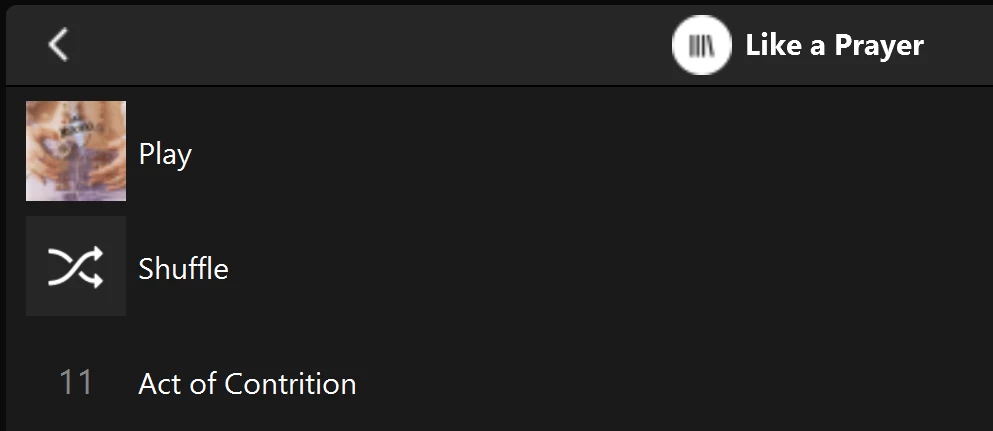
Multiple of one album.
Only one track (The same track) showing in both albums

You can see that a look into the folder for this album shows 11 tracks. 
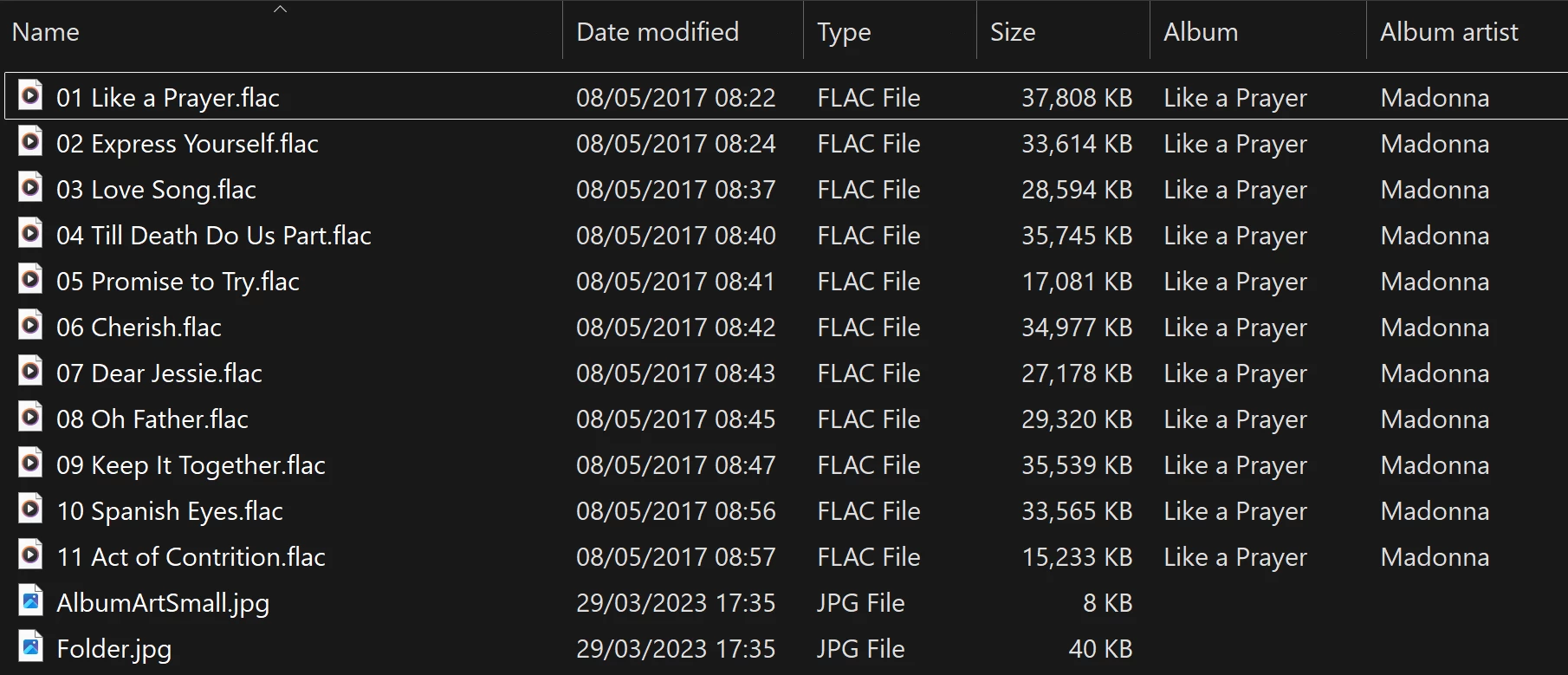
View into the folder for album

Doing a re-scan of the library does not fix the issue. But I have found that by adding a new album to my library fixes the issue after a re-scan. However I have noticed that adding a new album can correct one problem but then suddenly another suddenly is inflicted with the same issue.
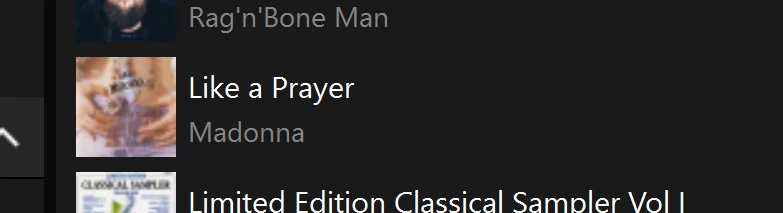
So I am very confused as why adding one album can suddenly cause this issue with other completely unrelated albums. Sorry to have rambled on.

Any thoughts anyone? 

Anthony

141 replies

Trending Lyricist I
November 22, 2025

I'll make a point to call as well and have the document it. . Having the same issue here, same wonkiness in that sometimes albums are corrected but it only spawns other mistakes as well. 


Good to know I'm losing my mind(about this at least)

Enthusiast II
November 23, 2025

Hi Anthony,

I’ve been dealing with a similar problem. I am now playing whack-a-mole, which has confirmed that it is NOT a tagging issue. I was showing a bunch of duplicate titles in my album list, so on my NAS I moved those albums out of the music folders to another folder not in the music library and reindexed. New albums were now duplicates that were not before. So I moved those out, reindexed, and a few new duplicates appeared. Just for fun I’m going to keep going to see if I can get a clean album list. There are a few specific albums that seem to have shown up consistently, but still no obvious tagging issues with them. But albums that have not been problems in the past are now showing up as duplicates as I chase this down.

I haven’t read all the preceding posts but did want to add my confirmation that it is not a tagging issue.

Good luck…

Roger France

Trending Lyricist I
November 23, 2025

Hi Anthony,

I’ve been dealing with a similar problem. I am now playing whack-a-mole, which has confirmed that it is NOT a tagging issue. I was showing a bunch of duplicate titles in my album list, so on my NAS I moved those albums out of the music folders to another folder not in the music library and reindexed. New albums were now duplicates that were not before. So I moved those out, reindexed, and a few new duplicates appeared. Just for fun I’m going to keep going to see if I can get a clean album list. There are a few specific albums that seem to have shown up consistently, but still no obvious tagging issues with them. But albums that have not been problems in the past are now showing up as duplicates as I chase this down.

I haven’t read all the preceding posts but did want to add my confirmation that it is not a tagging issue.

Good luck…

Roger France

It's definitely not a tagging issues like the similar bug from last year with various artists/compilations. Some things will self correct after adding new items and new ones will pop up, and as mentioned before, they show up as normal in folder view. 

Contributor I
November 23, 2025

I’m seeing this issue and it’s very frustrating as it seems to be a moving target, with the affected albums changing every time a local muisc library rebuild is performed.


What I’ve noticed is that the single track that is displayed in these duplicate albums is always the last track on the album.  For example, the album ‘Tango In The Night’ by ‘Fleetwood Mac’ is displayed twice in my music library.  With each only showing the track ‘You And I, Part II’, which is the 12th and last track on the album.

Anthony_6Author
Collaborator II
November 23, 2025

What I’ve noticed is that the single track that is displayed in these duplicate albums is always the last track on the album.  For example, the album ‘Tango In The Night’ by ‘Fleetwood Mac’ is displayed twice in my music library.  With each only showing the track ‘You And I, Part II’, which is the 12th and last track on the album.

I have this problem, but on the albums concerned it is track 6 of 13 & on the other album it’s track 3 of 10. I reported this to Sonos support a good while ago, as have others blighted by this problem. Despite Sonos saying they would get back to me, I’ve heard nothing.

I would advise you to contact Sonos support. The more people that report this might get something done, I live in hope.

Anthony
Enthusiast II
December 24, 2025

I’m also suffering from this issue - it’s been two months now, no update from Sonos?

It’s really frustrating.

Enthusiast II
December 24, 2025

I’ve also found an empty album in my library - I’m unsure if this is related or not. All files are tagged correctly (and I have played this album through my Sonos system before). Navigating through the menus I can find the band, the album, with the correct artwork, but when I select the album, it claims “No selections are available”.

Anthony_6Author
Collaborator II
December 24, 2025

I’ve also found an empty album in my library - I’m unsure if this is related or not. All files are tagged correctly (and I have played this album through my Sonos system before). Navigating through the menus I can find the band, the album, with the correct artwork, but when I select the album, it claims “No selections are available”.

I'm not sure that is related. Are you saying that on your server the album was actually empty i.e. the files were missing, or it only appears empty on Sonos. Mind you with Sonos anything is possible these days. Sonos always claimed it never made any changes to the actual library files to avoid damaging people's data.

Anthony
Enthusiast II
December 24, 2025

I’ve also found an empty album in my library - I’m unsure if this is related or not. All files are tagged correctly (and I have played this album through my Sonos system before). Navigating through the menus I can find the band, the album, with the correct artwork, but when I select the album, it claims “No selections are available”.

I'm not sure that is related. Are you saying that on your server the album was actually empty i.e. the files were missing, or it only appears empty on Sonos. Mind you with Sonos anything is possible these days. Sonos always claimed it never made any changes to the actual library files to avoid damaging people's data.


The files are on my server, the album is listed as being on there on Sonos...but there are no songs in it…


Stanley_4
Grand Maestro
December 24, 2025

Force a reindex, when it finishes try the Music Library folder view and see if it is listed there. If not send Sonos a diagnostic and call support to have the problem looked into and more important passed to the developers to see if it can be corrected.