
Collaborator II
October 13, 2025

Albums have suddenly started to behave strangely.

  • October 13, 2025
  • 141 replies
  • 3287 views

Hello all, I hope someone can help me.

I noticed the other day that a few albums in my library had suddenly split into multiple albums. At first I thought there may have been an update that had changed the way certain albums were tagged. I did some rudimentary checks on the album tags (I use Tag & Rename) but couldn't see any issues. However on further examination I noticed that the multiple of the albums had the same track in them see images below.

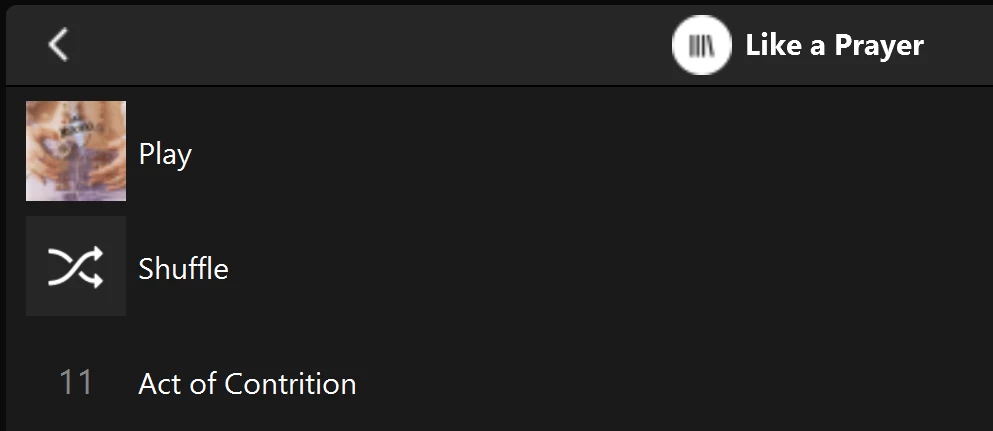
Multiple of one album.
Only one track (The same track) showing in both albums

You can see that a look into the folder for this album shows 11 tracks. 
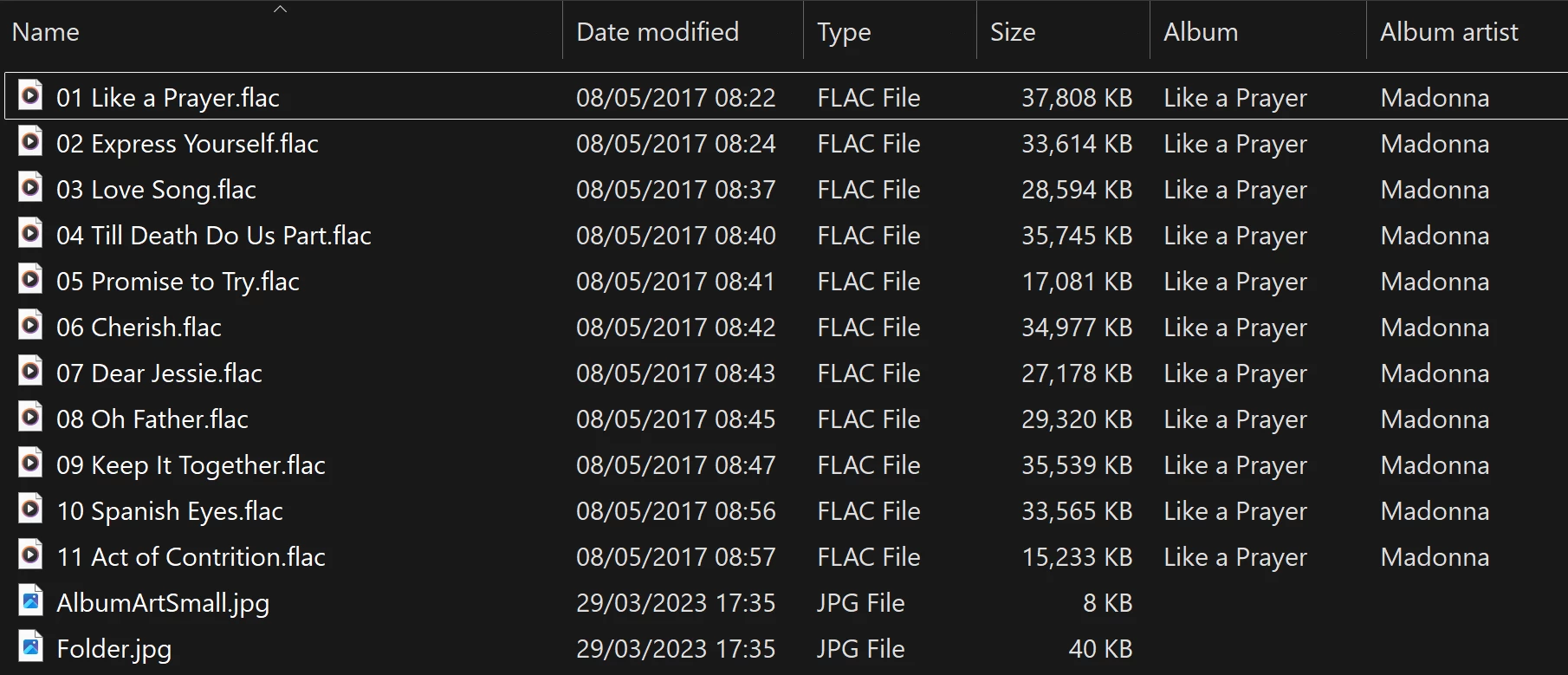
View into the folder for album

Doing a re-scan of the library does not fix the issue. But I have found that by adding a new album to my library fixes the issue after a re-scan. However I have noticed that adding a new album can correct one problem but then suddenly another suddenly is inflicted with the same issue.
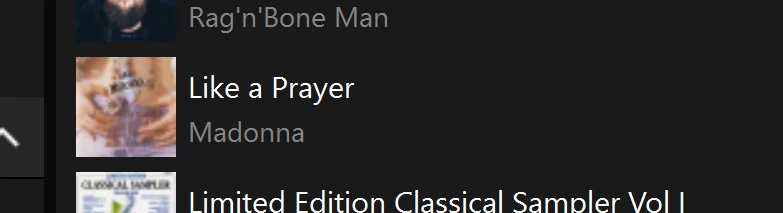
So I am very confused as why adding one album can suddenly cause this issue with other completely unrelated albums. Sorry to have rambled on.

Any thoughts anyone? 

Anthony

141 replies

Anthony_6Author
Collaborator II
October 14, 2025

Hi everyone, just a quick update. I spent about an hour on the phone with Sonos Technical support today. I didn’t get a fix, but it has been raised to level two support and they will be in touch.

As to be expected Sonos believed it was a tagging issue. Anyway I think I successfully convinced them it wasn’t. Through a screen share I think that showing them that by renaming a folder the problem went away on that Album, but then reappeared on another completely unrelated album, I may have convinced them.

Fingers crossed that it might well get some serious attention. I hope to keep you updated.

Anthony

Thanks Anthony

Hi everyone, just a quick update. I spent about an hour on the phone with Sonos Technical support today. I didn’t get a fix, but it has been raised to level two support and they will be in touch.

As to be expected Sonos believed it was a tagging issue. Anyway I think I successfully convinced them it wasn’t. Through a screen share I think that showing them that by renaming a folder the problem went away on that Album, but then reappeared on another completely unrelated album, I may have convinced them.

Fingers crossed that it might well get some serious attention. I hope to keep you updated.

Anthony

Thank you good sir! Keep us posted and if you need any more evidence, I’d be happy to provide it.

The trick, of course is if it gets fixed that Sonos doesn’t break it again :-P


! You have more patience that I! Let us know if you hear anything.

Thanks for all of your comments, this community is what makes Sonos great. Let's hope if a fix is forthcoming that as has been commented it doesn't result in something else breaking. Actually that's just like this problem, fix one album and another breaks. :-)

Anthony
kdowling
October 14, 2025

The other thing is that I’d loose DTS decode and that’s a deal breaker for me. I could do a split system, but that’s just a pain.

I 100% understand the internet piece of your choice, I’d probably do the same if I was in your position. I too live in a rural area, and I count myself very lucky in that we have good internet options, including Fiber, but that’s still no excuse for Sonos to deliver a subpar experience to those that don’t have that kind of access.

I get Sonos is in a hard place, trying to deal with everyone’s networking solutions, honestly, what might make the most sense is like say smart lights, Sonos makes a Hub product that connects into one’s Router. I have a sneaking suspicion that whatever “S3” becomes, that might play a part...but, it would have to work with zero issues and be rock solid.

--Brian

I left my home theater devices and one pair of Ones on S2. I never us the home theater devices for anything other than tv and hardly need the S2 app for that. Just for swapping Ace audio back and forth. So in my case, split system isn’t a big deal. S1 for music and S2 for home theater. A pair of Ones on S2 to test how S2 is moving forward (or not).

That is a fair point...I’ll have to ponder that. Realistically, then, I’d only have to reset two speakers: the Sonos One in the bedroom and the Play 5 in the living room as they are 100% music only. I’d say that the other home theater systems play music like maybe 1% or lower, but if I really needed to, I guess I could AirPlay to them. S1 and S2 could technically see the same library on a NAS right? Or S2 would have no local library access, I guess Plex could work for those...

S1 systems require the NAS to use SMBv1 and S2 systems require SMBv2 or SMBv3. If your NAS supports both, that should work. My music library is on an older NAS which is SMBv1 only. I have another smaller NAS that uses SMBv2/SMBv3. I mounted the first NAS’s music share onto a share on the second NAS. Then pointed S2 at the second NAS’s share. You could use a Raspberry Pi to do that too. I think Stanley_4 has some good info on that here somewhere.

Sorry Anthony, we hijacked your thread!

Anthony_6Author
Collaborator II
October 14, 2025


Sorry Anthony, we hijacked your thread!

No problem, I did notice, but that is what typically happens. Rabbit holes open up. Never mind it's all interesting.

Anthony
Anthony_6Author
Collaborator II
October 14, 2025

The other thing is that I’d loose DTS decode and that’s a deal breaker for me. I could do a split system, but that’s just a pain.

I 100% understand the internet piece of your choice, I’d probably do the same if I was in your position. I too live in a rural area, and I count myself very lucky in that we have good internet options, including Fiber, but that’s still no excuse for Sonos to deliver a subpar experience to those that don’t have that kind of access.

I get Sonos is in a hard place, trying to deal with everyone’s networking solutions, honestly, what might make the most sense is like say smart lights, Sonos makes a Hub product that connects into one’s Router. I have a sneaking suspicion that whatever “S3” becomes, that might play a part...but, it would have to work with zero issues and be rock solid.

--Brian


Brian, Isn't the hub idea the same as Sonos used to call the Bridge? many, many years ago. It is what gave Sonos the edge in reliability over WiFi networks back in the day.

Anthony 

Anthony
CronoCX
Enthusiast II
October 14, 2025

The other thing is that I’d loose DTS decode and that’s a deal breaker for me. I could do a split system, but that’s just a pain.

I 100% understand the internet piece of your choice, I’d probably do the same if I was in your position. I too live in a rural area, and I count myself very lucky in that we have good internet options, including Fiber, but that’s still no excuse for Sonos to deliver a subpar experience to those that don’t have that kind of access.

I get Sonos is in a hard place, trying to deal with everyone’s networking solutions, honestly, what might make the most sense is like say smart lights, Sonos makes a Hub product that connects into one’s Router. I have a sneaking suspicion that whatever “S3” becomes, that might play a part...but, it would have to work with zero issues and be rock solid.

--Brian


Brian, Isn't the hub idea the same as Sonos used to call the Bridge? many, many years ago. It is what gave Sonos the edge in reliability over WiFi networks back in the day.

Anthony 

Nope. That was a fancy signal booster. I had one for a day and ended up returning it because it was not great at doing much of anything and added more issues than it was worth. Something like a true Hub would end up being the heart of the Sonos system in a home. The speakers just talk to it and it could present itself to smart home apps like Apple Home or other automation systems. It would contain the library information and such. Basically grand central station. I think in congested networks, something like that could actually help, but I’m just spitballing.

Anyway, back to this problem :-D

--Brian

CronoCX
Enthusiast II
October 15, 2025

New firmware as of Oct 15th 2025 did not fix this problem:

Modern: Version: 17.5 (build 91.0.70070)
Legacy: Version: 17.2.1 (build 86.1.70070)

--Brian

Anthony_6Author
Collaborator II
October 16, 2025

New firmware as of Oct 15th 2025 did not fix this problem:

Modern: Version: 17.5 (build 91.0.70070)
Legacy: Version: 17.2.1 (build 86.1.70070)

--Brian

Brian,

I’ve been carrying out some tests with my music library. First I removed the library from my server (Unraid). I rescanned the library which obviously returned no music. I moved back the library in alphabetical chunks, rescanning the library each time and then checking for duplicates. It wasn’t until I got to the letter L that I saw the first duplicate. After that I returned the entire library. I then did a bulk rename of all folders by adding 01_ in front of each folder. It changed the albums affected but generated two new duplicates. I then removed the prefix from each folder and it returned the original duplicates and removed the two new duplicates.

I keep two separate library’s, one that has normal CD rips and one that has FLAC conversions of 24bit SACDs. When I added the second library back to Sonos and scanned the library every album was okay, no duplicates! It might just be a coincidence. Anyway I’ve left it alone for now.

I see that I’ve now got version 17.5 (build 91.0.70070). I did the tests before the overnight update. Understandably I’m in no rush to change anything on my library at the moment.

One other thing I noticed was that if you search for the artist of a duplicate album it will list the artist multiple times. If you then select any one of those artists it will list all of the tracks in the album but not in track number order, in alphabetical order instead.

Anthony

Anthony
Enthusiast II
October 16, 2025

In UK so 80.30.31/ 91.0.70070 just landed 15th for me. Prior to this update had experienced problems with duplicate albums & albums with no tracks in local library. Interestingly, neither resynching NAS, updating library in Windows desktop app or deleting library and then restoring it worked. As it only seemed to be a few instances I left it and waited for next update, using app only for paid streaming service.

Update yesterday seems to have sorted the local library in terms of tracks re-appearing in empty albums and duplicates disappearing. 


Anthony_6Author
Collaborator II
October 16, 2025

In UK so 80.30.31/ 91.0.70070 just landed 15th for me. Prior to this update had experienced problems with duplicate albums & albums with no tracks in local library. Interestingly, neither resynching NAS, updating library in Windows desktop app or deleting library and then restoring it worked. As it only seemed to be a few instances I left it and waited for next update, using app only for paid streaming service.

Update yesterday seems to have sorted the local library in terms of tracks re-appearing in empty albums and duplicates disappearing. 


Hi, yes I'm in the UK too.

It's good news if it really has fixed the problem. However as my library seems to be okay at the moment I'm just going to leave it untill I have to add another album.

See quote of CronoCX post below

"CronoCX wrote:

New firmware as of Oct 15th 2025 did not fix this problem:

Modern: Version: 17.5 (build 91.0.70070)

Legacy: Version: 17.2.1 (build 86.1.70070)

--Brian"

I'm a bit of a believer in "if it ain't broke don't fix it". Only time will tell.

I have been in touch with Sonos tech support (Tuesday 14-10-2025) and it was escalated to level two (whatever that really means). I was also told I would be kept informed. I've had no feedback so far. If I do hear anything I will post it in this tread.

Anthony 

Anthony
kdowling
October 16, 2025

Also on build 91.0.70070. I think you may have gotten lucky. I removed my library and added it back. Still have duplicates. It acts the same. Which albums are duplicated changes when adding an album or renaming a folder.