
Avid Contributor I
April 17, 2021
Answered

Sonos Desktop Issues with Sophos

  • April 17, 2021
  • 28 replies
  • 1882 views

Since I’ve tried customer service with both Sonos and Sophos, I thought I’d put this out there for any suggestions/wisdom.

Macbook Pro, running 10.13OS, Sonos 1 Desktop App and Sophos Home Premium 10.0.4 (and have had the same setup for some time with no issues).

While the Sonos desktop app will show connection to the system when checking “connect to existing Sonos system”, it never gets past the main screen error message “Sorry, we can’t connect to Sonos”.  Mobile apps work fine (all on the same wi-fi network).

Turning off Sophos does not change anything, but uninstalling it brings Sonos back (and reinstalling permits it for a day, then the issue returns).

Obviously, these two aren’t playing nicely together - again, I’ve been trying to get help on both ends. Any thoughts appreciated.
 

This topic has been closed for further comments. You can use the search bar to find a similar topic, or create a new one by clicking Create Topic at the top of the page.
Best answer by carbmac

UPDATE : Solution I got from Sophos works.  So here are the steps (as per Sophos email) :


==//==


Thank you for contacting Sophos Home support. 

I understand you are having difficulty connecting to your Sonos wireless speakers.

We recently saw this issue with another customer and found the following resolution.

1. Locate the IP address of the speakers
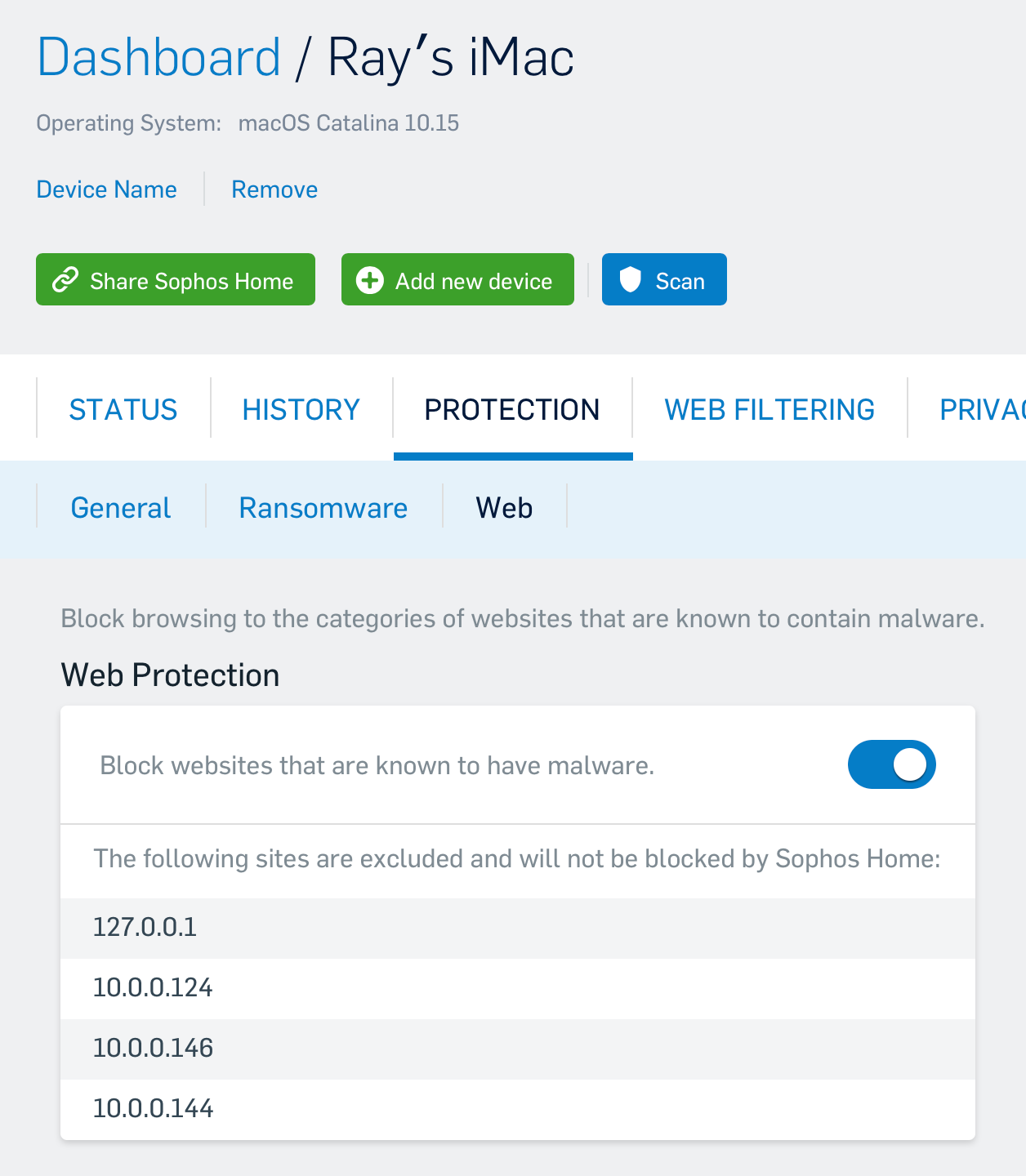
2. Add the IP address as a Web Exception by
- Log in to your Sophos Home Dashboard
- Navigate to the "Protections" tab and the "Web"
- Add the IP of the speakers as a web exception
- Add the local loopback address (this is essentially your computer IP address from the computer's perspective) of

  127.0.0.1

3. Wait for a few minutes for the software to sync and test.

==//==

The IP of each of your speaker can be found on your gateway management software (could be an iOS or other app, or a website).  

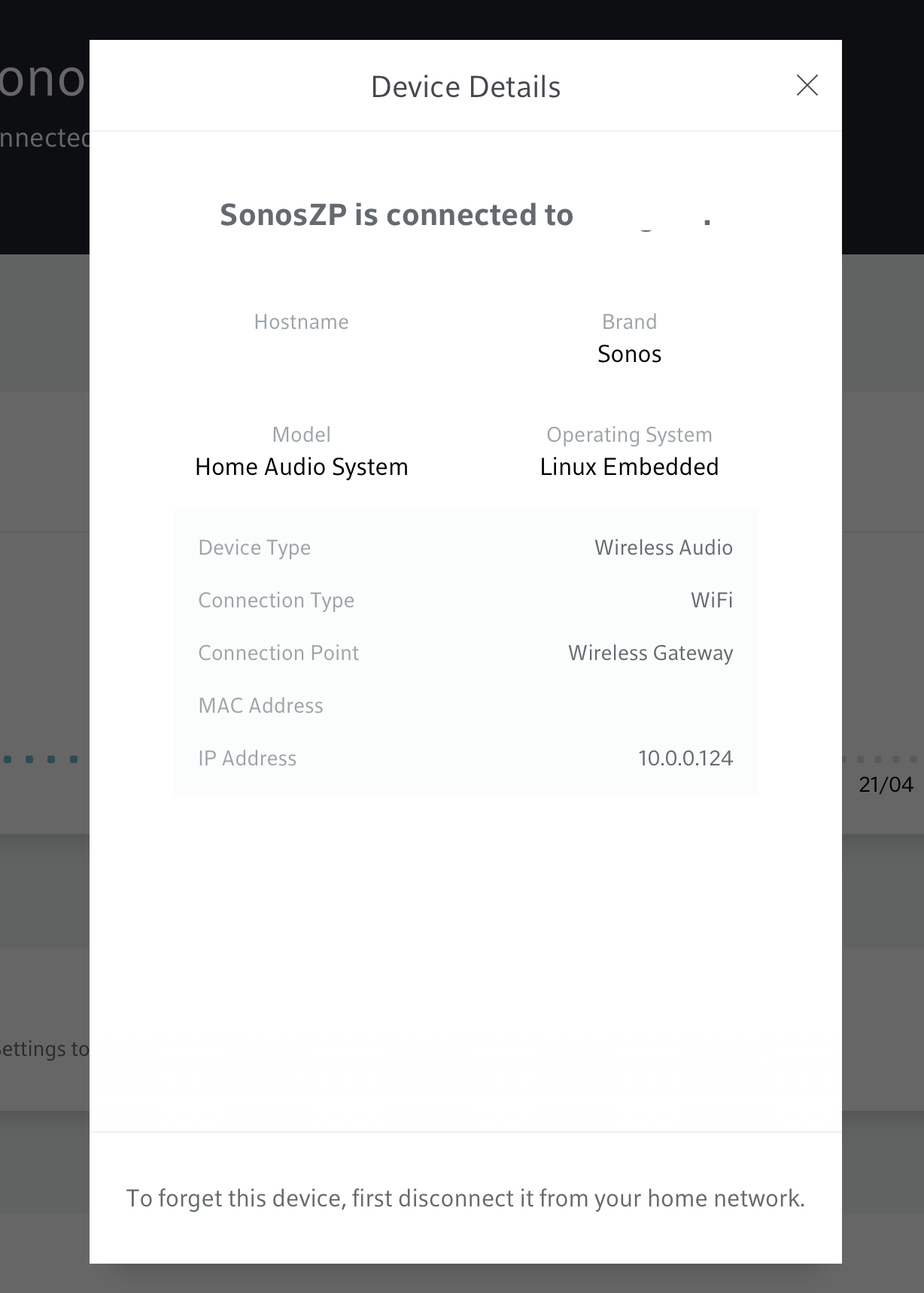
If you have an xFinity or Helix gateway, goto the web page management, under connect, scroll to your Sonos speaker, click on the first one and then, at the bottom, click on device details.  The IP address is in the popup.  That’s the IP you have to add along with 127.0.0.1.  Do that for each and every speaker in your Sonos setup.


I hope this helps you and others !


Ray

28 replies

Contributor I
May 18, 2021

I spent over an hour with Sonos Support and eventually worked out that it was Sophos Home, Web Protection that was stopping the Sonos Controller (Apple Mac OS 10.15.7) from connecting to my Sonos speakers.  I have now added the IP address of all my speakers to the web exceptions and everything is working once again.  Thank you for the guidance.  I have emailed Sonos support and suggested they add this to their diagnostics/troubleshooting database.  

Contributor I
May 24, 2021

Thanks carbmac. I’m sorted and happy boy.

Lyricist I
June 18, 2021

Running Mac OS Catalina and Sophos Home. My Sonos S1 Controller app has suddenly stopped working. I have installed all the IP Addresses for the Sonos speakers in Sophos, but still not working. 

I have followed all the ideas here, but still not working.

Can anyone help please.

Trending Lyricist I
June 18, 2021

Running Mac OS Catalina and Sophos Home. My Sonos S1 Controller app has suddenly stopped working. I have installed all the IP Addresses for the Sonos speakers in Sophos, but still not working. 

I have followed all the ideas here, but still not working.

Can anyone help please.

Can you use the Sonos app on a smartphone or tablet ?  If so, continue trouble shooting, but at least, you’ve a workaround now.

Is your system compatible with Sonos S2 ?  Try to download and configure that version, see if this fixes your issue.

Else, you could try to disable Sophos for a brief moment, then check if your Sonos S1 can control your Sonos speakers.  If so, then first enable Sophos again and contact them.  They might have a few more tricks up their sleeves they could offer you.


Cheers,


Ray 

Contributor I
June 19, 2021

Happy I found this thread. Big thanks to  @carbmac for the information.  Sophos Home was the blocker and the fix worked for me.

Tip: start by just turning off the Sophos Web Protect setting (“Block websites that are known to have malware.”) and see if this resolves the problem.  I did and lo and behold the controller instantly connected. 

Then add the IP addresses as exceptions as per the post (but be aware that as they may be assigned by DHCP they might change over time) and turn protection back on.  

Then exit Sonos controller and re-open.  As stated it may take longer than usual to connect but wait a bit.  It should all then connect OK.

Thanks again.


Trending Lyricist I
June 19, 2021


Happy I found this thread. Big thanks to  @carbmac for the information.  Sophos Home was the blocker and the fix worked for me.

Tip: start by just turning off the Sophos Web Protect setting (“Block websites that are known to have malware.”) and see if this resolves the problem.  I did and lo and behold the controller instantly connected. 

Then add the IP addresses as exceptions as per the post (but be aware that as they may be assigned by DHCP they might change over time) and turn protection back on.  

Then exit Sonos controller and re-open.  As stated it may take longer than usual to connect but wait a bit.  It should all then connect OK.

Thanks again.


Another satisfied customer ;-)


Disclaimer : I don’t work for either Sophos or Sonos.  

Lyricist I
June 20, 2021

Thank you for all the advice. Having tried all suggestions, I took the drastic step of deleting the Sophos software, and have now installed a new anti-virus software (TotalAV). Sonos S1 Controller on my MAC is now working again. Problem solved.

DavceTheSave


Avid Contributor I
June 24, 2021

Many thanks for sharing that….been driving me nuts for too long! 

I’m sure none of the logs flagged it up!

Trending Lyricist II
June 27, 2021

I was hopeful the above would work for me as this issue has been plaguing me for last couple of months.  Unfortunately, this fix did not work for me.  I’ll have to reach out to Sophos.  For now, I just have to disable all protection with Sophos when I want to use controller on my Mac.  Very frustrating.  I have a Sonos Bridge and wondering if that is impacting this work around. Hope they fix this soon :(

Trending Lyricist I
June 27, 2021

I was hopeful the above would work for me as this issue has been plaguing me for last couple of months.  Unfortunately, this fix did not work for me.  I’ll have to reach out to Sophos.  For now, I just have to disable all protection with Sophos when I want to use controller on my Mac.  Very frustrating.  I have a Sonos Bridge and wondering if that is impacting this work around. Hope they fix this soon :(

I know nothing about the Sonos Bridge, but it makes sense to have to add its IP address as well in Sophos.