
Avid Contributor I
April 17, 2021
Answered

Sonos Desktop Issues with Sophos

  • April 17, 2021
  • 28 replies
  • 1882 views

Since I’ve tried customer service with both Sonos and Sophos, I thought I’d put this out there for any suggestions/wisdom.

Macbook Pro, running 10.13OS, Sonos 1 Desktop App and Sophos Home Premium 10.0.4 (and have had the same setup for some time with no issues).

While the Sonos desktop app will show connection to the system when checking “connect to existing Sonos system”, it never gets past the main screen error message “Sorry, we can’t connect to Sonos”.  Mobile apps work fine (all on the same wi-fi network).

Turning off Sophos does not change anything, but uninstalling it brings Sonos back (and reinstalling permits it for a day, then the issue returns).

Obviously, these two aren’t playing nicely together - again, I’ve been trying to get help on both ends. Any thoughts appreciated.
 

This topic has been closed for further comments. You can use the search bar to find a similar topic, or create a new one by clicking Create Topic at the top of the page.
Best answer by carbmac

UPDATE : Solution I got from Sophos works.  So here are the steps (as per Sophos email) :


==//==


Thank you for contacting Sophos Home support. 

I understand you are having difficulty connecting to your Sonos wireless speakers.

We recently saw this issue with another customer and found the following resolution.

1. Locate the IP address of the speakers
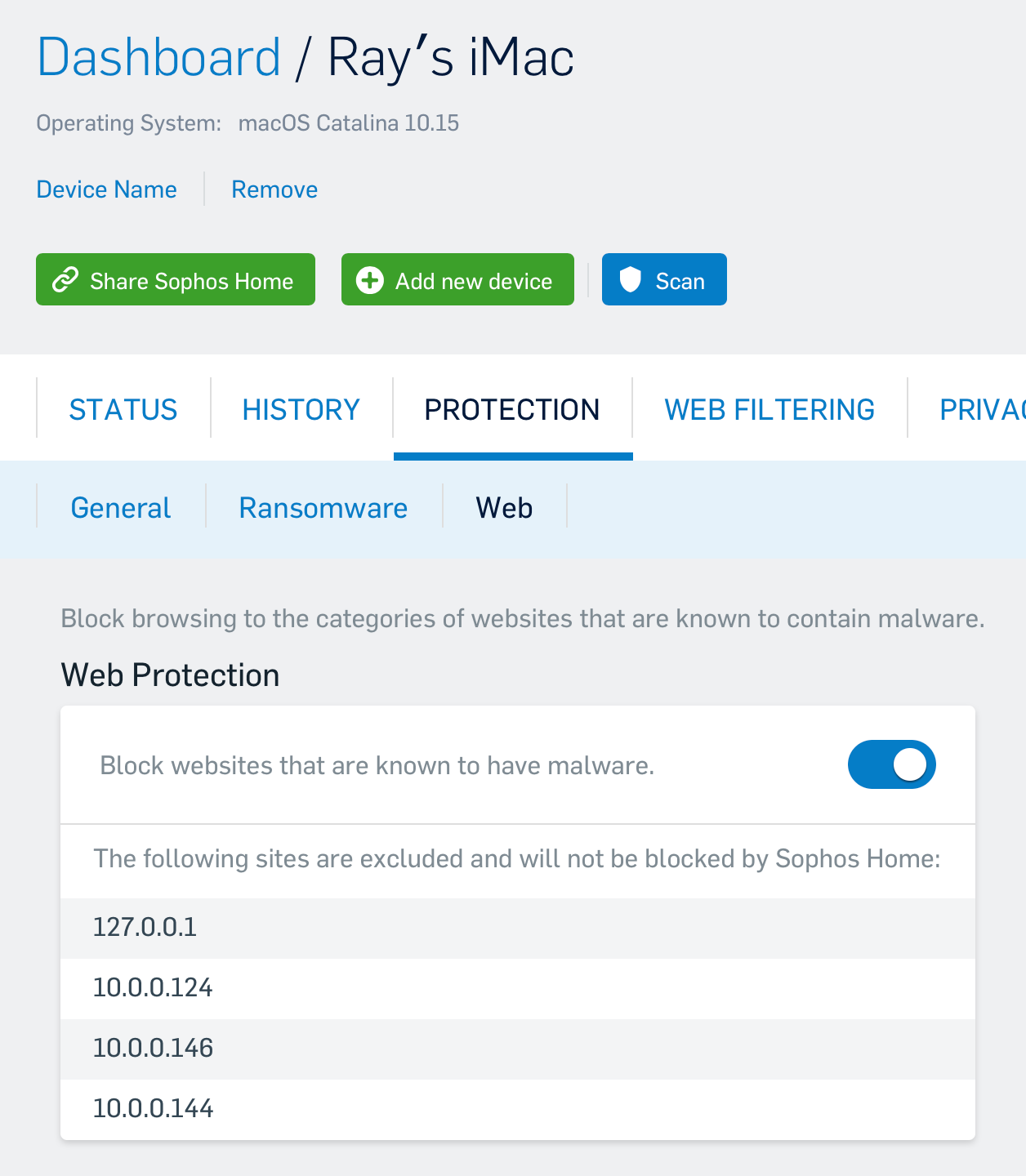
2. Add the IP address as a Web Exception by
- Log in to your Sophos Home Dashboard
- Navigate to the "Protections" tab and the "Web"
- Add the IP of the speakers as a web exception
- Add the local loopback address (this is essentially your computer IP address from the computer's perspective) of

  127.0.0.1

3. Wait for a few minutes for the software to sync and test.

==//==

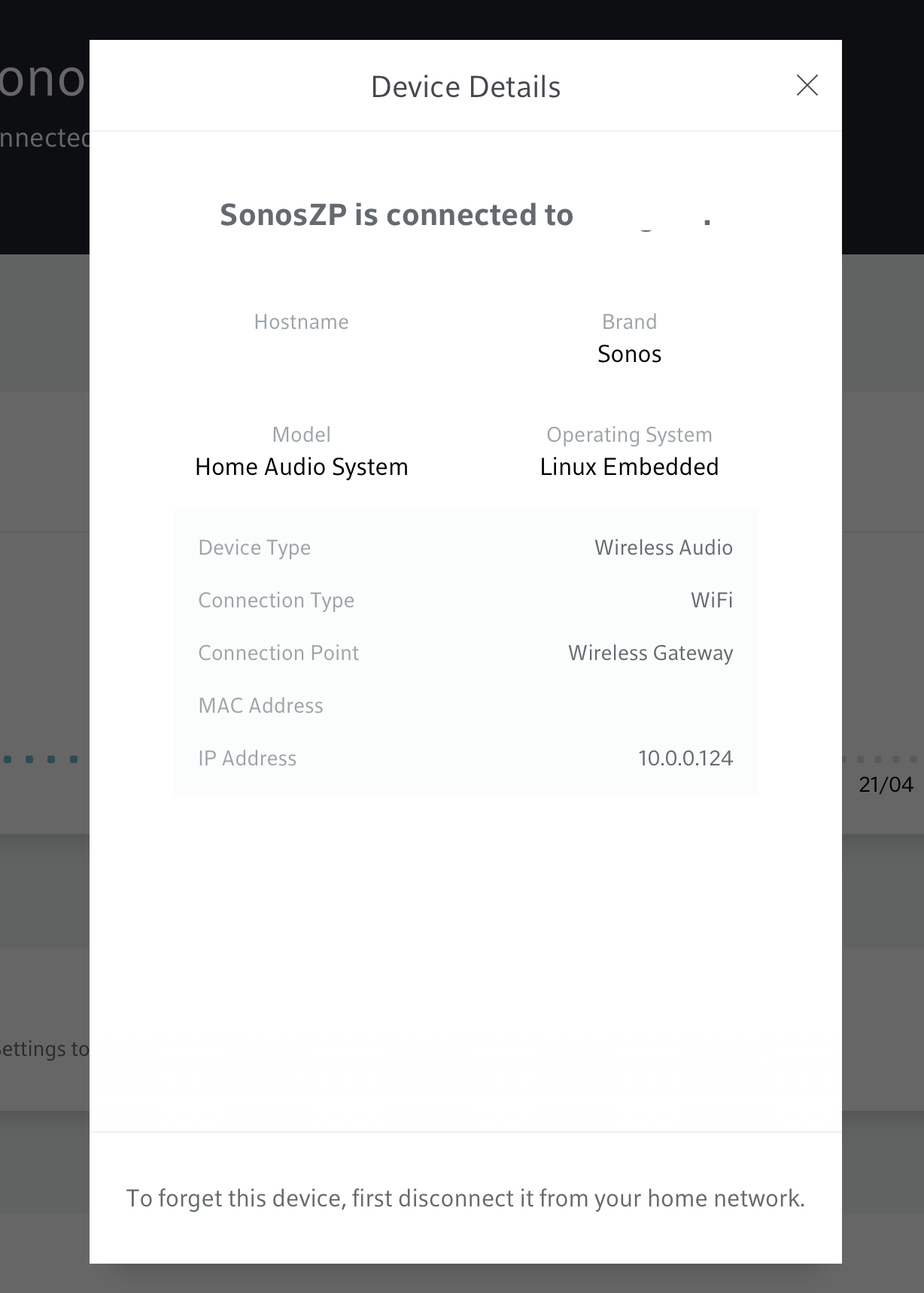
The IP of each of your speaker can be found on your gateway management software (could be an iOS or other app, or a website).  

If you have an xFinity or Helix gateway, goto the web page management, under connect, scroll to your Sonos speaker, click on the first one and then, at the bottom, click on device details.  The IP address is in the popup.  That’s the IP you have to add along with 127.0.0.1.  Do that for each and every speaker in your Sonos setup.


I hope this helps you and others !


Ray

28 replies

Trending Lyricist II
July 1, 2021

Thanks for the reply carbmac.  I am still struggling with this.  After not being able to enter in the IP addresses in Safari for some reason I had luck with Chrome.  On the positive, the app does now open but  functionality is clunky.  Volume control not working for  some speakers in a group, master play/pause is greyed out at top of controller and “now playing” shows nothing when I choose a Sirius channel to play to name a few issues now.  I am actually considering removing Sophos home at this point and trying an alternative (any ideas).  I reached out to Sophos and they are trying to help but going slow.  They also indicated they do not know when this is going to be fixed.  Any help or thoughts always appreciated.

Trending Lyricist I
July 1, 2021

Thanks for the reply carbmac.  I am still struggling with this.  After not being able to enter in the IP addresses in Safari for some reason I had luck with Chrome.  On the positive, the app does now open but  functionality is clunky.  Volume control not working for  some speakers in a group, master play/pause is greyed out at top of controller and “now playing” shows nothing when I choose a Sirius channel to play to name a few issues now.  I am actually considering removing Sophos home at this point and trying an alternative (any ideas).  I reached out to Sophos and they are trying to help but going slow.  They also indicated they do not know when this is going to be fixed.  Any help or thoughts always appreciated.

Just to make sure, in the list of exceptions, you do see all your Sonos speakers and the Sonos bridge, and 127.0.0.1, is that it  ?

Just to rule out any other cause, have you tried to temporarily disable Sophos ? From Sophos Dashboard, pick your device, then Protection / General and turn Real Time Protection OFF.  Wait for a minute or two, then launch Sonos app again.  Then, see if this is working (or not).  If it’s working, then you know something is wrong with Sophos and your Sonos setup.  If it’s still doesn’t work, issue might on the Sonos side of the equation.

As for other antivirus, I was using BitDefender prior to moving to Sophos.  But every now and then, one of its process will spike usage of the CPU and either bring my iMac (2019) to a crawl, or make the fan run like mad.  Tried to find a solution with BitDefender, didn’t get any (it’s a know issue and let it run, it’ll eventually stop…  is not a satisfactory answer).  That being said… BitDefender is working wonderfully for others.  YMMV.

Trending Lyricist II
July 4, 2021

Hello - So I did disable just “web protection” and everything worked fine.  I then went back into my fios gateway to compare my web exception listing in Sophos to the “sonos zp” ip addresses and sure enough I had 2 that were missing. I added those to “web exceptions” listing in Sophos and re-enabled “web protection”, closed and then opened Sonos controller and things seem to be working well now but want to give it a couple of days.  Thank you carbmac

Trending Lyricist I
July 4, 2021

Woohoo!!  Another satisfied customer :)


Have a good day and Happy 4th of July (if this applies to you)

Trending Lyricist II
July 18, 2021

Woohoo!!  Another satisfied customer :)


Have a good day and Happy 4th of July (if this applies to you)

Thank you again carbmac.  Two weeks in and rock solid now.  Side note - Sophos customer service was

very attentive throughout my case so I have to give

them kudos for customer service.  Unfortunately,

they do not know when a permanent fix will be available for this.  

Contributor I
August 28, 2021

This fix using the Sophos setup page is a TEMPORARY fix for the simple reason that if/when you reboot your router, your router will often reassign IP addresses to the various connected devices. Then the speakers will not work again. Sonos needs to get to work and solve this issue permanently!

106rallye
August 28, 2021

Is this not a Sophos problem?

Contributor I
August 28, 2021

Good question. How we can tell for sure?