
Avid Contributor I
April 17, 2021
Answered

Sonos Desktop Issues with Sophos

  • April 17, 2021
  • 28 replies
  • 1882 views

Since I’ve tried customer service with both Sonos and Sophos, I thought I’d put this out there for any suggestions/wisdom.

Macbook Pro, running 10.13OS, Sonos 1 Desktop App and Sophos Home Premium 10.0.4 (and have had the same setup for some time with no issues).

While the Sonos desktop app will show connection to the system when checking “connect to existing Sonos system”, it never gets past the main screen error message “Sorry, we can’t connect to Sonos”.  Mobile apps work fine (all on the same wi-fi network).

Turning off Sophos does not change anything, but uninstalling it brings Sonos back (and reinstalling permits it for a day, then the issue returns).

Obviously, these two aren’t playing nicely together - again, I’ve been trying to get help on both ends. Any thoughts appreciated.
 

This topic has been closed for further comments. You can use the search bar to find a similar topic, or create a new one by clicking Create Topic at the top of the page.
Best answer by carbmac

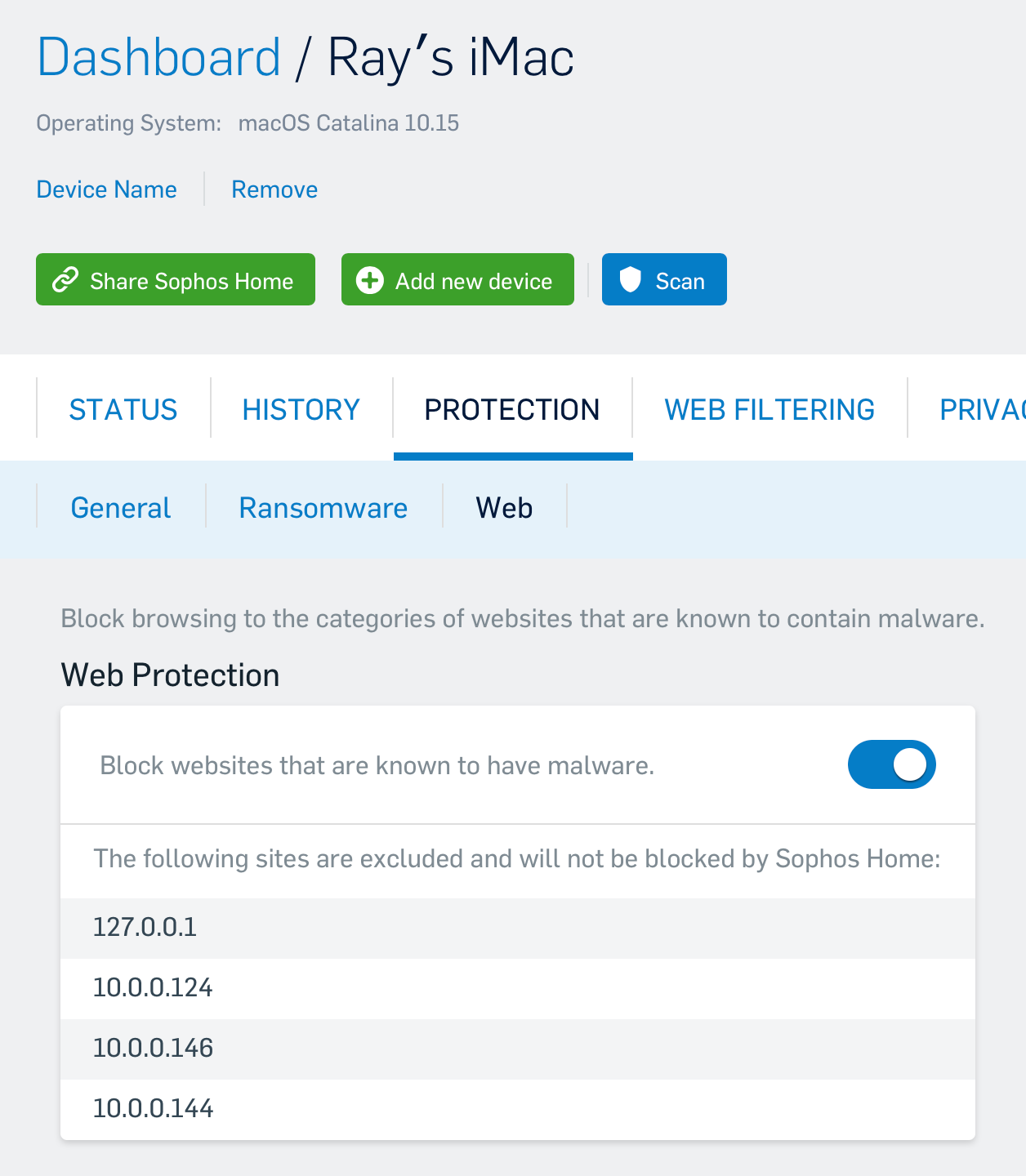
UPDATE : Solution I got from Sophos works.  So here are the steps (as per Sophos email) :


==//==


Thank you for contacting Sophos Home support. 

I understand you are having difficulty connecting to your Sonos wireless speakers.

We recently saw this issue with another customer and found the following resolution.

1. Locate the IP address of the speakers
2. Add the IP address as a Web Exception by
- Log in to your Sophos Home Dashboard
- Navigate to the "Protections" tab and the "Web"
- Add the IP of the speakers as a web exception
- Add the local loopback address (this is essentially your computer IP address from the computer's perspective) of

  127.0.0.1

3. Wait for a few minutes for the software to sync and test.

==//==

The IP of each of your speaker can be found on your gateway management software (could be an iOS or other app, or a website).  

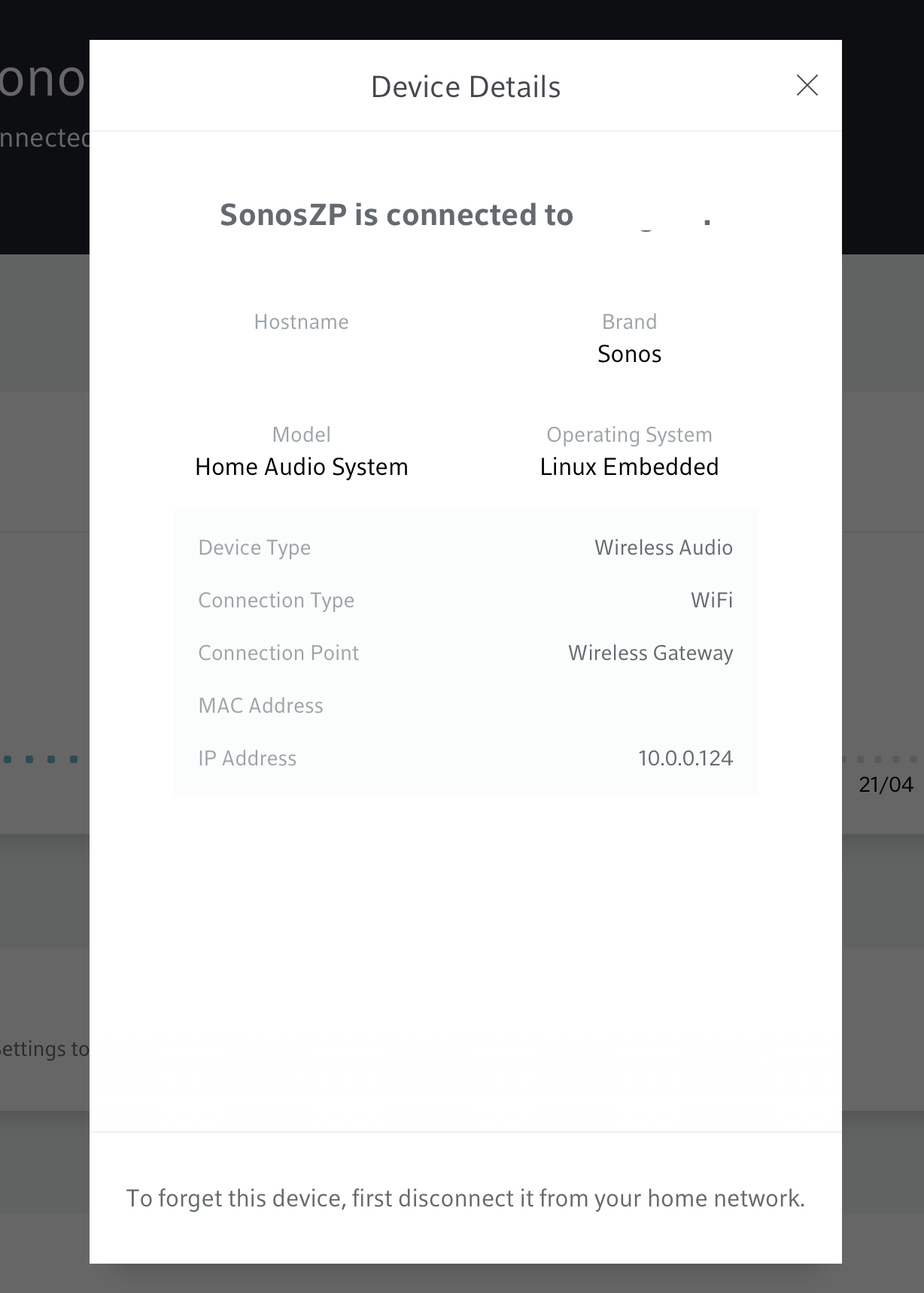
If you have an xFinity or Helix gateway, goto the web page management, under connect, scroll to your Sonos speaker, click on the first one and then, at the bottom, click on device details.  The IP address is in the popup.  That’s the IP you have to add along with 127.0.0.1.  Do that for each and every speaker in your Sonos setup.


I hope this helps you and others !


Ray

28 replies

Airgetlam
April 17, 2021

Honestly, no experience at all with Sophos, but it sounds to me like your Mac may occasionally be on a different network/node than your main Sonos connection is. Do you happen to be running any WiFi extenders, a mesh network, or anything equally unusual in your your network? And what is the make and model of your router? How are  both the Sonos and Mac connected to your network?

Bruce
slipcueAuthor
Avid Contributor I
April 17, 2021

Both devices are connected via wi-fi to a Deco TP-Link router (no mesh network).

Airgetlam
April 18, 2021

Huh. Nothing springs immediately to mind, so a few suggested tests, to see if the issue can be more accurately identified. 

These are all up to you, and whether you can do them…. first, check to be sure the Router’s firmware is up to date. Next, try linking both the Mac and the Sonos to the router with Ethernet cables, and see if the error continues to be reproducible. That will certainly go a ways to identify if there could be some wifi interference , although not a duplicate IP address. In fact, that, while being an extremely slight possibility, wouldn’t hurt to check. Just unplug all Sonos devices from power, then reboot the router. Once the router comes back up, plug the Sonos back in.

But there’s no guaranty here, it still could be some sort of intermittent wifi interference while they’re not wired, so it’s certainly worth reading the linked FAQ.

But if it continues, after checking those possibilities, I would recommend that you submit a system diagnostic within 10 minutes of experiencing this problem, and call Sonos Support to discuss it.

There may be information included in the diagnostic that will help Sonos pinpoint the issue and help you find a solution.

When you speak directly to the phone folks, there are more options available beyond just the diagnostic analysis.

Bruce
Trending Lyricist I
May 6, 2021

Since yesterday morning, I’ve started to have the same problem.  I also am running Sophos on my iMac and Macbook.  Both of which now can’t connect to my 3 Sonos speakers from the desktop app.


Tried the usual, with no success :

  • Reboot Gateway (xFinity XB6)
  • Uninstall Sonos 2 controller app (with App Cleaner) and reinstalled it, no success
  • Verified the Firewall settings on my to make sure Sonos is a recognized and authorized app (was there already)
  • Rebooted my iMac, Macbook. No luck.
  • Checked on my partner’s Macbook : it worked there. He’s running macOS Big Sur, I’m on Catalina (10.15).  Both with Sophos, however.
  • Checked on a Dell laptop.  Worked there as well.


Went to Sophos and deactivated Web Protection and after that, Mac desktop controller worked again.  Re-enabled Web Protection, stopped working.  Something is wrong with Sophos, but it would seem to be on at specific user level - meaning it’s blocking me, but it’s allowing my partner (we’re living in the same house). 

This needs further investigation.  I will try to contact Sophos with my findings.


Trending Lyricist I
May 6, 2021

Follow up : I’ve opened a ticket with Sophos, detailing my findings.  I will update again once I get an answer from them.

carbmacAnswer
Trending Lyricist I
May 7, 2021

UPDATE : Solution I got from Sophos works.  So here are the steps (as per Sophos email) :


==//==


Thank you for contacting Sophos Home support. 

I understand you are having difficulty connecting to your Sonos wireless speakers.

We recently saw this issue with another customer and found the following resolution.

1. Locate the IP address of the speakers
2. Add the IP address as a Web Exception by
- Log in to your Sophos Home Dashboard
- Navigate to the "Protections" tab and the "Web"
- Add the IP of the speakers as a web exception
- Add the local loopback address (this is essentially your computer IP address from the computer's perspective) of

  127.0.0.1

3. Wait for a few minutes for the software to sync and test.

==//==

The IP of each of your speaker can be found on your gateway management software (could be an iOS or other app, or a website).  

If you have an xFinity or Helix gateway, goto the web page management, under connect, scroll to your Sonos speaker, click on the first one and then, at the bottom, click on device details.  The IP address is in the popup.  That’s the IP you have to add along with 127.0.0.1.  Do that for each and every speaker in your Sonos setup.


I hope this helps you and others !


Ray

James L.
Retired Community Staff
May 7, 2021

Nice one @carbmac, thanks for following up and sharing your findings! 


I’ve gone ahead and marked your steps as the best answer to the topic so people experiencing similar issues can find the solution easier :slight_smile:

Mark good posts by pressing the like button, and select the best answer on questions you've asked to help others find solutions.
Trending Lyricist I
May 7, 2021

Glad I could help :)


Have a great weekend (mine will be full of music.. hehe!)

Lyricist III
May 17, 2021

If only I had stumbled across this post a few hours earlier it would have saved me a lot of time and pounding of my head on my desk. I tried everything imaginable from rebooting my router, my Sonos speakers, disabling LittleSnitch and pf firewall on my Mac, etc. to try and fix why, literally overnight, my Desktop Controller suddenly could not see “the system” anymore. At one point I too ran it from another machine running 11.0 (Big Sur) and discovered the app ran fine. So I knew -something- had to be suddenly causing this on my desktop running 10.15 (Catalina). Finally on a whim I decided to disable Sophos Home’s web filtering option and nearly fell out of my chair when it started working.

To say this -shouldn’t- be happening is an understatement. Especially since these two apps have been co-existing for years. Clearly Sophos pushed some kind of functionality update (this isn’t likely a “signature” problem) and changed (I say “broke”) something with its proxy/filter service related to local /non-routable network addresses. 

Thanks to carbmac (Ray) for posting their suggested “solution” which should really be a work-around until they fix their damn code. >:-(

Trending Lyricist I
May 17, 2021

UPDATE : It’s been almost a couple of weeks and it’s still working for me.  Though, occasionally, you’ll notice that when launching Sonos desktop client, the interface will show up but it’ll take a long time before it actually connects to your speaker or speakers.  9 out 10 times, it takes only 2-4 seconds.  But on that 10th time, it can take up to 30-40 seconds.