
Trending Lyricist I
October 29, 2019
Answered

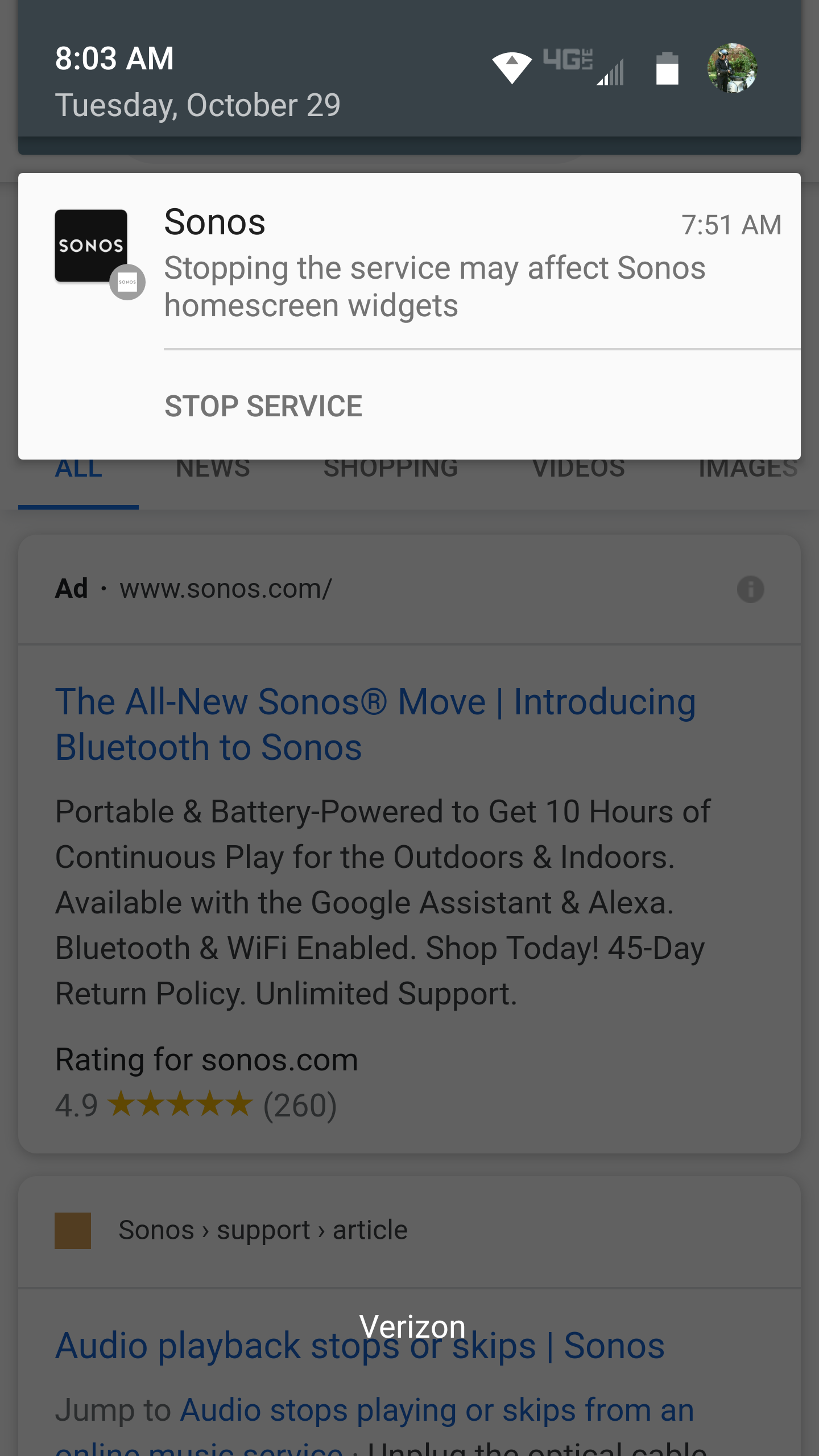
odd notification: Stopping the service...

  • October 29, 2019
  • 23 replies
  • 8530 views

I have an old Droid Turbo. A Sonos notification popped up yesterday stating "Stopping the service may affect Sonos homescreen widgets.". And a link to Stop Service.  

There was an update, which I have now installed, but the notification remains. 

I can't clear it.  I restarted my phone. Still there.

Anyone know why it's there and how to clear it..?  I didn't generate it.

Thanks!


    This topic has been closed for further comments. You can use the search bar to find a similar topic, or create a new one by clicking Create Topic at the top of the page.
    Best answer by Ryan S

    Hi folks, nothing to worry about this one, we’re looking into if we can have it removed. If you’re seeing it though, for most Android versions, if you tap and hold on the notification, there will be an option to hide the notification without affecting the service behavior. 

    23 replies

    Lyricist I
    October 29, 2019

    Upon attempting to disable the notification, it gave me 4 different 'types' of notifications that I could disable. One of the options was "background services". Disabled it and it's fine now. The system status and playback controls notifications can be left on. 


    Android 10 btw. 

    Trending Lyricist I
    October 29, 2019

    The unexplained notification is back. 

    I tried tap & hold. The message switches to an "(i)" link to app notifications, then a second tap & hold returns to the original view.  But the silly notification won't go away…


    Lyricist I
    October 30, 2019

    The unexplained notification is back. 

    I tried tap & hold. The message switches to an "(i)" link to app notifications, then a second tap & hold returns to the original view.  But the silly notification won't go away…


    Go in settings. Notifications. It should list all you apps. Find Sonos. Assist notification settings in there. Not 100% sure how it work for you as I am on Android 10 and the menus are slightly different u

    AjTrek1
    October 30, 2019

    Hi folks, nothing to worry about this one, we’re looking into if we can have it removed. If you’re seeing it though, for most Android versions, if you tap and hold on the notification, there will be an option to hide the notification without affecting the service behavior. 

    I’m not sure this is the most desirable workaround as I think it would disable all notifications from the app. 


    @rbromero

     I think you quoted@Ryan S in error. :smile: You probably meant to quote@hughjarvis wherein he used my suggestion to toggle Notifications on/off/on which appears to have worked.  The emphasis in on “ON”  as the last setting in my suggestion.

    If you were to leave Notifications turned “Off” you most certainly would not receive any further notifications. Ask yourself….do any of your devices cease to operate just by a mere on/off/on cycle? Doing so clears errors in most cases and is considered basic trouble shooting 101 as opposed to a factory reset.

    Cheers!

    No, I did not quote in error. I intended to quote@Ryan S  . When I click and hold as suggested, the option I have is to disable “Allow notification from this catgegory.” I don’t want to disable notifications from this category. 

    BTW, I am completely familiar with 101 troubleshooting and I don’t appreciate the condescension implied in your response. I am actually a software engineer and have already tried the “101” troubleshooting steps and they were unsuccessful.


    I was trying to point out that others that are not as tech savvy may not want to disable this category of notifications as it might prevent them from seeing other important notifications in this category in the future. 

    Sorry you felt insulted. BTW...Ryan’s answer was not a work around. It was a legitimate function for most Android versions as he stated. My untested suggestion was the work-around. Check your wording next time .

    Cheers! 

    Together Everyone Achieves More = T.E.A.M.
    Lyricist II
    October 30, 2019

    The unexplained notification is back. 

    I tried tap & hold. The message switches to an "(i)" link to app notifications, then a second tap & hold returns to the original view.  But the silly notification won't go away…


    Bummer. I was hoping something you had tried would have fixed the issue. None of the things I have tested so far have worked. I think turning off the notifications completely(whether for this category or from the app as whole) would work, but I don’t like the fact that I might miss other important notifications. 

    Hopefully there will be a fix coming soon. 

    Contributor I
    November 1, 2019

    Hi folks, nothing to worry about this one, we’re looking into if we can have it removed. If you’re seeing it though, for most Android versions, if you tap and hold on the notification, there will be an option to hide the notification without affecting the service behavior. 


    That option actually hides ALL notifications, not just this rogue one, which isn’t really what many will want to do though.


    Edit - never mind - saw this has already been posted.

    Enthusiast II
    November 1, 2019

    I've removed the widget from the homescreen of my device and the notification disappeared...

    Lyricist I
    November 5, 2019

    all the previous comments are through. You might get rid of the annoying notification …. if you have Android 10. But if you have Android 6 (like me) then the only option that Android allows you, is to switch off all notifications. Which is just too bad, because I prefer to control my Sonos while my phone is locked. 


    Sonos, pls also get rid of this notification for users on Android 6. Why does it always seem that everyone is forced to buy new hardware and software?  

    controlav
    Lead Maestro
    November 6, 2019

    Sonos are dropping support for Android 6 (limited controller features only), so maybe that will solve your problem?

    Author of the leading independent Sonos apps for Android, MacOS, iOS, Windows and Xbox.
    November 8, 2019

    Pixel 2 Android 10

    I’m stilling getting this notification and it won’t go away. I disabled background notifications, which got rid of it, but then that prevents me from dismissing the player notification when I’m not using Sonos. I click “Hide Notification” and nothing works.

    I re-enabled background notifications and I can now dismiss the player notification like normal, but when I do, the “Stopping the service...” notifications comes back and can’t be dismissed.