
Trending Lyricist I
October 29, 2019
Answered

odd notification: Stopping the service...

  • October 29, 2019
  • 23 replies
  • 8530 views

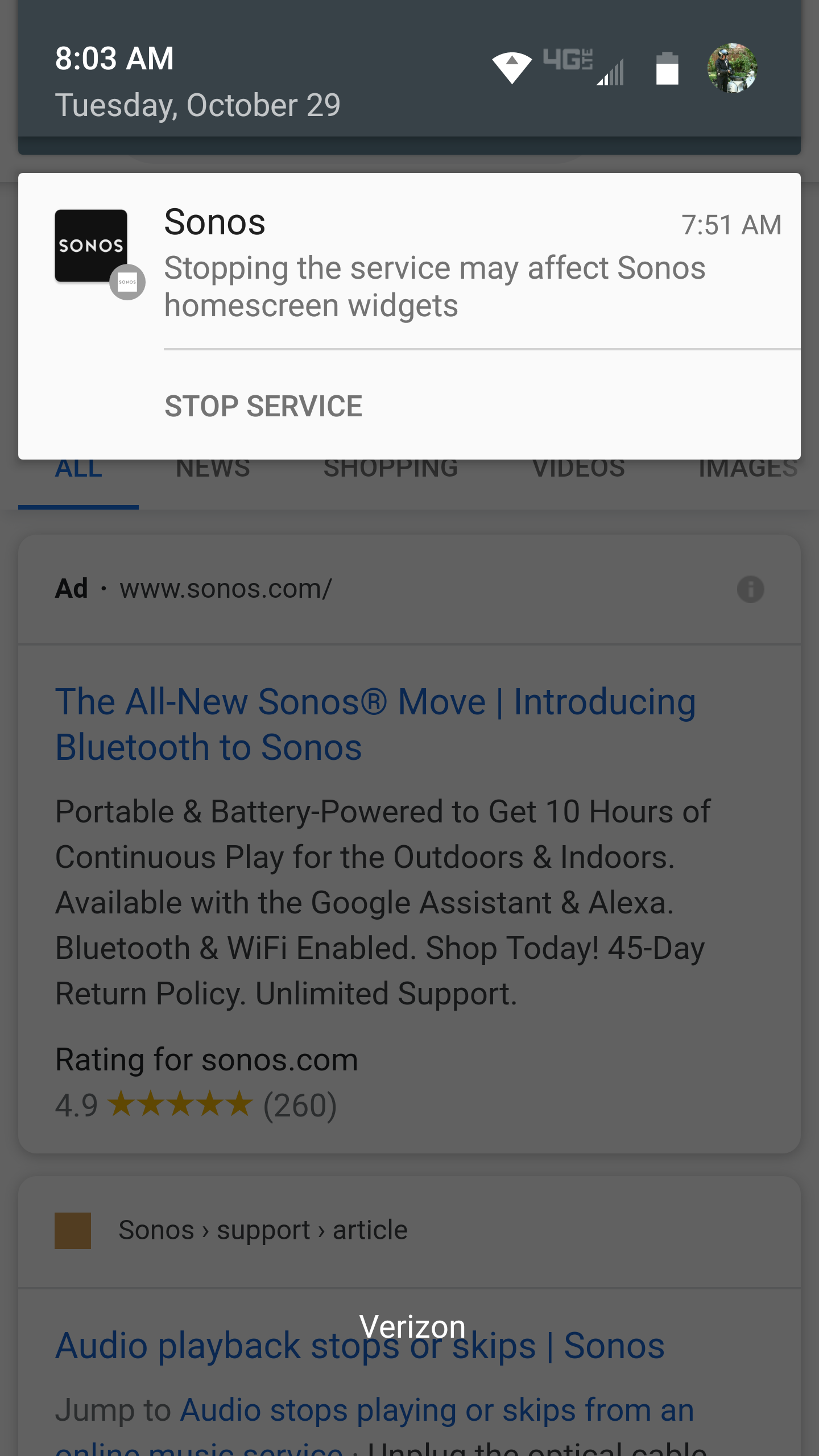
I have an old Droid Turbo. A Sonos notification popped up yesterday stating "Stopping the service may affect Sonos homescreen widgets.". And a link to Stop Service.  

There was an update, which I have now installed, but the notification remains. 

I can't clear it.  I restarted my phone. Still there.

Anyone know why it's there and how to clear it..?  I didn't generate it.

Thanks!


    This topic has been closed for further comments. You can use the search bar to find a similar topic, or create a new one by clicking Create Topic at the top of the page.
    Best answer by Ryan S

    Hi folks, nothing to worry about this one, we’re looking into if we can have it removed. If you’re seeing it though, for most Android versions, if you tap and hold on the notification, there will be an option to hide the notification without affecting the service behavior. 

    23 replies

    AjTrek1
    October 29, 2019

    Hi highjarvis

    I use an iPhone so things may be a little different with your phone or tablet. I assume you have a section in your device that lists all the apps you have installed. Assuming that’s the case search for the Sonos app and see if “Allow Notifications” is turned on.  If so toggle the switch to view notifications on/off/on. Doing so may clear the memory. Just a guess :thinking:

    Cheers!

    Together Everyone Achieves More = T.E.A.M.
    Trending Lyricist I
    October 29, 2019

    Thanks, that was a good idea, and seems to have worked. 😀

    I'd still like to know why the notification appeared.... but life goes on, less cluttered!

    AjTrek1
    October 29, 2019

    @hughjarvis 

    Good to know. Let’s hope the notification doesn't re-appear. :wink:

    Cheers!

    Together Everyone Achieves More = T.E.A.M.
    Avid Contributor I
    October 29, 2019

    Hi, keep getting this since app update this morning. Anyone help. TIA

    Lyricist II
    October 29, 2019

    I just started getting this notification today after an update of the Sonos app on my android device. 

    Ryan S
    Ryan SAnswer
    Retired Sonos Staff
    October 29, 2019

    Hi folks, nothing to worry about this one, we’re looking into if we can have it removed. If you’re seeing it though, for most Android versions, if you tap and hold on the notification, there will be an option to hide the notification without affecting the service behavior. 

    Mark good posts by pressing the like button, and select the best answer on questions you've asked to help others find solutions.
    Trending Lyricist I
    October 29, 2019

    I did try tapping, double-tapping, and tap & hold, but none allowed me to get rid of it.

    But I’ll try again it it resurfaces.

    Meanwhile AjTrek1 had a great workaround.

    Lyricist II
    October 29, 2019

    Hi folks, nothing to worry about this one, we’re looking into if we can have it removed. If you’re seeing it though, for most Android versions, if you tap and hold on the notification, there will be an option to hide the notification without affecting the service behavior. 

    I’m not sure this is the most desirable workaround as I think it would disable all notifications from the app. 

    AjTrek1
    October 29, 2019

    Hi folks, nothing to worry about this one, we’re looking into if we can have it removed. If you’re seeing it though, for most Android versions, if you tap and hold on the notification, there will be an option to hide the notification without affecting the service behavior. 

    I’m not sure this is the most desirable workaround as I think it would disable all notifications from the app. 


    @rbromero 

     I think you quoted @Ryan S in error. :smile: You probably meant to quote @hughjarvis wherein he used my suggestion to toggle Notifications on/off/on which appears to have worked.  The emphasis in on “ON”  as the last setting in my suggestion.

    If you were to leave Notifications turned “Off” you most certainly would not receive any further notifications. Ask yourself….do any of your devices cease to operate just by a mere on/off/on cycle? Doing so clears errors in most cases and is considered basic trouble shooting 101 as opposed to a factory reset.

    Cheers!

    Together Everyone Achieves More = T.E.A.M.
    Lyricist II
    October 29, 2019

    Hi folks, nothing to worry about this one, we’re looking into if we can have it removed. If you’re seeing it though, for most Android versions, if you tap and hold on the notification, there will be an option to hide the notification without affecting the service behavior. 

    I’m not sure this is the most desirable workaround as I think it would disable all notifications from the app. 


    @rbromero

     I think you quoted@Ryan S in error. :smile: You probably meant to quote@hughjarvis wherein he used my suggestion to toggle Notifications on/off/on which appears to have worked.  The emphasis in on “ON”  as the last setting in my suggestion.

    If you were to leave Notifications turned “Off” you most certainly would not receive any further notifications. Ask yourself….do any of your devices cease to operate just by a mere on/off/on cycle? Doing so clears errors in most cases and is considered basic trouble shooting 101 as opposed to a factory reset.

    Cheers!

    No, I did not quote in error. I intended to quote @Ryan S  . When I click and hold as suggested, the option I have is to disable “Allow notification from this catgegory.” I don’t want to disable notifications from this category. 

    BTW, I am completely familiar with 101 troubleshooting and I don’t appreciate the condescension implied in your response. I am actually a software engineer and have already tried the “101” troubleshooting steps and they were unsuccessful.

    I was trying to point out that others that are not as tech savvy may not want to disable this category of notifications as it might prevent them from seeing other important notifications in this category in the future.