

rosswells127
Prodigy I
July 16, 2024
Answered

Music Library Compilations Issue Under 16.3.

  • July 16, 2024
  • 147 replies
  • 7696 views

Today I successfully updated to the latest 16.3 Firmware and Windows Desktop Controller.
I subsequently performed an “Update Music Library Now” from the 16.3 Windows Desktop Controller.
Now any Sonos Controller (including SonoPhone, SonoPad) show multiple entries for each compilation album when viewing Albums.
Just an example shown below...
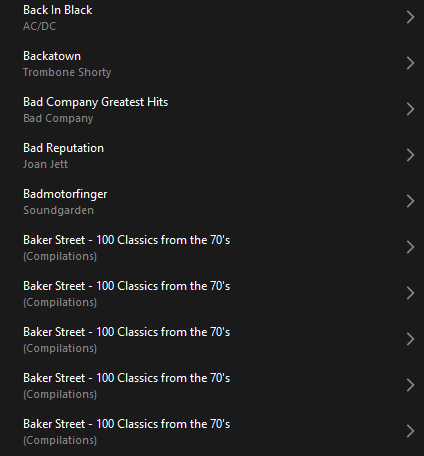
 

Does anyone else have this issue?
Ross.

This topic has been closed for further comments. You can use the search bar to find a similar topic, or create a new one by clicking Create Topic at the top of the page.
Best answer by Corry P

Hi @rosswells127 

I’m not sure why you posted this twice (please don’t), but we are aware of this issue and are now investigating. Thanks for flagging!

147 replies

Lyricist III
July 25, 2024

I am also unable to play my Music Library stored on an external hard drive. It started roughly a week ago. At least that’s when I noticed it. As with the original post here and the screencap, I see multiple entries for the same album under Albums, but when I try to play any of my established (iTunes) playlists, which normally work fine, it spins for about 30 seconds, then says “Unable to browse music.”

This occurs on my PC, my MacBook Air, and my iPhone. All three are running the current apps and the operating systems are all current. I re-indexed my Music Library, and I rebooted my router.

Nothing works. The problem still persists. I get “Unable to browse music” and can’t play any playlist.

Prodigy III
July 25, 2024

I am also unable to play my Music Library stored on an external hard drive. It started roughly a week ago. At least that’s when I noticed it. As with the original post here and the screencap, I see multiple entries for the same album under Albums, but when I try to play any of my established (iTunes) playlists, which normally work fine, it spins for about 30 seconds, then says “Unable to browse music.”

This occurs on my PC, my MacBook Air, and my iPhone. All three are running the current apps and the operating systems are all current. I re-indexed my Music Library, and I rebooted my router.

Nothing works. The problem still persists. I get “Unable to browse music” and can’t play any playlist.

There was a system update a week ago that impacted some people’s systems. But the app update on Monday had elements intended to help with that and music library access in general - just checking: have you updated the app?

Edit: just saw the line about you running the current apps...

Lyricist III
July 25, 2024


There was a system update a week ago that impacted some people’s systems. But the app update on Monday had elements intended to help with that and music library access in general - just checking: have you updated the app?

Edit: just saw the line about you running the current apps...

Yes, thanks for the feedback, Rhonny, and I can confirm that I am running the most current version of the Sonos app on both computers and my phone.

Lyricist III
July 25, 2024

Just to clarify my initial comment, I do see my current/updated “Imported Playlists” under “Music Library,” but attempting to play any of the playlists gives me the spinning (about 30 seconds of it), then the message “Unable to browse music.”

Lyricist III
July 26, 2024

https://www.theverge.com/2024/7/25/24206203/sonos-ceo-apology-redesigned-app-controversy

so, it seems the chaos we are all discussing here, is the fix to May
hahaha


Lyricist III
July 26, 2024

This guy just won’t quit with the mealy-mouthed, dishonest updates.

It is by now well established that the app update was so they could meet their deadline for selling the new headphones, and had nothing to do with improved performance, which is what is claimed in the letter.

The employees aren’t pained at our frustration, they’re pained because they got dropped in it by the CEO and engineering colleagues, who engineered one of the greatest foul-ups in product development history. This will be being taught in business school for decades, as a case study in how not to do things.

How this guy has not yet resigned is beyond me - it clearly needs someone else in charge to rebuild brand loyalty.

Trending Lyricist I
July 27, 2024

Same issue here. Multiple classical and box sets showing several times in the library. Just another frustration... From what I can tell they all play the same and are all listed out of order. Does each instance count towards the maximum amount of files???


Prodigy II
July 27, 2024

The big problem I’m seeing is with “X feat Y” guest artists on tracks. I did a quick experiment with flipping the Music Library->Group Albums Using setting, from “Album Artists” (which has worked for 15 years) to “iTunes”. My tags usually read artist=“Artist; Guest”, album artist=”Artist”.

When I tried the iTunes setting, tracks with “Artist; Guest” disappear from the library. With the “Album Artist” grouping, you get either multiple copies of the album or a random tracklist order.

Weirdly, the desktop and mobile behaviour is different. Here’s an example - the last Ozzy Osbourne album, which is loaded with guest stars. Inspecting the tags in foobar shows the “Artist; Guest” tags look like this: 

With Album-Artist grouping, the latest Sonos desktop app (and 3rd party SonoPad app) finds all the tracks, just not in the right order: 


And the iOS app thinks the 13-track album only consists of the three songs with no guest artist!

So it might be a new bug with the player firmware, there are possible bugs with the desktop app, but there’s definitely a bug with the nowhere-near-shippable new mobile app.

I can’t see any pattern for why some albums like this also list multiple copies with the same broken unordered tracklist.

There is drastic workaround, which is to edit tags, and put the featured artist in the track title instead of the artist tag. Which I may have to do.

Trending Lyricist I
July 27, 2024

The tags are fine, however. If I open the same library in music bee, everything looks good and is the way it should be. So obviously it is reading something wrong. I have no idea at all how it works, just thinking out loud. 

Prodigy II
July 27, 2024

Update: tried Group Albums Using “do not group”, same as the “iTunes” setting.

I did a quick search to see if the problem is my tags all along. Looks like there might not be a recommended way to separate multiple artists using ID3 tags, and “;” can confuse some players/apps. I think the track ordering bug is due to Sonos now taking only the last artist tag value (the “guest artist”) and ordering tracks alphabetically by this artist (ie. the final “guest” artist listed) then by track number. This also accounts for the multiple copies of the album showing up (one per guest/no-guest artist combination). So maybe the “bug” is actually that Sonos has switched overnight from “accepts many different tagging formats” to “only works with specific tagging format(s)”. With “;” as my dbPoweramp-supplied separator, desktop app now treats the tag as different artists for the same album (but not multiple artists per track), mobile app can’t handle multiple artists in the same tag.