

rosswells127
Prodigy I
July 16, 2024
Answered

Music Library Compilations Issue Under 16.3.

  • July 16, 2024
  • 147 replies
  • 7696 views

Today I successfully updated to the latest 16.3 Firmware and Windows Desktop Controller.
I subsequently performed an “Update Music Library Now” from the 16.3 Windows Desktop Controller.
Now any Sonos Controller (including SonoPhone, SonoPad) show multiple entries for each compilation album when viewing Albums.
Just an example shown below...
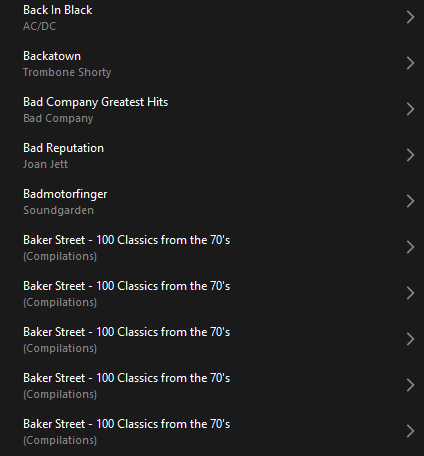
 

Does anyone else have this issue?
Ross.

This topic has been closed for further comments. You can use the search bar to find a similar topic, or create a new one by clicking Create Topic at the top of the page.
Best answer by Corry P

Hi @rosswells127 

I’m not sure why you posted this twice (please don’t), but we are aware of this issue and are now investigating. Thanks for flagging!

147 replies

Lyricist III
July 24, 2024


Lyricist III
July 24, 2024

I’m just using the data in the app - here shows as release 20240717.

Prodigy III
July 24, 2024

I’m just using the data in the app - here shows as release 20240717.

Ah okay. It was meant to go live on Thurs 18th, hence the old release name, but was in fact held back until Monday 22nd.

Lyricist III
July 24, 2024

Honestly Rhonny - I appreciate your detail, but honestly don’t care
all I care is that Sonos hasn’t worked since the 16.3 broke it - which for me was last week on July 18 when I open my windows desktop app and updated.

MoPac
Headliner III
July 24, 2024

jreddaway:

 For IOS I’ve used 8player Pro, fidata, mconnect & Music Life.  For Droid I’ve used Bubble UPnP.  Gapless may not work.

Prodigy III
July 24, 2024

Honestly Rhonny - I appreciate your detail, but honestly don’t care
 

I’m not sending you any more Christmas cards, Scoott. 

Avid Contributor I
July 24, 2024

Absolutely have the same issue. And not only that, but each instance of the album is empty - the song(s) on the album do not show anywhere.

And they are absolutely found in the Apple Music library that is linked.


Lyricist III
July 24, 2024

Haha, this nonsense is so bad, at this point all you can do is laugh.

Thankfully I had never updated the Windows Desktop app as it was the only thing I could use to set alarms after the May fiasco. I come back from holiday, and now my library is completely messed up - and I didn’t even update anything! Not only are the compilation albums showing as a list of tracks, when I try and play the track I want, it plays a completely different track! If you were trying to create the worst app in the world, you wouldn’t be able to make it this bad.

On my iPhone, with the latest update, my Music Library now appears more reliably than before. That’s it. The alphabet to the right hand side STILL isn’t there, so I can’t jump to an album, every track I’ve tried to play so far doesn’t work, and the alarm feature is STILL nerfed (I can’t edit any alarms in the app, if I try and save a change, nothing happens).

Renowned Enthusiast I
July 25, 2024

jreddaway:

 For IOS I’ve used 8player Pro, fidata, mconnect & Music Life.  For Droid I’ve used Bubble UPnP.  Gapless may not work.

Thank you, @MoPac   

I have had a quick try with BubbleUPnP and was most impressed with the way it found and connected with not only my NAS library but also all of my Sonos speakers, making all the info on each of them instantly accessible. 

It would be interesting, using this, to compare how the latest and previous firmware versions structure the various data tables they create and use. I am not, however, prepared to install the firmware update to check it out!

Enthusiast II
July 25, 2024

Another broken thing. It’s exhausting keeping up with this nonsense. I hate Sonos.