

rosswells127
Prodigy I
July 16, 2024
Answered

Music Library Compilations Issue Under 16.3.

  • July 16, 2024
  • 147 replies
  • 7696 views

Today I successfully updated to the latest 16.3 Firmware and Windows Desktop Controller.
I subsequently performed an “Update Music Library Now” from the 16.3 Windows Desktop Controller.
Now any Sonos Controller (including SonoPhone, SonoPad) show multiple entries for each compilation album when viewing Albums.
Just an example shown below...
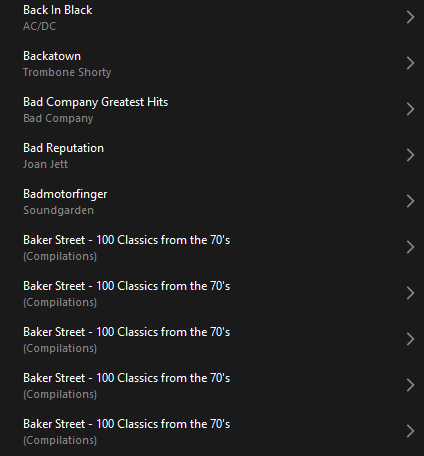
 

Does anyone else have this issue?
Ross.

This topic has been closed for further comments. You can use the search bar to find a similar topic, or create a new one by clicking Create Topic at the top of the page.
Best answer by Corry P

Hi @rosswells127 

I’m not sure why you posted this twice (please don’t), but we are aware of this issue and are now investigating. Thanks for flagging!

147 replies

Lyricist III
July 24, 2024

Dear Corry P - If you are SONOS staff, please can you confirm whether there is a fix available in the UK.  How can I get this fix? Is there any risk I will lose access to my music library again (i.e. has the fix been fully tested?). Thank you.

Prodigy III
July 24, 2024

Dear Corry P - If you are SONOS staff, please can you confirm whether there is a fix available in the UK.  How can I get this fix? Is there any risk I will lose access to my music library again (i.e. has the fix been fully tested?). Thank you.

There is a fix for music library issues in the app update that was released on Monday, which has had many positive responses. The compilation issue detailed here won’t be fixed yet though as it was only reported over the last week or so. 
It all depends on what fix you might be referring to. 

Lyricist III
July 24, 2024

Thank you Rhonny for the response. By “fix”, I am just asking what I have to do to get my albums to list correctly. I have not received any messages about updates for many weeks and have no idea how to update without a specific prompt. So it sounds like either we have not had an update in the UK or it happened automatically without me knowing. But you seem to be suggesting that there is no update which fixes the album/compilation problem.

Could someone from SONOS confirm this?


Lyricist III
July 24, 2024

I’m not Sonos
But, I’m with you GNP
Certainly - there’s been no update for either my Android app or the Windows Desktop app since 16.3 started this whole fiasco for me on July 18. I’m checking every day on both platforms.  
I’m in the USA.  


Corry P
Sonos Staff
July 24, 2024

Hi @GNP 

There will be nothing you can do to improve the situation reported here with Music Library albums showing one entry for each artist involved in the album - this will be up to us to fix with a software update. As @Rhonny mentioned, the issue only manifested late last week, and identified some time after that, so it will take more time yet to fix.

"Common sense is the collection of prejudices acquired by age eighteen." - Albert Einstein
Lyricist III
July 24, 2024

Hi @GNP 

There will be nothing you can do to improve the situation reported here with Music Library albums showing one entry for each artist involved in the album - this will be up to us to fix with a software update. As @Rhonny mentioned, the issue only manifested late last week, and identified some time after that, so it will take more time yet to fix.

Thank you for confirming - your response answers my query.  I will await the next update.

Prodigy III
July 24, 2024

I’m not Sonos
But, I’m with you GNP
Certainly - there’s been no update for either my Android app or the Windows Desktop app since 16.3 started this whole fiasco for me on July 18. I’m checking every day on both platforms.  
I’m in the USA.  


Strange you’ve not had the app update when everyone else has. It went live on Monday, in the Play Store. Maybe yours already updated automatically. Check which version you have (Android latest is 80.05.06). 

Prodigy III
July 24, 2024

Thank you Rhonny for the response. By “fix”, I am just asking what I have to do to get my albums to list correctly. I have not received any messages about updates for many weeks and have no idea how to update without a specific prompt.


To update your phone app, you need to open either the Google Play app for Android or the App Store app on iOS. Search for Sonos and if it says “Update” next to the results, you have an app update to install. 

To check your speakers/system is up to date, open the Sonos app, click the cog (settings) in the top right of the home screen, then tap Manage, then System Updates, then Check for Updates. 

If no updates for either, then you are up-to-date.

Lyricist III
July 24, 2024

I have 80.05.06 in Android - it was release on 07/17/2024 - that’s a week ago, Wednesday of last week.  This update, along with 16.3 on the Desktop which came to me on 07/18/2024 were the start of the fiasco.  

Prodigy III
July 24, 2024

I have 80.05.06 in Android - it was release on 07/17/2024 - that’s a week ago, Wednesday of last week.  This update, along with 16.3 on the Desktop which came to me on 07/18/2024 were the start of the fiasco.  

80.05.06 for Android was released on Monday 22nd, along with the app update for iOS. It was not released on Weds of last week. Last week saw a system update only, which threw out a lot of Android phones until this week’s app update.