Avid Contributor I
April 8, 2021
Answered

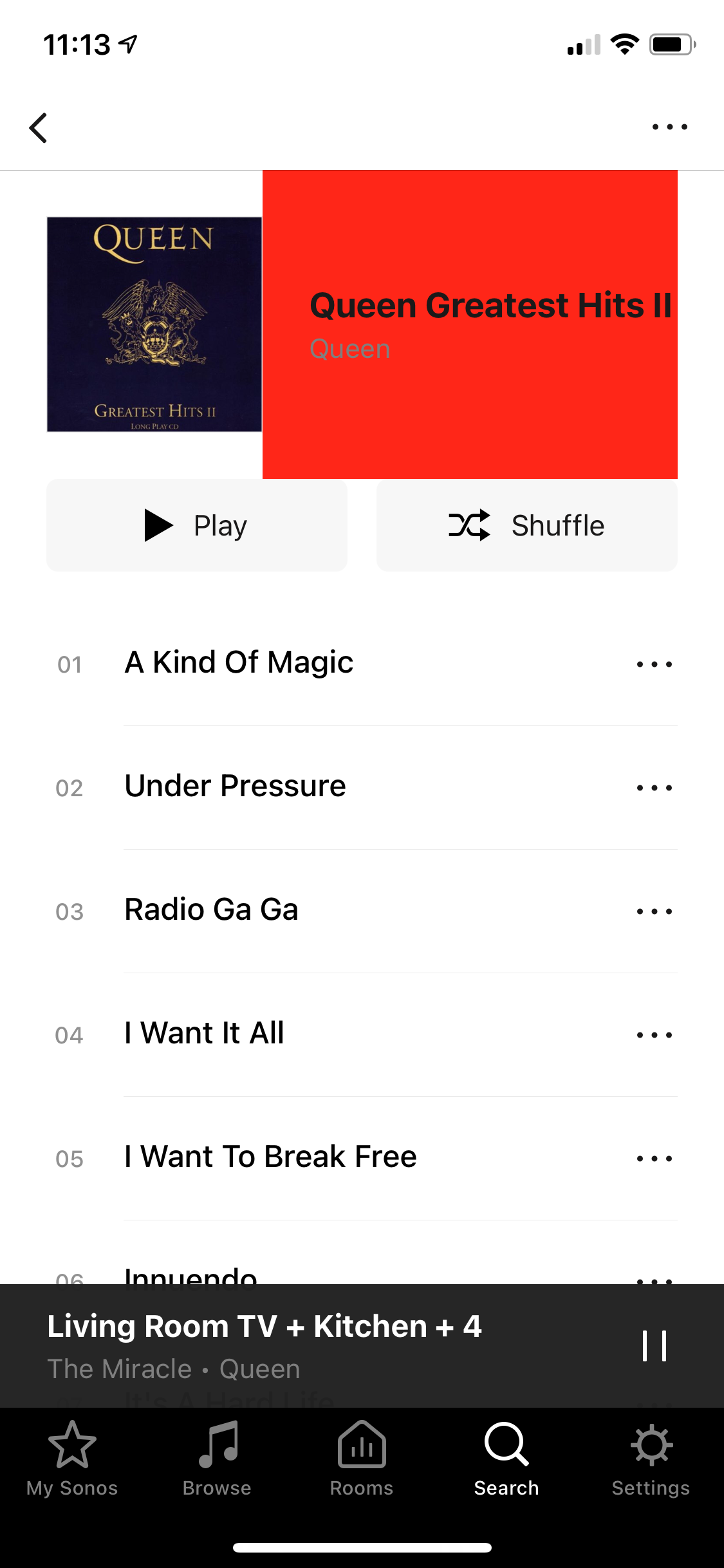
Horrible red box at top of search results

  • April 8, 2021
  • 18 replies
  • 288 views

What’s is going on with this horrible red box that’s suddenly appeared?!  
Is Sonos intentionally degrading their S1 app to piss off their already disenfranchised legacy-owning customers?!!

 

This topic has been closed for further comments. You can use the search bar to find a similar topic, or create a new one by clicking Create Topic at the top of the page.
Best answer by James L.

Hey folks, 


Thanks for your patience on this! We’re rolling out an update to the S1 iOS app today that should rectify this problem. Make sure you update to the latest build as of writing (build 57.5-88080) and you won’t see the red box on your browse view any more. :smiley:

18 replies

Trending Lyricist I
April 8, 2021

ensure when you drill down to the album to play you only tap once on the album cover , so that it then shows the album and all its tracks


melvimbe
April 8, 2021

Good to know this hasn’t appeared for anyone else!  I will try reinstalling etc. And to have it confirmed this is not intentional!!

I can confirm there is no issue with my album artwork, always been fine prior to today. Will investigate further.…


in terms of general dissatisfaction, yes I must confess to being not too happy with Sonos these days, with the whole S1/S2 thing, and the way that’s being handled.  It’s clear I’m far from the only one too, and yes I am sufficiently unhappy that it does feel a lot like Sonos are looking to make my experience on S1 an unhappy one at any opportunity.  Like for example these regular prompts to upgrade which confuse everyone in our household and also regularly and continuously spoil the user experience.

I don’t think I should feel like I need to apologise for expressing this.


It might help if you attempted to try and understand the situation before assuming that Sonos is just out to annoy their own customers.   I definitely agree that the prompts to upgrade would be annoying and I can’t imagine many S1 customers don’t know about S2 by now.  However, the app updates are there for security patches, so that your Sonos system isn’t a door way for hackers to get into your home network.  It’s not about trying to spoil the user experience, obviously, and surely something Sonos would rather not have to bother with on either S1 or S2.

Danny
James L.
Retired Community Staff
April 8, 2021

Thanks for the information folks, we’ve been able to reproduce this and have raised it with our development team. They’ll take a closer look into it and work on a fix as soon as possible, though we have no further information to provide at this time. Once again, thanks for bringing this to our attention :slight_smile:

Mark good posts by pressing the like button, and select the best answer on questions you've asked to help others find solutions.
Trending Lyricist I
April 8, 2021

thanks for your assistance and response ,  and glad it’s a bug and not a new feature !!!   :slight_smile:

PeckAuthor
Avid Contributor I
April 8, 2021

Yes thanks for confirming it’s being fixed.

As has been described above - it’s in lots of places when browsing My Sonos or search results. The current playing screen is fine.

Avid Contributor I
April 9, 2021

I’ve got the same problem, getting it on browsing my own library and on Plex.

Glad to hear support have been able to reproduce it as I was very worried this was an intentional new design element after latest S1 update. 

James L.
James L.Answer
Retired Community Staff
April 12, 2021

Hey folks, 


Thanks for your patience on this! We’re rolling out an update to the S1 iOS app today that should rectify this problem. Make sure you update to the latest build as of writing (build 57.5-88080) and you won’t see the red box on your browse view any more. :smiley:

Mark good posts by pressing the like button, and select the best answer on questions you've asked to help others find solutions.
PeckAuthor
Avid Contributor I
April 12, 2021

What’s is going on with this horrible red box that’s suddenly appeared?!  
Is Sonos intentionally degrading their S1 app to piss off their already disenfranchised legacy-owning customers?!!


That’s good news!  Thanks James.

Clearly I am also relieved to see that Sonos are continuing to look after us S1 laggards! :-)