Avid Contributor I
April 8, 2021
Answered

Horrible red box at top of search results

  • April 8, 2021
  • 18 replies
  • 288 views

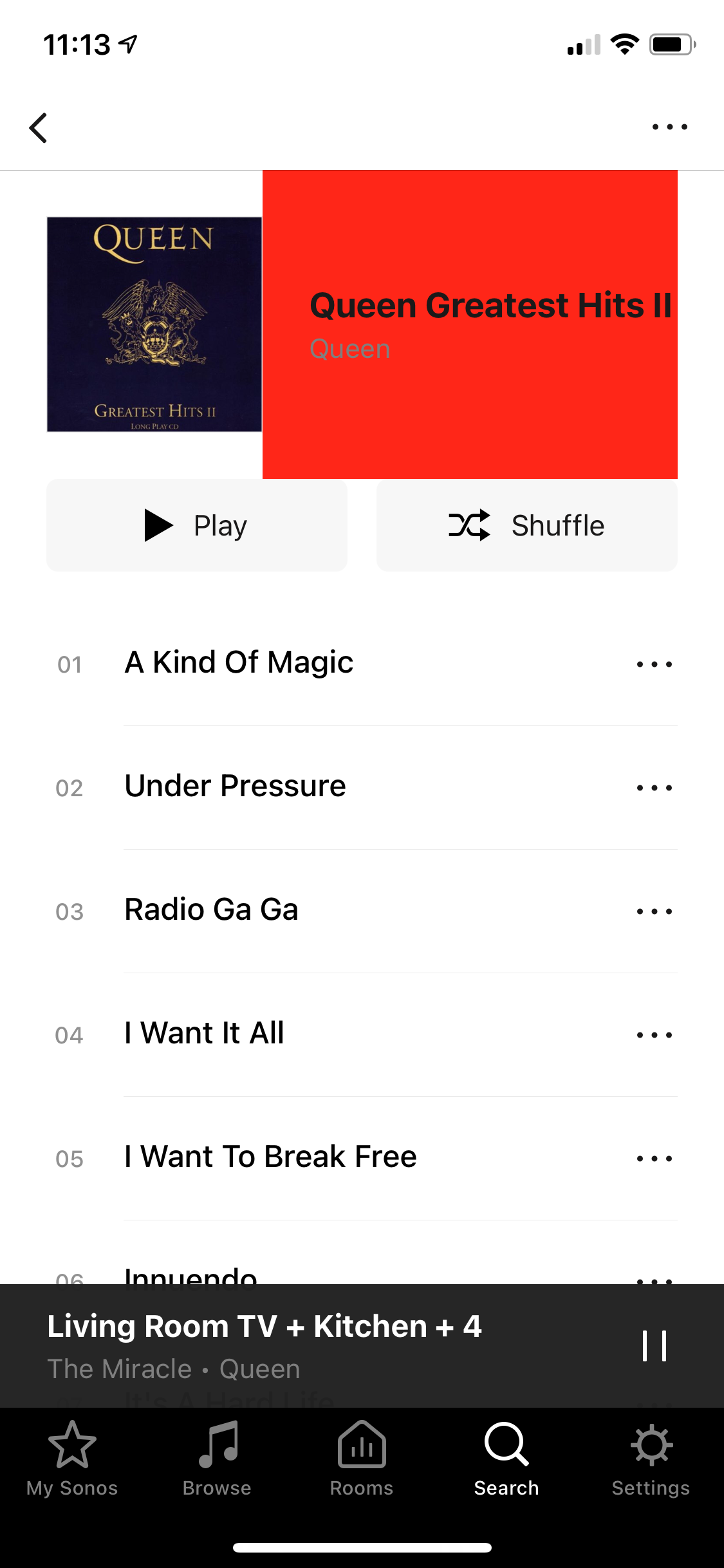
What’s is going on with this horrible red box that’s suddenly appeared?!  
Is Sonos intentionally degrading their S1 app to piss off their already disenfranchised legacy-owning customers?!!

 

This topic has been closed for further comments. You can use the search bar to find a similar topic, or create a new one by clicking Create Topic at the top of the page.
Best answer by James L.

Hey folks, 


Thanks for your patience on this! We’re rolling out an update to the S1 iOS app today that should rectify this problem. Make sure you update to the latest build as of writing (build 57.5-88080) and you won’t see the red box on your browse view any more. :smiley:

18 replies

James L.
Retired Community Staff
April 8, 2021

Hey @Peck,


I’ve never seen anything like that before… Does it persist even when force closing and re-opening the app? Also, which music service is this on?


I can confirm 100% that this is not intentional nor are we “degrading” your experience.


Edit: clarification

Mark good posts by pressing the like button, and select the best answer on questions you've asked to help others find solutions.
April 8, 2021

Yes I expect that is the explanation.  All the top business schools now teach ‘piss off your customers at every opportunity’ as best business practice.

April 8, 2021

My S1 app seems to be red box free, even for Queen Greatest Hits Vol II.  Search results look entirely normal.

What is the music source illustrated?

You might try uninstalling the app, reinstall and ‘connect to existing system’

106rallye
April 8, 2021

@Peck As John B has noted there's a lot of frustration in your post. This makes it harder for other users to want to assist you.

Looking at your screenshot I see a red rectangle that looks to me like a picture of a CD cover, like the one next to it. This does not seem to be the original cover for Queen - Greatest Hits II though. Maybe the original cover is missing from your music database or server and this is some kind of replacement?

PeckAuthor
Avid Contributor I
April 8, 2021

Good to know this hasn’t appeared for anyone else!  I will try reinstalling etc. And to have it confirmed this is not intentional!!

I can confirm there is no issue with my album artwork, always been fine prior to today. Will investigate further.…


in terms of general dissatisfaction, yes I must confess to being not too happy with Sonos these days, with the whole S1/S2 thing, and the way that’s being handled.  It’s clear I’m far from the only one too, and yes I am sufficiently unhappy that it does feel a lot like Sonos are looking to make my experience on S1 an unhappy one at any opportunity.  Like for example these regular prompts to upgrade which confuse everyone in our household and also regularly and continuously spoil the user experience.

I don’t think I should feel like I need to apologise for expressing this.

PeckAuthor
Avid Contributor I
April 8, 2021

Yes I expect that is the explanation.  All the top business schools now teach ‘piss off your customers at every opportunity’ as best business practice.

Would be good if Sonos attended one of these very good business schools!!

Trending Lyricist I
April 8, 2021

Hi

i think this is an “update”  in version 11.2.7   i have got the ugly red box today , and a friend who updated today also see this red box  , please can sonos confirm if this was intentional ? if so why as its really ugly and just seems unnecessary ?

106rallye
April 8, 2021

Just to clarify: the "red box” appears when playing from your own library? The CD cover turns red when a song starts playing?

James L.
Retired Community Staff
April 8, 2021

Hi

i think this is an “update”  in version 11.2.7   i have got the ugly red box today , and a friend who updated today also see this red box  , please can sonos confirm if this was intentional ? if so why as its really ugly and just seems unnecessary ?

I already confirmed further up in this thread that this isn’t intentional. Please tell me which music service you’re experiencing this on and which options in the app you’re choosing as we haven’t seen this behaviour before.

Mark good posts by pressing the like button, and select the best answer on questions you've asked to help others find solutions.
Trending Lyricist I
April 8, 2021

Hi , no


its when you browse music from the app , by album , or artist , in both music library and in napster , when you drill down in either albums or artists , and select a specific album  this is where the red box appears ,  if you then select the album to play , the playing window is normal,   with just the normal album art