
Master T
Prodigy I
October 19, 2022
Answered

14.18 Broke Desktop Volume Controller

  • October 19, 2022
  • 75 replies
  • 2955 views

The update to 14.18 seems to have broken the volume controller on the desktop app (Windows 11).  While I can still adjust the overall volume of a particular group with the top slide, the pop-up sliders that allow me to control the volume of the speakers within the group individually are no longer functional. 
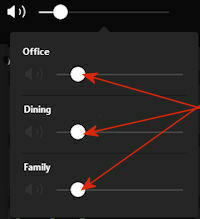


I have confirmed that all of my speakers, as well as the apps on my phone and desktop all updated to 14.18. The sliders are working normally on my phone.

This topic has been closed for further comments. You can use the search bar to find a similar topic, or create a new one by clicking Create Topic at the top of the page.
Best answer by jstory

Sonos just release an update today 11/15/2022. Update Version 14.19 / Build: 70335070 appears to have fixed this problem for me.

75 replies

World-Class Superstar
October 29, 2022


@John B I’ve never said I needed help and I’ve already had my rant. 


Over and out.

October 29, 2022

Thanks for the lecture. I am open to many possible causes of your issues. But it isn't a problem with the app.

Lyricist III
October 29, 2022


@John B I’ve never said I needed help and I’ve already had my rant. 


Over and out.

Who are you sorry?


Nice to see established members being so open and welcoming here.

October 29, 2022

Over and out.

Lyricist III
October 29, 2022

Thanks for the lecture. I am open to many possible causes of your issues. But it isn't a problem with the app.


They just keep coming!


I doubt anyone is going to get through to you but you really need to step up your troubleshooting skills and start looking at the bigger picture of things rather than going into a situation already blinkered from your own beliefs that it absolutely cannot be (a) so it HAS to be (b).  


Imagine speaking to Microsoft and saying that you think theres a problem with Windows and they just turn around and say its nothing to do with Windows, its your network, without even doing any troubleshooting.  You wouldn’t be happy would you but thats exactly what you’re doing here, you’re discounting everything else just to support your narrative.


Trending Lyricist I
October 29, 2022

Adding to all this as I too have the issue since the update, even the iOS app version has issues in that what used to be fine motor control for volume levels has gotten very difficult to control. I used to be able to lower volume on my Moves in 1 unit increments and now as soon as I try to hit the general volume level to access individual volume controls a gross change to volume happens and then trying to lower to a specific level (like “1”) as i want to set for sleeping is now much more difficult.

It jumps large increments or to “0” and it takes so much longer to get under control. Then If I get close to “1” the general level goes to “0” and makes any changes impossible until I increment the general volume up from “0” then I can control the individual levels again and repeat as above.. very very frustrating…

October 29, 2022

Before people start saying “reboot” or “its your network”, I can assure them that its not, I’ve been working in IT for about 20+ years so would hope I know what I’m doing by now).  


Troubleshooting will always start with some degree of “it might be this or it might be that”, its the joy of troubleshooting complex issues because you don’t know where they’re going to take you. 


LOL

Trending Lyricist I
October 29, 2022

Network problems are networks problems, not app problems - but is the network problem on the Sonos product or is it at the network infrastructure products, that is another question. Sonos isn’t always very capable on surviving (well) on different kind of network setups. There are same category products that do better, and those that do worse. But simply outlining that that problem isn’t on Sonos network & protocol stack is rather silly. I can easily do a valid, working and “correct” network where Sonos has issues and competitor does not. Is the problem then on Sonos or my network?

The volume control issue is not a network issue. It might be app issue, but to me it seems like it would not be - the app just shows symptoms of the problem differently on different OS’s. It would seem to be issue with the S2 O/S.

Maybe we will some day know. Or then we won’t. But a fix will come, eventually. Until then I again struggle using my Sonos setup.

October 29, 2022

@boogey . That is a reasonable analysis. Sonos does make greater demands on a network than a single device does. The network isn't necessarily faulty, but does have some setting or feature that makes it difficult or impossible for Sonos to work optimally.

For example, if a controller device connects to 5GHz and the speakers are on 2.4GHz, and the router does not bridge the two bands, then the app won't be able to find the speakers. A decent router will bridge the bands - but some don't. Is that a network fault or just a limitation? The router will serve many users without problems.  There are ways round this. I am not bothered whose 'fault' it is. It's a network issue requiring a network solution.

For the avoidance of doubt, I KNOW that the current problem with the desktop volume control is a Sonos bug. It was @Stuow who went off topic by complaining about the iOS app  

Lyricist II
October 30, 2022

We have exactly the same problem on three separate Sonos systems - one at work and at two homes.

It speaks to seriously inadequate software testing if such a bug in something this basic is allowed through to general release; and it’s very dissonant with Sonos’ “high-end” positioning.

Quite amazing.