
Master T
Prodigy I
October 19, 2022
Answered

14.18 Broke Desktop Volume Controller

  • October 19, 2022
  • 75 replies
  • 2955 views

The update to 14.18 seems to have broken the volume controller on the desktop app (Windows 11).  While I can still adjust the overall volume of a particular group with the top slide, the pop-up sliders that allow me to control the volume of the speakers within the group individually are no longer functional. 
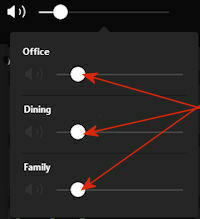


I have confirmed that all of my speakers, as well as the apps on my phone and desktop all updated to 14.18. The sliders are working normally on my phone.

This topic has been closed for further comments. You can use the search bar to find a similar topic, or create a new one by clicking Create Topic at the top of the page.
Best answer by jstory

Sonos just release an update today 11/15/2022. Update Version 14.19 / Build: 70335070 appears to have fixed this problem for me.

75 replies

Airgetlam
October 23, 2022

My experience is there has been no reduction in the reliability of the Sonos software. Every time I’ve thought there was a potential issue, it turned out to be in my own network, and not a Sonos issue.
 

I’ve been a customer since before 2009. 

Bruce
Trending Lyricist I
October 23, 2022

I don’t know if there has been a reduction as it’s always been a bit unreliable. To the extent, that I don’t recommend it to my clients. And then it takes surprisingly long time to fix the issues they have, if they ever do get fixed.

Sonos customer since 2019.

Airgetlam
October 24, 2022

Odd. Since I assigned reserved IP addresses to all my Sonos devices, I’ve only experienced two cases of instability. One was due to a failing microwave that was spewing interference across all sorts of radio frequencies, and the other was new neighbors who installed a router that used the same broadcast channel I’d been using. It would be nice if LANs didn’t have all sorts potentials for failure, but the nature of networking is such that in order to be as expansive as it needs to be, it has inherent potentials for failure. WiFi itself is even more fragile, since it uses radio frequencies, rather than Ethernet cables. 

Bruce
controlav
Lead Maestro
October 24, 2022

What is most strange about this bug is that why was the volume code change AT ALL on the PC app anyway? It’s not like that version gets new features, and nothing in the underlying tech on the volume APIs has changed, ever.

Obviously one can use other apps or devices to work-around this issue, but it’s just so strange to me that (i) this was changed at all and that (ii) no-one tested it afterwards. It’s not some test corner-case, it just flat doesn’t work at all.

Author of the leading independent Sonos apps for Android, MacOS, iOS, Windows and Xbox.
Airgetlam
October 24, 2022

I’d assume it was a change in Windows, and not that someone changed the code in Sonos. Which suggests that Sonos may have been using a non-standard/approved way to enact the appropriate action. And when Windows “fixed” that code, it broke the way that Sonos was doing it….however, that’s merely a guess, based on the fact that I’d think Sonos hasn’t touched that area of the code in likely years. 

Bruce
controlav
Lead Maestro
October 24, 2022

I’d assume it was a change in Windows, and not that someone changed the code in Sonos. Which suggests that Sonos may have been using a non-standard/approved way to enact the appropriate action. And when Windows “fixed” that code, it broke the way that Sonos was doing it….however, that’s merely a guess, based on the fact that I’d think Sonos hasn’t touched that area of the code in likely years. 

Highly unlikely, esp as the S1 app is still fine (also WPF) and this breakage came with the latest S2 app update. The PC app uses WPF for its UX, and WPF is frozen in time (well the version built into the OS). My day job is a large and complex WPF app and much as it has its issues, randomly breaking apps has not been its thing for many years.

Author of the leading independent Sonos apps for Android, MacOS, iOS, Windows and Xbox.
Airgetlam
October 25, 2022

Seems odd that Sonos would have been messing around in that area of the code, certainly...although it may presage some other change upcoming that we’re unaware of. Who knows. :)

Bruce
Contributor I
October 25, 2022

Just adding myself to the list, I have the same issue.

  • Loudspeaker symbol greyed out and no control possible
  • Rebooting all speakers and AMP does not solve the problem
  • I can get some of my rooms to work by deleting the group and adding them back together, but never all of them
  • The issue started exactly with the latest update
Trending Lyricist I
October 25, 2022

The issue is just not in the Windows version, in Windows it just happens to be most obvious. Controlling playback with pre-existing (before app start) groups in latest Android version has issues as well. Result is sudden end of playback on devices that already existed in that group before you added new devices AND adjust the volume, after moment or so. 

Windows version tried to fix a problem they knew they have. That’s why they had a change. But the end result for the user didn’t go thru QA in Windows. Let’s see how the Android app does once it hits with another update. 

It’s sad that Sonos has started to keep Windows version as obsolete. They get praise from media for having a great app - but in fact it really sucks. Spotify, and now Amazon Music, are so much better in finding what you want to play, that I actually dislike using Sonos app. In Windows I can quickly multiwindow into music I like, but in Android app getting to my latest album (not EP, not single) from my favourite Finnish band is just a hit and miss of a lot of random stuff that might never the the correct thing to hit. 

phobden
Trending Lyricist I
October 28, 2022

I am very attached to the windows version of controller.
Nearly all my operations are done there.
Also a shame that certain management and setup options only work on android….

Waiting with bated breath for fix to 14.18