
Master T
Prodigy I
October 19, 2022
Answered

14.18 Broke Desktop Volume Controller

  • October 19, 2022
  • 75 replies
  • 2955 views

The update to 14.18 seems to have broken the volume controller on the desktop app (Windows 11).  While I can still adjust the overall volume of a particular group with the top slide, the pop-up sliders that allow me to control the volume of the speakers within the group individually are no longer functional. 
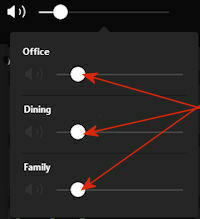


I have confirmed that all of my speakers, as well as the apps on my phone and desktop all updated to 14.18. The sliders are working normally on my phone.

This topic has been closed for further comments. You can use the search bar to find a similar topic, or create a new one by clicking Create Topic at the top of the page.
Best answer by jstory

Sonos just release an update today 11/15/2022. Update Version 14.19 / Build: 70335070 appears to have fixed this problem for me.

75 replies

Lyricist III
October 20, 2022

Heh, just went back to that laptop/surface.  Opened the application, and its doing it again.  I dont think I changed the groups in the 24 hours but guess it thinks so.  But cant control individual volumes again.  Assume remaking the group would temp fix some of it, but meh just grabbed my phone.


I really hate that us with large local libraries and like desktop control are now second class citizens.  All focus is on streaming and mobile devices.  If nothing else make it work like it used to, some of us have it setup and want to forget about it and it ‘just work’ like it once did.

Corry P
Sonos Staff
October 20, 2022

Hi @Master T et al

We are aware of this issue and are working on a fix.

"Common sense is the collection of prejudices acquired by age eighteen." - Albert Einstein
World-Class Superstar
October 20, 2022

Hi @Master T et al

We are aware of this issue and are working on a fix.

Thanks for the info.

controlav
Lead Maestro
October 20, 2022

I just tried the PC app and I note that all of the device speaker icons are greyed out, which is probably a clue. (The icon next to Group is white).

I also checked my own PC app, and it works fine. This proves the issue is in the Sonos PC controller app, not the firmware of the speakers.

Author of the leading independent Sonos apps for Android, MacOS, iOS, Windows and Xbox.
Master T
Master TAuthor
Prodigy I
October 20, 2022

I just tried the PC app and I note that all of the device speaker icons are greyed out, which is probably a clue. (The icon next to Group is white).

Yes, this is as noted in the images provided above.  When you group and ungroup the speakers using the Desktop app, all but the group controller icon revert to normal (white).

I also checked my own PC app, and it works fine. This proves the issue is in the Sonos PC controller app, not the firmware of the speakers.

Agreed, and perhaps I should have been clearer that “14.18” in the OP was meant to refer to the version of desktop controller software, not the firmware (although at the time I did not know if this was happening on iOS as well).

Trending Lyricist I
October 22, 2022

Same for me, I can’t control the individual speakers after installing the update.  Or sometimes I can control one of my three speakers.  On top of that the update said it “failed” with an error code but later said my system was up to date.  That happens a lot these days

Contributor II
October 23, 2022

Hi @Master T et al

We are aware of this issue and are working on a fix.

3 days later and still working on a fix? Not only should something like this not happen if there is a proper QA but more importantly the quickest and appropriate fix would be to downgrade all systems to the previous version that used to work just fine. Sometimes I loathe having invested in Sonos.

Smilja
October 23, 2022


Hi @Master T et al

We are aware of this issue and are working on a fix.

3 days later and still working on a fix? Not only should something like this not happen if there is a proper QA but more importantly the quickest and appropriate fix would be to downgrade all systems to the previous version that used to work just fine. Sometimes I loathe having invested in Sonos.


Oh the drama. It is weekend and as the PC controller isn’t as essential to controlling Sonos as the Android and iOS apps are we’ll have to wait patiently.

»And the world is like an apple whirling silently in space, Like the circles that you find in the windmills of your mind.« (›Windmills Of Your Mind‹ [1967]. Music by Michel Legrand ; English lyrics written by Alan & Marilyn Bergman)
October 23, 2022

-

@loungebob . With a system as complex as Sonos, bug-free releases are probably unknown, although this is a bigger bug than one would hope to see sneak through. But it happens. Everywhere.

And you obviously haven't read the threads  oomplaining about updates being too frequent. The vast majority of users either don't ecer use the desktop app or can manage without it for a while. Nobody died.


Trending Lyricist I
October 23, 2022

-

@loungebob . With a system as complex as Sonos, bug-free releases are probably unknown, although this is a bigger bug than one would hope to see sneak through. But it happens. Everywhere.

And you obviously haven't read the threads  oomplaining about updates being too frequent. The vast majority of users either don't ecer use the desktop app or can manage without it for a while. Nobody died.


That’s true, but for people like me with an older generation of Sonos devices the quality has progressively declined.  The mobile app works less reliably than before, updates like this for the desktop controller cause problems, and half the time the desktop controller reports the “update failed” when it seems to have actually succeeded.  Plus if you have the older generation of speakers you have to use 2 Sonos mobile apps which is incredibly confusing.  Luckily I am relatively tech savvy and can workaround these issues but for someone who is not Sonos would not be a good option.