
Master T
Prodigy I
October 19, 2022
Answered

14.18 Broke Desktop Volume Controller

  • October 19, 2022
  • 75 replies
  • 2955 views

The update to 14.18 seems to have broken the volume controller on the desktop app (Windows 11).  While I can still adjust the overall volume of a particular group with the top slide, the pop-up sliders that allow me to control the volume of the speakers within the group individually are no longer functional. 
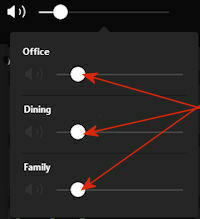


I have confirmed that all of my speakers, as well as the apps on my phone and desktop all updated to 14.18. The sliders are working normally on my phone.

This topic has been closed for further comments. You can use the search bar to find a similar topic, or create a new one by clicking Create Topic at the top of the page.
Best answer by jstory

Sonos just release an update today 11/15/2022. Update Version 14.19 / Build: 70335070 appears to have fixed this problem for me.

75 replies

Lyricist III
October 19, 2022

Try ungrouping them in the desktop app.  Then group them back up.  That happened to me yesterday and ungroup regroup ‘fixed’ it, sorta.  Once grouped the one I grouped on Office for me, i couldnt control the volume or mute in the Windows app but the rest I could. 

Airgetlam
October 19, 2022

I’d also be tempted to reboot the machine, if you haven’t already, to force a reset of the OS and the application, too. 
 

I’ve not seen this issue on the Mac side, but probably not an equivalency. 

Bruce
Lyricist III
October 19, 2022

Mac seemingly unaffected here.  I know I did try rebooting the laptop and no change.  Windows 10, MS Surface (older one).  All updated stuff via Mac desktop app.

Airgetlam
October 19, 2022

I’d probably submit a diagnostic, then, and contact Sonos support directly. Sounds like a slight bug in their Windows controller code….or a change that they didn’t anticipate in Windows ;)

Bruce
Master T
Master TAuthor
Prodigy I
October 19, 2022

Try ungrouping them in the desktop app.  Then group them back up.  That happened to me yesterday and ungroup regroup ‘fixed’ it, sorta.  Once grouped the one I grouped on Office for me, i couldnt control the volume or mute in the Windows app but the rest I could. 

Yes, I’m seeing the same behavior now. It’s different from what I saw initially as well. I can now adjust the volume of all the individual speakers except the group controller. In the pop-up, the icon to the left is grayed out on the group controller, and the slider on “Office” won’t move.

I’d also be tempted to reboot the machine, i

I did reboot the desktop PC before my post this morning.


Diagnostic 1092604331


Dez S
Lyricist III
October 19, 2022

I’m having the same issue. I can control the Group volume but not the individual room speakers.

Sonos please please fix this.

Lyricist I
October 19, 2022

Even if there is a workaround it shouldn’t do this right after an update.  I have been a computer programmer for 25 years, and this appears to be a bad enough bug that the update should be yanked and the issue fixed.  Then a new update pushed.

Even if you do the workaround of ungrouping them and grouping them again, there is high chance that 1 or 2 of your rooms are grayed out in the desktop individual volume control pop up.  the workaround if there is only one grayed out is to tweak the master volume so the grayed out room is the volume you want, and then tweak the other rooms individually.

I had noticed this graying out issue happening before this last disastrous update.

World-Class Superstar
October 19, 2022

I’m having the same issue. I can control the group volume but not the individual room speakers.

rosswells127
Prodigy I
October 19, 2022

Same issue here.

Ross.

Contributor I
October 19, 2022

Came here to see if others were having this issue, and glad I’m not alone.

I’ve been able to duplicate the issues mentioned above, including the sorta-workaround by ungrouping/regrouping.

At least the similar function on iOS still works, so I guess I’ll just wait for a fix.