
Question

Why does the iOS queue not render?

  • September 12, 2026
  • 4 replies
  • 17 views

Forum|alt.badge.img

I uninstalled the Sonos Controller from my iPhone and then reinstalled, so I presume have the latest build of it.

I added 34 entries to a queue using the Add to end of queue and Add next options. When I click the queue button, the Queue page opens and never fully realizes--all I see is a grey list of items with no data in it. It does render the correct track count. See screen shot.
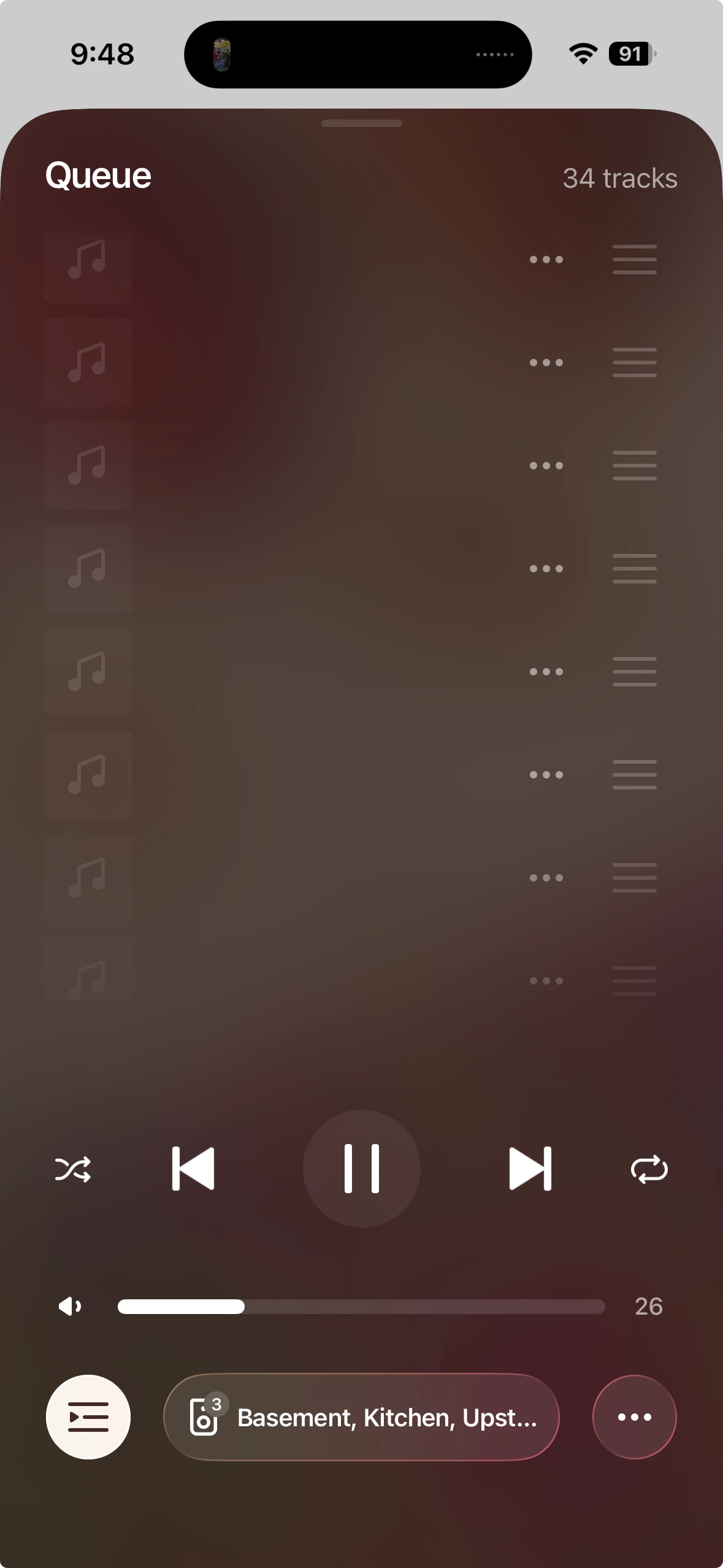
I tried leaving the queue up for a while and it did not seem to render.

I am loading tracks from a (large) personal library, though it seems like that should not matter.

This feature does work on my MacOS controller on my MacBook Pro--I can see all of the songs just fine.

This feature appears to have been broken for me since two years ago--so is it just me? I can’t fathom why such a major and fundamental feature would remain broken for everyone.


4 replies

controlav
Forum|alt.badge.img+24
  • Lead Maestro
  • September 12, 2026

Since the move to the cloud for music services, the mobile app has had challenges with local library support because the reach-around from the cloud back to local is, well, a bit tricky.

The Desktop app doesn’t use the cloud stuff, so is always going to be more reliable than mobile for this.

FWIW I don’t see this specific problem, but I’m using a Windows Server for my music.

There was an S1-only bug a while ago with Apple Music playlists that displayed like this, hard to see if that is related.


Forum|alt.badge.img
  • Author
  • Trending Lyricist I
  • September 12, 2026

Thanks for the reply. The Sonos components to which this renders are a combination of S1 (I have two old Play 3) and one S2 (Sonos 5) controllers.

I guess I could try removing the Play 3 units from the network to see if that clears up the problem.


  • September 12, 2026

If this has been broken for 2 years, it could be because Sonos S2 has changed how local music libraries are accessed on macs. These might help:

Share your macOS music folder with Sonos

Add your music library to Sonos


  • September 12, 2026

Thanks for the reply. The Sonos components to which this renders are a combination of S1 (I have two old Play 3) and one S2 (Sonos 5) controllers.

I guess I could try removing the Play 3 units from the network to see if that clears up the problem.

Mixing S1 and S2 systems is not possible. S1 systems require an S1 controller and S2 systems require an S2 controller. You can have both, but they don’t interact. Also, they access the local music library differently. S2 now requires the library to be set up as an SMBv2/v3 share.