Question

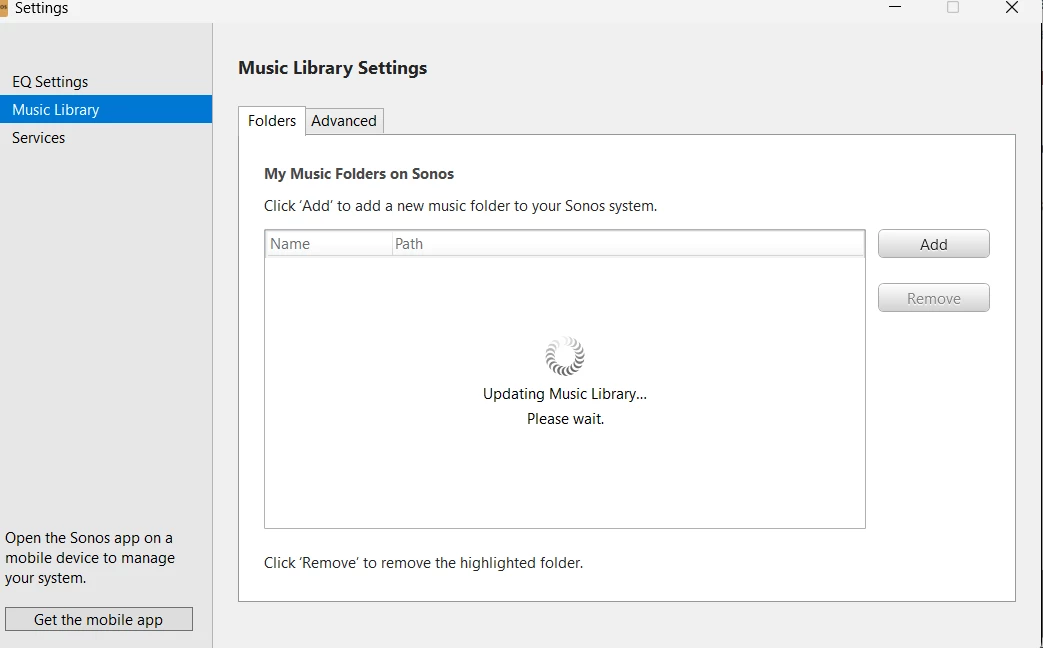
updating music library please wait

  • April 18, 2026
  • 11 replies
  • 72 views

This has been stuck for hours and   only have about 5gb of file that im trying to add

11 replies

Stanley_4
  • Grand Maestro
  • April 18, 2026

Is your system fully updated?

How many tracks?

What speaker are you using for the update? Do you have a more capable one available?

Is that from a desktop controller? Have you tried doing it from an app?

Have you tried refreshing your network and starting the process over?


  • Author
  • Contributor I
  • April 18, 2026

yes my system is fully updated

i have close to 1000 tracks 

i am using desktop controller. on the app, add shared folders is grayed out 


i have always used desktop controller to add my folders 


yes i did refresh but the when i go to the app i still updating music library


i also restarted and reinstalled sonos 


  • Author
  • Contributor I
  • April 18, 2026

also i just reset my pc 

i had backed up my files on google drive and downloaded them once my reset was complete


  • Author
  • Contributor I
  • April 18, 2026

fixed i factoery reset all my speakers and reconnected them


106rallye
Forum|alt.badge.img+18
  • April 19, 2026

Good that you are okay now. Since you reset everything (resetting Sonos should only be needed when Sonos explicitly asks you to) it will forever be unclear what the real problem was.


  • Author
  • Contributor I
  • April 24, 2026

Its still happening 


106rallye
Forum|alt.badge.img+18
  • April 24, 2026

Maybe call Sonos?


Stanley_4
  • Grand Maestro
  • April 24, 2026

fixed i factoery reset all my speakers and reconnected them

Its still happening 

And there is why Sonos and most users here (but not idiot AI bots) tell you not to Factory Reset.

It usually makes things worse and rarely fixes anything.


When it is approriate or necessary to use it is called out as such in the Sonos documentation.


  • Author
  • Contributor I
  • April 24, 2026

Maybe call Sonos?

I will try that next


MoPac
Forum|alt.badge.img+19
  • Headliner III
  • April 24, 2026

yes my system is fully updated

i have close to 1000 tracks 

i am using desktop controller. on the app, add shared folders is grayed out 


i have always used desktop controller to add my folders 


yes i did refresh but the when i go to the app i still updating music library


i also restarted and reinstalled sonos 

What do you mean “add shared folder is grayed out”?


Stanley_4
  • Grand Maestro
  • April 24, 2026

Maybe a screenshot or photo of the greyed out setting screen?

Usually that is a side-effect of something not being on the latest software or firmware but you said all was up to date so it is confusing.

What firmware version are your Sonos on, what app version are you running and what is the version of the desktop controller?


