Answered

Unable to connect to Sonos on iPad (but iPhone works fine)

  • December 23, 2023
  • 7 replies
  • 4661 views

Forum|alt.badge.img+2

I just bought a new iPad and set it up. When I open the Sonos app, it says “Unable to connect to Sonos. Let’s fix it.” 

However, Sonos is working just fine on my iPhone. When I open the app, I can see all of my devices and control them as expected. 

When I tap the “Let’s fix it” bubble and start to go through the steps, it wants me to unplug all of the devices and plug them back in. I’m wary of doing this because I don’t want to make any changes that would interfere with the system working on the Sonos app on my iPhone, which is how I primarily use it.

When I tap “Join nearby system”, it says “We can’t find a Sonos system on <name of my network>. Make sure your Sonos system is powered on and connected to the network.” It is. I went to the Sonos app on my iPhone and tapped “System”, then “Network > Manage Networks”. Under “Networks”, the name of my network is indeed listed there. 

Why isn’t it working on my iPad when it works on my iPhone? I’ve already tried deleting and reinstalling the Sonos app on the new iPad, but that didn’t work. 

Best answer by buzz

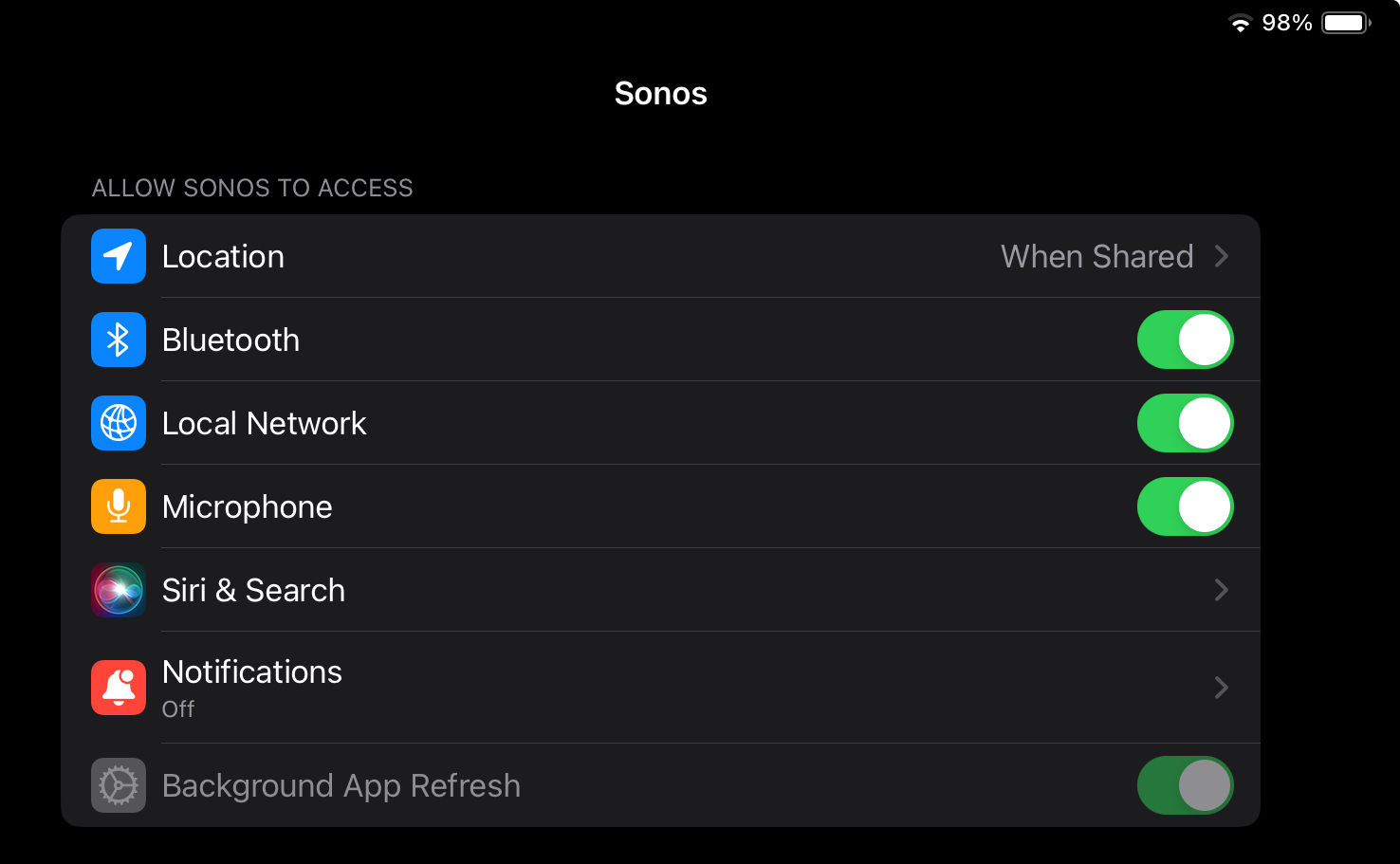
Go to the iPad Settings, scroll to the Sonos App and make sure that Access to the local network is enabled.

This topic has been closed for further comments. You can use the search bar to find a similar topic, or create a new one by clicking Create Topic at the top of the page.

7 replies

buzz
  • Answer
  • December 23, 2023

Go to the iPad Settings, scroll to the Sonos App and make sure that Access to the local network is enabled.


Forum|alt.badge.img+2
  • Author
  • Avid Contributor I
  • December 23, 2023

Thanks. I just did a Live Chat with Sonos and we got it fixed. 


106rallye
Forum|alt.badge.img+18
  • December 24, 2023

@switters For future readers: how as it fixed?


Forum|alt.badge.img+2
  • Author
  • Avid Contributor I
  • December 24, 2023

@switters For future readers: how as it fixed?

To be honest, we weren’t sure. The support rep asked me to submit a diagnostic report on both the iPad and my iPhone. Just doing that seemed to fix it on the iPad. 


controlav
Forum|alt.badge.img+24
  • Lead Maestro
  • December 24, 2023

Go to the iPad Settings, scroll to the Sonos App and make sure that Access to the local network is enabled.

Is this an option on the iPad? I thought this was an iPhone-only option?


buzz
  • December 27, 2023

From my iPad:


johnnymumu
Forum|alt.badge.img+1
  • Trending Lyricist I
  • January 15, 2024

Just solved this with a DNS server change. 8.8.8.8 ftw.