Answered

Still no resolution with Amazon Music and S1

  • March 27, 2026
  • 22 replies
  • 338 views

For several months, I have been experiencing persistent issues with the S1 controller and Amazon Music. Despite reaching out to support for help, the problem remains unresolved. I have been a longtime user of both Amazon Music and the S1 controller, but ever since the most recent S1 software update on iOS, I can no longer use control Amazon music without constantly receiving the error message: "This song is not encoded correctly."

I have already tried all standard troubleshooting steps, such as rebooting the devices, restarting the router, ensuring all software is up to date, and reinstalling the Amazon service within the app—none of which has resolved the issue. It's clear that Amazon Music itself isn't the problem, as the service works perfectly when accessed through Alexa (to control Sonos) or outside the Sonos app. Additionally, other music services, such as Spotify and Radio Paradise, continue to function normally with the S1 controller. This suggests the issue is unique to the combination of S1 and Amazon Music.


While I suspect the recommended solution would be to upgrade to S2, I have significant investments in hybrid legacy equipment and am not ready to make that transition. Has anyone else encountered this problem? I have been a loyal Sonos customer for over a decade, and until recently, everything worked seamlessly. This appears to be a new issue specific to the S1 App.


Best answer by Corry P

Hi ​@craigtib 

Welcome to the Sonos Community!

I am sorry to hear of this issue you are having with playing Amazon Music content on your S1 Sonos system.

We are aware of this issue when trying to play Amazon Music Unlimited content on S1 Sonos systems that results in a “not encoded correctly” error and are investigating. I will update this thread when I hear of a fix in place.

In the meantime, you can play Amazon Music Unlimited content by initiating playback via Alexa or Direct Control (from the Amazon Music app) instead of through the Sonos app.

I hope this helps.

22 replies

controlav
Forum|alt.badge.img+24
  • Lead Maestro
  • March 27, 2026

The S1 app hasn’t change in eons. If you are having issues recently, its either due to Amazon changing something, or your local network conditions changing.

The error you are seeing is usually indicative of poor connections between devices. Updating to S2 would not help if this is the case.

What does the signal strength matrix show for your devices? (I’m assuming they are using SonosNet).


  • Author
  • Contributor I
  • March 27, 2026

Thanks for the response, I am using a boost plugged into switch, so therefore everything is on SonosNet.  On the S1 App I don’t see wireless strength anywhere.


MoPac
Forum|alt.badge.img+19
  • Headliner III
  • March 27, 2026

 Try here.


  • March 27, 2026

You can see the signal matrix by going to the following and selecting Network Matrix. Substitute the IP address of one of your sonos devices (Settings → System → About).

http://xxx.xxx.xxx.xxx:1400/support/review


Stanley_4
  • Grand Maestro
  • March 27, 2026

The matrix view, from the internal web server might serve better.

Replace my address with yours, make sure to keep the :1400 on the end.

http://172.16.1.115:1400/support/review


  • Contributor I
  • March 27, 2026

I am also using S1. My problem with Amazon music only affects the stations, not albums or playlists. I chatted with support who confirmed they are “having an issue” with Amazon music. No indication when the problem would be fixed. 


Corry P
Forum|alt.badge.img+19
  • Sonos Staff
  • Answer
  • March 31, 2026

Hi ​@craigtib 

Welcome to the Sonos Community!

I am sorry to hear of this issue you are having with playing Amazon Music content on your S1 Sonos system.

We are aware of this issue when trying to play Amazon Music Unlimited content on S1 Sonos systems that results in a “not encoded correctly” error and are investigating. I will update this thread when I hear of a fix in place.

In the meantime, you can play Amazon Music Unlimited content by initiating playback via Alexa or Direct Control (from the Amazon Music app) instead of through the Sonos app.

I hope this helps.


  • Author
  • Contributor I
  • April 2, 2026


Hi ​@craigtib 

Welcome to the Sonos Community!

I am sorry to hear of this issue you are having with playing Amazon Music content on your S1 Sonos system.

We are aware of this issue when trying to play Amazon Music Unlimited content on S1 Sonos systems that results in a “not encoded correctly” error and are investigating. I will update this thread when I hear of a fix in place.

In the meantime, you can play Amazon Music Unlimited content by initiating playback via Alexa or Direct Control (from the Amazon Music app) instead of through the Sonos app.

I hope this helps.


Thank you Corry P - I will be patient


  • Lyricist I
  • April 6, 2026

Same issue. S1 not playing Amazon Music Unliited. Error message I receive, “Unable to play ‘song’ - the song is not encoded correctly”. No resolution despite repeated troubleshooting.  Been going on for weeks.  Not sure if my old Play 5 is Gen 1 or Gen 2.


Stanley_4
  • Grand Maestro
  • April 6, 2026

 Not sure if my old Play 5 is Gen 1 or Gen 2.

Is the bottom flat, Gen 2.

Does it have a base, Gen 1.


MoPac
Forum|alt.badge.img+19
  • Headliner III
  • April 6, 2026

 Is S1 still only able to play 16/44.1?  Maybe Amazon Music Unlimited is trying to play something with a higher sample rate.


  • Lyricist I
  • April 6, 2026

just another me too post.


S1 and Amazon Music Stations broken, yet playlists work fine. 

Called support and they eventually determined this was a known issue, no ETA.   Only later did I find this post.  


  • Lyricist III
  • April 27, 2026

I can confirm this problem with my setup (S1 controller, Sonos Port and Play:1), and have been noticing this annoying issue for several months.

Another observation: On my side, the problem occurs only with Amazon Music Unlimited. After a downgrade to Amazon Music Prime, the radio stations worked fine with my Sonos equipment. That is why I seriously consider to use only the Prime version in the future until the problem has been fixed.


In case you missed it posted above:


In the meantime, you can play Amazon Music Unlimited content by initiating playback via Alexa or Direct Control (from the Amazon Music app) instead of through the Sonos app.”


  • Lyricist III
  • April 28, 2026

In case you missed it posted above:


In the meantime, you can play Amazon Music Unlimited content by initiating playback via Alexa or Direct Control (from the Amazon Music app) instead of through the Sonos app.”


Thanks for the hint! However, streaming from my Apple devices (using the Amazon Music App)  to Sonos Play:1 is not an option since the Play:1 does not support Airplay...


Corry P
Forum|alt.badge.img+19
  • Sonos Staff
  • April 28, 2026

Hi ​@viridis 

Thanks for the hint! However, streaming from my Apple devices (using the Amazon Music App)  to Sonos Play:1 is not an option since the Play:1 does not support Airplay...

You don’t need AirPlay - you can use the Amazon Music app itself to play directly to your Sonos system!

I hope this helps.


  • Lyricist III
  • April 28, 2026

Hi ​@viridis 

Thanks for the hint! However, streaming from my Apple devices (using the Amazon Music App)  to Sonos Play:1 is not an option since the Play:1 does not support Airplay...

You don’t need AirPlay - you can use the Amazon Music app itself to play directly to your Sonos system!

I hope this helps.

Interesting - I was not aware of that.

Very simple question: How is this done? When tapping the button

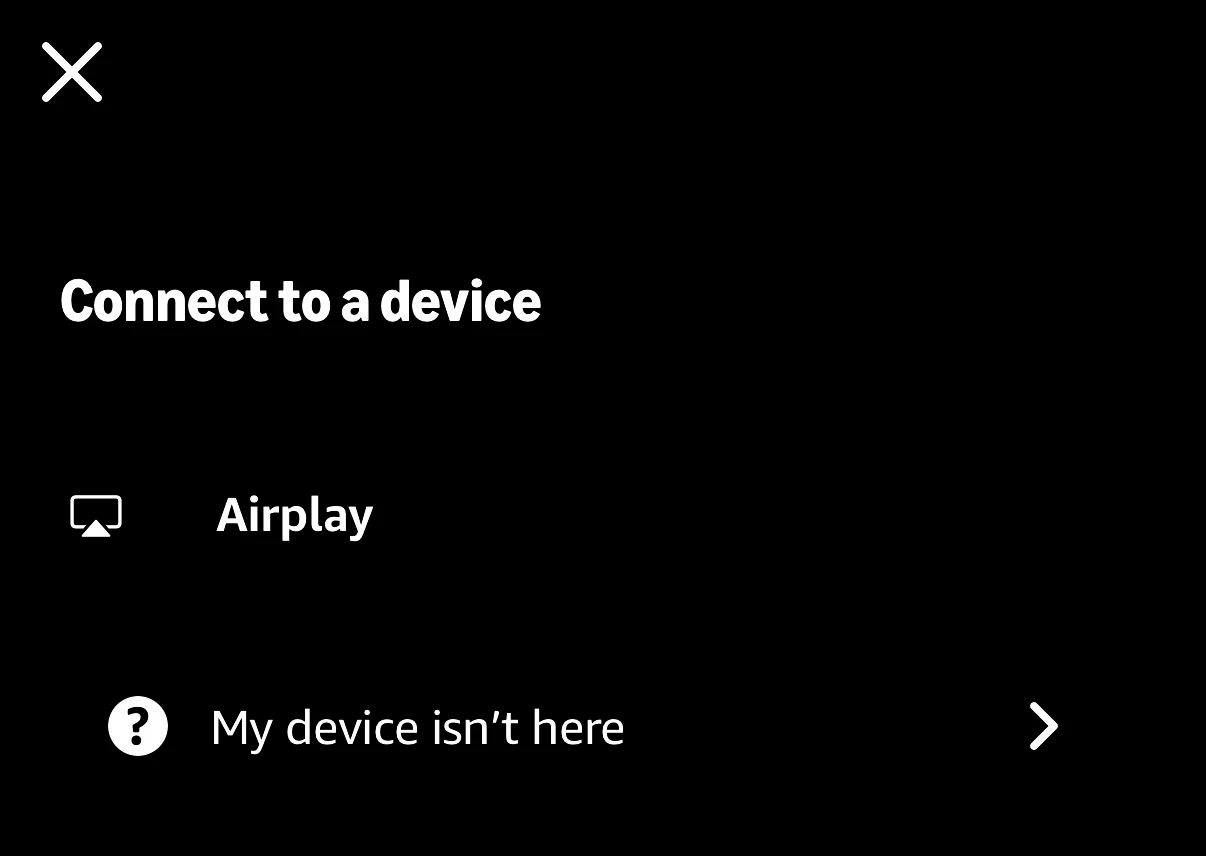
the Play:1 does not show on the list:

So is there another way to stream to the Play:1 from the Amazon Music App without Airplay?


Corry P
Forum|alt.badge.img+19
  • Sonos Staff
  • April 29, 2026

Hi ​@viridis 

I am not familiar with the Amazon Music app, so I just installed it. It saw all my devices including an Amp that I have not used in quite a while, so it seems it takes the list of speakers it can use from the Sonos skill for Alexa.

This is also mentioned on our Stream audio to Sonos from another app help pages briefly.

So, it seems you would need to install the Alexa app and add the Sonos skill to your Alexa setup in order for the Amazon Music app to see your Play:1 as a playback option.

Apologies - I did not realise it would be quite this complicated, but it should only take about 3 minutes or so to complete.

I hope this helps.


Forum|alt.badge.img
  • Lyricist II
  • April 29, 2026

As ​@Corry P says.

I have the ‘Prime’ version of Amazon Music.
I have installed the Sonos skill on my Alexa and authorised it.
I then say:
“Alexa, play soft rock on Extension”

(Where Extension is the Sonos room that I need. You need to get in the ‘on Extension’ quickly, or it will play on the Alexa device).

I have not tried doing this via the Alexa app (yet) or tried via the S1 app.


melvimbe
  • April 29, 2026

As ​@Corry P says.

I have the ‘Prime’ version of Amazon Music.
I have installed the Sonos skill on my Alexa and authorised it.
I then say:
“Alexa, play soft rock on Extension”

(Where Extension is the Sonos room that I need. You need to get in the ‘on Extension’ quickly, or it will play on the Alexa device).

I have not tried doing this via the Alexa app (yet) or tried via the S1 app.

You can setup your echo device so that it automatically plays music requests on the Sonos room of your choice, without specifically naming it. It’s been years since I’ve done this though, so can’t tell you the exact steps.

Also, the recommendation was to request audio via the Amazon Music app, not through the Alexa or S1 Sonos app, as a work around.


Forum|alt.badge.img
  • Lyricist II
  • April 29, 2026


You can setup your echo device so that it automatically plays music requests on the Sonos room of your choice, without specifically naming it.

I tried to do this but have not figured out how. I will keep trying.


MoPac
Forum|alt.badge.img+19
  • Headliner III
  • April 29, 2026

I don’t use Alexa to play from Sonos speakers.  Instead I use Sonos Voice Control.  Just for kicks though I activated the Sonos skill in the Alexa app and was able to ask Alexa to play on one of the Sonos speakers.  That worked fine.  For this test I did not have Alexa active on the Sonos speaker.  I used an Echo speaker to ask for music to play on the Sonos speaker.  The request was “Alexa.  Play Jazz on the TV Room”.