

Answered

Sonos volume control frozen

  • October 21, 2022
  • 2 replies
  • 88 views

Forum|alt.badge.img+1

Hi,

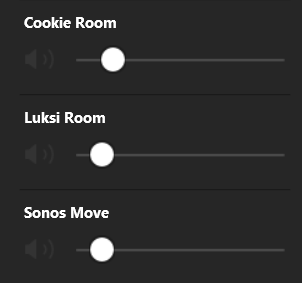
A week ago I started to experience some strange behavior from Sonos volume control in the controller app. When I want to control the volume of one of the devices, occasionally that possibility is frozen/shaded and I cannot control the volume. If I increase or decrease the volume for the group, then the volume of the frozen device is also increased/decreased.

I tried to remove the devices from the party mode and then connect them again, but then the volume of the Sonos device, to which I connect others, cannot be controlled (frozen/shaded).

Anyone experience the same issue or had a same issue and managed to solve it? Willing to share the solution?

I run the group of Sonos One (Gen 2) speakers and one Sonos Move.

Thank you and best regards. 


Best answer by bockersjv

If this is on the Windows controller Sonos have confirmed that it’sa known issue. 

This topic has been closed for further comments. You can use the search bar to find a similar topic, or create a new one by clicking Create Topic at the top of the page.

2 replies

bockersjv
Forum|alt.badge.img+21
  • Local Superstar
  • Answer
  • October 21, 2022

If this is on the Windows controller Sonos have confirmed that it’sa known issue. 


Forum|alt.badge.img+1
  • Author
  • Avid Contributor I
  • October 21, 2022

If this is on the Windows controller Sonos have confirmed that it’sa known issue. 

Hi @bockersjv,

thank you for the feedback! Yes, it is the Windows controller. I hope the fix will come soon.

Best regards.

