Answered

Sonos speaker connected to Access Point but cant be controlled when iPhone connected to another Access Point

  • July 15, 2026
  • 21 replies
  • 178 views

Forum|alt.badge.img

I’ve seen a few discussions about this issue, but I haven’t come across anyone who has found a solution.

I have a Sonos Five connected to one of my access points (5GHz, using the same SSID as my router and other APs). When my iPhone is connected to that same AP and the Sonos Five, everything works perfectly. I can start music from the Sonos app and control playback without any problems.

However, when I move to another part of the house and my iPhone roams to a different AP, the Sonos app can no longer control the Sonos Five. The speaker still appears in the app, but whenever I try to pause, play, or perform any other action, I get a "Could not connect to server" error.

Does anyone know what might be causing this?

Roaming on the iPhone appears to work smoothly, but it feels like the Sonos app isn’t refreshing its connection properly. Even if I leave it for a long time, it never seems to recover.

Interestingly, if I roam back to the main router’s Wi-Fi, the Sonos app immediately recognises what’s playing and I regain full control of the Five. The issue only occurs when the phone is connected through a different access point.

My access points are Omada EAP650s, all configured identically and running in standalone mode. Roaming works fine for every other Wi-Fi device in the house, so this seems to be a Sonos-specific issue.

Any ideas or suggestions would be greatly appreciated. Thanks!
Best answer by craigski

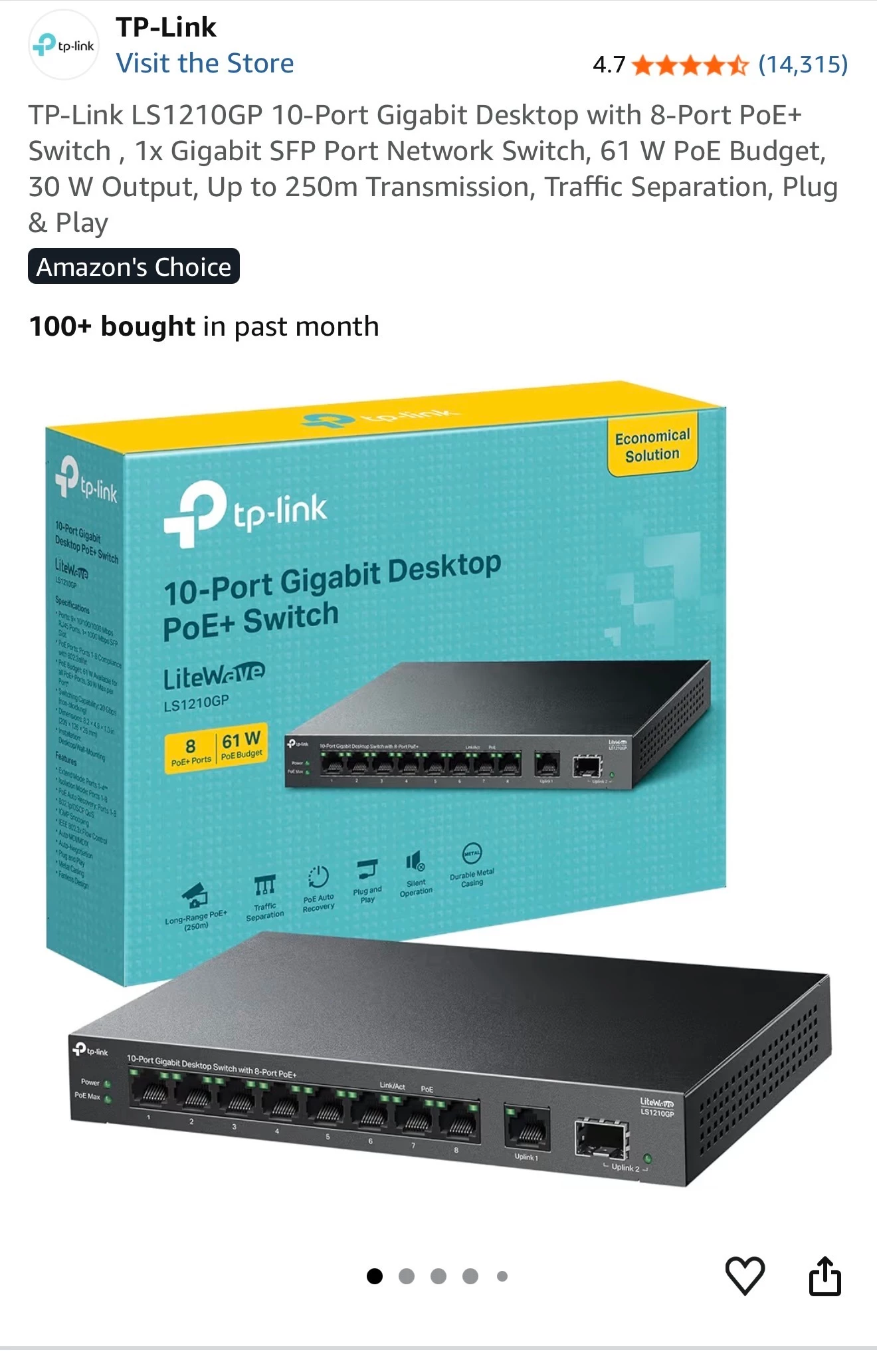
This is the switch I use in my setup 


Spec here:

https://www.tp-link.com/uk/business-networking/soho-switch-poe/ls1210gp/#specifications

Two “Features” that will need to be correctly configured in your setup:

Advanced Features • Extend Mode Button (Ports 1–4, Up to 250 m PoE power supply and data transmission)
• Isolation Mode Button (Ports 1–8)
• PoE Auto Recovery Button (Ports 1–8)
• Compatible With IEEE 802.3af/at Compliant PDs
• IEEE802.3x Flow Control
• 802.1p/DSCP QoS
• IGMP Snooping
• Green Technology


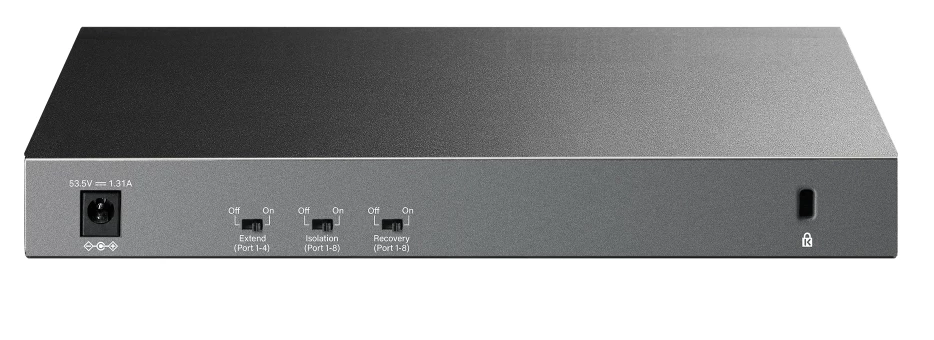
Check switch on back, make sure Isolation is set to OFF.

The irony that “Smart” switches can be dumber than a cheap unmanaged switch if the smart features are misconfigured for a specific use case, eg AirPlay, Sonos, etc 😀

21 replies

Stanley_4
  • Grand Maestro
  • July 15, 2026

You appear to have two access points that are not passing all the needed data between them.

How are the APs connected to your router?

What APs are you using? 

Is the router doing any filtering of the connection?

Maybe connect a dumb switch to your router and then both APs to it to remove the router as a possible problem?


Forum|alt.badge.img
  • Author
  • Contributor I
  • July 15, 2026

Hi, Archer AX73 router → POE 8 port switch → 2 x APs (Omada EAP650)

APs running in standalone mode.  Airplay is also effected. (if my iphone is connected to one AP i can not Airplay to a sonos speaker connected to the other AP - does not show up in Airplay list)

no filtering is turned on on the router and AP isolation if off.


MoPac
Forum|alt.badge.img+19
  • Headliner III
  • July 15, 2026

Sound like “Standalone Mode” means the APs are separate from each other.  That may be the problem.  This is only a guess as I have never dealt with a network containing APs.  Of course “Isolation Mode” OFF seems to indicate the APs are working together.  Confusing!


Forum|alt.badge.img
  • Author
  • Contributor I
  • July 15, 2026

Yep makes sense but finding a solution is proving difficult - only thing i can do is add a controller (OC200) and play around with some settings .. just wondered if any other option will work before i do that


jgatie
  • July 15, 2026

Yep makes sense but finding a solution is proving difficult - only thing i can do is add a controller (OC200) and play around with some settings .. just wondered if any other option will work before i do that


Access Points should be configured to be on the same subnet and should be actual extenders, not standalone routers/access points.   Omada calls this “Repeater Mode”, which can be changed from “Standalone Mode” using the configuration App or a Web browser.


Forum|alt.badge.img
  • Author
  • Contributor I
  • July 15, 2026

I can not change the APs to repeater mode with out the Controller.  plus, I have the APs connected via ethernet due to distances between them and the router 


jgatie
  • July 15, 2026

I can not change the APs to repeater mode with out the Controller.  plus, I have the APs connected via ethernet due to distances between them and the router 


I don’t know why the Ethernet connection would preclude configuring them as repeaters, nor what the “Controller” entails.  But my post stands as is . . . if you wish to access your Sonos system via Access Points, they must be configured to be on the same subnet as your main router.  They cannot be standalone access points.  


Forum|alt.badge.img
  • Author
  • Contributor I
  • July 15, 2026

Router and the two APs are on the same subnet


Forum|alt.badge.img+18
  • Local Superstar
  • July 15, 2026

The issue is with Multicast, Sonos and Airplay rely on a network capable of Multicast between devices. The AP(s) and/or switch are probably filtering Multicast, for ‘performance’. I have also seen this between bands on same AP.

What model of switch? 


jgatie
  • July 15, 2026

Router and the two APs are on the same subnet


I really don’t know what to say.  I’ve given you the solution to your problem (configure the APs in “Repeater Mode”).  It would appear you are unwilling to attempt this for some reason.  This is a users forum, for Sonos users to request help from other users.  We have no way of changing how Sonos operates, so what else would you like us to do for you?


AjTrek1
  • July 15, 2026

@jgatie is correct. Router and AP’s must act as a unified unit on the same subnet. If they are independent stand alone AP’s then Sonos cannot see your device when it is connected to a different AP. That’s it. There’s no way to get around it.

Your cell phone or tablet will function no matter what. Sonos needs to communicate back n forth constantly but it can’t do so between stand alone AP’s and router.

When you say the AP’s are connected via Ethernet is that back to the router or between the AP’s themselves?

I know everyone likes to think of themselves as network savvy and therefore build their own network using different brand components and switches. Sonos doesn’t play well under those conditions. It’s better to go with an off-the-shelf mesh setup where all components are of the same brand. Doing so allows for seamless integration via wireless communication between components or wired via Ethernet.

However if you insist on using your setup I suggest you call Sonos tech support for assistance.


jgatie
  • July 15, 2026

By the way, the Omada EAP650 can be configured via a Web browser, there is no need to use the separate Controller.  Do the following:


 Launch a web browser and navigate to http://tplinkeap.net or use the EAP’s specific IP address found in your router’s DHCP client list. Log in using admin as both the username and password.


Forum|alt.badge.img
  • Author
  • Contributor I
  • July 15, 2026

@jgatie is correct. Router and AP’s must act as a unified unit on the same subnet. If they are independent stand alone AP’s then Sonos cannot see your device when it is connected to a different AP. That’s it. There’s no way to get around it.

Your cell phone or tablet will function no matter what. Sonos needs to communicate back n forth constantly but it can’t do so between stand alone AP’s and router.

When you say the AP’s are connected via Ethernet is that back to the router or between the AP’s themselves?

I know everyone likes to think of themselves as network savvy and therefore build their own network using different brand components and switches. Sonos doesn’t play well under those conditions. It’s better to go with an off-the-shelf mesh setup where all components are of the same brand. Doing so allows for seamless integration via wireless communication between components or wired via Ethernet.

However if you insist on using your setup I suggest you call Sonos tech support for assistance.

Thanks for this info.  Yep i understand that they all need to be one unified unit.  This is what i am trying to do. 

You can not just switch them from Standalone mode to repeater mode.  That isnt an option for the Omada EAP650 - via the web ip interface or via the Omada app.

They are all currently using the same subnet - both APs and Router.  The APs are connected via Ethernet to a switch (TPLINK 8port POE)  which goes back to the router (Archer AX73).

Im guessing the OC200 switch will give me more control and options to for the APs - Multicast settings, Repeater mode settings etc.

I was just seeing if anyone has resolved this issue with my hardware without the OC200 contoller.

I will report back when the controller comes to confirm how/if its fixable.


Forum|alt.badge.img+18
  • Local Superstar
  • July 15, 2026

I’m a little confused by this terminology. “Repeater Mode” mode will enable the wireless uplinks, ‘”AP mode” is used when the APs are wired. “Standalone Mode” describes how they APs are managed, ie not via a controller.

As they are wired, I would suggest “AP mode” is preferred.

I would disable the WiFi on the Archer router if you are using separate APs.

I would try to use a controller to manage APs, it will simplify setup.

The issue is Multicast traffic misconfiguration on the network AP(s) and/or switch.


AjTrek1
  • July 15, 2026

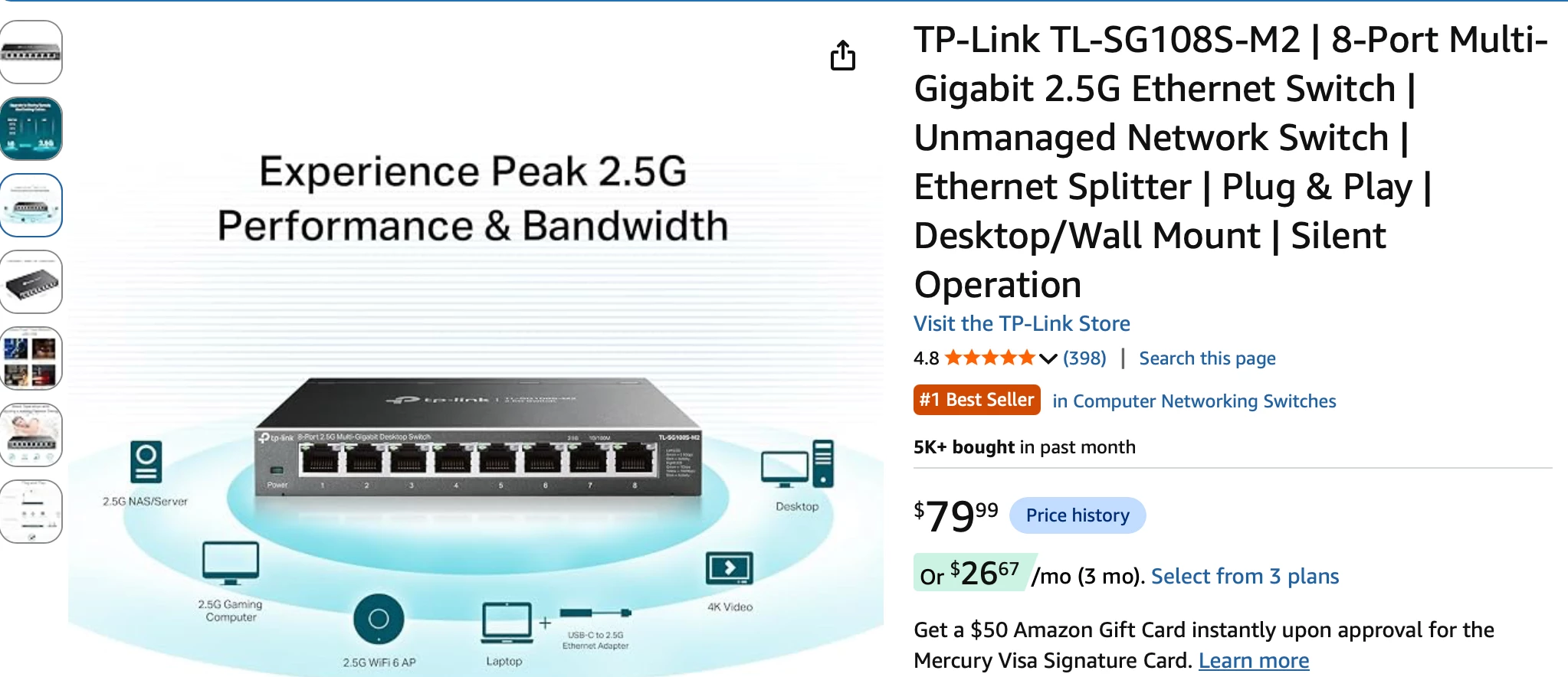
Also, managed switches while they sound more sophisticated are just that. They require a bit more than just plugging them into power and attaching Ethernet cable. They need to be configured via their web interface; unless they have DIP switches (Dual In-line Package switch) for adjustment. I use an unmanaged switch like this by TP-Link.

It works great and depending upon the color of the activity lights you know; if the connection (to the receiving device) is 10/100 Mbps or 10/100/1000 Mbps.


Forum|alt.badge.img
  • Author
  • Contributor I
  • July 15, 2026

Also, managed switches while they sound more sophisticated are just that. They require a bit more than just plugging them into power and attaching Ethernet cable. I use an unmanaged switch like this by TP-Link.

It works great and depending upon the color of the activity lights you know; if the connection (to the receiving device) is 10/100 Mbps or 10/100/1000 Mbps.


Yep agree. This is the switch I use in my setup 


Stanley_4
  • Grand Maestro
  • July 15, 2026

I use a cheap one as it only needs to pass 10/100 for Sonos use. $20

https://www.amazon.com/dp/B00A121WN6?ref_=ppx_hzsearch_conn_dt_b_fed_asin_title_15&th=1

Multiple access points aren't an issue, couple Ubiquity ones here that once properly configured have no Sonos issues


Pools-3015
Forum|alt.badge.img+17
  • Prodigy I
  • July 15, 2026

Yep makes sense but finding a solution is proving difficult - only thing i can do is add a controller (OC200) and play around with some settings .. just wondered if any other option will work before i do that

You do not need the hardware controller in order to configure the APs. You can use the software controller for Windows or Ubuntu:

https://support.omadanetworks.com/us/download/software/omada-controller/

Do you have separate SSIDs for the 5Ghz and 2.4Ghz radios I would combine them if I were in your shoes. And turn off client isolation if its enabled


Forum|alt.badge.img+18
  • Local Superstar
  • Answer
  • July 16, 2026

This is the switch I use in my setup 


Spec here:

https://www.tp-link.com/uk/business-networking/soho-switch-poe/ls1210gp/#specifications

Two “Features” that will need to be correctly configured in your setup:

Advanced Features • Extend Mode Button (Ports 1–4, Up to 250 m PoE power supply and data transmission)
• Isolation Mode Button (Ports 1–8)
• PoE Auto Recovery Button (Ports 1–8)
• Compatible With IEEE 802.3af/at Compliant PDs
• IEEE802.3x Flow Control
• 802.1p/DSCP QoS
• IGMP Snooping
• Green Technology


Check switch on back, make sure Isolation is set to OFF.

The irony that “Smart” switches can be dumber than a cheap unmanaged switch if the smart features are misconfigured for a specific use case, eg AirPlay, Sonos, etc 😀


AjTrek1
  • July 16, 2026

Just to add to ​@craigski comments about smart switches with POE…

I installed one about a year ago and for about a week not only Sonos was acting up but other things like my cameras and hue lights stopped responding. I kept fiddling with my router and even returned the one that is my main unit on my mesh in favor of a less sophisticated model. Well there was no change in network behavior. Then it dawned on me that the issues started with the installation of the POE switch.

I removed the switch and replaced it with a dumb switch and voila problem solved. I went so far as to repurchase the more sophisticated router as my main and no problems have surfaced since.

I’ll not be so vain as to say that it wasn’t because of my lack of knowledge to properly configure the switch. However, if so I’ll never know as I’m not going to temp fate again 😂


Forum|alt.badge.img
  • Author
  • Contributor I
  • July 17, 2026

This is the switch I use in my setup 


Spec here:

https://www.tp-link.com/uk/business-networking/soho-switch-poe/ls1210gp/#specifications

Two “Features” that will need to be correctly configured in your setup:

Advanced Features • Extend Mode Button (Ports 1–4, Up to 250 m PoE power supply and data transmission)
• Isolation Mode Button (Ports 1–8)
• PoE Auto Recovery Button (Ports 1–8)
• Compatible With IEEE 802.3af/at Compliant PDs
• IEEE802.3x Flow Control
• 802.1p/DSCP QoS
• IGMP Snooping
• Green Technology


Check switch on back, make sure Isolation is set to OFF.

The irony that “Smart” switches can be dumber than a cheap unmanaged switch if the smart features are misconfigured for a specific use case, eg AirPlay, Sonos, etc 😀

Yep, it turned out to be the isolation toggle on the Switch. When I turned this to off.. I could tell there was a change in my set up as the Omada app showed both PoE APs, rather than just the one you were connected to.  
But, I did go ahead and add a OC200 controller to my setup.. which has worked wonders! 
 

So yeah, cheers for the help and advice. It does go to show you can use business style APs which are not in mesh mode, and still have a stable roaming setup which works brilliantly with Sonos and AirPlay, not matter what AP/Router I’m connected to in the house.
Speediest’s are showing my max full fibre 500mbps download speed on both APs.  Although I did have to unplug the and replug in the PoE Ethernet cable on the back on the network switch for one of the APs as it had dropped down to 10/100 after toggling the isolation switch. 
 

All in all, solid setup now.