
Answered

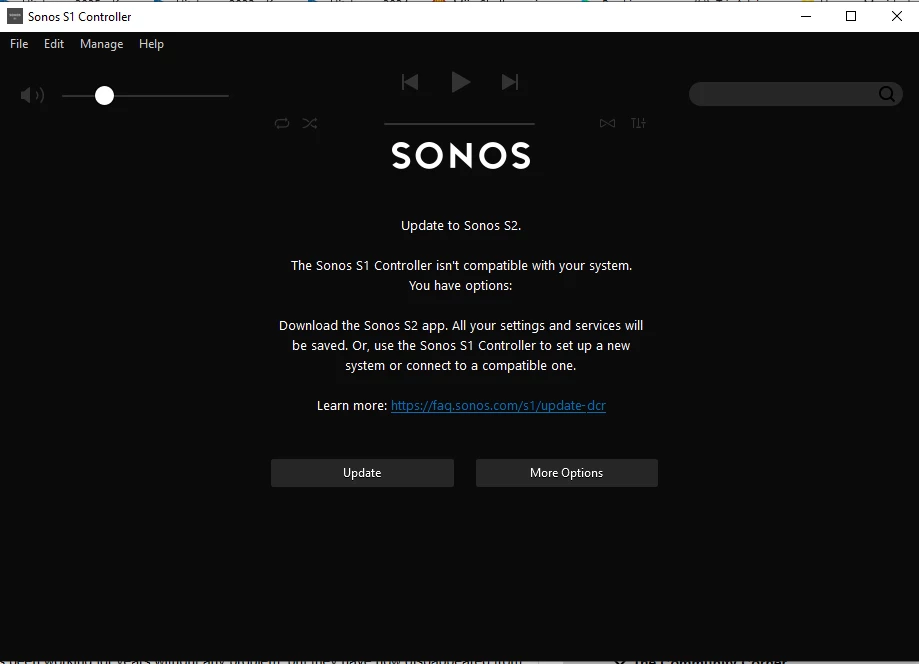
Sonos S1 controller isn't compatible with your system

  • January 28, 2026
  • 7 replies
  • 97 views

Nightmare; just spent 3 hours on various efforts to make my S1 app connect to my two long serving CONNECT units. Has been working for years without any problem, but they have now dispappeared from my S1 app. When I try to open the S1 app, it somehow connects to my parallel S2 system, and suggest I upgrade to S2. 

Have been on a chat with the UK chat and the dutch chat support, but the chat connection dropped 4 times while working through this. There may be a workaround with shutting down my whole S2 system, then resetting the app, disconnecting/reconnecting the CONNECTs, but really? Problem is compounded by the fact that you may reset it for one OS, but I have 4 (W11, W10, Android and Ipad). When the app works on one operating system, trying to connect with another breaks the Sonos-system again.

The early adapters into the Sonos universe are not well served here. Is there anyone with a suggestion?
 

Best answer by Airgetlam

I’d avoid the ‘chat’ and call in.

Sounds like you need a network refresh. Unplug all Sonos devices from power. Reboot your router. Wait two minutes, then plug in just your S1 devices. Wait another 2 minutes, then open your S1 controller. Apply any outstanding updates. Then test your S1 system.

Next, plug in your S2 devices to power. Wait 2 minutes, and open your S2 controller, and apply any updates there may be. Finally, test the S2 system. 

At this point, both should be working as normal. If they aren’t, call Sonos Support to discuss it. Don’t use the ‘chat’.

When you speak directly to the Support staff, they have tools at their disposal that will allow them to give you advice specific to your network and Sonos system.


7 replies

Airgetlam
  • Answer
  • January 28, 2026

I’d avoid the ‘chat’ and call in.

Sounds like you need a network refresh. Unplug all Sonos devices from power. Reboot your router. Wait two minutes, then plug in just your S1 devices. Wait another 2 minutes, then open your S1 controller. Apply any outstanding updates. Then test your S1 system.

Next, plug in your S2 devices to power. Wait 2 minutes, and open your S2 controller, and apply any updates there may be. Finally, test the S2 system. 

At this point, both should be working as normal. If they aren’t, call Sonos Support to discuss it. Don’t use the ‘chat’.

When you speak directly to the Support staff, they have tools at their disposal that will allow them to give you advice specific to your network and Sonos system.


  • Author
  • Contributor I
  • January 28, 2026

Hi Bruce,

Thanks for the response. Next time, I will call straight away.

I will try your suggestion to reset all the way back from the router. My concern is still that I must also update/reset all the devices with the S1 app.  Particularly annoying as I mainly engage with the S1 system through Spotify. If they don't appear in S1, they also go missing from the Spotify linked devices. Especially as I feel it is a bug, that the S1 checks if there are S2 devices on the system first before it checks for S1 devices.

Thanks, Regards, Jan


Stanley_4
  • Grand Maestro
  • January 28, 2026

Rebooting is no problem, avoid doing a reset until you consult with Sonos support as it not only makes more work for you to recover from it, but it also wipes important diagnostic data support could access.


Airgetlam
  • January 28, 2026

And nothing in my process requires a reset of the speakers at all, merely a reboot / refresh of the network.

We could argue all day (ineffectually, IMHO) about Sonos’ need to market upgrades from S1 to S2, but that really doesn’t matter in this case. 


  • Author
  • Contributor I
  • January 30, 2026

Thanks all, good to have some support!

Next day I restarted the router and, as if by magic, the two CONNECTs showed up again 😀. There was also an update for the units in the S2 system in between the original problem and the restart. It could be coincidence, but who knows how S1 and S2 systems interact (interfere?). I have about 25 other wifi/LAN networked  devices and they were all working fine; why is SONOS so temperamental with regards to the network?

My experience with Sonos is that it works fine for years on end, but then something weird happens and the instructions are grossly inadequate to resolve the issue. I don't need a chatbot inanely ask me to check if the power is on... I need some insightful support to troubleshoot the issue. In this case, the key issue was, why did S1 "see” the S2 networked devices, and why did it try to get me to upgrade to S2.

And as for integration of S1, S2 and S softwares I am willing to accept that it is impossible to have software compatible with hardware of 15-20 years age difference. It is a testament to SONOS build quality that the equipment stays running for so long. Also great that there still is support for the older system; I just wish they were more knowledgeable.

Jan


buzz
  • January 30, 2026

If you haven’t already done this, I suggest that you reserve IP addresses in your router.


Stanley_4
  • Grand Maestro
  • January 30, 2026

Sonos makes far more varied and intensive use of your network, it is also far less forgiving of flaws  or errors other devices can cover up as they don't need instant connections.
