Answered

Sonos Library sorting albums by Artists instead of track number

  • January 15, 2026
  • 17 replies
  • 108 views

I think this topic was brought up a year ago:


But I’m still having this same problem.  I have “Song Number” selected in “Sort Folders By” but the tracks in any album with multiple artists are ordering the tracks by Artist and not by the track number.

Can anyone help me with this?

Best answer by Corry P

Hi ​@George215 

Welcome to the Sonos Community!

I’m sorry to hear of this issue you are having with your albums playing in the wrong track order due to having differing Artist tags.

This issue was resolved nearly a full year ago. If you are seeing this issue now, I first recommend that you ensure your Sonos system and Sonos app are fully up to date.

If that does not resolve the issue, I can only recommend you get in touch with our technical support team in order to document the reoccurrence of this issue.

I hope this helps.

17 replies

Corry P
Forum|alt.badge.img+19
  • Sonos Staff
  • Answer
  • January 16, 2026

Hi ​@George215 

Welcome to the Sonos Community!

I’m sorry to hear of this issue you are having with your albums playing in the wrong track order due to having differing Artist tags.

This issue was resolved nearly a full year ago. If you are seeing this issue now, I first recommend that you ensure your Sonos system and Sonos app are fully up to date.

If that does not resolve the issue, I can only recommend you get in touch with our technical support team in order to document the reoccurrence of this issue.

I hope this helps.


  • Author
  • Contributor I
  • January 19, 2026

Just a quick update:  this issue has nothing to do with updating software, or generic system updates.  I already had my software and system updated, metadata on files cleaned, and all other obvious settings arranged correctly.

After wading through an AI bot, and then a low level tech support, I was able to escalate to someone competent, who took my documentation on the problem and is supposed to get back to me sometime this week.

Hopefully there will be a real resolution that I can post here, and if it is an application wide problem Sonos will push an actual solution.


  • Lyricist III
  • March 13, 2026

Thank you George215. I have been suffering from (most likely) the same problem ever since Sonos 2 was released (that was what, five or six years ago?). The problem seems to exist when there are multiple different artists in a single album. The symptom is that the album tracks are no longer in order exclusively by track number (ID tag Track); rather, tracks are shown and played first by groups of a given artist (in alphabetical order) so that only within each group of tracks of a common artist do they play by track number. In order to get Hamilton to appear and play in order, I needed to edit the metadata so that all tracks have the same artist, which then messes up the search/sort by artist. 

If you are seeing something different, please let me know so I can have fun wading through the AI bot and low-level tech support and report this as a different issue. 

I hope that Sonos can really fix this after five years! 

Sorry, Corry P, this issue may have been resolved but it was never fixed. Nope. I have gone through all of the updates over the last 5+ years. Still broken. 


  • Author
  • Contributor I
  • March 13, 2026

The positive aspect of this experience was that I was able to escalate to the engineering team, document my problem, and get a few emails in return.  The negative aspect is that they never were able to solve the problem, and just ghosted me.

I used this experience as motivation to get myself as detached from the Sonos ecosystem as possible.  Here’s what I did:


  1. Bought a Raspberry Pi 5 and installed Lyrion Music Server
  2. Used the UPnP/DLNA plugin to add my Sonos speakers as Players.
  3. Connected my services (I use Tidal; Spotify is available, as well as other internet radio stations and of course podcast feeds.)
  4. Deleted the Sonos apps so that my local collection isn’t being pointlessly stored in the cloud. I haven’t gotten around to isolating my Sonos speakers entirely from the wider internet, but that’s on the to-do list.

And I’m all set.  The tremendously difficult problem of sorting audio files by their metadata is now solved.

If for some reason you are hesitant to use services, maybe because like me you have a large and familiar collection of music, you can use Tailscale and and play your local collection from your phone with no trouble.

I originally bought into Sonos (over a decade ago if I recall correctly) because at the time any DIY solution was not worth the tradeoff in time invested, and I’m happy to pay for a finished product like Sonos if it just works out of the box like it should.  But now it is relatively easy to set up an alternative, and I would never even have noticed that fact if Sonos hadn’t manage to obliterate the good will of a generally lazy and local customer like myself. Now I will never give Sonos another dime.

Good luck!


MoPac
Forum|alt.badge.img+19
  • Headliner III
  • March 13, 2026

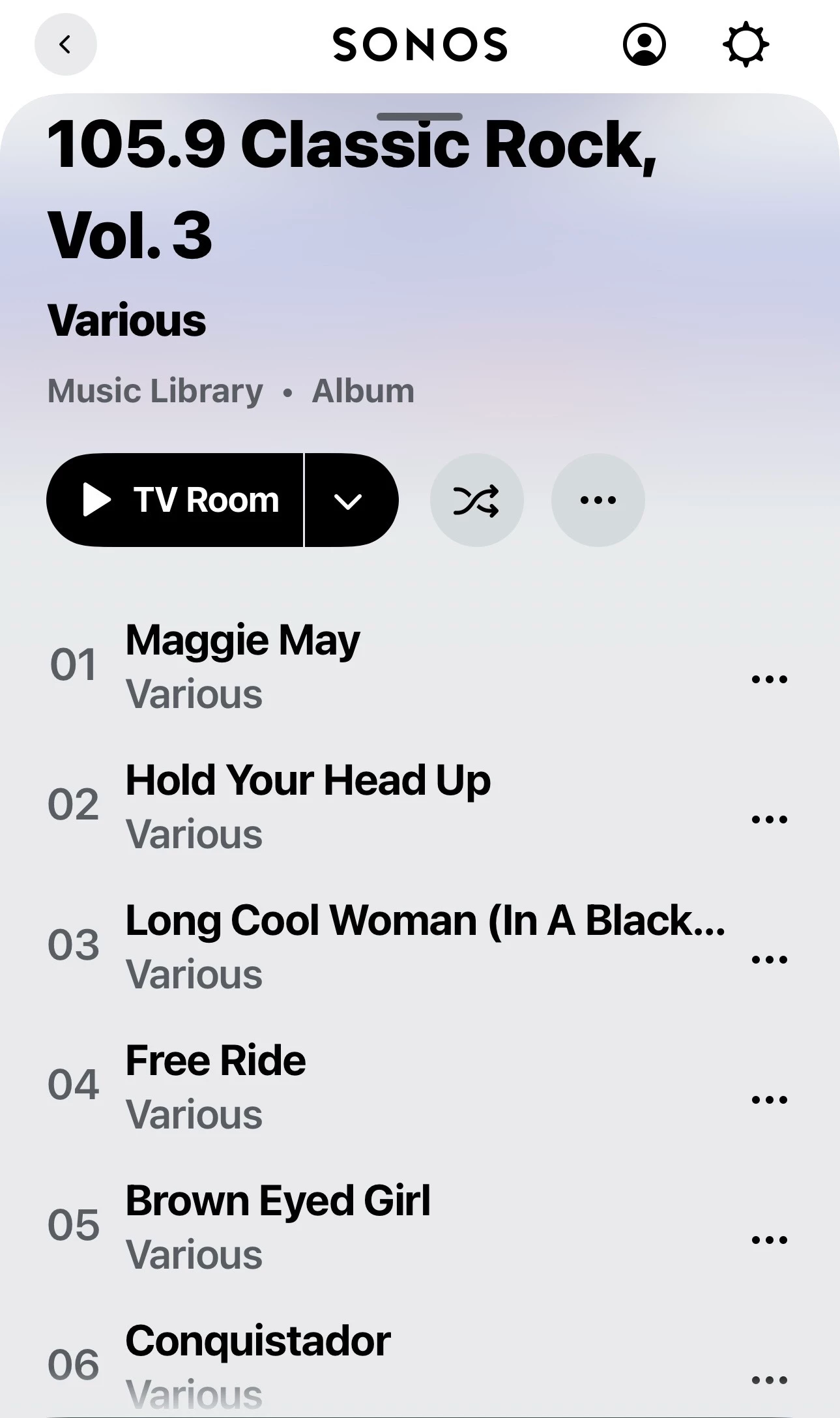
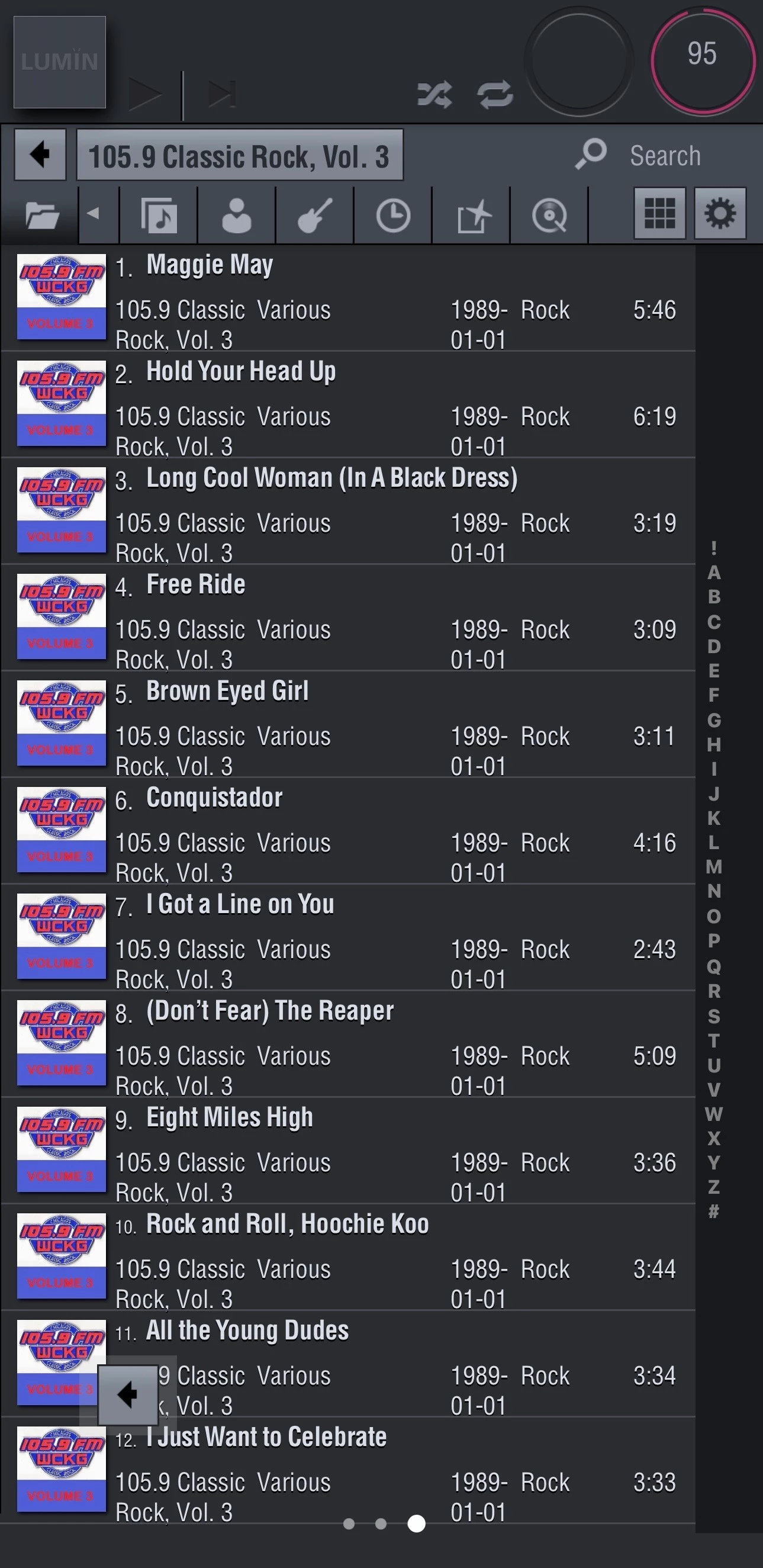
  I’m up to date with S2 & firmware.  The screenshots are Sonos Album view of a compilation and that same album in Album view in Lumin Music.  As you can see in both cases the tracks are in order.  Artist tag is the performer.  Album Artist tag is Various.


  • Lyricist III
  • March 13, 2026

George215, now I really owe you one. I’m just might order a Raspberry Pi now. I can’t thank you enough for sharing that solution. Nice to know I can salvage the $$$ I’ve invested in Sonos products and listen to my classical, musical, compilation, and soundtracks albums once again as they were intended. 

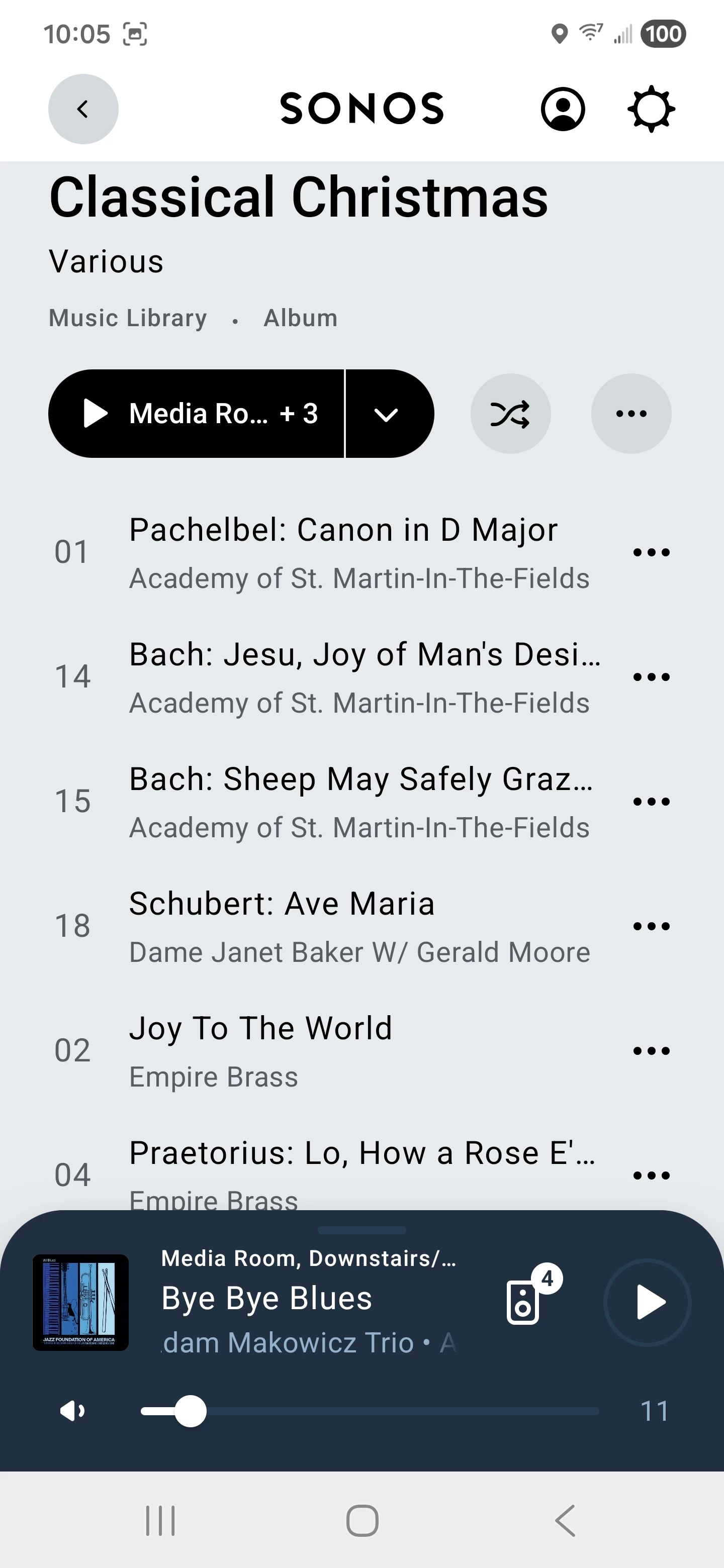
MoPac, thank you for posting that. I again updated my firmware and checked for app updates just before doing my most recent test. Unfortunately, I don’t have the same experience as you. As you can see, I also have Album Artist as Various and Artist as the individual. Tracks are ordered alphabetically by Artist instead of by track number. Any suggestions (aside from buying an iPhone 🙂) are always appreciated. 


MoPac
Forum|alt.badge.img+19
  • Headliner III
  • March 13, 2026

That is weird.  I have no idea why it sorts that way.  Years ago before I even had any Sonos there was an app that did sort tracks alphabetically.  It was so long ago I don’t remember which control point app it was and which renderer I was playing to.  I’ll look at my notes tomorrow.  Not that looking there will shed any light on your issue.

 As I remember only a few albums had that issue.


MoPac
Forum|alt.badge.img+19
  • Headliner III
  • March 13, 2026

 Do your tags include the track number?  Sorry if this is a stupid question.  Strange coincidence…your artists are sorted alphabetically, but so are you track names.  So which is it?

 I do see that your artist is showing under the track name where in my screenshot the Album Artist ( Various ) is showing under the track name.  I see your issue now.


Stanley_4
  • Grand Maestro
  • March 13, 2026

If getting a Pi get two good quality and fast micro SD cards, one to run the OS on and one that you will clone the running one onto for backup. They don't fail often but a 30 second SD swap beats a full reinstall session.


buzz
  • March 13, 2026

I include the track number as the first couple characters in the file names. In the SONOS controller Music Library setup I “Sort Folders” by File Name.


  • Lyricist III
  • March 13, 2026

buzz - yep, I have my files name also with first few characters as the number. So, I just now tried your suggestion (changed to sort by file name) and it didn’t work. (I later made other changes just to make sure my changes were being applied, and not user error.) Oh, but thank you. I noticed one thing that the Sonos folks should be aware of - there is no option to group Albums by Album. I mean, what the heck? isn’t that the very definition of Album - the name of the album to which a group of tracks belong? @Sonos - anyone reading this? In any event, I have it set to group by Album Artist and have tried sorting folders all three options, none make it work the way it should. 

Stanley_4 - great advice, thanks! I look forward to starting this project. 

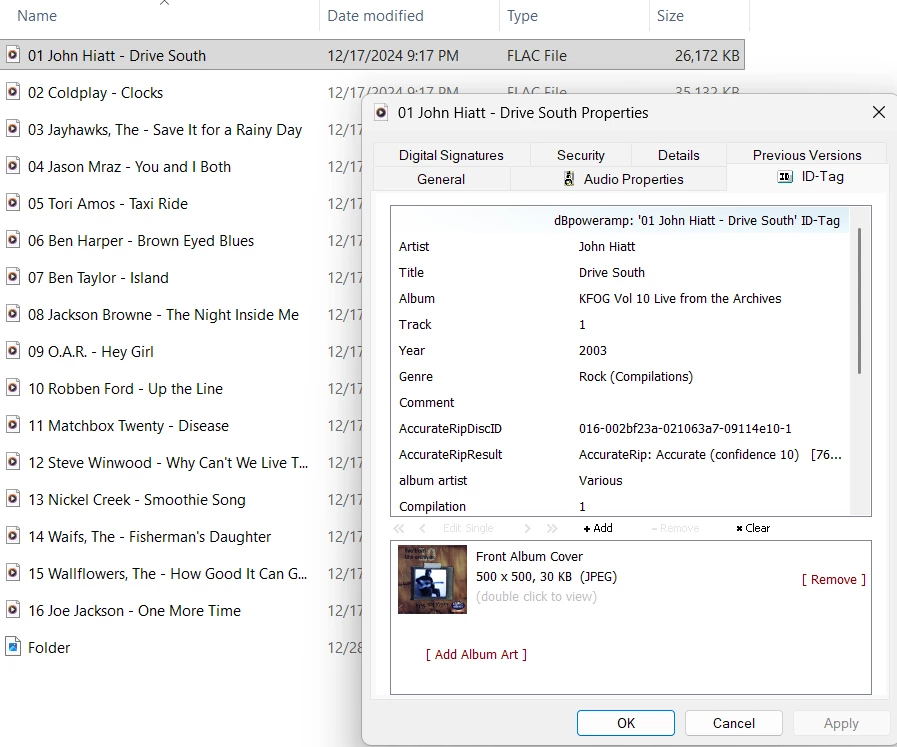
In case anyone spots a clue, here’s an example screenshot of my tags and filenames, etc. 

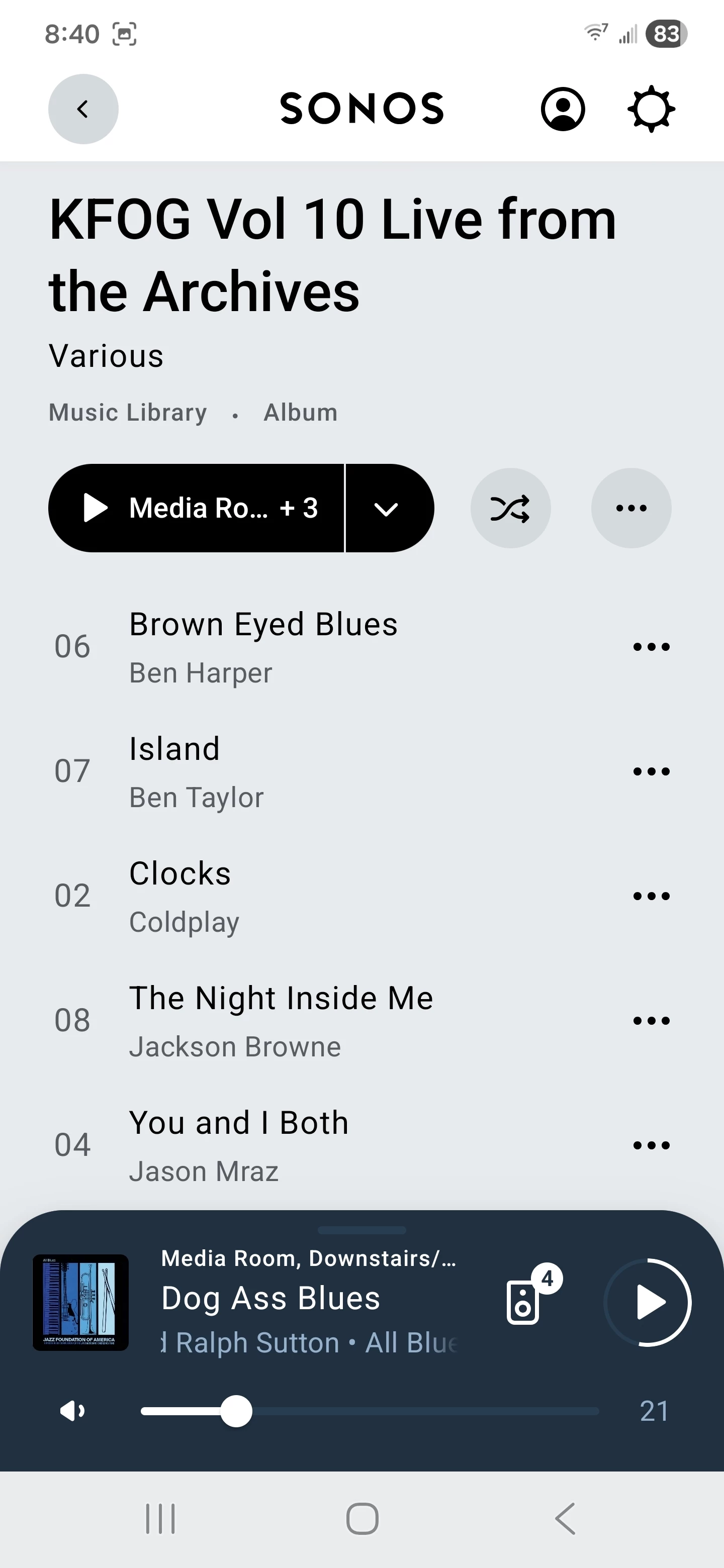
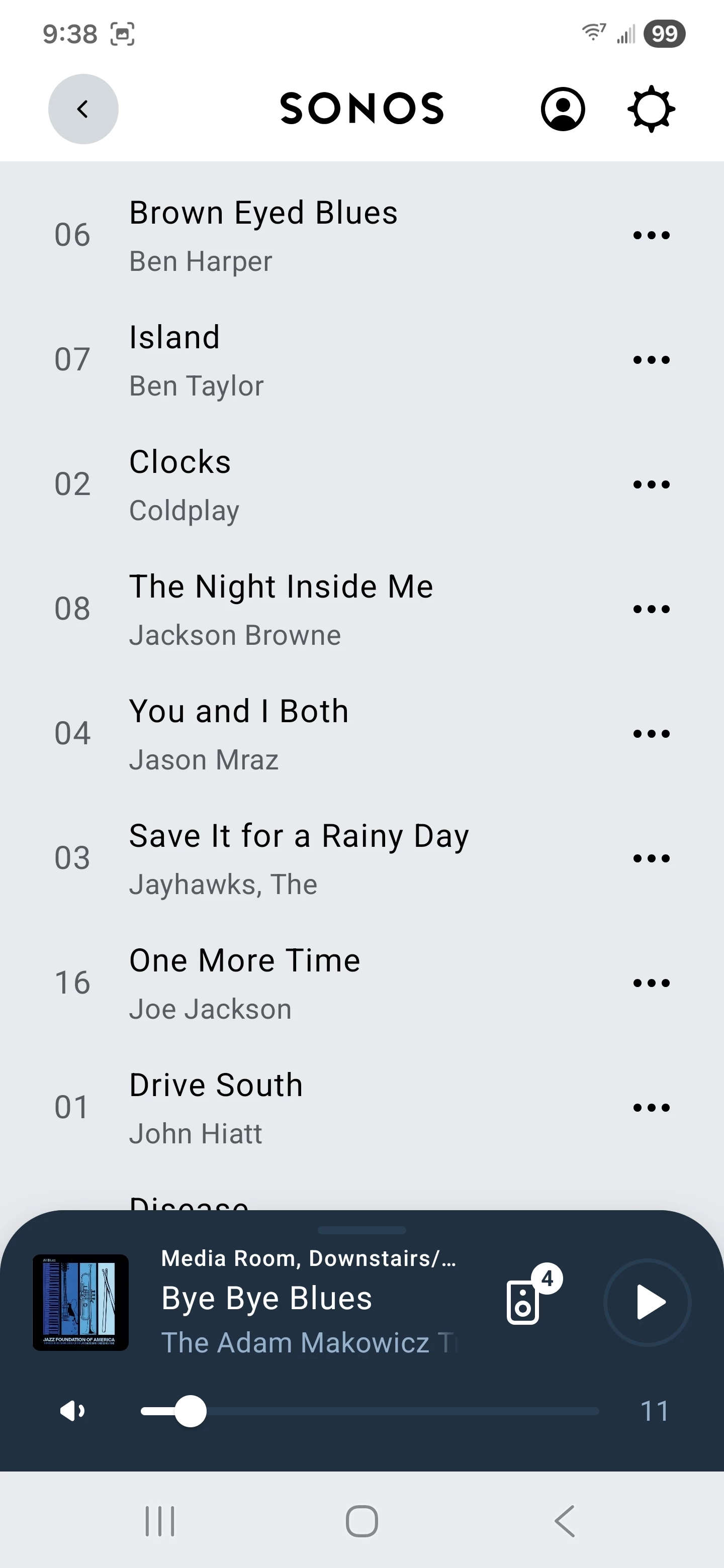
… and how it shows up on Sonos. You can see that Sonos recognizes Drive South as track number one but is sorting first by Artist. 

Here is a better example of how it is sorting first by Artist, then second by Track: 


Using flac, ripped using dbpoweramp, Sonos S2, Build 82.01.9-release+20260303.72b6033 on Android. On Windows, running Sonos Controller for PC, version 17.2.2, Build 90068190. (Same ordering issue exists with Sonos for PC.) Music library stored on a NAS (all in one single shared folder). 


MoPac
Forum|alt.badge.img+19
  • Headliner III
  • March 13, 2026

@mtnscall 

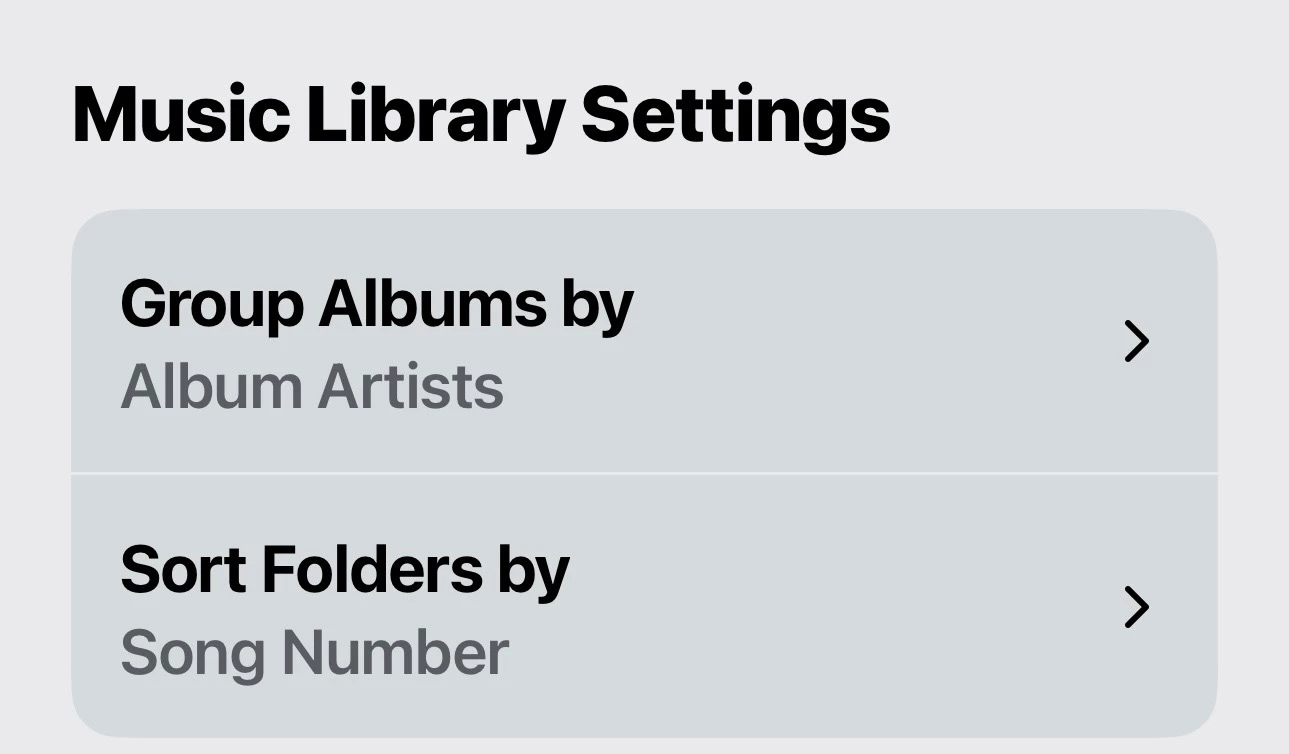
 your tags look perfect.  In my case the Music Library settings have never been changed.  All my albums appear to sort by track number.  Your tag example was a compilation and is exactly how I would tag a compilation.  The only difference may be how I tag regular one artist albums.  For those the Artist & Album Artist are exactly the same.  I have no clue why your samples are sorting the way they are.  I’ve never changed the settings shown below.


  • Lyricist III
  • March 13, 2026

Thanks again, ​@MoPac . 


  • March 13, 2026

I’m pretty sure the “Sort Folders By” setting only applies to Music Library > Folders. I changed mine from Song Number to Song Name and after the library re-scanned (54 minutes) that was the only place I saw a change. Everywhere else was still by track number.

All my Various Artists albums, Album Artist=Various Artists, Artist=Performer, list in track number order. 


  • March 13, 2026

I noticed you have a Compilation tag set. I don’t have any Compilation tags. My understanding was that originally Sonos used that to indicate compilation albums in itunes libraries. I guess now called Apple Music libraries. 


  • Lyricist III
  • March 13, 2026

Right. I checked and the Classical Christmas example does not have the Compilation tag set. Just to make sure, I set the Compilation flag on that KFOG album to 0 and rescanned. No change. Thanks for the suggestion, however. 

It’s good to know that Sonos is sorting properly for other folks. I’m tempted to do a complete factory reset of my entire system, but with 8 devices (and two of them physically hard to reach), I was hoping for an easy button. 🙄


MoPac
Forum|alt.badge.img+19
  • Headliner III
  • March 13, 2026

 I don’t use the Compilation tag.  In fact my tags look just like the sample shown by ​@mtnscall.  The only difference would be the removal of the two AccurateRip… lines and the removal of everything below Album Artist.  Don’t want to overload the index with all that tag data.

 Factory reset should only be used when you are going to sell the speaker or if you bought someone else’s speaker.