Sonos Controller - Duplicate Album Titles

  • October 20, 2025
  • 215 replies
  • 2101 views

Show first post

215 replies

Forum|alt.badge.img+3
  • Author
  • Enthusiast II
  • March 24, 2026

...

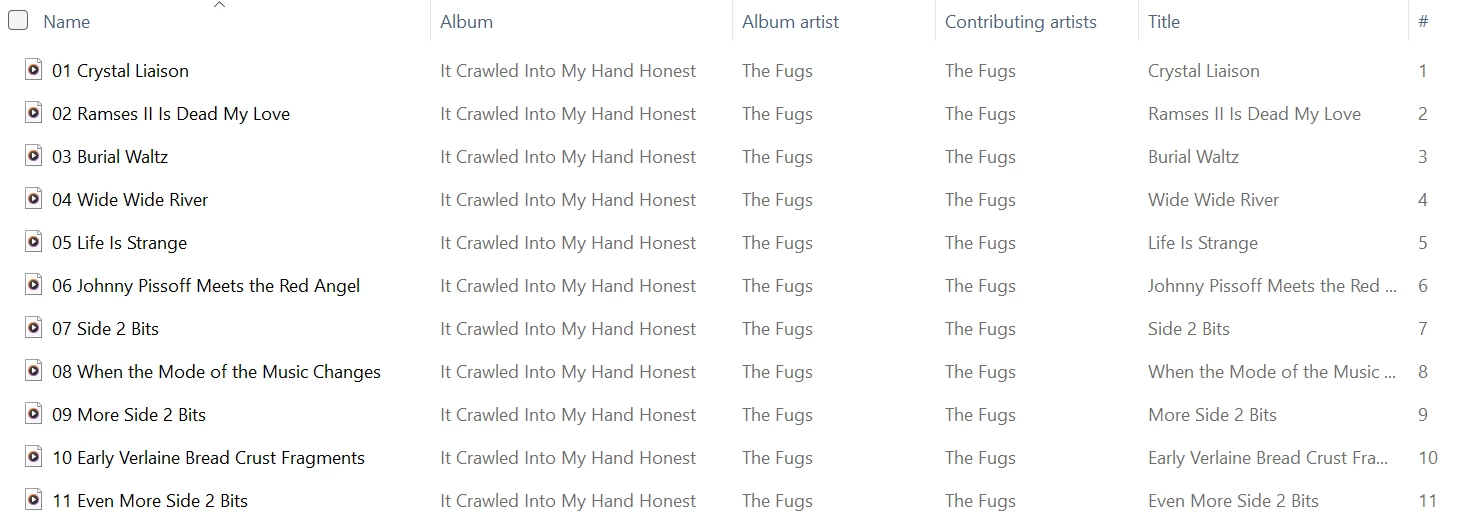
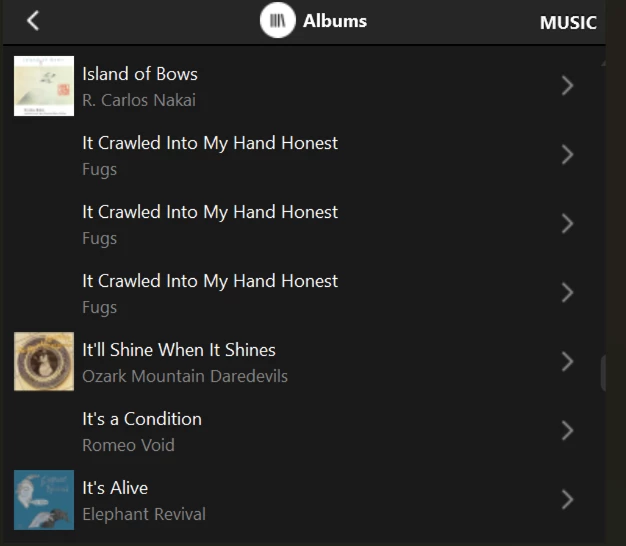
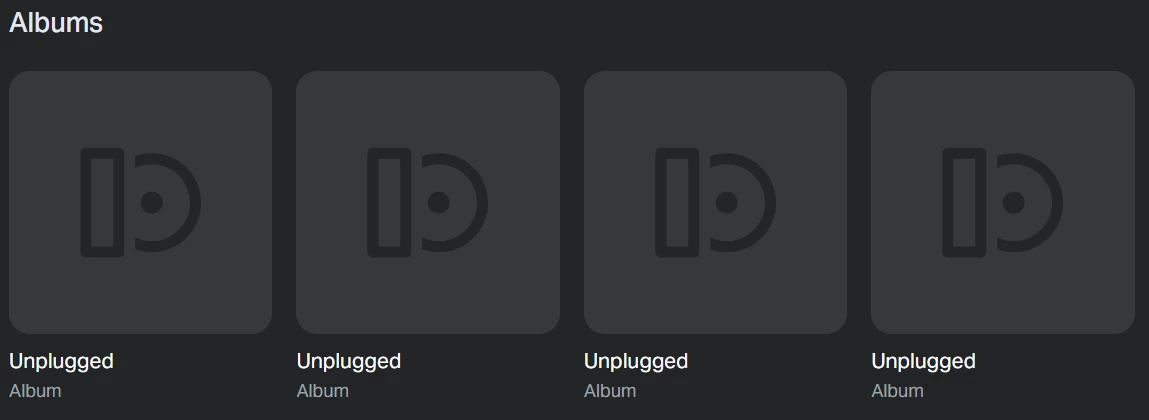
HOWEVER, a cursory glance at the Web Controller, which I have used once in the last few years, there is a real mess of duplicates.  There are no options how to group anything either.  It’s not a big issue for me but it is inconsistent.


FWIW, I painfully checked the web controller and see the same four duplicate titles I have been posting about. But the fact that there is no Album Artist listed with each album title makes albums that happen to have the same title look like duplicates.

Not a fan of the web controller...


  • March 24, 2026

Painful is the way I would describe it too. It was obviously not designed for local music library use.


Forum|alt.badge.img+10
  • Enthusiast II
  • March 24, 2026

Well, it was designed that way originally, but in the last few years many new bugs have cropped up, and I think music library used to be a “primary use case” and now it is a “secondary use case”. Since most ppl (not me) use a streaming service of some sort.


Forum|alt.badge.img+3
  • Author
  • Enthusiast II
  • March 24, 2026

...in the last few years many new bugs have cropped up, and I think music library used to be a “primary use case” and now it is a “secondary use case”. Since most ppl (not me) use a streaming service of some sort.

What kind of bugs?  Asking just for awareness.

I agree with the thought that the music library is probably not much of a priority for them, and I’m starting to look elsewhere for an alternative.

And I do use a streaming service, but I’m not willing to part with the many vinyl albums I have copied, no longer possessing the originals, that are not, AFAIK, ‘commercially available’ on places like Pottyfi.  😮


Forum|alt.badge.img+10
  • Enthusiast II
  • March 24, 2026

For a while the library didn’t work at all with S2. Then there were bugs where songs on compilations would each come out as their own album. Now this duplicate album bug. I actually switched to SonoPad when they put out that version of the controller that didn’t work any more, and now almost never use the controller on ios. I do use the mac controller sometimes….


Airgetlam
  • March 24, 2026

Huh. I never lost access to my local library with S2. Had to update to an updated version of SMB at some point, but never lost access. 


  • March 25, 2026

Well, it was designed that way originally, but in the last few years many new bugs have cropped up, and I think music library used to be a “primary use case” and now it is a “secondary use case”. Since most ppl (not me) use a streaming service of some sort.

I was referring to the new “Web Controller” at https://play.sonos.com/  only. That is supposed to be the replacement for the desktop controllers at some point.


Forum|alt.badge.img+10
  • Enthusiast II
  • March 25, 2026

I found a (well known) fix for this. I very tediously shortened all file names so that total path < 170 and file name < 90. This fixed it for me. 


  • March 25, 2026

That’s interesting. I’ve never heard that before. Where can I read about this?


Forum|alt.badge.img+3
  • Author
  • Enthusiast II
  • March 25, 2026

I found a (well known) fix for this. I very tediously shortened all file names so that total path < 170 and file name < 90. This fixed it for me. 

Not sure I’m understanding this.

I provided *one album* to SONOS support that, when indexed just by itself, caused it to appear duplicated.

On my system, the longest total path name for any one of its songs is 106 characters.

The longest file name by itself is 61 characters.

What am I missing?  And ‘well-known’?  What is your source for this?

Sorry, but this is news to me.  Maybe not surprising, but would like to see more info.

Thanks!


CronoCX
Forum|alt.badge.img+4
  • Enthusiast II
  • March 25, 2026

I found a (well known) fix for this. I very tediously shortened all file names so that total path < 170 and file name < 90. This fixed it for me. 

One album that I’m having this issue with now is only 70 characters, with spaces, and with the IP Address before the file name. It’s not a character issue. That said, long strings can be an issue, even with Operating Systems :)

//**.*.***.***/C*****/M****/M****/B****/Bear McCreary/Rebel In The Rye

---Brian


Forum|alt.badge.img+3
  • Author
  • Enthusiast II
  • March 25, 2026

...

I provided *one album* to SONOS support that, when indexed just by itself, caused it to appear duplicated.

...

A little more background on this one ‘album’ that I’m not sure I shared before.

The ‘album’ is just a bunch of tracks that Paste magazine made available free to subscribers for download years ago.

I downloaded them and created a pseudo-album called Paste Vault and tagged each track appropriately.

The ‘album’ consists of 157 downloaded tracks.  And, as I said above, when indexed just by itself, it produced the three false duplicate album titles.

The number of tracks seemed to be a factor.  I whittled it down to 71 tracks and still got the three duplicates. The first and third consisted of all tracks except track 70, with ‘Various Artists’ as the album artist.  The second had just track 70, with that track artist as the album artist.

When I cut it to 70 tracks, I got TWO duplicate entries:  one with all tracks except 70, and the other with just 70.

Finally, cutting it down to 69 tracks eliminated the false duplicates.


Side note:  the Windows controller handled these duplicates different from the Android controller.

Windows:  queuing any one of the three duplicates gave the same result:  track 70 became number one in the queue, with the other 70 tracks numbers 2-71.

Android:  queue any of the three and you just get the tracks associated with that album entry.


Not sure how this all fits in with the path name/file name conjecture.  Anyway, the Paste Vault album now indexes correctly, once I turned on the Compilation tag in all its tracks.

Bottom line:  seems like a lot of variables at play here, besides simply path name and file name.


Forum|alt.badge.img+3
  • Author
  • Enthusiast II
  • March 25, 2026

I found a (well known) fix for this. I very tediously shortened all file names so that total path < 170 and file name < 90. This fixed it for me. 

One album that I’m having this issue with now is only 70 characters, with spaces, and with the IP Address before the file name.

//**.*.***.***/C*****/M****/M****/B****/Bear McCreary/Rebel In The Rye

---Brian

Plus ‘.mp3’or something?  But the point is still valid.


Forum|alt.badge.img+10
  • Enthusiast II
  • March 25, 2026

I use Bliss, and they told me about that filename limitation. For stupid reasons, I use my own java program to copy music from my local iTunes to my NAS, so I just changed it to print out all the filenames that are too long, then I hand edited them.

But, it turns out that the Albums I found that were bad all had long songs on them - I could have just edited them first.

Also, google will tell you about this issue. Just google “sonos limits on folder name length”. But, as others have pointed out, there are probably other issues at play here….


buzz
  • March 25, 2026

Huh. I never lost access to my local library with S2. Had to update to an updated version of SMB at some point, but never lost access. 

Me too. Most of my tracks were ripped in the 200x era. I’ve had to rerun the index a few times in order to accommodate SONOS updates, but I don’t recall any major problems. By the way, I usually use the Windows desktop controller for library maintenance, rarely use Android.

 I’ve always kept track and file names as short as practical. Maybe this has kept me out of trouble. I can deal with Playlists and Queues of many, many thousands of tracks.


Forum|alt.badge.img+10
  • Enthusiast II
  • March 25, 2026

Yeah, I always used the windows desktop for library stuff, but when my win computer blew up I got a mac, so I use that now. My preferred controller, SonoPad, doesn’t do any library maintenance at all, unfortunately.

It would be very un “sonos like”, but if they would just give an error message instead of indexing incorrectly it would be pretty sw8 for a lot of ppl….


Stanley_4
  • Grand Maestro
  • March 25, 2026

I see the Bliss stuff, from 2016 so it is likely S1, SMB v1 related. The sonos.custhelp.com referred to can't be found from my network, nxdomain error.

Couldn't  find any other pages in the top 10 on my search engine.

Couldn't find a SMB Samba document giving maximum file and path lengths. 


Forum|alt.badge.img+10
  • Enthusiast II
  • March 25, 2026

It’s not an SMB thing. It’s the Sonos firmware that does the indexing. I use SMB 2, fwiw. I’m sure there’s more to it, but I shortened my filenames down to what google said and it worked for me.


Forum|alt.badge.img+10
  • Enthusiast II
  • March 25, 2026

Here’s the start of what google says:


Sonos has specific, albeit sometimes soft, limits on file paths and folder names within a local music library to ensure the system can index and display them properly. 

Folder and File Path Limits

  • Total Path Length: For optimal performance, the entire file path—including the folder names, subfolder names, and the file name itself—should be kept under 180 characters.
  • Maximum Limit: While some systems might handle more, paths approaching 186–255 characters are likely to cause severe indexing issues, with 187+ characters often resulting in the file not loading at all.
  • Folder Structure: It is recommended to keep folder names short and simple, such as using Artist/Album/Song rather than long, descriptive paths. 


    Sonos Community +2

Forum|alt.badge.img+10
  • Enthusiast II
  • March 25, 2026


here is the search results beginning:
 

Sonos has specific, albeit sometimes soft, limits on file paths and folder names within a local music library to ensure the system can index and display them properly. 

Folder and File Path Limits

  • Total Path Length: For optimal performance, the entire file path—including the folder names, subfolder names, and the file name itself—should be kept under 180 characters.
  • Maximum Limit: While some systems might handle more, paths approaching 186–255 characters are likely to cause severe indexing issues, with 187+ characters often resulting in the file not loading at all.
  • Folder Structure: It is recommended to keep folder names short and simple, such as using Artist/Album/Song rather than long, descriptive paths. 


    Sonos Community +2

Forum|alt.badge.img+4
  • Collaborator II
  • March 25, 2026

It’s all very well discussing file size limits and file name lengths, and I’m not saying that doesn’t make a difference to some people’s libraries. But my library was perfectly fine until around September / October when I started seeing false duplicates. I hadn’t added any new music or changed my tags for a long time. Stupidly I did have Sonos set to index my library every day at midnight, a pointless exercise when I’m not adding lots of new albums. I’ve turned that off now so it only gets indexed when I do add new albums, very infrequently.
 

About 3 weeks ago I did make a copy of my library and carried out some experiments with it. Unfortunately it didn’t prove anything conclusive. However I may re-visit that and take a look at removing / changing some tags and see what that comes up with. See my post about this on page 4 of this thread.


buzz
  • March 25, 2026

Consider the possibility that the “new improved” indexer will not tolerate quite as many characters in the tags and some of your formerly close to the limit tags are now over the limit.


Forum|alt.badge.img+4
  • Collaborator II
  • March 25, 2026

Consider the possibility that the “new improved” indexer will not tolerate quite as many characters in the tags and some of your formerly close to the limit tags are now over the limit.

Well, isn't it up to Sonos to make that clear. They should then give instructions on what the requirements are. All I'm seeing when I search the web is a lot of conflicting information with no backing from Sonos.


Forum|alt.badge.img+7
  • Prodigy I
  • March 25, 2026

Just pursuing a line of thought so can I just ask... Are people seeing this issue consistently on the desktop as well as the phone apps?

Mac or PC but specifically PC... 🤔


MoPac
Forum|alt.badge.img+19
  • Headliner III
  • March 25, 2026


here is the search results beginning:
 

Sonos has specific, albeit sometimes soft, limits on file paths and folder names within a local music library to ensure the system can index and display them properly. 

Folder and File Path Limits

  • Total Path Length: For optimal performance, the entire file path—including the folder names, subfolder names, and the file name itself—should be kept under 180 characters.
  • Maximum Limit: While some systems might handle more, paths approaching 186–255 characters are likely to cause severe indexing issues, with 187+ characters often resulting in the file not loading at all.
  • Folder Structure: It is recommended to keep folder names short and simple, such as using Artist/Album/Song rather than long, descriptive paths. 


    Sonos Community +2

 My path is very simple.  Maybe that’s why I can’t find any duplicate albums, at least not yet.  Path= Genre - Artist - Album ( Tracks ).  Tags= Artist - Track Name - Album - Track No. - Date - Album Artist.  Nothing else in the tags.  No folder names or track names are crazy long.  For classical the Artist & Album Artist are the last name of the composer.  I don’t put the composer’s name in the track names.  I add new music around once every two weeks.  No index issues.  My share name is IP Address etc.