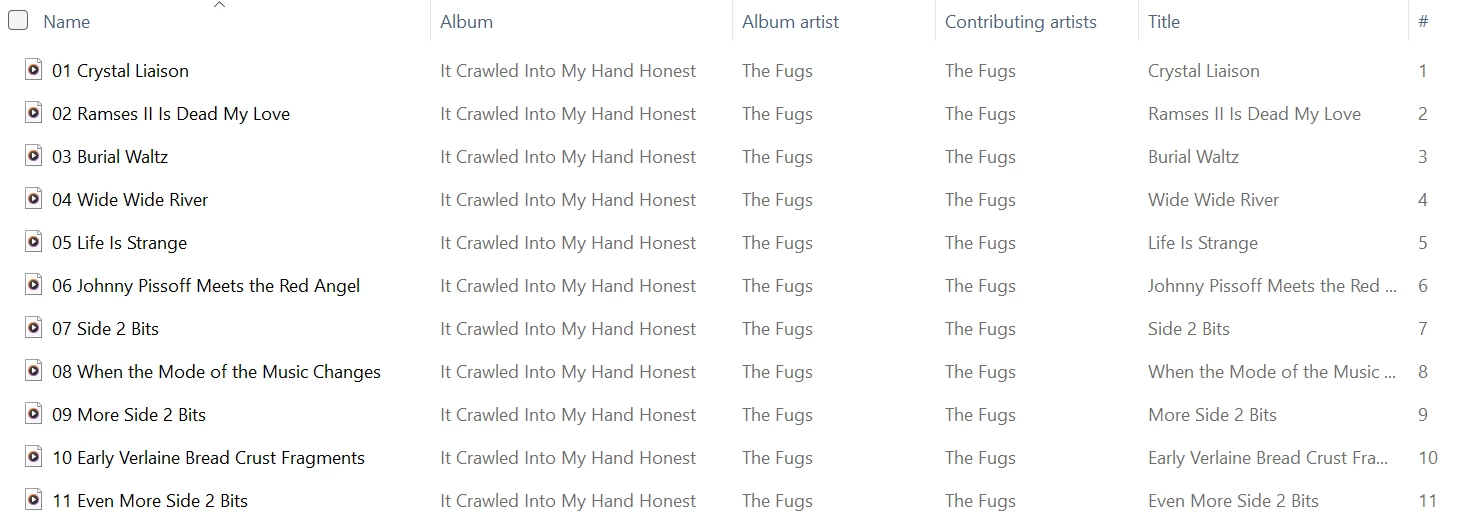
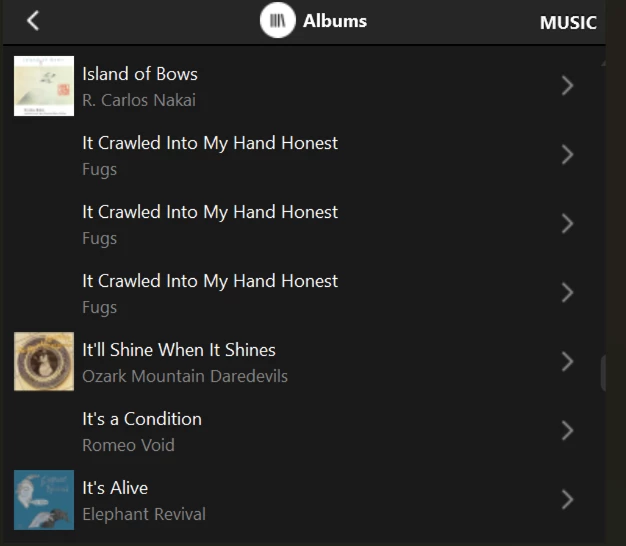
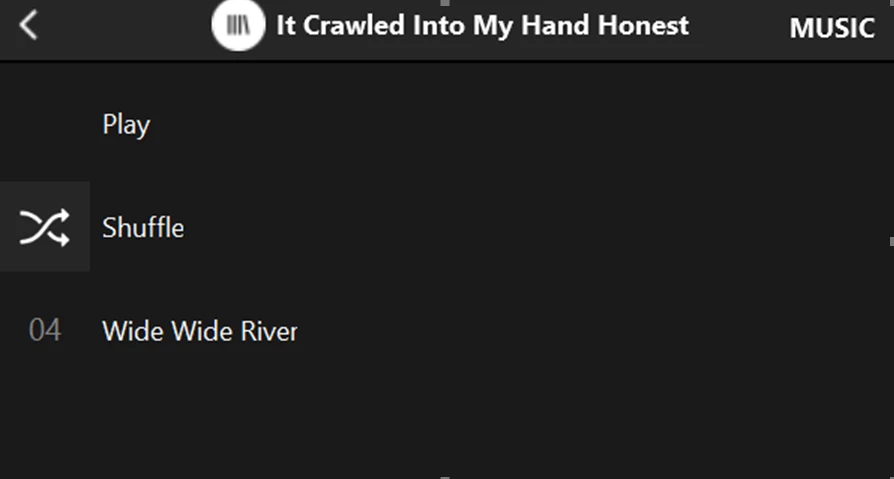
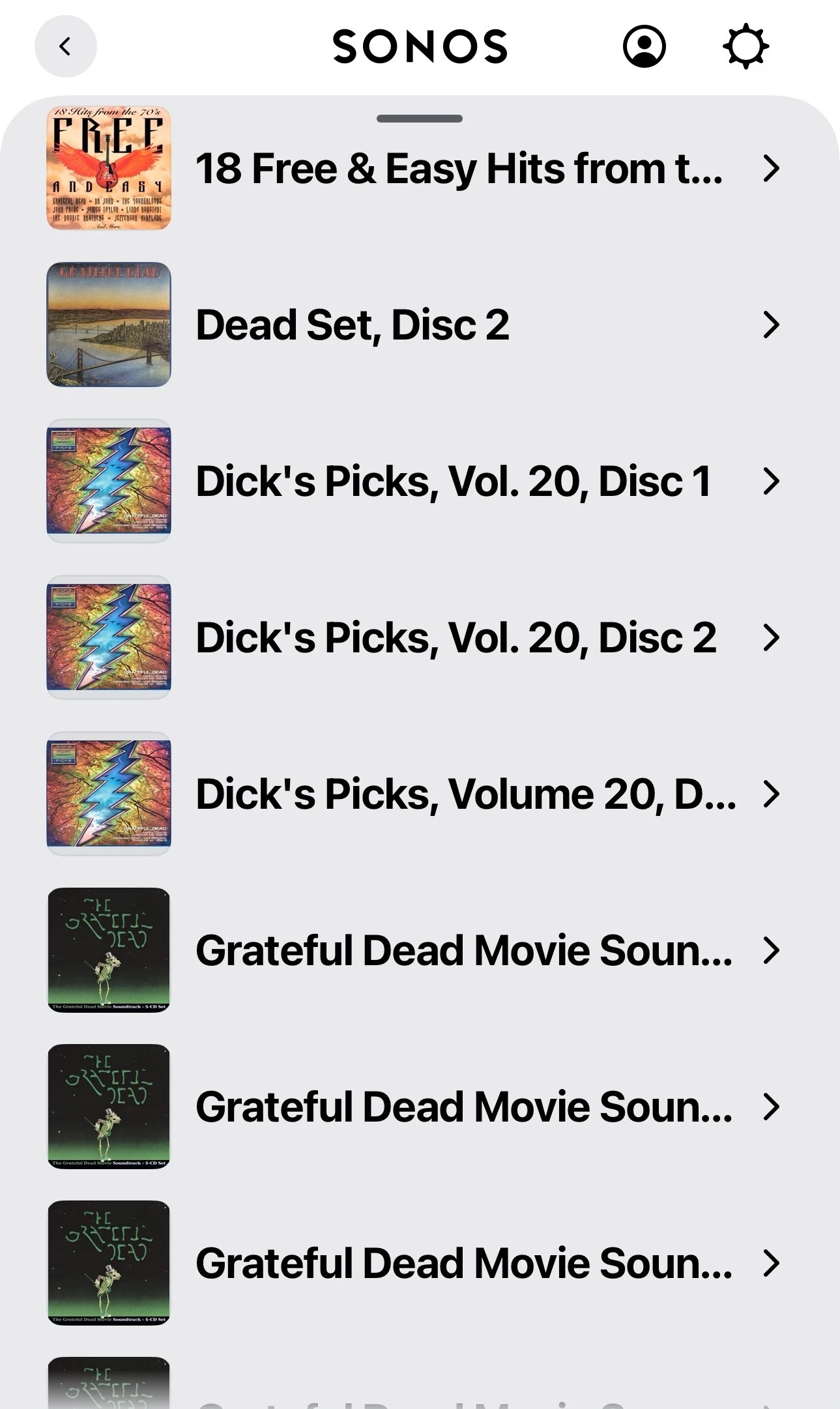
Sonos Controller - Duplicate Album Titles

  • October 20, 2025
  • 181 replies
  • 1788 views

Show first post

181 replies

CronoCX
Forum|alt.badge.img+4
  • Enthusiast II
  • March 12, 2026

I realize I have a very large music library. And I half expected to run into problems eventually. But my S1 system doesn’t have a problem and it’s using the exact same library. Adding all songs to an empty queue in S1 says 50,502 songs. In S2 it says 50,470. Don’t know why the difference.

WTF LOL. That’s bonkers.


MoPac
Forum|alt.badge.img+19
  • Headliner III
  • March 12, 2026

@CronoCX 

 Missed the detail where the two albums are both #2.  Your zoomed in screenshot clarifies that.  My eyes ain’t what they used to be.


  • March 12, 2026

I realize I have a very large music library. And I half expected to run into problems eventually. But my S1 system doesn’t have a problem and it’s using the exact same library. Adding all songs to an empty queue in S1 says 50,502 songs. In S2 it says 50,470. Don’t know why the difference.

WTF LOL. That’s bonkers.

I know it is 😀. A lifetime of buying music. I’m old school. And OLD! 


Forum|alt.badge.img+6
  • Prodigy I
  • March 12, 2026

Yep, I have a large.library too and same symptoms here, specifically though, I am still consistently not seeing ANY of my 'Various Artists' Album Artist tagged compilation albums in artist search results. PC app/phonos are good though…

Getting very fed up with this now. Nearly 2 years they have had to make the new app work as well as the old one. As far as this functionality is concerned it is still a fail!


MoPac
Forum|alt.badge.img+19
  • Headliner III
  • March 12, 2026

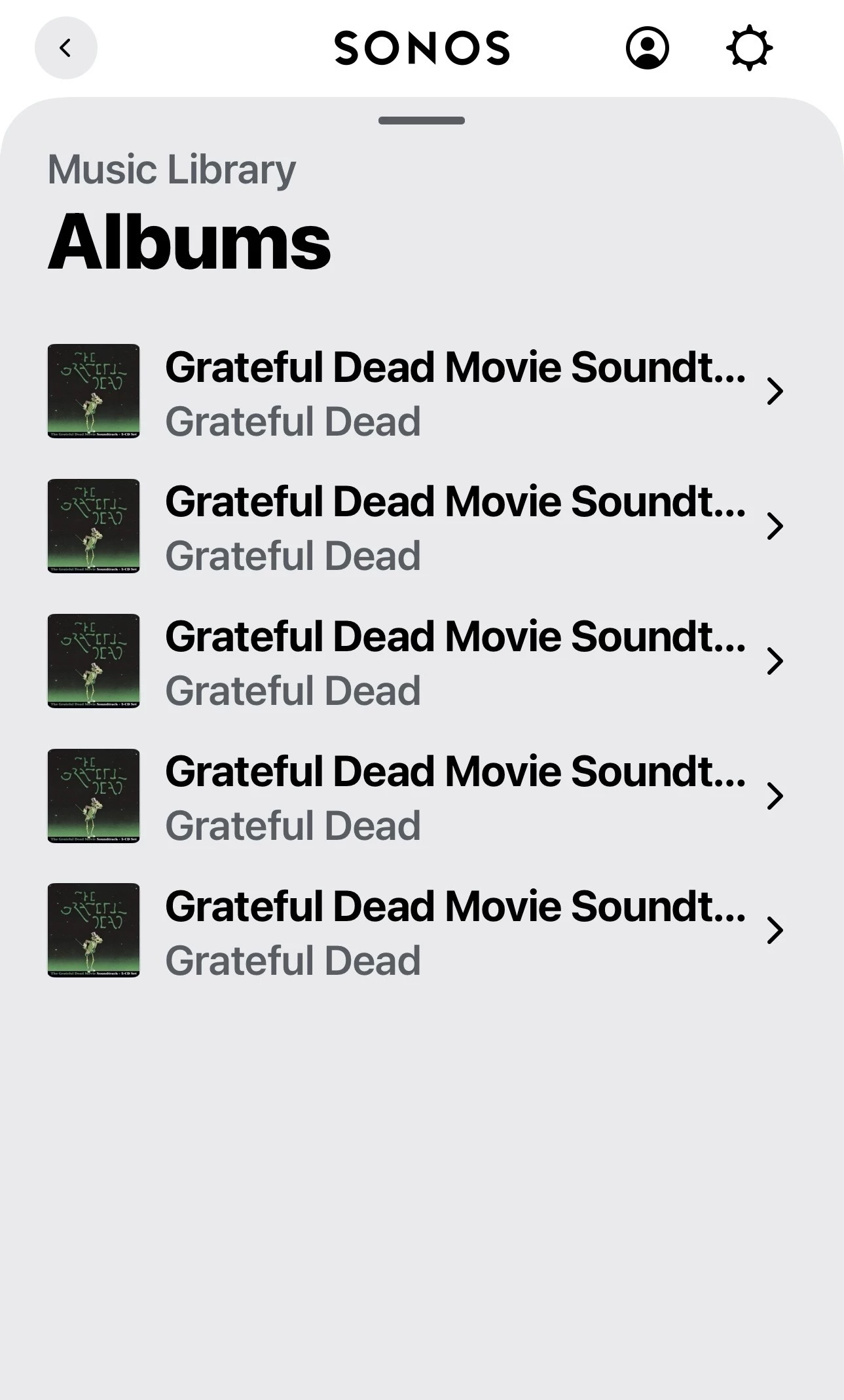
 Search does seem to be broken.  When I search for Grateful Dead in “Music Library” I get only some of the albums ( 1st screenshot ).  If, within that initial search screen, I touch Artists / Grateful Dead it shows all the albums ( 2nd screenshot ).  No compilations with Grateful Dead as one of the Artists are shown on either screen.  Only the albums where Grateful Dead is both the Artist & Album Artist in the tags.


MoPac
Forum|alt.badge.img+19
  • Headliner III
  • March 12, 2026

 Now that I look at this more carefully the search is working correctly.  When I search for Grateful Dead it’s looking for albums with the name Grateful Dead as part or all of the album name.  Touching Artists at the top of that first screen gets you to Grateful Dead the artist.  Then you get a list of all the Grateful Dead albums.  Confusing at first.  Maybe Artist and Albums and whatever else should all show on the first screen and you can scroll down to see the various results.


Forum|alt.badge.img+3
  • Author
  • Enthusiast II
  • March 12, 2026

...

Finally I took the half with the duplicates and split that in half.  Reindexed the first half. No duplicates.  Reindexed the second half. No duplicates.

So the two halves combined yielded two duplicates, but each half individually yielded none.

...


FYI:  I passed the above info on to SONOS support and received this reply:

I'm going to run this issue by the development team.  Having comments in the metadata should not result in duplicate albums.  I will keep you posted and let you know what they find out.


And I will also keep you posted.


Another interesting observation: as you know many albums contain files besides the audio tracks (cover art, booklets).

After noting my existing duplicate titles, I just tried moving some of those non-audio files out and re-indexed. Completely different results. Some former duplicates are now gone, some persisted, and some new ones showed up.

I passed this info along also, for whatever it’s worth.

But I did just get a SONOS update earlier today, so who knows where things stand.


Forum|alt.badge.img+3
  • Author
  • Enthusiast II
  • March 13, 2026

...

Another interesting observation: as you know many albums contain files besides the audio tracks (cover art, booklets).

After noting my existing duplicate titles, I just tried moving some of those non-audio files out and re-indexed. Completely different results. Some former duplicates are now gone, some persisted, and some new ones showed up.

I passed this info along also, for whatever it’s worth.

But I did just get a SONOS update earlier today, so who knows where things stand.


Just to clarify for myself, because of getting that SONOS update, I repeated the exercise:  re-index, remove some the same non-audio files I had removed earlier, re-index, restore the non-audio tracks, re-index.  This time everything checked out the same before and after each re-index.  So please disregard the above issue.  Sorry for the false alarm.

I must have been caught in that SONOS update. So I should add that, since the SONOS update, I have gone from 12 false duplicates down to 5. An improvement but still a problem.

I informed SONOS support of all of the above.  BTW, just FYI, my library is just under 20,000 tracks. Not nearly as big as some.


  • March 13, 2026

Thanks for that. And as another data point, I have no additional files in my library. Just folder.jpg and audio files. No embedded artwork. They are almost all flac files with some older mp3 files (not many). Meticulously and consistently tagged. All comment fields are blank.

The only tags I use are title, artist, album, date/year, track no, & genre. The album artist tag is only used for various artists albums, otherwise it is not there. Any other tags that may have come with the file are removed.  


CronoCX
Forum|alt.badge.img+4
  • Enthusiast II
  • March 13, 2026

@CronoCX 

 Missed the detail where the two albums are both #2.  Your zoomed in screenshot clarifies that.  My eyes ain’t what they used to be.

I’ve always had crappy vision :-D


CronoCX
Forum|alt.badge.img+4
  • Enthusiast II
  • March 18, 2026

Interesting, I’m on the latest software and firmware about out of the 1,341 albums (around 41,500 tracks) I have indexed, only 2 albums now have this issue.

Progress?

--Brian


MoPac
Forum|alt.badge.img+19
  • Headliner III
  • March 18, 2026

 Do you have any other systems you use that can confirm those two guilty albums are tagged properly and should not show as duplicate albums in Sonos.  Here I could check with BlueSound ( Another indexing system ) or I could look at my library as presented by the server MinimServer, Squeeze server, MPD or JRiver Media Center as a server.  Unfortunately I have not yet found an album in Sonos that shows duplicate albums when it should only show one album.  Of course I have not taken the time to look carefully for such a condition.

 Back when compilations were all presented the wrong way in the Sonos app the other systems showed them correctly.  After Sonos corrected this issue with an update the compilation album I was using as a test showed properly.

 I really don’t play compilations that much.  So I’m probably a poor choice of someone who could help you.  My compilations are longish playlists that are shuffled so it sounds like a compilation.


CronoCX
Forum|alt.badge.img+4
  • Enthusiast II
  • March 18, 2026

 Do you have any other systems you use that can confirm those two guilty albums are tagged properly and should not show as duplicate albums in Sonos.  Here I could check with BlueSound ( Another indexing system ) or I could look at my library as presented by the server MinimServer, Squeeze server, MPD or JRiver Media Center as a server.  Unfortunately I have not yet found an album in Sonos that shows duplicate albums when it should only show one album.  Of course I have not taken the time to look carefully for such a condition.

 Back when compilations were all presented the wrong way in the Sonos app the other systems showed them correctly.  After Sonos corrected this issue with an update the compilation album I was using as a test showed properly.

 I really don’t play compilations that much.  So I’m probably a poor choice of someone who could help you.  My compilations are longish playlists that are shuffled so it sounds like a compilation.

Plex says their also fine. And my Plex is setup to use local embedded tags. It’s not going out to say MusicBrainz and grabbing metadata.

Seriously friend, it’s not my tags because if it was, then every album would have an issue.

--Brian


Forum|alt.badge.img+3
  • Author
  • Enthusiast II
  • March 18, 2026

Interesting, I’m on the latest software and firmware about out of the 1,341 albums (around 41,500 tracks) I have indexed, only 2 albums now have this issue.

Progress?

--Brian

😊 So like about 30 tracks per album? I have over 1,500 ‘albums’ for my 20,000+ tracks, but some consist of just a downloaded single. Very rarely do I mess with the structure of whatever I import.

Anyway, since I’ve added some new stuff and reindexed, I now have six false duplicates - including one album I’ve had a long time that just showed up as a duplicate for the first time.

Still not good...and as some problematic albums seem to come and go, I don’t think tagging is an issue. On many occasions I have highlighted all tracks of a ‘duplicate’ album in Windows explorer and selected ‘properties’, and I don’t see ‘multiple values’ for key items title and album artist.

I do have quite a few ‘compilations’, but none of them are currently at issue.  And they are all flagged as compilations.


MoPac
Forum|alt.badge.img+19
  • Headliner III
  • March 19, 2026

 I’ll keep looking to see if I can find any duplicate albums.  Haven’t found one yet, but that doesn’t mean there are no duplicates somewhere in my library.  Enough people are having this issue so there must be something wrong.  As far as a compilation tag I have no idea what that is.  If it is a tag that can be added using DbPoweramp I’ve never used it.


Forum|alt.badge.img+6
  • Prodigy I
  • March 19, 2026

@MoPac Compilation tag is a Yes/No, flag added in DbPoweramp via a check box on the top bar with other album details between Genre and Date when ripping and can be added through power amps 'Edit ID Tags' functionality (mp3tag too). On ripping it automatically checks if metadata selected has multiple artists.

For my part duplicates, as has been observed here, do move around/alter across indexing so in a large collection it can be a bit hit and miss finding them! I have found that they are not biased towards any given album(s)/index position/date added or compilation status.

Primary issue I am seeing with compilations is that I am using specific album artists such as 'Various Artists', 'Various Artists - Soundtrack' and 'Ministry of Sound' for some of my compilations and neither show in the Android app search results under artists but do in the PC and Phonos apps(*). Removing the compilation tag has no effect so this, and the Phonos/PC apps(*) working, would tend to point away from tagging issues.

I have however tried various re-tagging and file renaming exercises in an attempt to resolve both issues but with no success.The chosen associated speaker during the indexing is also of have no noticeable impact.

I have a relatively large library of around 2,000+/- artists and 3,500+/- albums and 50,000+/- tracks, with about 380 albums spread across the above compilation artists. I have seen duplicates across all of them but am indexing fairly regularly at present and duplicates do not remain very static, the compilation search results however do.

I am sincerely hoping that the resolution to both these issues lies in the same, or a related, fix and will be addressed in one update 🤞

(*) As a note, my tagging was fine with S1 app too where I didn't notice, over a period of many years, either issue.


MoPac
Forum|alt.badge.img+19
  • Headliner III
  • March 19, 2026

@User117655 

 Thanks.  I have a better understanding of the issue now.  Guess I’m so busy exploring Dolby Atmos music that I haven’t been using Sonos to play my local library that much.  For local library play I have a stereo system that outperforms Sonos.


Forum|alt.badge.img+6
  • Prodigy I
  • March 22, 2026

Just as an addition, not something I am falling foul of but just saw it on a friends system with m3u playlists:

* When indexing ensure the NAS recycle folder for the share is empty. It's contents will be included by Sonos when indexing if you map to your NAS at the share level.

If recycle is enabled on your share folder(s) and the share contains a #recycle folder (Synology for ex.) in addition to your music folder(s)/files then ensure it is empty. Or at least does not contain music files.

This could lead to ghost/duplicate files.

I have not gone back to look but if this has been mentioned previously my apologies...


Forum|alt.badge.img+3
  • Author
  • Enthusiast II
  • March 22, 2026

Just as an addition, not something I am falling foul of but just saw it on a friends system with m3u playlists:

* When indexing ensure the NAS recycle folder for the share is empty. It's contents will be included by Sonos when indexing if you map to your NAS at the share level.

If recycle is enabled on your share folder(s) and the share contains a #recycle folder (Synology for ex.) in addition to your music folder(s)/files then ensure it is empty. Or at least does not contain music files.

This could lead to ghost/duplicate files.

I have not gone back to look but if this has been mentioned previously my apologies...

Thanks for mentioning this.  I had also noticed this some time ago and took steps to make sure it wasn’t an issue for me, but it’s worth noting here.  Very good point!  :)


CronoCX
Forum|alt.badge.img+4
  • Enthusiast II
  • March 23, 2026

Just as an addition, not something I am falling foul of but just saw it on a friends system with m3u playlists:

* When indexing ensure the NAS recycle folder for the share is empty. It's contents will be included by Sonos when indexing if you map to your NAS at the share level.

If recycle is enabled on your share folder(s) and the share contains a #recycle folder (Synology for ex.) in addition to your music folder(s)/files then ensure it is empty. Or at least does not contain music files.

This could lead to ghost/duplicate files.

I have not gone back to look but if this has been mentioned previously my apologies...

While this might be the case in some cases, it does not for mine. Right now my “Recycle” bin only has some JPGs in it and I’m still seeing duplicated albums.

--Brian


MoPac
Forum|alt.badge.img+19
  • Headliner III
  • March 23, 2026

 I think with the NAS Recycle folder you could conceivably have duplicate albums with the same tracks in each album.  The duplicate album issue in Sonos is different in that there are duplicate albums, but there are different tracks in each of the albums.


buzz
  • March 23, 2026

The NAS recycle bin issue usually results in tag updates being ignored. The indexer will ignore the second and following occurrences of a file. If the user edits a file, but the file is first encountered in recycle, the edits will not be visible to the user. Duplicate files in the regular list can also result in issues. For example, if the user accidentally created a second copy of a file, edits the primary copy, but the secondary copy is first presented to the indexer, the edits are seemingly ignored.

Other than the indexer fully processing one share before moving on to the next, the user has no control over processing order. This can result in interesting issues if the index is full before all tracks can be included or the indexer terminates due to an error. Recently edited tracks are typically presented to the indexer last. Consider the case where there is only room for four more tracks, we are attempting to add eight tracks a-b-c-d-e-f-g-h, and there is a foreign character in track ‘e’ tags that will cause the indexer to terminate early. If processing proceeds in the order shown, ‘e’ through ‘h’ will be missing, but on the next run, since the user has no control over processing order, and ‘e’ is encountered as one of the four, different tracks can be ‘missing’ on each index run. Depending on when the NAS presents track ‘e’, dozens or hundreds of tracks could be ‘missing’.

Typically the user wants to verify the recent edits and will notice any issues here, but there may be other issues to be discovered much later.


Stanley_4
  • Grand Maestro
  • March 23, 2026

If you are running into illegal character issues with your NAS you might try the "catia vfs" configuration options to remove them from the SMB stream without requiring file or folder renaming.

Scroll down to the October update section:

https://stan-miller.livejournal.com/650.html


  • March 23, 2026

This is all very interesting, but not related to the problem which this thread (and this one Albums have suddenly started to behave strangely.) is about. Which is an actual bug introduced in the S2 indexing which Sonos has yet to identify and fix. It is not caused by incorrect tagging or duplicate files. Nor file name strangeness. 


CronoCX
Forum|alt.badge.img+4
  • Enthusiast II
  • March 23, 2026

 I think with the NAS Recycle folder you could conceivably have duplicate albums with the same tracks in each album.  The duplicate album issue in Sonos is different in that there are duplicate albums, but there are different tracks in each of the albums.

But then that would indicate that Sonos is looking in other folders it does not have access to. You can assign one path to the Sonos software for indexing. MAYBE if your music was at the Root level, which I doubt many people do.. Again, what kdowing said is correct. “This threrad is about Which is an actual bug introduced in the S2 indexing which Sonos has yet to identify and fix. It is not caused by incorrect tagging or duplicate files. Nor file name strangeness.” I’ll also add that it does not happen on S1, or, for that matter S2 software before the botched May 2024 update.

--Brian