Sonos Controller - Duplicate Album Titles

  • October 20, 2025
  • 109 replies
  • 1328 views

Show first post

109 replies

Forum|alt.badge.img+6
  • Prodigy I
  • February 14, 2026

This obviously has nothing to do with tags or metadata. This has been shown over and over again. If you rename a folder (a FOLDER!) on the nas and then re-index, a different set of albums will show this anomaly. The albums that showed this problem no longer do, and a DIFFERENT set of albums now do. That would indicate to any competent tech support person or software engineer that metadata is not involved in this problem.


EXACTLY!

I have seen this again and again! Even 'fixed' tags (not actually required as already compliant) for compilation albums - no change what so ever... Desktop app (and Phonos) ✔️ though 🤷🏼‍♂️


Forum|alt.badge.img+4
  • Collaborator II
  • February 15, 2026

This obviously has nothing to do with tags or metadata. This has been shown over and over again. If you rename a folder (a FOLDER!) on the nas and then re-index, a different set of albums will show this anomaly. The albums that showed this problem no longer do, and a DIFFERENT set of albums now do. That would indicate to any competent tech support person or software engineer that metadata is not involved in this problem.


EXACTLY!

I have seen this again and again! Even 'fixed' tags (not actually required as already compliant) for compilation albums - no change what so ever... Desktop app (and Phonos) ✔️ though 🤷🏼‍♂️

I totally agree. I first reported this in October 2025 & here we are no further forward. Sonos broke it & but don’t seem to have a clue how to fix it.


Forum|alt.badge.img+3
  • Author
  • Enthusiast II
  • February 16, 2026

I received the following request from Sonos support:  “Roger, Can you check to see if there is an inconsistency between tracks in the albums that currently show up as duplicates?  The tracks should all either have the compilation flag or not have the flag.  Let me know what you find.”


This is example of clueless support. This obviously has nothing to do with tags or metadata. This has been shown over and over again. If you rename a folder (a FOLDER!) on the nas and then re-index, a different set of albums will show this anomaly. The albums that showed this problem no longer do, and a DIFFERENT set of albums now do. That would indicate to any competent tech support person or software engineer that metadata is not involved in this problem.


Understood and agreed. You are preaching to the choir. But as long as they are paying attention, I’m going to cooperate, and I am just reporting events here.

But just to magnify your point:  if you remove a folder, rename it, and add it back with the new name, you see the different results as you described. But if you then remove that folder again, rename it back to its original name, and add it back, you still get a totally different set of ‘duplicates’ from those on the original album list.

Maybe this is what you were implying, but I just wanted to clarify.

And I have made these points with them via email, but they seem intent on pursuing their own line of investigation. Perhaps you would have responded differently to them, but I’d like to keep communication with them open and provide whatever they request.

Thank you.


  • February 16, 2026

I received the following request from Sonos support:  “Roger, Can you check to see if there is an inconsistency between tracks in the albums that currently show up as duplicates?  The tracks should all either have the compilation flag or not have the flag.  Let me know what you find.”


This is example of clueless support. This obviously has nothing to do with tags or metadata. This has been shown over and over again. If you rename a folder (a FOLDER!) on the nas and then re-index, a different set of albums will show this anomaly. The albums that showed this problem no longer do, and a DIFFERENT set of albums now do. That would indicate to any competent tech support person or software engineer that metadata is not involved in this problem.


Understood and agreed. You are preaching to the choir. But as long as they are paying attention, I’m going to cooperate, and I am just reporting events here.

But just to magnify your point:  if you remove a folder, rename it, and add it back with the new name, you see the different results as you described. But if you then remove that folder again, rename it back to its original name, and add it back, you still get a totally different set of ‘duplicates’ from those on the original album list.

Maybe this is what you were implying, but I just wanted to clarify.

And I have made these points with them via email, but they seem intent on pursuing their own line of investigation. Perhaps you would have responded differently to them, but I’d like to keep communication with them open and provide whatever they request.

Thank you.

I commend you for sticking with it. I don’t have the patience for it. I’m hoping they will eventually come to an understanding of what is actually happening and fix the problem. I mean, it did work correctly. And then there was a system update and this problem was introduced. But if they keep pursuing this as a tag problem, it may never get fixed. I hope I’m wrong.


  • Prodigy III
  • February 16, 2026

One of the albums I highlighted is not a compilation and doesn’t have the compilation flag set. You’d have thought that the fact one speaker can index it and another can’t would lead them down a different path to compilation flag meta-data… 


Forum|alt.badge.img+4
  • Collaborator II
  • February 16, 2026

One of the albums I highlighted is not a compilation and doesn’t have the compilation flag set. You’d have thought that the fact one speaker can index it and another can’t would lead them down a different path to compilation flag meta-data… 

Yes, I quite agree, they seem transfixed on it being a metadata problem. Yet, as you may remember, I pointed out that scanning the library using the server name rather than using the IP address of the server gave different results, my server (running Unraid) has a fixed IP address, whether that makes a difference I don't know. That was repeatable, as it was always the same six albums or the same one album as I flipped between IP or name. So I really can't believe that is meta data related. It's the same with folder name changes, although that isn't repeatable. As each time you do it you will get differing albums misbehaving or if you're really lucky none. I need to change the genre of two albums but I afraid to do it as I'll have to re scan the library. At the.moment I only have one album showing the problem & it isn't one I listen too that often. So I am leaving well alone, but I really shouldn't have to worry about that.

I think that they would like it to be a metadata problem so they can blame the user. But then, why didn't the problem always exist, this is a fairly recent problem.

It's good that they are looking into it. We can only hope that one day it will be fixed.


Forum|alt.badge.img+3
  • Author
  • Enthusiast II
  • February 21, 2026

FYI: Just an update.

Received this email from Sonos support, asking three questions:

“In that screenshot you sent that shows the 12 tracks listed out, what is the column just to the left of the Title column?  Also, what is your default media player on your computer for audio files?  You mentioned that making any kind of change to the music library and then reindexing would fix the problem.  What if you changed the name of the root music folder, reindexed (should result in failure), then changed the name back again and reindexed again?”

My reply:

“The screen shot was from your Windows controller.  The column to the left of the track title is the album art.

The tracks shown are MP3 files.  My default player for MP3 files is the Windows Media Player.

I think there is a misunderstanding.  I didn’t say that “making any kind of change to the music library and then reindexing would fix the problem”.  I said that “I realize that if I turned that (compilation) flag on for *all* my albums, that would probably eliminate the problem - for now”.  But it introduces a new one.  And I don’t see how to rename a root folder on my Synology server.  But given that your premise for the request was not correct, it’s probably not important.”

Any helpful comments would be appreciated.  Thank you.


Forum|alt.badge.img+4
  • Collaborator II
  • February 21, 2026

And I don’t see how to rename a root folder on my Synology server.  But given that your premise for the request was not correct, it’s probably not important.”

Any helpful comments would be appreciated.  Thank you.

I don’t for one minute think that messing around with root folders is going to make any difference. After all we both have the same problem, but I’m using Unraid, you’re using Synology, two different types of servers. I actually tried using an old Buffalo link station NAS, and made a copy of the library onto it, I got the same issue but with differing albums. When I’ve got a bit more time I might set up a library on my new Terramaster NAS, currently only used for backups from my Desktop PC. Also, why was it all good until about 4 to 5 months ago. I certainly didn’t change anything at my end and from what you’re saying neither did you.

What worries me is that Sonos don’t actually seem to understand the problem despite you clearly explaining it to them.


Forum|alt.badge.img+6
  • Prodigy I
  • February 22, 2026

deleted...


Forum|alt.badge.img+3
  • Author
  • Enthusiast II
  • February 26, 2026

Just FYI:  Another update. This email request was received from SONOS support on Monday 2/23/26:

vvvvv

“You mentioned in an email awhile back that you removed albums that were showing up as duplicates from your library and then re-indexed.  This resulted in new albums showing up as duplicates.  Can we try to remove _all_ your albums from your library, then re-indexing, then move all the albums back and re-indexing again?”

^^^^^


My reply:

vvvvv

“In summary,

  1. I emptied out the music folders, reindexed, and verified that SONOS now showed my library as empty.
  2. I then moved everything back as it was and reindexed.  Duplicates reappeared – 12 of them.
  3. One particular album (Paste Vault) has appeared consistently as a duplicate and seemed to be an outlier in the symptoms it displayed, so I removed it and reindexed.
  4. Now only five duplicate entries, but none of the twelve found earlier; five new entries.
  5. Removed one more album that had a large number of tracks and reindexed.
  6. Again five duplicates, but only three from the previous list of five, with two new ones.
  7. Restored everything back to their original locations and reindexed.  Results identical to step two above – the same 12 duplicates.

...I suspect that it is some kind of memory overflow issue in your software.  Indeed, this problem did not exist before a particular software (or firmware?) update was introduced.  Many users on the SONOS discussion site are experiencing the same problem and concur.

I’ve spent a lot of my time on this at no cost to you, and don’t plan to spend any more.  I think it’s time for you to ... conduct your own research going forward.”

^^^^^


I attached a document to my email with screen shots verifying the results of each step.

Cheers!


  • February 27, 2026

That actually looks like progress from support. I think they might be getting it.


Forum|alt.badge.img+3
  • Author
  • Enthusiast II
  • March 2, 2026

That actually looks like progress from support. I think they might be getting it.

FYI: Another (frustrating) email exchange. Not ‘getting it’ yet...

From SONOS support:

vvvvv

“The official fix for this is to navigate to Manage > Music Library Settings > Advanced, then under Group Albums using, select Album Artists.  From there, manually edit the Album Artist of any affected album to 'Various Artists'. Can you confirm these steps do not resolve the issue for you?”

^^^^^

My reply:

vvvvv

“The different ‘Paste’ albums that currently show duplicate entries definitely have ‘Album Artist’ = ‘Various Artists’.  See screenshots below for confirmation.  The other duplicate album entries definitely do NOT have ‘Various Artists’.  But, as I have tried repeatedly to convey, there is no ‘affected album’.  Re-indexing after any change made to the music library results in different albums showing the erroneous duplicate entries.  Sad that this is what I have come to expect.”

^^^^^

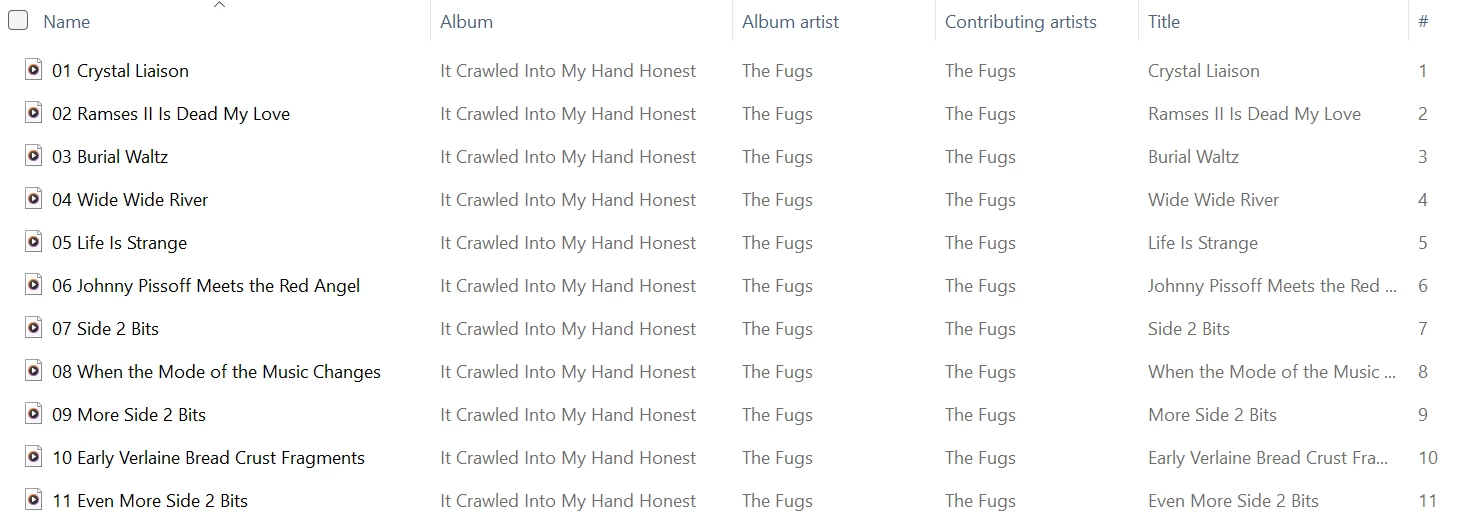
An example of one of the included screenshots is shown here.


Forum|alt.badge.img+4
  • Collaborator II
  • March 2, 2026

Hi, ​@RogerWF.

Personally I think you deserve a medal for being so persistent. 🥇


  • March 3, 2026

That actually looks like progress from support. I think they might be getting it.

FYI: Another (frustrating) email exchange. Not ‘getting it’ yet...


Darn. I was really hoping it was finally headed in the right direction.


  • Prodigy III
  • March 3, 2026

Perhaps you should switch to albums that are not compilations with support… I have standard albums that are impacted where you would hope it was obvious that the solution is not to change the album artist to ‘Various Artists’ or mess around with the compilation tag. 

I have heard *nothing* back on my case. 🙄


Forum|alt.badge.img+6
  • Prodigy I
  • March 3, 2026

That exact 'fix' does not work for me, to the extent that 'Various Artists' returns 0 results, that's ZERO results, in the Android app search. Same for other artists that are compilations, like 'Ministry of Sound'. PC app search however works perfectly for these albums - just like all apps used to 🤷🏼‍♂️

Also seeing random (non compilation) artists fail to show and be duplicated but very difficult to track down. 

Gave up on the circular discussion with support... This issue is annoying and important to me that it is fixed but if Sonos want me to diagnose bugs for them then give me full access and a contract to do so. Otherwise I just don't have the time... ​@RogerWF I appreciate your tenacity with this 👍


Forum|alt.badge.img+3
  • Author
  • Enthusiast II
  • March 3, 2026

Perhaps you should switch to albums that are not compilations with support… I have standard albums that are impacted where you would hope it was obvious that the solution is not to change the album artist to ‘Various Artists’ or mess around with the compilation tag. 

I have heard *nothing* back on my case. 🙄

I presented 12 albums with false duplicate entries to them, only three of which are compilations. I only pointed those three out to them specifically because they already had ‘Various Artists’ as the Album Artist - which was their proposed ‘official’ fix. Not a ‘fix’ at all.

The nine other cases are ‘standard’ albums, as you called them, and I’m not going to change them to Various Artists just to cover up for the shortcomings in their software.

I did go through all the tracks on my ‘Various Artists’ albums and set the compilation tag - pretty easy to do in bulk - just to see what effect it would have. As you might expect, I now have a completely new set of ‘false’ duplicates. Making any change to the library yields new and unpredictable results.


Forum|alt.badge.img+3
  • Author
  • Enthusiast II
  • March 3, 2026

That exact 'fix' does not work for me, to the extent that 'Various Artists' returns 0 results, that's ZERO results, in the Android app search. Same for other artists that are compilations, like 'Ministry of Sound'. PC app search however works perfectly for these albums - just like all apps used to 🤷🏼‍♂️

...

Interesting that you mentioned this. I hadn’t noticed, but yes: searching for ‘Various Artists’ in the PC app returns the long list of albums that I would expect. But when I do the same search with the Android app, I only get three hits. Will look into it later to see if I can tell what’s unique about those three, but...zero confidence in Sonos software at this point.


Forum|alt.badge.img+4
  • Collaborator II
  • March 4, 2026

Hi all.

Yesterday I spent a good few hours messing around with my Sonos library to see if I could pin down the problem. Firstly I created a new music library folder named Sonos2, how inventive. I set up Sonos to read the music from the new location and removed the link to my original library. I started off by copying 50 albums to the new library. Then got Sonos to index that library, so far so good no false duplicates. I then added 10 more albums at a time indexing after each 10. At 90 albums I got my first false duplicate album. I then removed 5 albums and the false duplicate went away with no new duplicates. I then added 1 more album at a time, at 89 albums I got the same false duplicate. I then removed 1 track at a time from the 89th album. After removing 2 tracks the duplicate disappeared. I put back 1 track and the same false duplicate reappeared. At this point I got quite excited because I started think have I found the issue? It’s the number of tracks! But then I realised that my albums included a number of JPG files that I think are generated by Windows, files named Folder.jpg and AlbumArtSmall.jpg. So I removed them from the 1 album but that made no difference the false duplicate remained, I assume that Sonos simply ignores files that aren’t recognised as audio files.

I then bulk removed all files with the JPG extension in all albums. That made no difference. I then added the 90th album back and to my surprise the false duplicate disappeared. I then added more albums until I got to 127, then I suddenly had 3 false duplicates, removing albums didn’t cure the issue until I got down to 112 albums, where I suddenly had two new false duplicates and the original 3 disappeared.

The only consistency I had was that the single track that appeared in all the false duplicates was the last track in the album. At this point I called it a day, my head was beginning to ache. There just doesn’t seem to be a consistent issue to pin down, rather like playing whack-a-mole.

I really don’t know what the problem is or what’s causing it, I certainly don’t think it’s got anything to do with the metadata. But infuriatingly this wasn’t a problem that existed in the past, so clearly it is something that Sonos have changed with a firmware or software update.

It seems that Sonos don’t seem to be able to duplicate the issue, but that doesn’t help those of us who that experience it, we can’t all be wrong, or is it that we are such a small group that Sonos doesn’t really care that much. I do wonder if there are others out there that simply haven’t noticed the problem or simply choose to live with it or assume it’s their fault.

As a footnote all the above tests were carried out on the Windows version of the Sonos software on a Windows 11 PC connected to a fully wired Ethernet network Sonos system using 2 x Amps, 1 x Play 3, 1 x OneSL and 1 x Port. My media library is stored on a server that runs Unraid V7. I have played around by moving the library onto a Buffalo link station NAS and a Terramaster NAS, all showed up with the same false duplicates issue.

I contacted support back on the 14th of October but despite a promise of a call back or email I never heard another thing from them.

All I really want to do is listen to music, is that really asking too much? The answer is obviously yes, as far as Sonos is concerned.


  • Prodigy III
  • March 4, 2026


I really don’t know what the problem is or what’s causing it, I certainly don’t think it’s got anything to do with the metadata. But infuriatingly this wasn’t a problem that existed in the past, so clearly it is something that Sonos have changed with a firmware or software update.

For me, this has all the hallmarks of library update that’s exposed a memory management issue in the code, which might be why they’re unsure of where the problem is. However, you would have thought they could create a debug version of the code to see if that sheds any light on what is going wrong. I’m sure a few of us would agree to install that if it helped move things forward faster. 


Forum|alt.badge.img+4
  • Collaborator II
  • March 4, 2026

For me, this has all the hallmarks of library update that’s exposed a memory management issue in the code, which might be why they’re unsure of where the problem is. However, you would have thought they could create a debug version of the code to see if that sheds any light on what is going wrong. I’m sure a few of us would agree to install that if it helped move things forward faster. 


I would certainly agree, and would be willing to do this if it helps to solve the problem.


  • March 4, 2026

Back on Anthony’s thread from October, I noted that this first occurred with system update 91.0-68261 on 9/16/25. But I wasn’t positive it didn’t start with the previous update, which was 90.0-68140 on 9/2/25. It was one of those two. More than likely it was 91.0-68261.

This “should” be extremely useful information to those Sonos folks trying to track down this problem.


Forum|alt.badge.img+3
  • Author
  • Enthusiast II
  • March 5, 2026

Hi all.

Yesterday I spent a good few hours messing around with my Sonos library to see if I could pin down the problem. Firstly I created a new music library folder named Sonos2, how inventive. I set up Sonos to read the music from the new location and removed the link to my original library. I started off by copying 50 albums to the new library. Then got Sonos to index that library, so far so good no false duplicates. I then added 10 more albums at a time indexing after each 10. At 90 albums I got my first false duplicate album. I then removed 5 albums and the false duplicate went away with no new duplicates. I then added 1 more album at a time, at 89 albums I got the same false duplicate. I then removed 1 track at a time from the 89th album. After removing 2 tracks the duplicate disappeared. I put back 1 track and the same false duplicate reappeared. At this point I got quite excited because I started think have I found the issue? It’s the number of tracks! But then I realised that my albums included a number of JPG files that I think are generated by Windows, files named Folder.jpg and AlbumArtSmall.jpg. So I removed them from the 1 album but that made no difference the false duplicate remained, I assume that Sonos simply ignores files that aren’t recognised as audio files.

I then bulk removed all files with the JPG extension in all albums. That made no difference. I then added the 90th album back and to my surprise the false duplicate disappeared. I then added more albums until I got to 127, then I suddenly had 3 false duplicates, removing albums didn’t cure the issue until I got down to 112 albums, where I suddenly had two new false duplicates and the original 3 disappeared.

The only consistency I had was that the single track that appeared in all the false duplicates was the last track in the album. At this point I called it a day, my head was beginning to ache. There just doesn’t seem to be a consistent issue to pin down, rather like playing whack-a-mole.

I really don’t know what the problem is or what’s causing it, I certainly don’t think it’s got anything to do with the metadata. But infuriatingly this wasn’t a problem that existed in the past, so clearly it is something that Sonos have changed with a firmware or software update.

It seems that Sonos don’t seem to be able to duplicate the issue, but that doesn’t help those of us who that experience it, we can’t all be wrong, or is it that we are such a small group that Sonos doesn’t really care that much. I do wonder if there are others out there that simply haven’t noticed the problem or simply choose to live with it or assume it’s their fault.

As a footnote all the above tests were carried out on the Windows version of the Sonos software on a Windows 11 PC connected to a fully wired Ethernet network Sonos system using 2 x Amps, 1 x Play 3, 1 x OneSL and 1 x Port. My media library is stored on a server that runs Unraid V7. I have played around by moving the library onto a Buffalo link station NAS and a Terramaster NAS, all showed up with the same false duplicates issue.

I contacted support back on the 14th of October but despite a promise of a call back or email I never heard another thing from them.

All I really want to do is listen to music, is that really asking too much? The answer is obviously yes, as far as Sonos is concerned.


Hi,

I spent some time continuing down the path you’ve started.  I have one ‘album’ that has 157 tracks.  It’s actually just a collection of free music that Paste magazine made available for download to subscribers a long time ago, and I just combined them in an ‘album’ called Paste Vault, and adjusted the metadata for each track so that tracks were numbered correctly, ‘Paste Vault’ was the album title, ‘Various Artists’ was the album artist, and the contributing artist for each track was the actual track artist. If I reindex with that as the only album in my library, I get three duplicate album entries. I then whittled down the number of tracks using a sort of binary search technique, and finally found that:

  • with 71 tracks, reindexing showed the same three ‘albums’ - the first and third showing all tracks except track 70 in the Windows app, with Various Artists as the album artist, while the second showed only track 70, with ‘Joe Pug’ (the contributing artist) as the album artist;
  • I deleted track 71, reindexed, and then had just two ‘albums’ - the first the same as the first above, and the second the same as the second above;
  • finally I deleted track 70, reindexed, and finally got just one ‘album’ with accurate album and track info for the 69 tracks.

Interesting to note that, back in the first situation with the three duplicate album entries, queuing any one of the three with the Windows app produces the same result:  the queue consists of track 70 as number one in the queue, with the other 70 tracks as numbers 2-71 in the queue.

But using the Android app to queue them produces a queue having only the tracks associated with the particular album entry being queued. That is, queuing the first or third album queues all tracks except for track 70, while queuing the second album queues only track 70.

I passed this on to the guy from SONOS support who has been communicating with me, along with a Dropbox link to the 71-track album, and I included the very helpful info provided by kdowling regarding when the problem likely originated.

HOWEVER: I should add that I have another ‘album’ that has 155 tracks, which indexes correctly.  A long time ago I combined the Beatles Anthologies 1-3 into a single ‘album’, adjusting the metadata accordingly.

One other note: I have temporarily removed the Paste Vault album from my music library and reindexed.  I still got false duplicates after reindexing, but not as many (I had 13 but now have just 4).  Then I removed the Beatles Anthology ‘album’ and reindexed, but that had no effect - same 4 duplicates.  All other albums equate to real album collections.

Will post any feedback I receive.  Cheers!


  • March 5, 2026

Interesting to note that, back in the first situation with the three duplicate album entries, queuing any one of the three with the Windows app produces the same result:  the queue consists of track 70 as number one in the queue, with the other 70 tracks as numbers 2-71 in the queue.

I need to say that my library doesn’t have the “Various Artists” problem that you are having. I have 338 Various Artist albums and a few are just tracks thrown together like you mentioned. Of those, the one with the most tracks has 173.

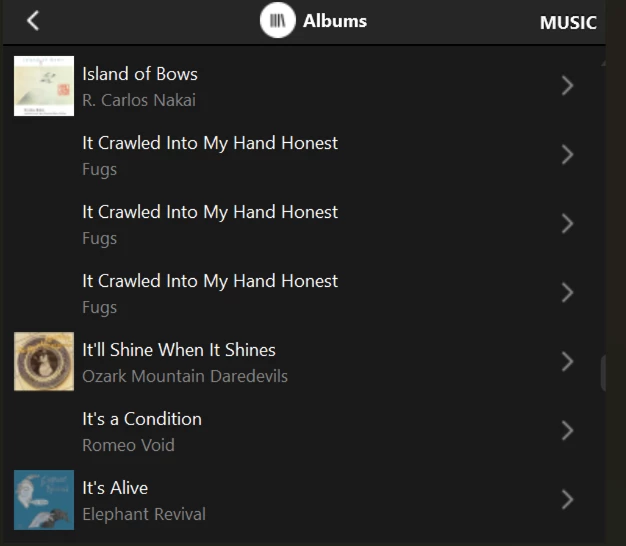
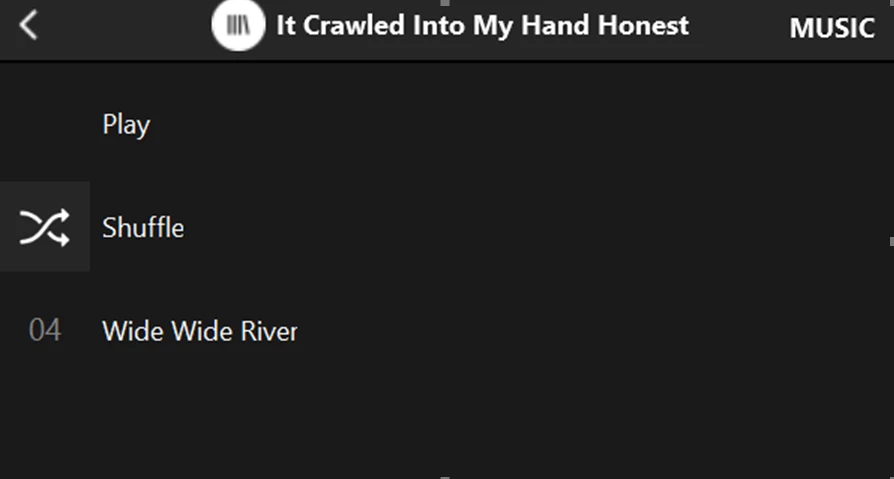
My problem has only been albums showing 3 times in a row with only 1 track (the same track) in each one. Those albums show and play correctly from “Music Library/Folders”. The albums doing this changes each time the library is updated and re-scanned. This is the problem that first started back in September with that update.


Forum|alt.badge.img+6
  • Prodigy I
  • March 5, 2026

I would guess that music_library/folders will always be correct and reflect your library structure as that, I would think, is just a folder-file map whereas the indexing relies on metadata...