Sonos Controller - Duplicate Album Titles

  • October 20, 2025
  • 81 replies
  • 988 views

Show first post

81 replies

Corry P
Forum|alt.badge.img+19
  • Sonos Staff
  • January 27, 2026

Hi ​@Anthony_6 

@Ian_S 

Hi, I think I may have stumbled on something. If I remove & add my library using the browse option it adds my server under its server name. I then get six albums duplicated. When I manually add the library using my server IP address I get one duplicated album. I’ve tried repeating it and I always get the same six or one album depending on use of IP address or name.

That’s pretty interesting. I’ll look into this tomorrow (my shift ends in 5 minutes). Thanks for flagging/helping.


  • Prodigy III
  • January 27, 2026

@Anthony_6 - Cue another ‘bug’ on the Era 300 speaker. It won’t let you index or add a share with a name. It has to be an IP address… So I’m stuck with the IP address as the Era (being much faster it seems in processing than my other speakers) usually ends up being the associated product, so unless I use the IP address of the NAS in the share name, it refuses to re-index or add a new share. Interesting to know that also causes different behaviour.

I’m wondering if there are issues in the SMB access in the embedded Linux kernel beyond configuration! 


  • Prodigy III
  • January 27, 2026

@Corry P - new case number raised. Need to try and schedule a phone call. 


Forum|alt.badge.img+1
  • Author
  • Enthusiast I
  • January 28, 2026


Hi, Ian,

Thanks for the info. Sounded promising, so I tried the same thing. Result was an improvement:  I went from 11 false duplicates to only 3. Then I made a minor change to the library (just added one track to an existing playlist and saved), and reindexed. Now I have 5 false duplicates - one of the earlier 3 and then four new ones.

Like most other cases, each of the ‘duplicates’ shows just one track, except for one (the one that persisted) - one of its three duplicate entries shows just one track, but the other two show all tracks except for the one listed in the first entry.

Still a bug…

Thanks again,

Roger


Forum|alt.badge.img+6
  • Prodigy I
  • January 28, 2026

@RogerWF My experience too, like I said before the issue seems to drift across artists/albums and is not always consistent with the duplications either... I am also seeing omissions in the search results!


  • Prodigy III
  • January 28, 2026

@Corry P - new case number raised. Need to try and schedule a phone call. 

@Corry P That was an effort. Getting past L1 on the phone was horrible. Not what I expect of any company. The escalation contact was much, much better. He’s passing it onto engineering, so hopefully it will get some attention. You may struggle to get more people to do this if they have to try and explain it to your first line of phone support. 


Corry P
Forum|alt.badge.img+19
  • Sonos Staff
  • January 28, 2026

Hi ​@Ian_S 

Sorry to hear that, but it is kind of expected when a new issue arises - they have no documentation on it, but they do have steps to try to follow. Things should go much smoother now.

I have tried indexing my own library with the server’s IP address in the path instead of with the server’s name, and I did get two albums show as duplicates that I did not get before then. I managed to fix the metadata for them, however, and they now no longer show as duplicates regardless of whether I use the IP address or server name. So, while the behaviour does seem inconsistent, the underlying issue can still - seemingly, in my case at least - be solved by fixing the metadata. I recommend that you do this, though I’d also ask you to maybe keep an unaltered backup of the problem media so we can examine the differences in metadata for you, to try and understand what is going wrong.

I hope this helps.


  • Prodigy III
  • January 28, 2026

Hi ​@Ian_S 

Sorry to hear that, but it is kind of expected when a new issue arises - they have no documentation on it, but they do have steps to try to follow. Things should go much smoother now.

I have tried indexing my own library with the server’s IP address in the path instead of with the server’s name, and I did get two albums show as duplicates that I did not get before then. I managed to fix the metadata for them, however, and they now no longer show as duplicates regardless of whether I use the IP address or server name. So, while the behaviour does seem inconsistent, the underlying issue can still - seemingly, in my case at least - be solved by fixing the metadata. I recommend that you do this, though I’d also ask you to maybe keep an unaltered backup of the problem media so we can examine the differences in metadata for you, to try and understand what is going wrong.

I hope this helps.


@Corry P - I don’t see what the metadata issue is, so really don’t know how to fix it. Album artist, Album name are all correct and the same… the fact that different speakers handle it differently and can cope or not is odd. Will leave as is for now as at least it’s reproducible should the Sonos engineering team need to look first hand. I can’t really go back to a SMB name as then the Era 300 is effectively useless for me as it stops playing any file, let alone index them! 


Corry P
Forum|alt.badge.img+19
  • Sonos Staff
  • January 28, 2026

HI ​@Ian_S 

Yeah, fair enough - lets keep things as they are so the team can examine it all. I agree there is something odd happening.


Forum|alt.badge.img+4
  • Collaborator II
  • January 28, 2026

Hi ​@Corry P & ​@Ian_S 

This is exactly why I don’t want contact support. I went through all this back in October, and nothing happened. I’m afraid it’s a tactic used by many tech companies to put people off contacting them. Basically 1st level support is to fob you off and to try and convince you it’s your fault that it doesn’t work. I spent over an hour with the first contact at Sonos & for nothing. Sadly since the Patrick Spence affair it’s become difficult to trust Sonos on anything. But I will say that ​@Corry P is an example of good customer care, keep up the good work.

Anyway, it’s great that ​@Ian_S persevered, I just hope that someone does take this issue seriously.

If I’m feeling brave I might just contact support again in the hope that it may reinforce ​@Ian_S .


Corry P
Forum|alt.badge.img+19
  • Sonos Staff
  • January 28, 2026

Hi ​@Anthony_6 

That is fair feedback and I will pass it up the chain.

Please be aware, however, that the vast majority of calls are resolved by support agents following basic steps outlined in their documentation. Outlying cases such as these have to be confirmed to be outlying cases, and that takes some time. If we assumed every report of an issue from a customer was a unique problem, we’d never get any of them fixed as we’d be too busy investigating everything. 

Please also bear in mind that issues are assigned a higher priority according to how many customers are affected - if this issue does indeed get in the way of you enjoying your music as you’d like to, I recommend that you get another case assigned to this new ticket, as that will result in the issue having a higher priority. Having said that, there are clear inconsistencies here, so my feeling is that it will get addressed sooner or later.


Forum|alt.badge.img+4
  • Collaborator II
  • January 28, 2026

@Corry P yes I was a little harsh on 1st level support, the chap I spoke to in October was nothing but pleasant. I should know having worked in retail selling tech. Complaints such as “this iPad doesn’t work”, you are aware the battery needs to be charged sir! 😂


  • Prodigy III
  • January 28, 2026

@Corry P, ​@Anthony_6 

Just for clarity, after Corry’s comments last night about adding to the case, I used the chat service as it was past the service hours for phone, to try and just add the links to the two main threads on here. The AI chatbot just put me straight through to an agent, who was polite, read the links, and said it would need to be escalated, and would require me to phone to further progress… He put it in a new ticket, but that’s fine. So I called this morning and the person who answered didn’t bother to read the links and just assumed that this was a simple not knowing how to add a share, and was insistent on trying to take me through it. I had to argue with them quite strongly just to get them to stop and read the links. They did this while I was on hold for about 20 mins and then put me through to someone in the Netherlands on the escalation team, who did listen & read the links… 

It would have been near on impossible to explain this on the phone to someone like that without being able to provide screenshots etc. like you can here. So, completely get that calls need screening and many are simple fixes, but the agents could at least read anything in the case before going off on a completely wrong path. Had I not had the threads here I would have just given up, and probably just requested a refund on the speaker. 


Corry P
Forum|alt.badge.img+19
  • Sonos Staff
  • January 28, 2026

Thanks for the feedback, ​@Ian_S - it’s all valuable!


Forum|alt.badge.img+1
  • Author
  • Enthusiast I
  • January 28, 2026

... I am also seeing omissions in the search results!

Getting quite comical. No, sad.

Just to add my experience: I have had a ticket opened on this issue for quite some time now. I have had SONOS L2 online looking live at my system. I have uploaded sample ‘problem’ albums to Dropbox for them to work with. I have had multiple email exchanges with different people (who I won’t name), but here is the latest email text (received Monday 1/26/2026):

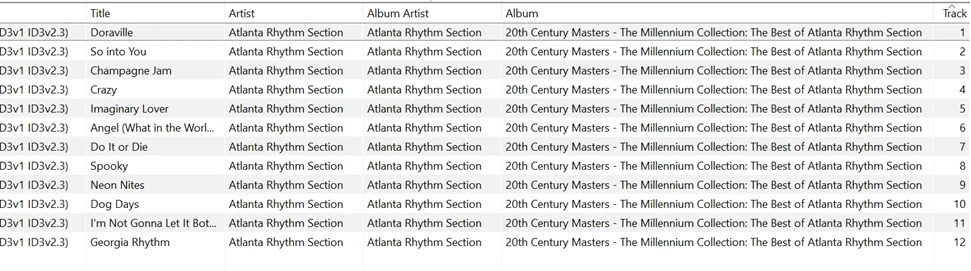
“If you run that album through your ID3 tag software, are there any differences in the metadata from track to track?”

I replied with the screen shot shown below and have heard nothing since. Meanwhile, as I indicated earlier in this thread, I made a slight change to a playlist, reindexed, and the album shown in the screen shot is no longer among the false duplicates.

MP3TAG utility screen


  • Prodigy III
  • January 28, 2026

IMO they need a debug version of the indexing code that they can run in-situ to see if it sheds any light on what the speaker is seeing. Of course, running debug code may well cause different behaviour, but it lets them see if nothing else that the speaker is at least seeing the correct tracks from the NAS. If it ‘works’ with debug code, that is often an indication of a memory issue such as using a move instead of copy for instance where behaviour can become unpredictable. Either way it moves you forward. 

If we know copying the files within the environment changes behaviour, it’s unlikely copying files to a dropbox will shed any light. If one speaker can correctly index the files and another can’t then I’m struggling to see how it’s related to the actual metadata… 

Just my thoughts. 


  • Prodigy III
  • January 29, 2026

OK, so a bit more playing on my behalf has added to my understanding here. 

The associated product is for a session only between an individual controller and the Sonos system. My previous testing was using an iMac with the Sonos App constantly open, so rebooting/powering off speakers does change the AP… however, after playing with my MacBook, I can see that it picked a different AP to the iMac, and actually if I just closed and re-opened the Mac Sonos App, it seems to pick different speakers quite frequently, So, although you can’t guarantee which one it will pick, if you stop/start it enough it does seem to eventually pick the speaker you might want. Would have saved me a lot of reboots if I’d figured that out earlier!!

However, once you have the AP you ‘want’, then the behaviour remains the same, and I guess some further evidence is that with two Mac controllers simultaneously open pointing at different AP’s, I don’t get different libraries which is a relief… so there is just one speaker that indexes the library and propagates that to the others, it’s just not as fixed as I thought it was. 


I am now curious which speaker Sonos chooses (and why) to perform a scheduled re-index… I have turned this off since May ‘24 as it just trashed my system and manually updating when I add music is not that painful… however can see it might result in changing libraries for some with the wrong system combinations if the scheduled indexing speaker moves around. 


I can also see why people ask for the ability to specify a preferred speaker for controllers to interact with as there’s a noticeable performance difference between some kit. Era 300 is very fast, a Port with an ethernet connection seems a reasonable second. 


Forum|alt.badge.img+4
  • Collaborator II
  • January 29, 2026

Hi ​@Ian_S 

I’m curious to know how you find out which product is the associated product (AP). I only knew when I tested things because I had actually physically turned off all AP’s except one, therefore I knew by default it had to be the one left powered up. 


  • Prodigy III
  • January 29, 2026

Hi ​@Ian_S 

I’m curious to know how you find out which product is the associated product (AP). I only knew when I tested things because I had actually physically turned off all AP’s except one, therefore I knew by default it had to be the one left powered up. 

As far as I know, you can only do it from one of the desktop controllers, Windows or Mac, I use Mac. The about your system menu still lists the associated product IP at the top. On the new apps, phone/tablet, they removed it, so apart from only having one speaker powered on, you don’t know. 


Forum|alt.badge.img+4
  • Collaborator II
  • January 29, 2026

Hi ​@Ian_S 

I’m curious to know how you find out which product is the associated product (AP). I only knew when I tested things because I had actually physically turned off all AP’s except one, therefore I knew by default it had to be the one left powered up. 

As far as I know, you can only do it from one of the desktop controllers, Windows or Mac, I use Mac. The about your system menu still lists the associated product IP at the top. On the new apps, phone/tablet, they removed it, so apart from only having one speaker powered on, you don’t know. 

Okay, I see it now on Windows app, thank you. I can see that one of my Amps is the AP.


  • Prodigy III
  • January 29, 2026

Hi ​@Ian_S 

I’m curious to know how you find out which product is the associated product (AP). I only knew when I tested things because I had actually physically turned off all AP’s except one, therefore I knew by default it had to be the one left powered up. 

As far as I know, you can only do it from one of the desktop controllers, Windows or Mac, I use Mac. The about your system menu still lists the associated product IP at the top. On the new apps, phone/tablet, they removed it, so apart from only having one speaker powered on, you don’t know. 

Okay, I see it now on Windows app, thank you. I can see that one of my Amps is the AP.

If you repeatedly close and re-open the Windows app, it may choose a different AP… so you can use this to change the AP to ‘test’ stuff. There doesn’t appear to be an understood reason for which speaker gets chosen yet. 


Forum|alt.badge.img+4
  • Collaborator II
  • January 29, 2026

Hi ​@Ian_S 

I’m curious to know how you find out which product is the associated product (AP). I only knew when I tested things because I had actually physically turned off all AP’s except one, therefore I knew by default it had to be the one left powered up. 

As far as I know, you can only do it from one of the desktop controllers, Windows or Mac, I use Mac. The about your system menu still lists the associated product IP at the top. On the new apps, phone/tablet, they removed it, so apart from only having one speaker powered on, you don’t know. 

Okay, I see it now on Windows app, thank you. I can see that one of my Amps is the AP.

If you repeatedly close and re-open the Windows app, it may choose a different AP… so you can use this to change the AP to ‘test’ stuff. There doesn’t appear to be an understood reason for which speaker gets chosen yet. 

I’d seen that screen before, but i'd never really noticed the AP part. Apart from one Amp all my products are connected via ethernet & i’ve used fixed IP addresses for all Sonos products.


Forum|alt.badge.img+1
  • Author
  • Enthusiast I
  • February 14, 2026

...it’s unlikely copying files to a dropbox will shed any light. If one speaker can correctly index the files and another can’t then I’m struggling to see how it’s related to the actual metadata… 

Just my thoughts. 


Agreed.  FYI:  I copied it to Dropbox *at their request*.

Adding an update to a thread that I started a while back:  Sonos Controller - Duplicate Album Titles | Sonos Community.


Forum|alt.badge.img+1
  • Author
  • Enthusiast I
  • February 14, 2026

I received the following request from Sonos support:  “Roger, Can you check to see if there is an inconsistency between tracks in the albums that currently show up as duplicates?  The tracks should all either have the compilation flag or not have the flag.  Let me know what you find.”

My reply is included below. If you know of any other specific info I should look for, please advise.  Thanks!


=== My response to Sonos support =================

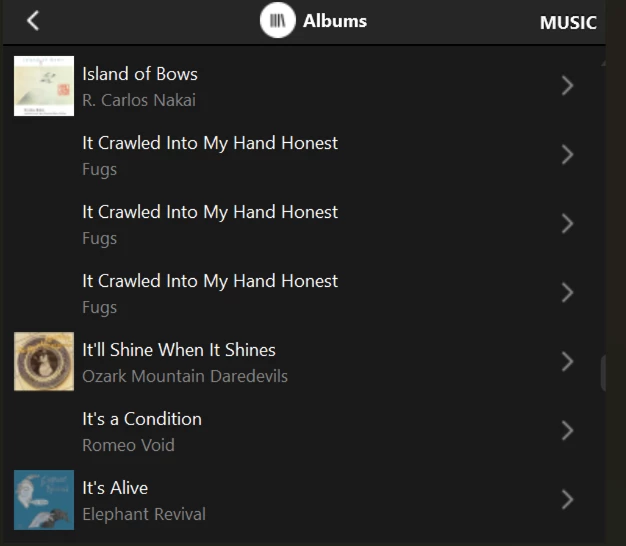
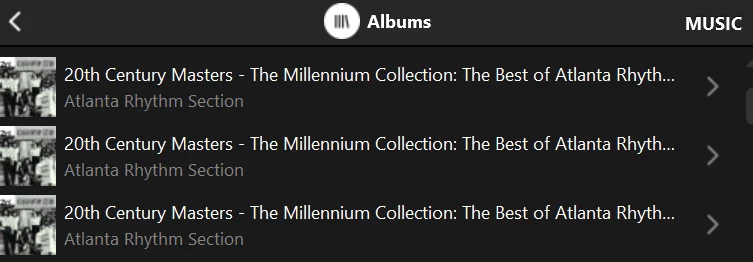
One album, ripped from a CD, erroneously listed multiple times in Sonos Albums list.


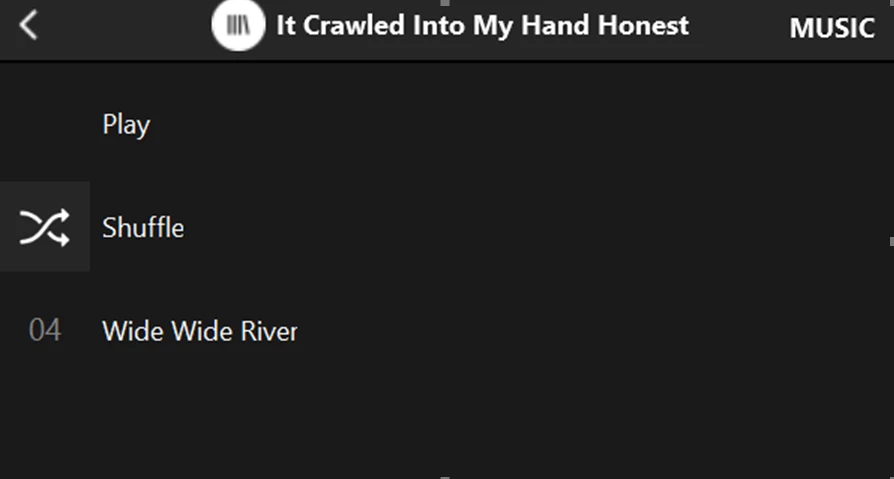
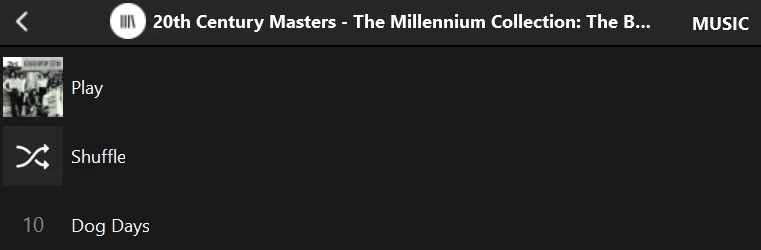
Selecting any one of these entries only shows one track: track 10.


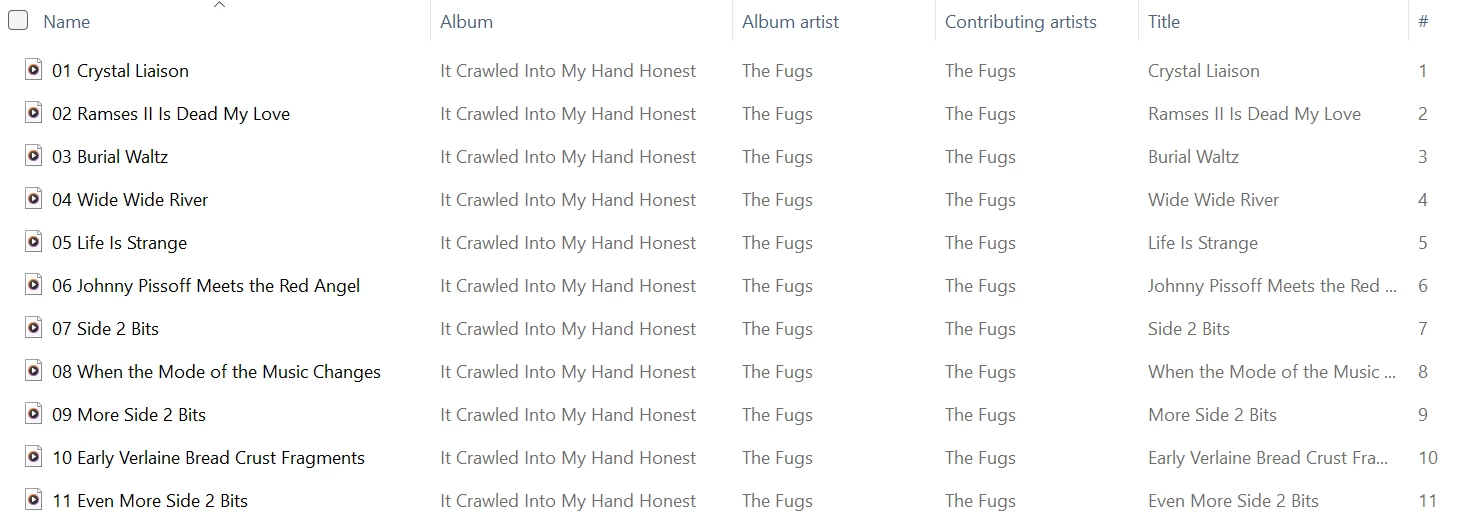
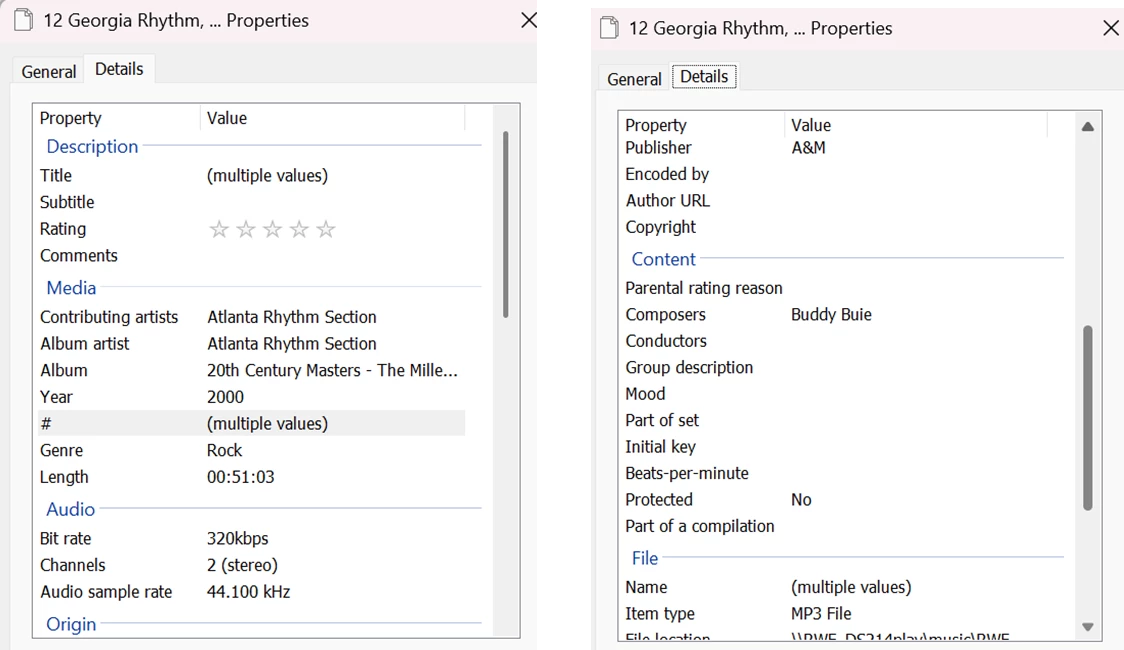
Select all tracks in Windows Explorer, then right-click to bring up Properties:

Note: ‘Part of a compilation’ field is null. No ‘multiple values’ for ‘Album’ and ‘Album Artist’.

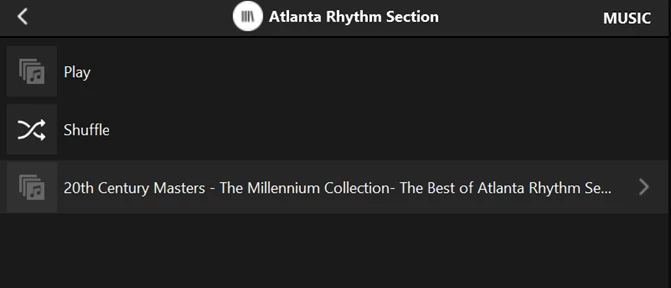
Same album is only shown once in Folders list:


Track listing when album is selected from Folders list:


  • February 14, 2026

I received the following request from Sonos support:  “Roger, Can you check to see if there is an inconsistency between tracks in the albums that currently show up as duplicates?  The tracks should all either have the compilation flag or not have the flag.  Let me know what you find.”


This is example of clueless support. This obviously has nothing to do with tags or metadata. This has been shown over and over again. If you rename a folder (a FOLDER!) on the nas and then re-index, a different set of albums will show this anomaly. The albums that showed this problem no longer do, and a DIFFERENT set of albums now do. That would indicate to any competent tech support person or software engineer that metadata is not involved in this problem.