Sonos Controller - Duplicate Album Titles

  • October 20, 2025
  • 81 replies
  • 987 views

Show first post

81 replies

Forum|alt.badge.img+1
  • Author
  • Enthusiast I
  • December 12, 2025

Does your tag editor have a mass/multiple update tags option?

Hi Stanley,

I am no expert with this utility, as I did a good bit of putzing around, trial and error stuff, untiI I finally got to this point. So I may be wrong, but it seems that it will work on all files (i.e. tracks) within the 'active' directory.

So in theory, I guess you could put many tracks (or subdirectories, maybe?) in a single folder, open it with the utility, and do one mass update.

I did ask Sonos 'what would be the harm in just turning on the compilation flag in *all* tracks?' Then it would be very easy to do a mass update without copying or moving things around (assuming it will operate on subfolders within the 'active' folder, of course).

But, bottom line? We customers should not have to do crap like that to cover for the shortcomings in their software.

The utility is mp3tag. Feel free to take a look.

Roger France


Forum|alt.badge.img+1
  • Author
  • Enthusiast I
  • January 22, 2026

Time for an update.


I received this email on 1/9/26 from Sonos support:

“The solution is to use software to convert these 11 albums into files that have consistent metadata or to use the id3 tag software to bulk edit the compilation tag.  For more info see https://support.sonos.com/en-us/article/local-music-library-grouping-and-sorting

Aye-aye-aye. They have looked at my system and know that the tracks on these albums have ‘consistent metadata’.


I replied on 1/12 saying that I didn’t think it should be up to me to turn on a misleading ‘compilation’ tag to cover up for their software deficiencies. Especially when, if I did that for these 11 albums, the problem would probably just move to other albums next time I made a change to my library and re-indexed.


I then received this reply that same day from a different person in Sonos support:

“Let me kindly explain that the cause of the problem is that random files downloaded from some magazine had inconsistent metadata. Sonos sorts files based on metadata. The metadata needs to be consistent if albums are to be expected to show up correctly.”


Aye-aye-aye-aye-aye-aye-aye! :) I replied, again that same day, saying that the problem existed on albums that didn’t come from ‘some magazine’ (they know that I have a number of CD’s from Paste magazine, a few of which were among the ‘duplicates’). I included multiple screen shots detailing the problem with one ‘non-magazine’ CD.


No response, until 1/18, when I received this apparently automated email from Sonos support:

“We haven't heard from you in a while. We wanted to follow up and ensure that you received the help you needed. If you still need help, reply to this email within 24 hours and our team will continue assisting you.”


WTF? So I replied that same day, again explaining the problem, and saying that it was still an open issue.

No reply. So, the next day I followed up again, simply forwarding the email I had send the day before. Still crickets.


And that’s Sonos ‘support’.


  • Prodigy III
  • January 23, 2026

Hi - 

I’ve been having some ‘fun’ since getting an Era 300… I had disabled the automatic re-indexing a long time ago after the mess the compilation ‘bug’ made of it. The Era not being able to cope with a name instead of IP address in the file path forced me to re-index. I don’t just have duplicate album names but also lots of missing tracks. On one album I have two entries, but both with only one out of 10 songs in it… the rest just missing. Not a compilation, nothing special, no multi-disc.. 

Another fine mess, now where did I put that copy of the Cuckoo? 


Forum|alt.badge.img+4
  • Collaborator II
  • January 23, 2026

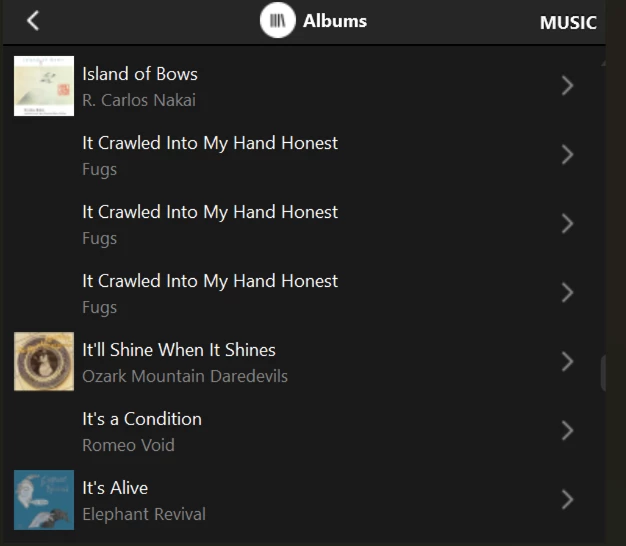
None of us should feel fearful of having to run an index on our music library. After all you have to if you’ve added a new album or made a change. The other day I added a new album and afterwards I found no albums showing duplication, great! Then I added another album & I now have 5 albums showing as duplicates with one track in each! I know I can still play them by using the folder option, but should I have to do that?


  • Prodigy III
  • January 23, 2026

Just been looking through the album list on the Mac controller, trust it slightly more than the iOS app, and I have a mix of issues. Some duplicate albums where they have the same single track, others where the album title is the same and you get a series of duplicates, some with all tracks duplicated and others where even though the indexing is set to group by album artist, and it’s consistent on all tracks, it’s split by artist… no consistency and no obvious connection in things like special characters in titles, well, not that I can see anyway. 


Forum|alt.badge.img+4
  • Collaborator II
  • January 23, 2026

I think this is the fundamental problem. It’s very inconsistent in what happens, therefore it makes it very hard to track down what the issue really is. If it was always the same album that was duplicated then at least you’d know the fault was with something in that album. Sadly this is not the case. I think it’s an issue with the way the album information is read in the process of scanning the library. I do remember that in the old S2 (pre Spence) scanning a library took far longer than it does in the new S2 (post Spence). I presume new coding may have made it faster but maybe less reliable. Just my thoughts.


  • Prodigy III
  • January 23, 2026

Maybe there is a pattern…

Looks like the different speaker code levels have different indexing results. If I index using older products (but not really old) such as Port or One, then the re-index seems to trip up in the same places. If I index using the Era 300 I get different results, but it also trips up consistently in the same place too.

We already know the Era 300 behaves slightly differently for local libraries as it can’t handle a NAS name and needs an embedded IP, but also on Sonology requires the ID used to browse the library to be an admin ID as well. 


Not great that we have different results from different products, and I guess any software updates will result in a different speaker potentially becoming the associated product. The Era 300 certainly seems to reboot much faster so in my system is quite often becoming the new associated product. 

What I haven’t done is change any of the folders to ‘move’ the problem, and have no doubt that happens, but having products behave differently too on different builds is less than ideal. 
 

My reference for indexing is Minimserver which doesn’t baulk on any of the albums Sonos does and looks at the exact same files. 


Corry P
Forum|alt.badge.img+19
  • Sonos Staff
  • January 27, 2026

Hi All

Please see my new guide - it should help!


  • Prodigy III
  • January 27, 2026

@Corry P - Not the issue I’m seeing… Album Artist is correctly populated. If I index with a ‘different’ speaker software level, I get different results. 

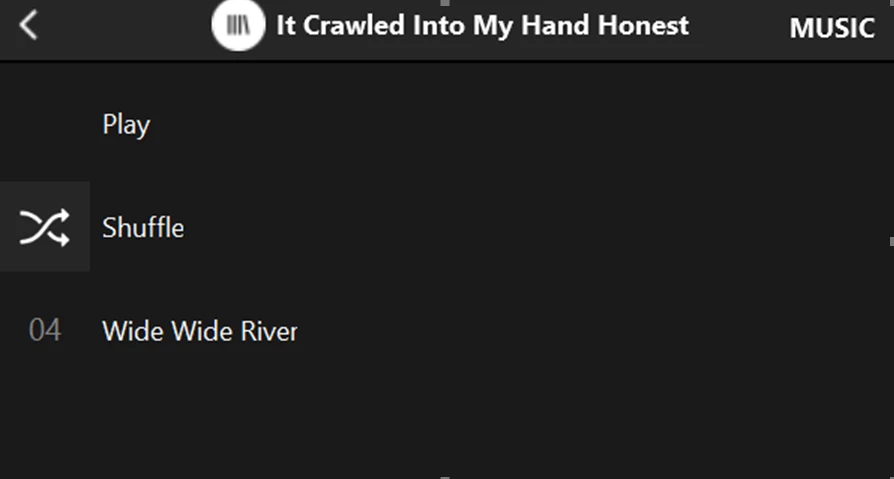
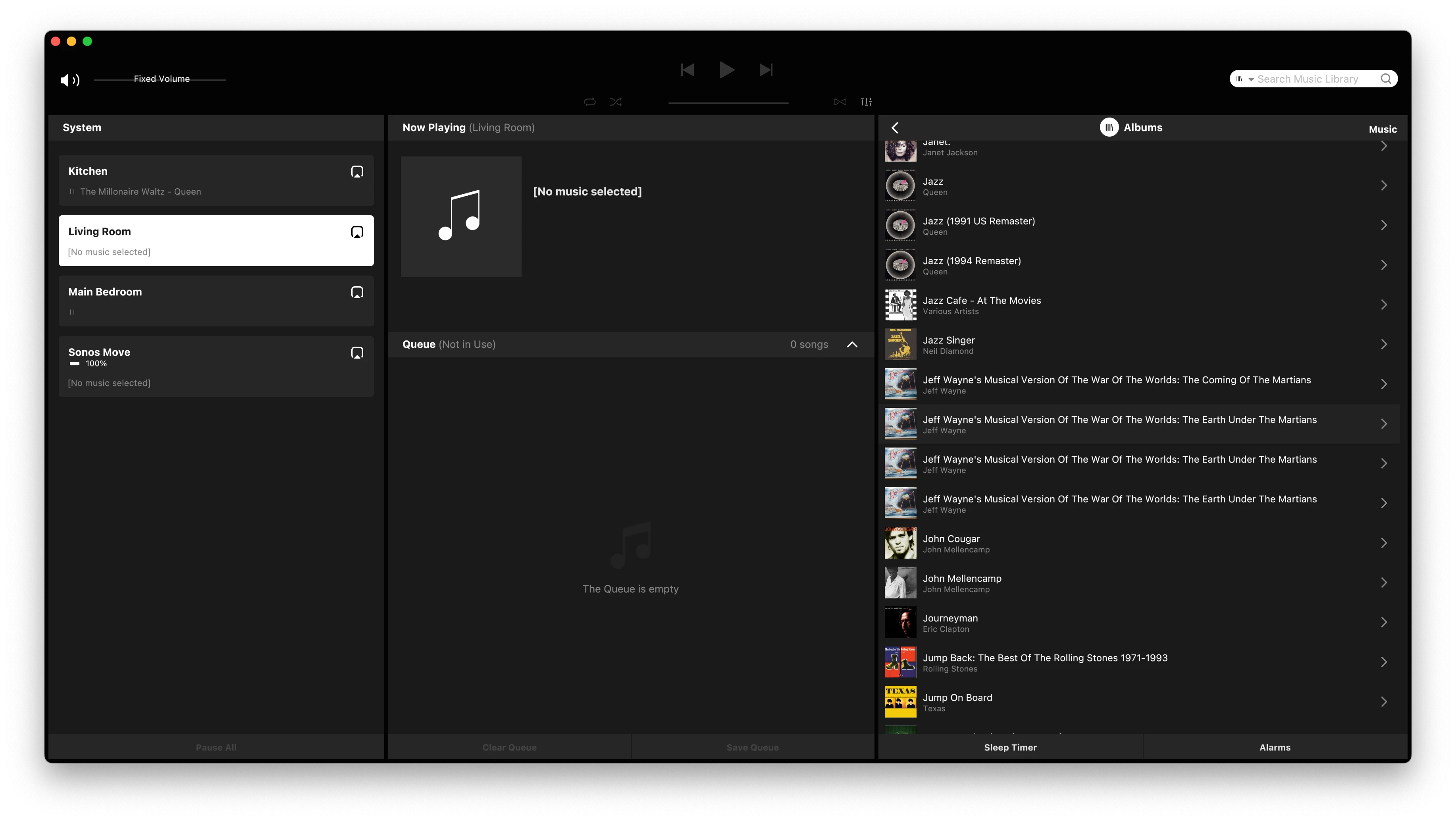
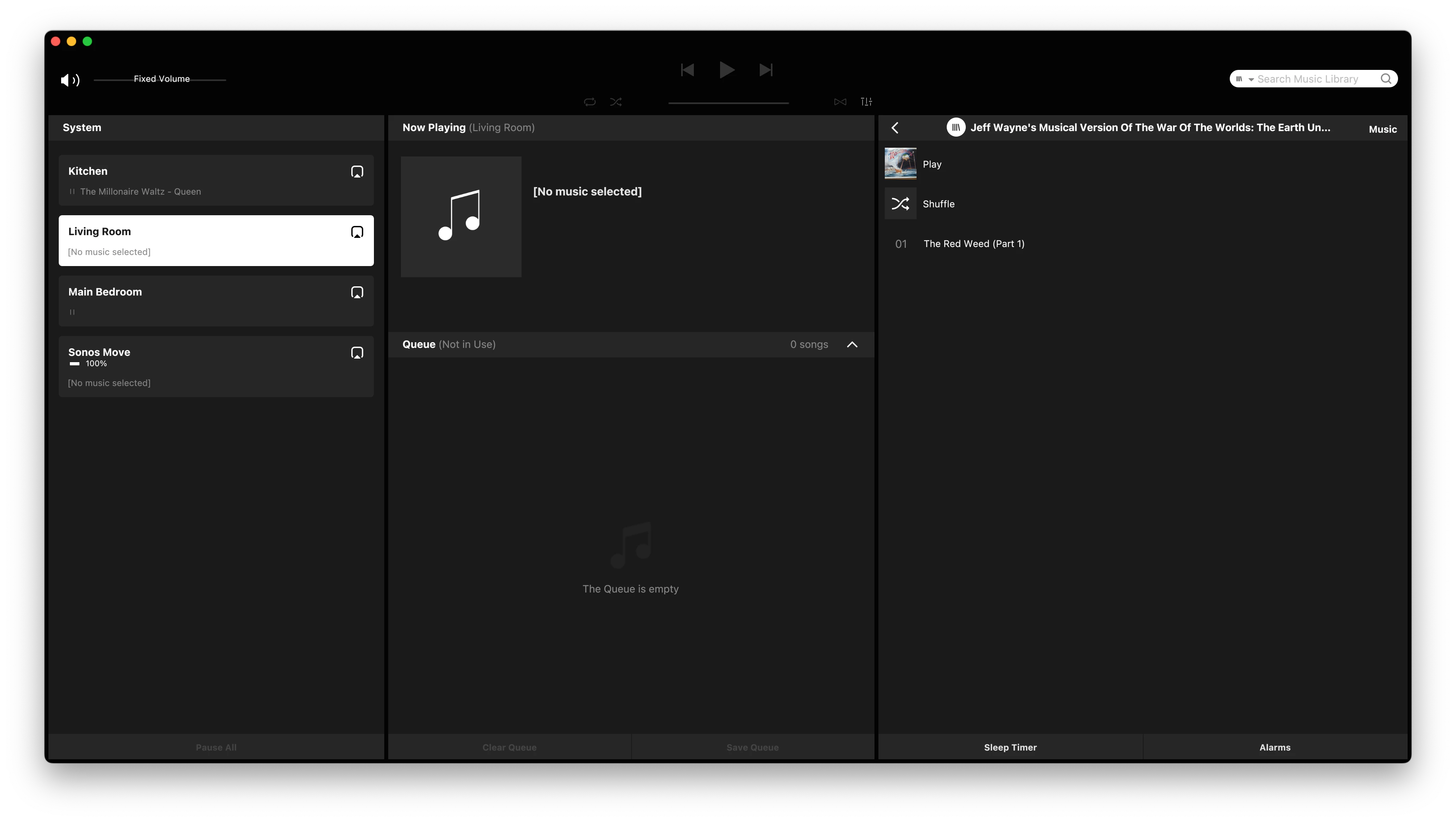
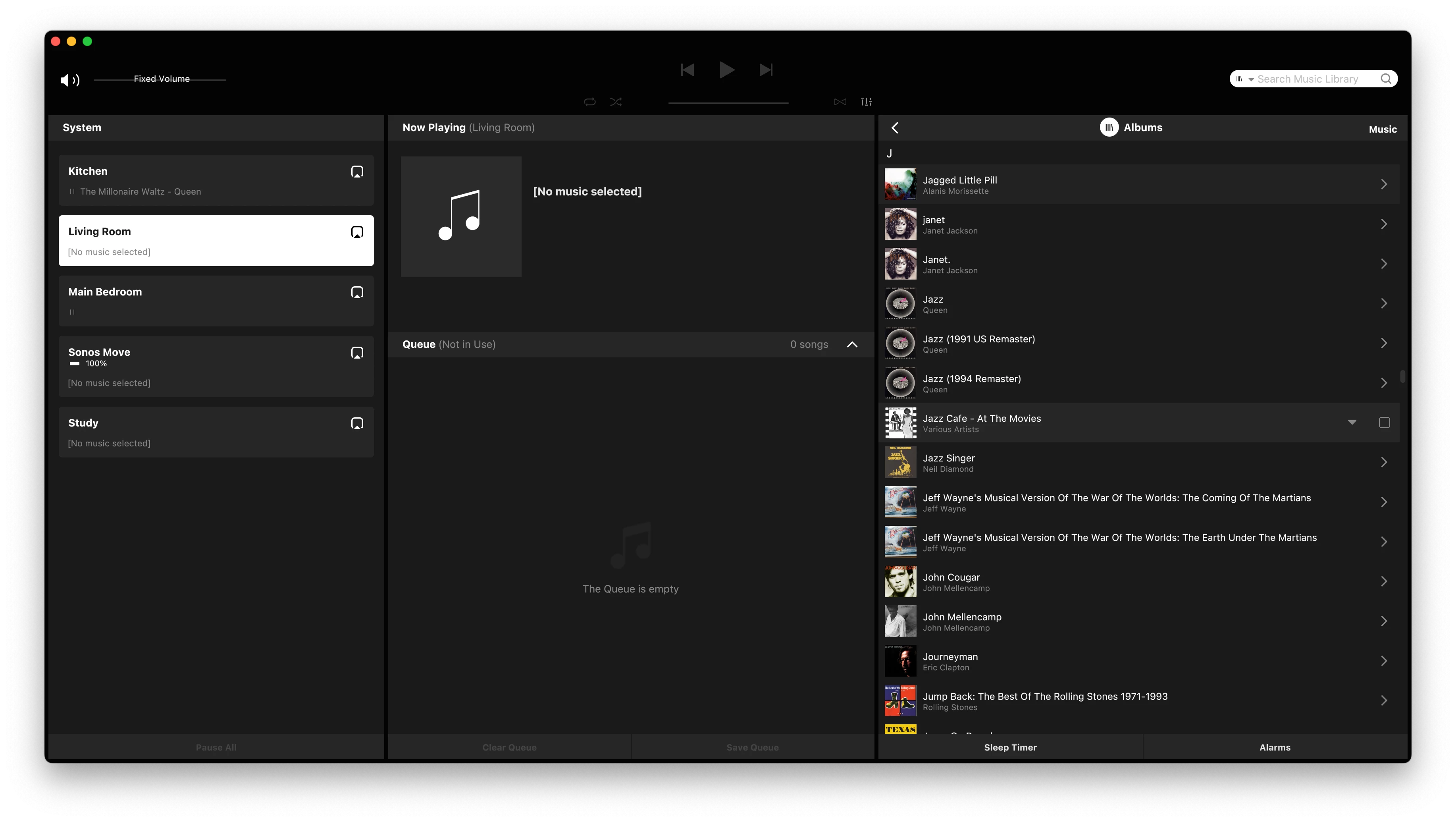
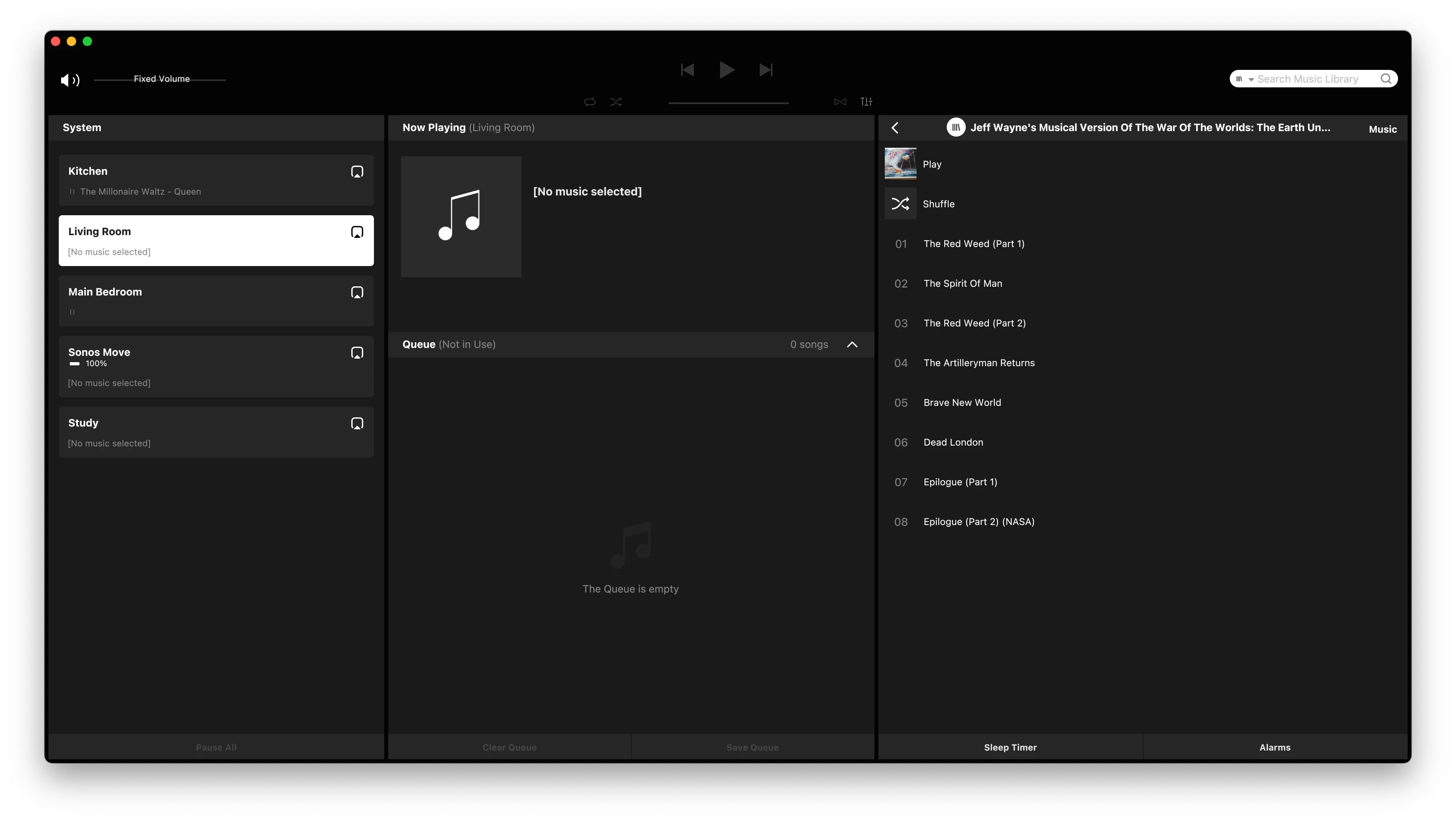
Note 3 copies of Jeff Wayne - … Under theMartians… each of them have the same SINGLE track listed..

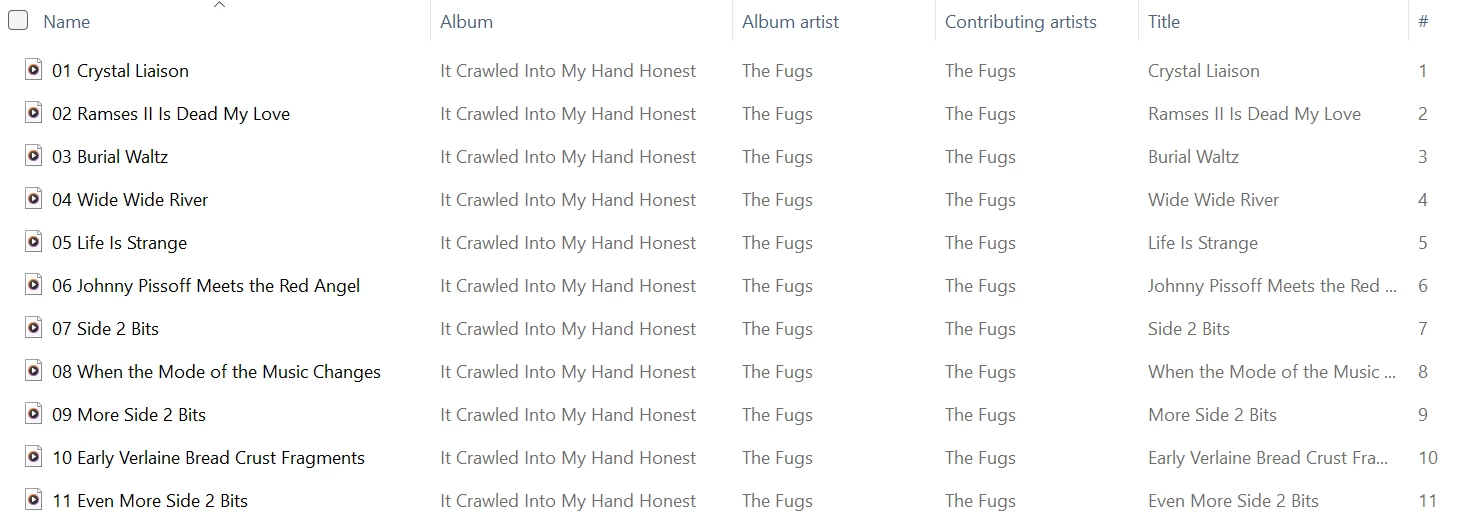
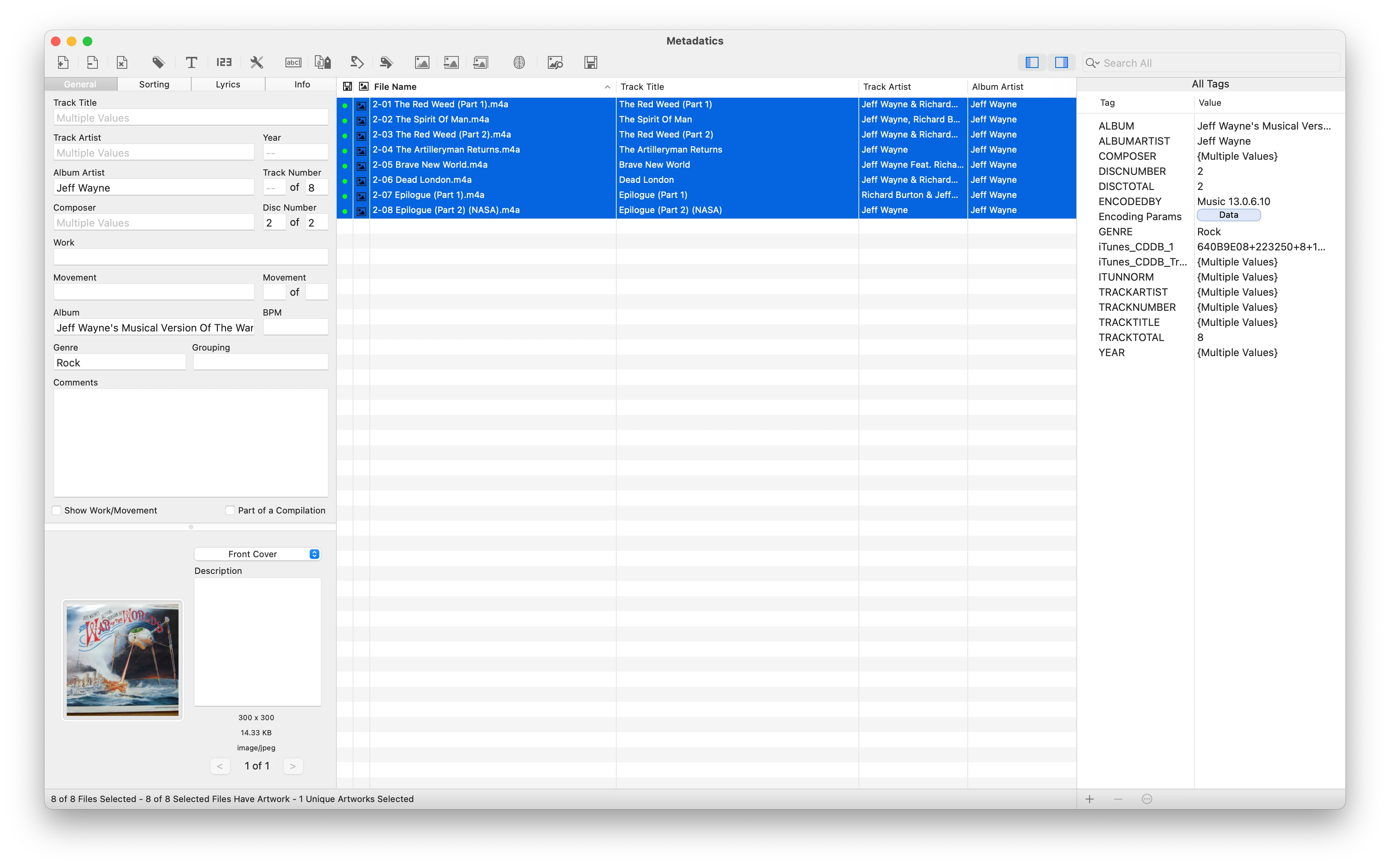
If I look at the files in metadactics, you can see they all have the same album artist and Album name. If they don’t it lists Multiple Values as you can see for track title and artist.. 

The above was indexed by an Era 300… if I index with a Port, the problem moves to different albums and the above is correctly indexed. 


Corry P
Forum|alt.badge.img+19
  • Sonos Staff
  • January 27, 2026

Hi ​@Ian_S 

That looks suspiciously like the issue I document at the end of my guide (in the hidden section). I recommend you remove the shared folder from your Music Library and then add it again.

Newer players (like the Era 300) run a more recent version of the Linux kernel, and therefore a newer version of the SMB (Samba on Linux) network file-sharing protocol - this may be the cause of the differences seen, but rebuilding the index from scratch may repair this issue, as it did in my case (with Coldplay).

I hope this helps.


  • Prodigy III
  • January 27, 2026

@Corry P - Done that.. Adding and removing (once you get past the issues the newer kernel has with Synology, more bugs) results in the same issue. If I remove and then turn the Era 300 off, I get different results. The incorrect scanning is consistent depending on which software level does the initial scan or re-index. 


  • Prodigy III
  • January 27, 2026

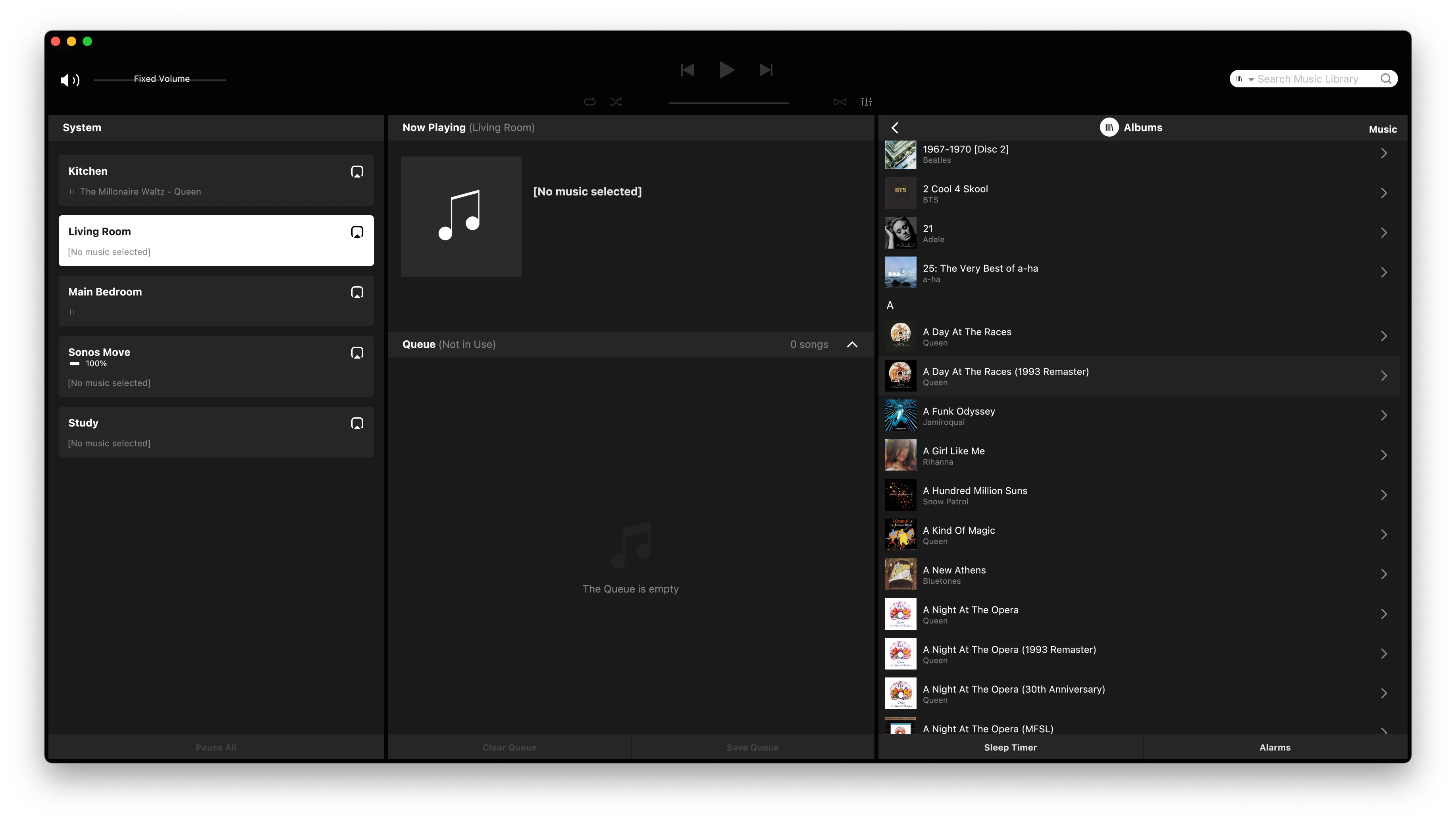
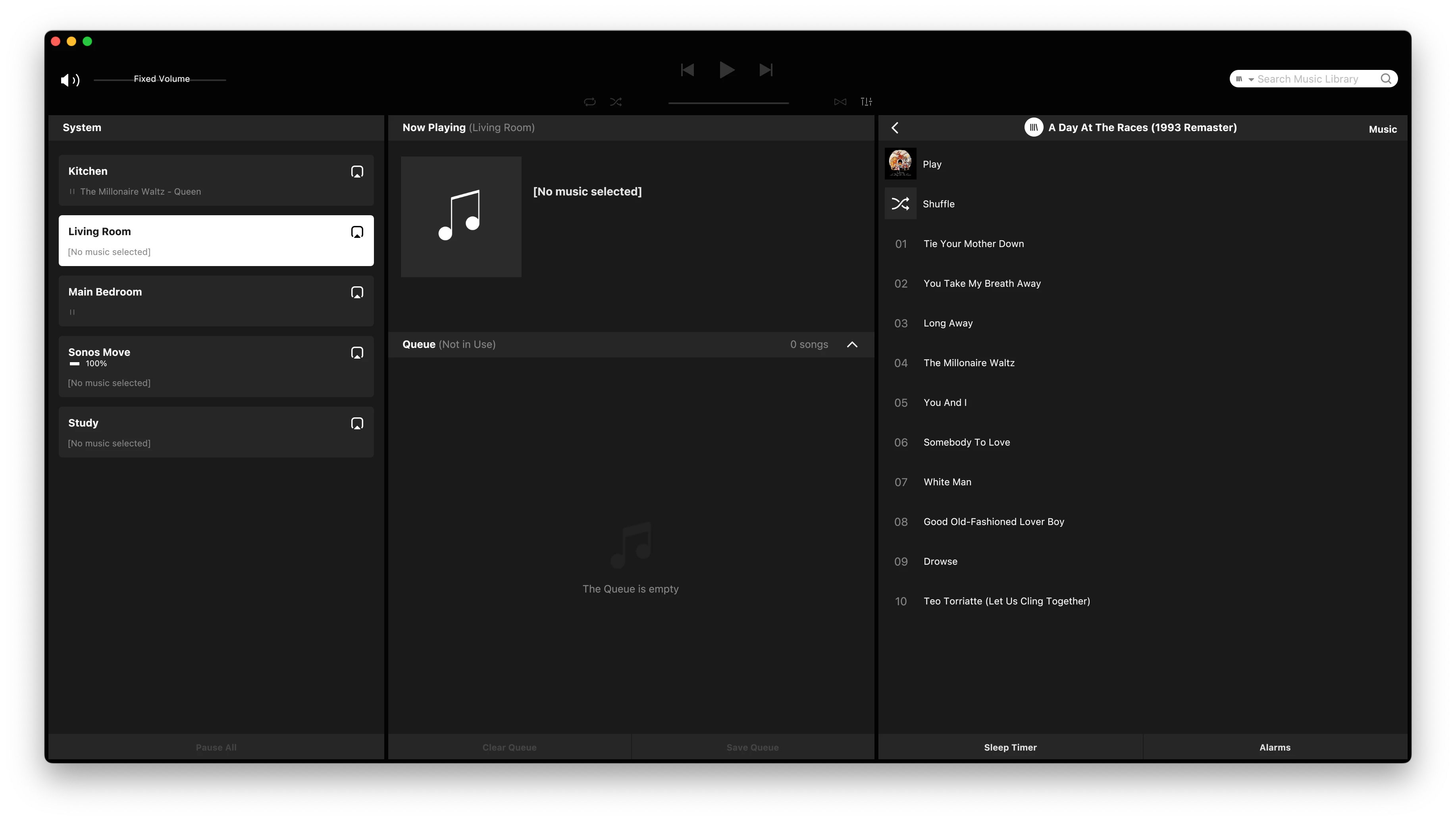
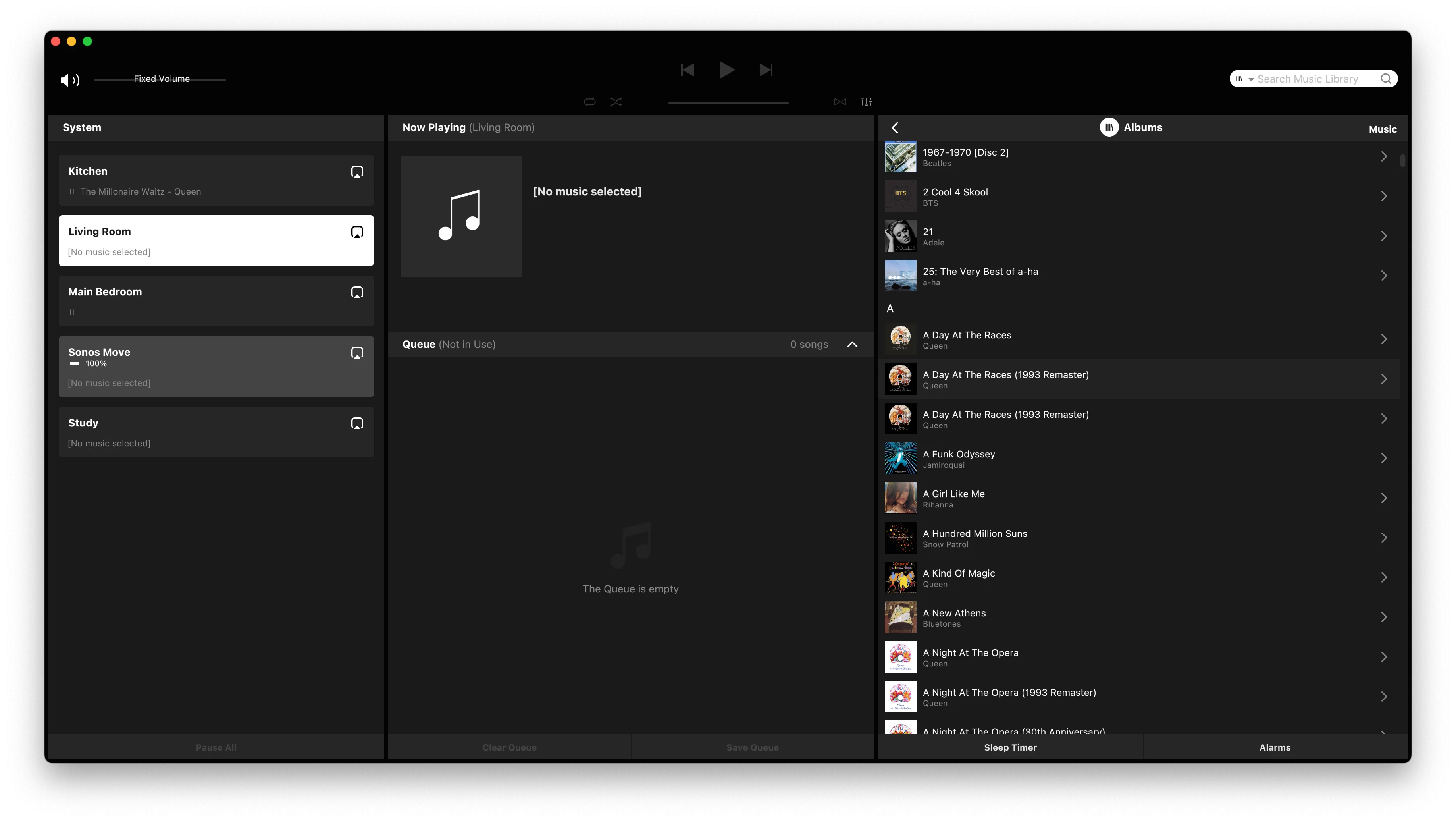
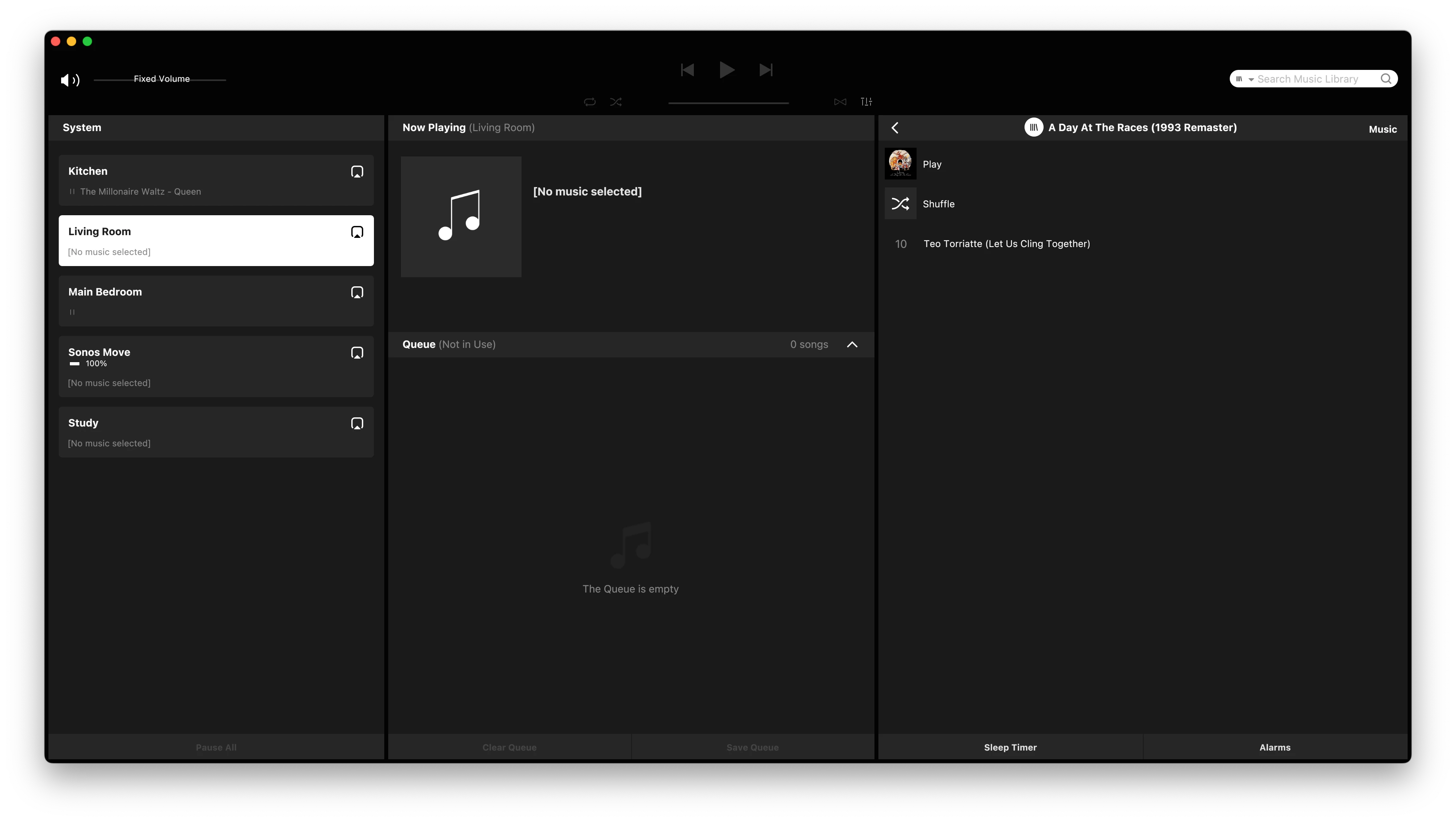
 See below… Queen - A Day At The Races 1993 Remaster… indexed correctly when the Era 300 is the associated product. 

If I turn off the Era 300 and re-index this becomes… 

And both entries for the 1993 remaster now just show:

Meanwhile, the previous example of the Jeff Wayne Album now looks like this…

As you can see… now matches the metadata reported by Metadatics … The above state happens on any Sonos speaker running 

Version: 17.7 (build 92071170)

The previous example when done by the latest version on the Era 300… The system will predictably flip-flop between the two, both obviously with issues. As detailed elsewhere, you can shuffle the files around which will fix the initial issue, but then move it somewhere else. So I’ve documented this as if I do nothing I get very different but repeatable behaviour. In both instances the metadata for Album Title and Album Artist are correct and do not change. 

Have also submitted a diagnostic. The last index was done by the speaker (a Sonos One) with an IP address ending in .194


Forum|alt.badge.img+4
  • Collaborator II
  • January 27, 2026

@Corry P 

Wow, this is getting confusing. I agree with ​@Ian_S , I’m seeing the same, an album repeating with the same one single track in each copy. This is not the same problem as your helpful guide shows. All my albums do have an Album artist & in compilations I have “Various Artists” as the album artist. However I was unaware of the turning off all my Sonos equipment bar one to carry out an index as ​@Ian_Ssuggests, really!

I have 3x Amps, 1x Port, 1x Play 3 & 1x One SL, which one do I leave on ??

It really shouldn't be this difficult. 


Corry P
Forum|alt.badge.img+19
  • Sonos Staff
  • January 27, 2026

Hi ​@Ian_S 

I can see you have an open case with our support team regarding adding Music Library, but that you did not describe this specific behaviour - I can only really recommend that you get back in touch and get this behaviour documented, as I agree that it cannot be the intended behaviour. It may help you to get the message across if you reference the latter part of this thread.


Hi ​@Anthony_6 

I have 3x Amps, 1x Port, 1x Play 3 & 1x One SL, which one do I leave on ??

As far as I am aware (taking ​@Ian_S’s report into account), they should all perform the task the same. I am thinking that the only devices that will show different results are those running newer versions of SMB, which you do not appear to have.

I do recommend you try removing the link to your music folder and re-add it, as described in the latter (hidden) section of my guide, but if that does not help, I recommend that you also get in touch with our support team regarding this behaviour.


I hope this helps.


  • Prodigy III
  • January 27, 2026

@Corry P 

Wow, this is getting confusing. I agree with ​@Ian_S , I’m seeing the same, an album repeating with the same one single track in each copy. This is not the same problem as your helpful guide shows. All my albums do have an Album artist & in compilations I have “Various Artists” as the album artist. However I was unaware of the turning off all my Sonos equipment bar one to carry out an index as ​@Ian_Ssuggests, really!

I have 3x Amps, 1x Port, 1x Play 3 & 1x One SL, which one do I leave on ??

It really shouldn't be this difficult. 

The Play:3 might be worth a shout, that runs older software than the others. Might plug mine back in later and see…

@Corry P The problem with complex issues like this is it’s very difficult to get past the defence layer in support without spending hours being told it’s a metadata problem etc. and having to go through it all again from the beginning with each different support person. Perhaps support could take a look at this thread… and maybe someone could also explain why my 300 purchase used 2 upgrade credits which at the moment is just feeling like Sonos rubbing salt in an open wound… 😏


  • Prodigy III
  • January 27, 2026

New software just arrived so I guess we should see if it makes any difference… 


  • Prodigy III
  • January 27, 2026

@Corry P Ok, so have updated and all my products are showing software 

Version: 18.0 (build 93173190)

Previously, the Era 300 was on 92.0-72171, and the other speakers 92.0-71170

As the Era 300 reboots the fastest it became the associated product and a re-index resulted in the same  result as above. I powered off the Era 300 and the One SL became the new associated product and produced the same result as above. 


Forum|alt.badge.img+4
  • Collaborator II
  • January 27, 2026

@Corry P ​@Ian_S 

Well I tried the removal & add of the library as suggested, I also switched all speakers off except the Play 3. The result… now I have 5 albums duplicated, each of the duplicated albums has the same one track in each duplication. DOH! I knew I should have left well alone, as prior to this I had only one album duplicated! 

I agree with Ian regarding Sonos support, I’ve been down that road, I called on the 14th of October 2025 @ 13:48 when I first noticed this problem, after an hour of trouble shooting I was told that a higher level tech would contact me, it didn't happen. 

As for the new software I’m not going to hold my breath.


  • Prodigy III
  • January 27, 2026

@Corry P ​@Ian_S 

Well I tried the removal & add of the library as suggested, I also switched all speakers off except the Play 3. The result… now I have 5 albums duplicated, each of the duplicated albums has the same one track in each duplication. DOH! I knew I should have left well alone, as prior to this I had only one album duplicated! 

I agree with Ian regarding Sonos support, I’ve been down that road, I called on the 14th of October 2025 @ 13:48 when I first noticed this problem, after an hour of trouble shooting I was told that a higher level tech would contact me, it didn't happen. 

As for the new software I’m not going to hold my breath.

@Anthony_6 - It’s possible that turning off the Play:3 and using a different speaker to just re-index may get you back to where you were. My system is at least consistent on what is mis-indexed by speaker if I don’t touch anything else. 


Forum|alt.badge.img+6
  • Prodigy I
  • January 27, 2026

I feel this is more subtle than just tagging correctly, for example I have noticed interactions with indexing and composer tags. I also suspect that library size may have an impact as the issue seems to drift across artists…

Again the desktop app is consistent and seems to work much better with sensible, and expected, search results being returned. Maybe it is not the fundamental indexing at fault but the interrogation mechanisms of Android vs iThing vs Windows vs Mac apps?

Either way it is neither consistent or right... yet 🤞


Forum|alt.badge.img+4
  • Collaborator II
  • January 27, 2026

@Corry P ​@Ian_S 

Well I tried the removal & add of the library as suggested, I also switched all speakers off except the Play 3. The result… now I have 5 albums duplicated, each of the duplicated albums has the same one track in each duplication. DOH! I knew I should have left well alone, as prior to this I had only one album duplicated! 

I agree with Ian regarding Sonos support, I’ve been down that road, I called on the 14th of October 2025 @ 13:48 when I first noticed this problem, after an hour of trouble shooting I was told that a higher level tech would contact me, it didn't happen. 

As for the new software I’m not going to hold my breath.

@Anthony_6 - It’s possible that turning off the Play:3 and using a different speaker to just re-index may get you back to where you were. My system is at least consistent on what is mis-indexed by speaker if I don’t touch anything else. 

@Ian_S 

Like you I've just made a list of the affected albums, when using the Play 3. I’m going to turn off the Play 3 & turn on my Port & re-scan, just to see what happens, nothing to lose but time eh 😊


  • Prodigy III
  • January 27, 2026

My results are all posted from the Mac App which has not changed/updated, so is consistent. The iOS and iPad Apps also match what the Mac one shows which would seem to indicate this is an issue with speaker software as that is the only thing changing. (It’s just easier to screenshot and type on the Mac). It’s the speaker software that does the indexing and propagates that around the individual Sonos speakers as far as I understand it. The controllers just query the speakers and then access the ‘source’ for album art as required I believe. 


Forum|alt.badge.img+4
  • Collaborator II
  • January 27, 2026

My results are all posted from the Mac App which has not changed/updated, so is consistent. The iOS and iPad Apps also match what the Mac one shows which would seem to indicate this is an issue with speaker software as that is the only thing changing. (It’s just easier to screenshot and type on the Mac). It’s the speaker software that does the indexing and propagates that around the individual Sonos speakers as far as I understand it. The controllers just query the speakers and then access the ‘source’ for album art as required I believe. 

I use the Windows version for much the same reasons.


Corry P
Forum|alt.badge.img+19
  • Sonos Staff
  • January 27, 2026

Hi All

The steps I documented on my guide helped for the 5 albums I had that were not displaying correctly (on all Windows and Android - I can’t test anything else). Given what ​@Ian_S has illustrated, it does seem that there is an additional issue we need to address. For this to happen, there needs to be existing support cases documenting the issue. For this reason, I recommend that anyone for whom my guide does not help get in touch with our support team to document the issue. As mentioned above, I recommend that you refer the agent you speak to to this conversation in order to bypass any suggestions that they will likely give in the first instance.

@Ian_S - regarding your discount voucher, please contact our sales department.


Forum|alt.badge.img+4
  • Collaborator II
  • January 27, 2026

@Ian_S 

Hi, I think I may have stumbled on something. If I remove & add my library using the browse option it adds my server under its server name. I then get six albums duplicated. When I manually add the library using my server IP address I get one duplicated album. I’ve tried repeating it and I always get the same six or one album depending on use of IP address or name.