Sky Max Hub, Orbi 7 mesh & Sonos discovery issues??

  • July 4, 2026
  • 22 replies
  • 229 views

homeconnected
Forum|alt.badge.img

Help from the pro’s needed...🙏

11 Speaker Sonos System - Becomes Unresponsive After a While (Sky Max + Orbi RBE871 AP Mode)

I’m hoping someone can point me in the right direction because I’m running out of ideas.

My client has an 11-speaker Sonos system consisting of:

  • Beam
  • Sonos Amps
  • Play:3s
  • Sonos Ones
  • Roam

For over 6 months they’ve experienced intermittent issues including:

  • Rooms disappearing
  • “Unable to connect”
  • “Cannot communicate”
  • App timing out
  • Speakers appearing in the app but with no playback controls
  • Alexa playing to the wrong room or saying it’s playing when nothing happens

Original Network

I discovered the network was configured like this:

  • Sky Max Hub (routing + Wi-Fi enabled)
  • Orbi RBE871 mesh (Router Mode + Wi-Fi enabled)

So there were effectively two routers and two Wi-Fi systems.

Changes Made

I spent the day simplifying everything:

  • Sky Max Hub now does all routing and DHCP.
  • Sky Wi-Fi disabled.
  • Orbi RBE871 changed to AP Mode.
  • Garden Orbi also changed to AP Mode.
  • Garden Sonos speaker moved into the same Sonos household as the rest of the house.
  • Reserved almost every Sonos IP on the Sky router except Beam that would not reserve IP?)

General Internet performance is excellent and all devices receive correct 192.168.0.x addresses.

Behaviour

Initially everything appeared much better.

However, after a short while (or after leaving the house and returning), some or most speakers become unresponsive.

The strange thing is:

  • All speakers still appear under Settings > About My System.
  • Music services are still visible.
  • Playback controls disappear.
  • Trying to start new music often fails with “Unable to connect” or similar.

Interestingly:

  • Previously playing speakers often continue playing.
  • Sometimes pressing the Play button on the physical speaker starts playback, even though the app cannot control it.
  • If I go into the Devices screen at the bottom of the app, the speakers that were already playing often still respond.
  • It seems to be starting new playback or controlling speakers that fails.

One particularly odd observation was that during one failure, the only speaker that responded was actually the one with the weakest Wi-Fi signal.

Sonos Support

I spent around two hours on the phone with Sonos Support.

They looked at diagnostics and suggested changing the Orbi 2.4GHz channel from 1 to 6 due to network congestion.

Immediately afterwards every speaker appeared to work.

I ended the call, walked outside to the van for a few minutes, returned to demonstrate everything was working… and almost the entire system had stopped responding again.

The behaviour was identical on both my phone and the client’s phone, so it doesn’t appear to be controller-specific.

Current Thoughts

At this point I’m wondering whether this could be related to:

  • SSDP/mDNS discovery
  • Multicast handling
  • Sky Max Hub behaviour
  • IPv6
  • Orbi AP Mode
  • Or something else entirely

General Internet access remains stable throughout.

I should also mention that before changing the network topology, the client’s main complaint was that when he walked between rooms, the Sonos app often took a long time to reconnect or would lose communication with the speakers.

One thing that keeps standing out is that every time I reboot the network, or make a network change, the Sonos system appears to work properly again for a while before gradually becoming unresponsive.

Has anyone experienced similar issues with Sky Max Hub + Orbi RBE871 in AP Mode + Sonos?

Before I return next week I’m compiling a checklist of things to try, including:

  • Wiring one Sonos player as a test.
  • Disabling IPv6.
  • Checking WPA2/WPA3 security settings.
  • Looking into multicast/IGMP settings.

Any advice or similar experiences would be greatly appreciated.

Thanks.

22 replies

AjTrek1
  • July 4, 2026

What type of amps are being used? Gen1, Gen 2 or the latest Sonos Amp?

If you haven’t done so… try naming all bands with the same SSID.  Follow the steps:

  1. Unplug all sonos
  2. Make the SSID change 
  3. Reboot Main Router
  4. Delete the App from your device (at this point just stop the app on your clients device; don’t delete it)
  5. Plug in all Sonos and let them come back
  6. Reinstall the app on your device 
  7. Select join an existing system 
  8. Accept all prompts 
  9. Sign-in with clients credentials 


Stanley_4
  • Grand Maestro
  • July 4, 2026

Plugging one Sonos to Ethernet will put all but the Roam in Sonosnet mode, that removes the ability of your other Sonos to connect with your Wi-Fi if they can see the Sonosnet signal. Not what you want. 

Being unable to reserve an IP address for the Beam is troubling, there is something wrong in your DHCP configuration that needs to be found and corrected. Might be as simple as it is already assigned but under a name you aren't expecting, sort by MAC address and it should show up.

I no longer have IPv6 access but last year when I did Sonos didn't seem to be doing much with it and on my now v4 only network I have no issues.

The leaving with the controller and returning to errors makes me suspect the phone may be connecting to a different AP, one not fully passing the required network traffic, or a VPN or the like diverting it.


Airgetlam
  • July 4, 2026

In addition to the excellent suggestions above, I’d want to review the wifi interference FAQ. If Sonos CS showed signs of WiFi interference on one channel, the base transmission channel by the router may be impacted as well, causing the speakers to have difficulty connecting. I’d want to ensure that your network (or theirs, technically) is locked down to a single channel, and not hopping. 

And a network refresh (power off all Sonos, reboot the router, wait two minutes, then bring Sonos back online) is always a good thing. You’d get refreshed router firmware and refreshed Sonos firmware, as well as refreshed IP assignments, although that part may be moot with your reservations, although not being able to reserve one for the Beam makes no sense. The router reboot may clear that issue . 

Make sure, when they’re all connected, that you check for, and apply any updates, too. 


homeconnected
Forum|alt.badge.img
  • Author
  • Contributor I
  • July 4, 2026

Thanks both. The system is on a single SSID and single subnet. The Orbi is in AP mode and Sky is the only DHCP server. The issue affects both my phone and the client’s phone simultaneously, which makes me think it isn’t simply a controller cache issue.

Interestingly, when the issue occurs, all speakers still appear under About My System with valid IP addresses, and sometimes pressing Play on the physical speaker starts playback even though the app cannot control it. A reboot of the network restores operation temporarily before the issue returns.

Im thinking Multicast forwarding issues across the Orbi satellites when in AP mode? But I’m no network engineer!

Im going to disable IPV6 on my next visit, I will update my findings  👍🏻


Stanley_4
  • Grand Maestro
  • July 4, 2026

I know there is good advice here on Ubiquiti gear since I have some, haven't followed Orbi though so it might be worth a check to see if there are reported problems and cures.

The search here is near worthless but the AI assistant can be interesting but often wrong, best is an external search using the site: option to just look at the forum posts.

site:en.community.sonos.com


Airgetlam
  • July 4, 2026

Agreed that it’s system based, most likely router, although that reboot still isn’t a bad idea. The controllers merely show you what’s happening on the speakers (when they’re connected),the controllers merely show is merely a ‘window’ and a command generator…the system runs fine without one connected, as designed. 

Your tests suggest an issue between the controllers and the speakers, if the speakers are working fine on their own. I’ll be interested to see what turning off IPV6 does. Although it is supposed to be backward compatible, to my knowledge Sonos doesn’t explicitly support anything other than IVP4. But I’d certainly be digging further into that connection between the two phones and the router. With no guarantee, unfortunately, but it’s the only thing that matches your current posts. 


Airgetlam
  • July 4, 2026

Oh, one more thing…Sky has a bad reputation for connections, at least with me (a Yankee, far removed from the issue). I’m certainly glad you’ve cleaned up and simplified that network. 


Forum|alt.badge.img+18
  • Local Superstar
  • July 5, 2026

Before you disable IPv6 on Sky Hub Max, I would try disabling 6GHz radio’s on Orbi for client connections, if that's possible, depends on specific model(s). Restart Orbi(s) , no need to restart Sonos devices.

The issue you are describing, when your controller (phone) roams between APs/bands, suggests this.

You mentioned that Sonos still functions, plays from hard buttons on devices etc, so I’m pretty sure its how the APs are handing the traffic between bands, especially with IPv6 also enabled.

There is no need to reserve IPs in DHCP, this is a legacy.

If you then disable IPv6, disable this on the Sky Max Hub, if possible, will have to restart Orb(s) and Sonos devices. Sonos will still use the IPv6 linklocal address, just wont get a Sky UK IPv6 global address.


Forum|alt.badge.img+18
  • Local Superstar
  • July 5, 2026

 I would try disabling 6GHz radio’s on Orbi for client connections, if that's possible

If you change the security protocol to WPA2 (is probably default “WPA2/WPA3” Transitional Mode) this will disable 6GHz client connections, as 6GHz band requires WP3.

Another thought, is when the phone controller is having issues with transport buttons etc, open a web browser on a laptop and go to play.sonos.com (IPv4 only), and check if the Web App can see all Sonos devices and control them.


Stanley_4
  • Grand Maestro
  • July 5, 2026

There is no need to reserve IPs in DHCP, this is a legacy.

This is probably correct, it depends on the type, features of the version and of your DHCP server as well as some configuration options. The preservation of MAC to IP address mapping is a "best effort hash function" not a certainty but it usually is good enough.

When nothing else is working keep reserved IP address assignment as something to try. It is a fairly quick and easy process, fully reversible with even less effort. Faster than most calls to support.


Forum|alt.badge.img+18
  • Local Superstar
  • July 6, 2026

When nothing else is working keep reserved IP address assignment as something to try. It is a fairly quick and easy process, fully reversible with even less effort. Faster than most calls to support.

OP already reserved IP addresses, which didn’t resolve issue. This is why I suggest there is no need to reserve.

There are 5M+ Sky broadband customers in UK, there is no requirement to reserve IP addresses on a Sky router for Sonos.

I would bet if the Orbi was turned off, and the Sky router WiFi used instead, there would be no issues for the devices in range of the Sky router WiFi.

Symptoms suggest issue is Orbi, and how it is handling the multicast network traffic from the controller (phone) and Sonos devices when clients are using different bands. Hence why I suggested disabling 6GHz band before disabling IPv6.

FWIW, Sky UK was one of the first UK ISP to rollout IPv6 (10+ years ago), so should have a more mature IPv6 network infrastructure than other ISPs.


homeconnected
Forum|alt.badge.img
  • Author
  • Contributor I
  • July 6, 2026

 I would try disabling 6GHz radio’s on Orbi for client connections, if that's possible

If you change the security protocol to WPA2 (is probably default “WPA2/WPA3” Transitional Mode) this will disable 6GHz client connections, as 6GHz band requires WP3.

Another thought, is when the phone controller is having issues with transport buttons etc, open a web browser on a laptop and go to play.sonos.com (IPv4 only), and check if the Web App can see all Sonos devices and control them.

play.sonos.com, good idea to try as a separate controller, can test when the phone is an issue, Also going to capture traffic when fault arises using Wireshark, once captured, my first change will be to disable 6Ghz on Orbi, However I remember the client telling me he had issues before he brought the latest Orbis, the previous Orbis would not have been 6GHz, although it could have been a different issue at the time as it was around 6 months ago.


homeconnected
Forum|alt.badge.img
  • Author
  • Contributor I
  • July 10, 2026

Quick update after another day of testing.

I spent several hours on site today and was able to reproduce the issue again.

The pattern seems fairly consistent:

  • The system can work normally for quite some time.
  • After the Sonos app has been used for a while (switching between different speakers, grouping/ungrouping, changing music sources etc.), the app gradually becomes unreliable.
  • Eventually individual rooms start showing “Unable to connect”, although all rooms remain visible in the app.
  • The affected room isn’t always the same one.

Some observations from today’s testing:

  • The speakers continue playing if they’re already playing.
  • All Sonos products remain visible in the iPhone app.
  • The Sonos web app (play.sonos.com) on a MacBook continues to work even while the iPhone app reports “Unable to connect”.
  • I captured traffic with Wireshark while the fault was present. The speakers continued advertising themselves via mDNS/SSDP and responded to HTTP requests, suggesting they were still on the network.
  • I also continuously pinged speakers during testing and didn’t see any packet loss or the speakers dropping off the network.

The customer has also noticed that the issue tends to occur after they’ve been at home and using the system for a while. For example, after finishing work and sitting down to play music, they found that the Dining Room speaker wouldn’t respond in the app, despite remaining visible.

The system is:

  • Orbi RBE871 (router with wireless satellites)
  • Sky Max broadband (Sky Stream Pucks in the Living Room and Dining Room)
  • Sonos S2
  • iPhones used as controllers

As another test, I disabled Wi-Fi 6E Mode on the iPhone (forcing it to use 5 GHz instead of 6 GHz). Initially the app appeared more responsive, but after further testing the issue returned, so at this stage I can’t conclude whether that setting has any effect.

At this point I’m still trying to determine whether this is related to:

  • the Sonos iOS app,
  • Orbi networking,
  • Sky equipment,
  • or some interaction between them.

Has anyone experienced a similar situation where:

  • all rooms remain visible,
  • play.sonos.com continues to control the system,
  • but the iPhone app intermittently reports “Unable to connect” after the system has been in use for some time?


  • July 10, 2026

Do you have this problem if using an S2 controller on an android device? How about an S2 desktop controller. Third party apps? Anything other than an iPhone S2 controller.


Airgetlam
  • July 10, 2026

With an issue only with the iOS controller, that suggests something going on with the iOS device contacting the router improperly, in some way. What did Sonos Support say, when you called them to discuss it?

While I might infer an issue with the iOS controller, the fact that I’ve not experienced any with the three separate devices, that are iOS based, suggest otherwise. Which is why I’m suggesting the hard data regarding the connection that Sonos can see, and we in the public can’t, may be useful.

If I were to guess, the iPhone(s) are switching network connections to alternate devices. Which then blocks the connection to the Sonos speakers. But as I say, that’s merely a guess. 


  • July 10, 2026

When this happens, close the iOS S2 controller (swipe up and then push off the top of the screen). Then start the app again. Does it now connect to the previous “Unable to connect” device?


homeconnected
Forum|alt.badge.img
  • Author
  • Contributor I
  • July 10, 2026

When this happens, close the iOS S2 controller (swipe up and then push off  the top of the screen). Then start the app again. Does it now connect to the previous “Unable to connect” device?

quitting and restarting the app will show the same screen but with no content, functions still unavalable for that chosen speaker, continuing to operate the apps functions will eventually render it unusable until left for an amount of time


  • July 10, 2026

Just trying to narrow it down. iPhone? iPhone S2 controller? Network? There’s just not enough info to go on. And since we don’t have access to any diagnostic information, it’s all just guessing. Did you test any other devices besides an iPhone?


I think your best option is to contact Sonos support again and try to escalate to higher level support. Unless a network expert pops in and says ‘yes, I seen this before. You need to check this option on your access points/router”, I don’t know what else can be done.


Airgetlam
  • July 10, 2026

No content is a result of the controller not being able to reach the ‘system’, which runs in the speakers, to get any information. Remember, the controller is only a window on to the system that runs on the Sonos devices themselves. It isn’t really part of the Sonos system itself, it does nothing other than show what is occurring on the system, and send commands to that system. It doesn’t ‘play’ anything itself, at the controller level…which is why we call it a controller ;). Think of it as the remote for your TV set. It doesn’t really do anything but send commands to the TV. In this case, it also reports what is happening on the system (note, I’m using the word system, rather than speakers, since that includes non-speaker Sonos devices such as the Port and Amp). 


AjTrek1
  • July 10, 2026

I’ll supply this information about my setup..who knows it may be of interest.  I don’t think the app is at fault. IMO there’s something with the network configuration. 

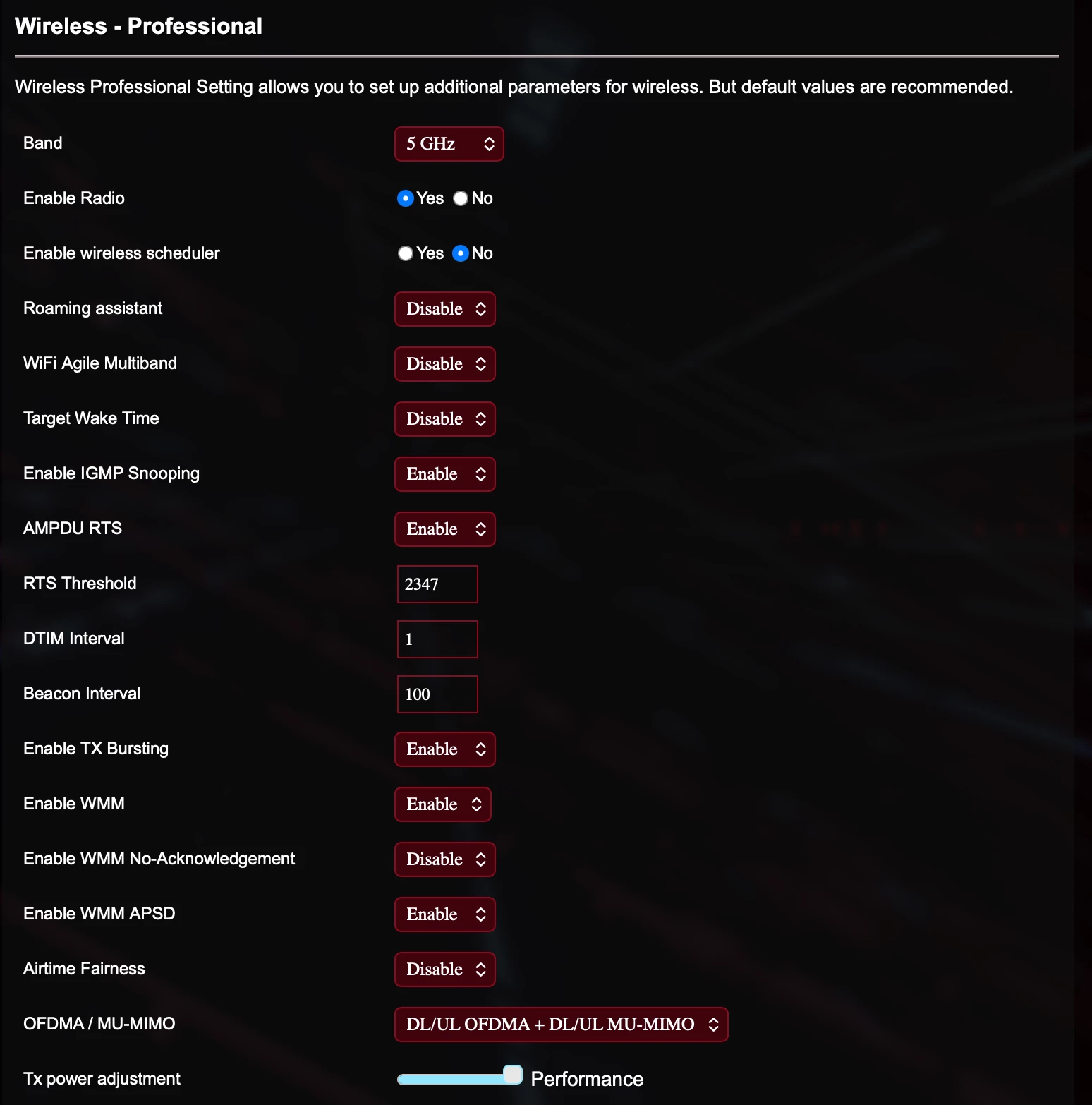
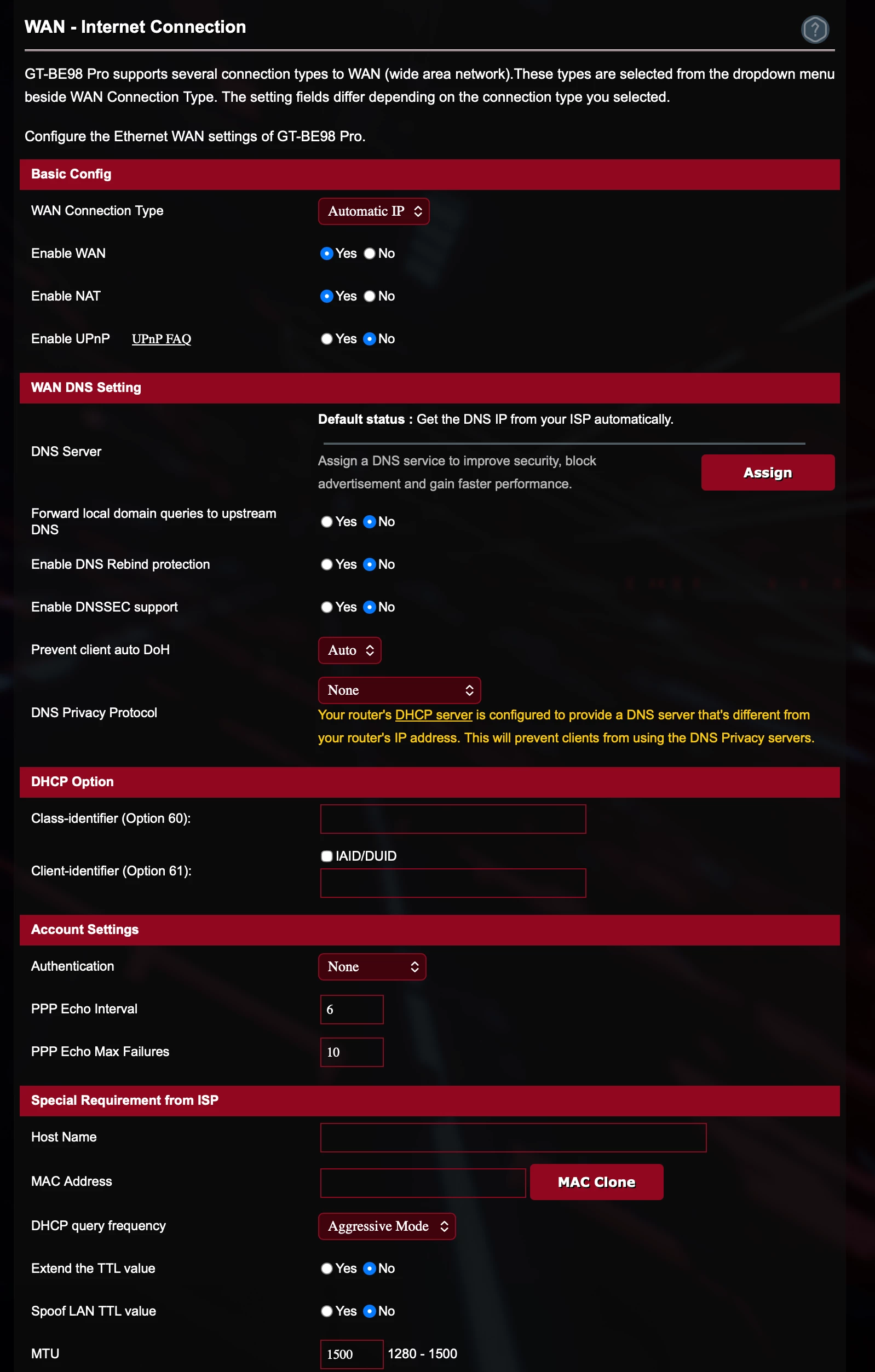
ASUS AiMesh WiFi 7

  • GT-BE 98Pro Quad Band_Main router
  • Ethernet Wired Backhaul to Satellites 
  • Single SSID
  • Encryption
  • WPA2/WPA3_2.4 Ghz/5 Ghz
  • WPA3_6 Ghz
  • Active Bands
  • 2.4 Ghz x 1_Channel Bandwidth 20/40 MHz
  • 5 Ghz x 1_Channel Bandwidth 20/4/80/160 MHz
  • 6 Ghz x 2_Channel Bandwidth 20/40/80/160/320 MHz
  • ISP Google Fiber
  • DNS Server 1_8.8.8.8
  • DNS Server 2_8.8.4.4
  • Firewall Enabled
  • DoS active
  • IPv6 Firewall Enabled
  • Connection Type_Native
  • DHCP_Enabled
  • LAN Setting_Stateless
  • Auto Connect to DNS Server_Enabled
  • RT-BE 96U x 2_Satellites 
  • Zen WiFi BD5 Outdoor x 1_Satellite
  • 2.4 Ghz
  • 5 Ghz


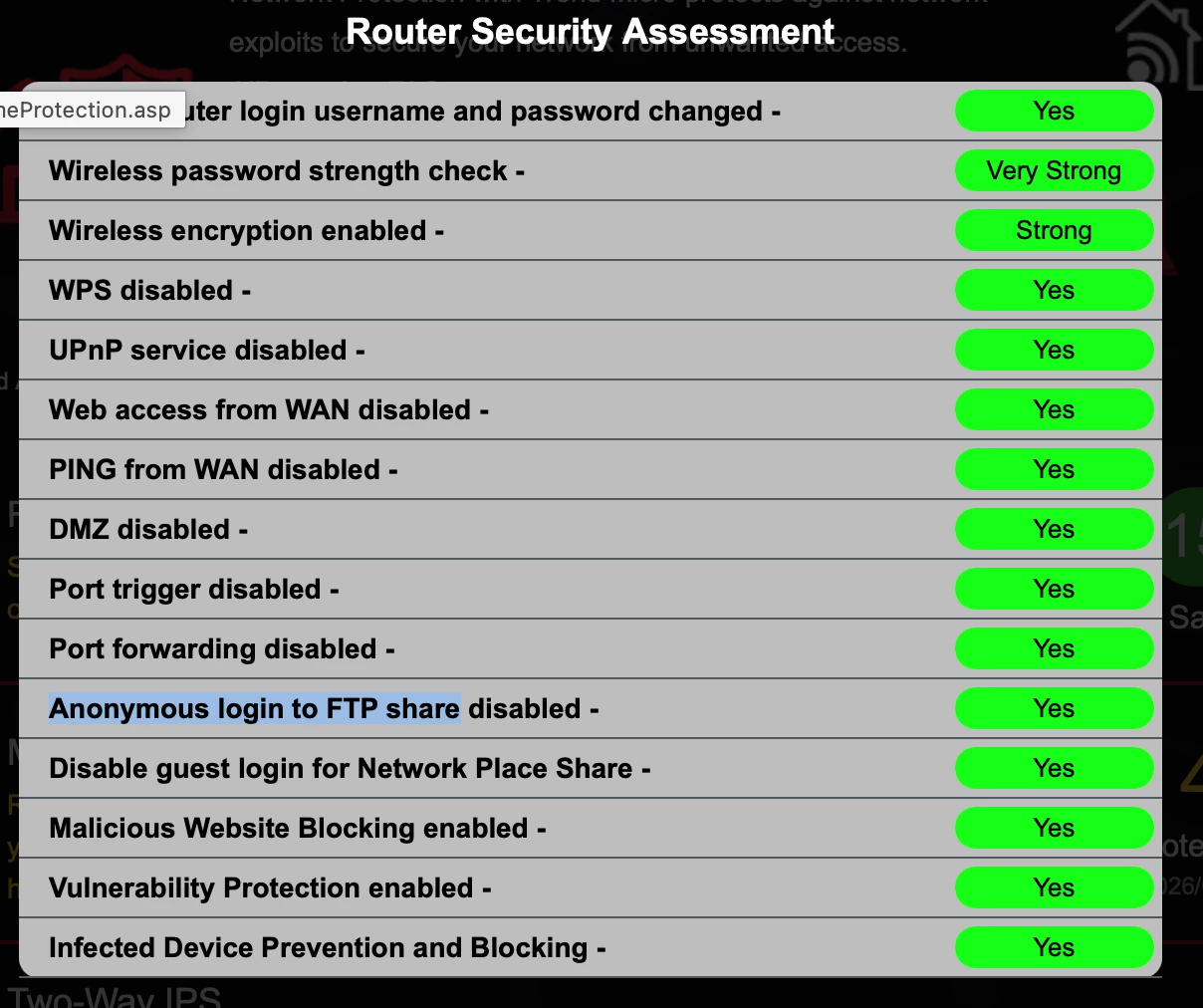
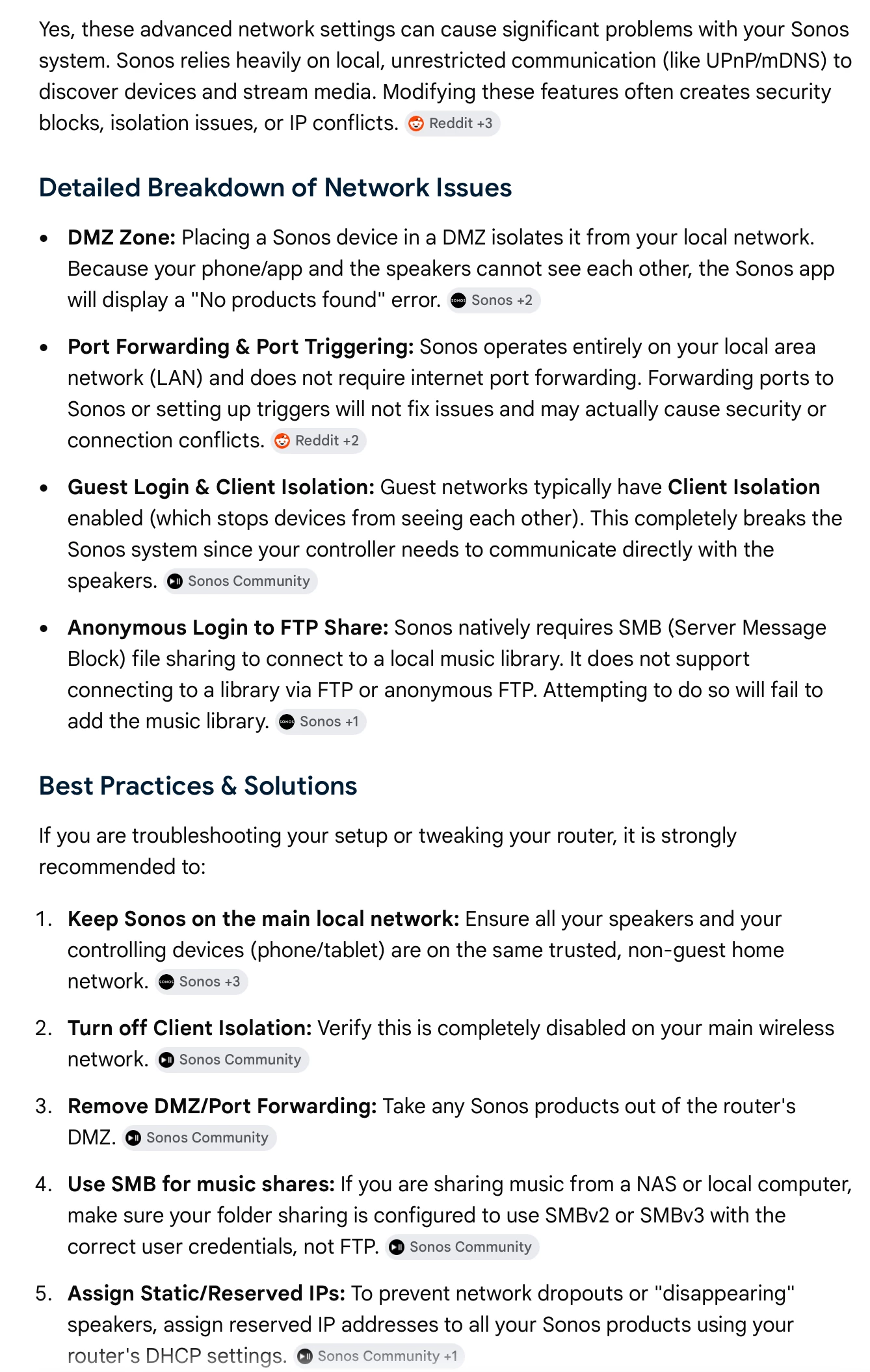
Additionally, below are my security settings. Below that is an AI synopsis of how they may affect Sonos


homeconnected
Forum|alt.badge.img
  • Author
  • Contributor I
  • July 12, 2026

Just trying to narrow it down. iPhone? iPhone S2 controller? Network? There’s just not enough info to go on. And since we don’t have access to any diagnostic information, it’s all just guessing. Did you test any other devices besides an iPhone?


I think your best option is to contact Sonos support again and try to escalate to higher level support. Unless a network expert pops in and says ‘yes, I seen this before. You need to check this option on your access points/router”, I don’t know what else can be done.

only used play.sonos.com which seems to work flawlessly on laptop, client and myself only have iPhones


  • July 12, 2026

Just trying to narrow it down. iPhone? iPhone S2 controller? Network? There’s just not enough info to go on. And since we don’t have access to any diagnostic information, it’s all just guessing. Did you test any other devices besides an iPhone?


I think your best option is to contact Sonos support again and try to escalate to higher level support. Unless a network expert pops in and says ‘yes, I seen this before. You need to check this option on your access points/router”, I don’t know what else can be done.

only used play.sonos.com which seems to work flawlessly on laptop, client and myself only have iPhones


Everything working from play.sonos.com shows that the speakers are connected/can communicate over the internet. But if you installed the sonos controller on the laptop, you could see if the laptop controller has the same local network problems that your iPhone controller is having. Helping to narrow the problem down to local network or just iPhone controller.

The desktop controller and the S2 iOS controller use different API’s to talk to/discover the sonos devices on the local network. So this test isn’t definitive. You really need to contact Sonos support where they can see what is happening on your local network.