missing Arc Ultra Bluetooth pairing in app?

  • November 6, 2024
  • 7 replies
  • 218 views

According to thr support article from the Sonos below, the app (both Android and iOS) should have a function to put Arc Ultra into Bluetooth pairing mode.


However, the latest version of the app on both platforms is MISSING the Bluetooth pairing function.


How do we report this bug? Is there a form or official tracker?


https://support.sonos.com/en-gb/article/pair-sonos-arc-ultra-with-bluetooth

This topic has been closed for further comments. You can use the search bar to find a similar topic, or create a new one by clicking Create Topic at the top of the page.

7 replies

Corry P
Forum|alt.badge.img+19
  • Sonos Staff
  • 9146 replies
  • November 6, 2024

Hi @Gweezel 

Welcome to the Sonos Community!

How do we report this bug? Is there a form or official tracker?

You already have - thank you!

The Bluetooth pairing function within the app is only currently available with Arc Ultra, however, so it is possible that the app is mistakenly not showing you that particular User Interface object (because it shouldn’t show it with other speakers). Please force-close the Sonos app and reopen it - you may find that fixes the issue immediately.

If you have Pi-Hole on your network (if you (or the tech person in your home) don’t know what this is, you won’t have it), please disable it while opening the Sonos app - if that helps, please see my article Sonos & Pi-hole to see how to configure Pi-Hole to work with Sonos.

I hope this helps - please let me know in either case as if there is an issue with this feature, I’ll need some more details from you to move forward. Thanks.


  • Author
  • Contributor I
  • 3 replies
  • November 7, 2024

Thanks for your response.  I tried force closing the app but it has made no difference.


Please let me know the details you need to go ahead with fleshing out the bug description


Corry P
Forum|alt.badge.img+19
  • Sonos Staff
  • 9146 replies
  • November 7, 2024

Hi @Gweezel 

Understood, and thanks for trying that step. In that case, could you please submit a support diagnostic from the affected controller and let me know here when you have done so?

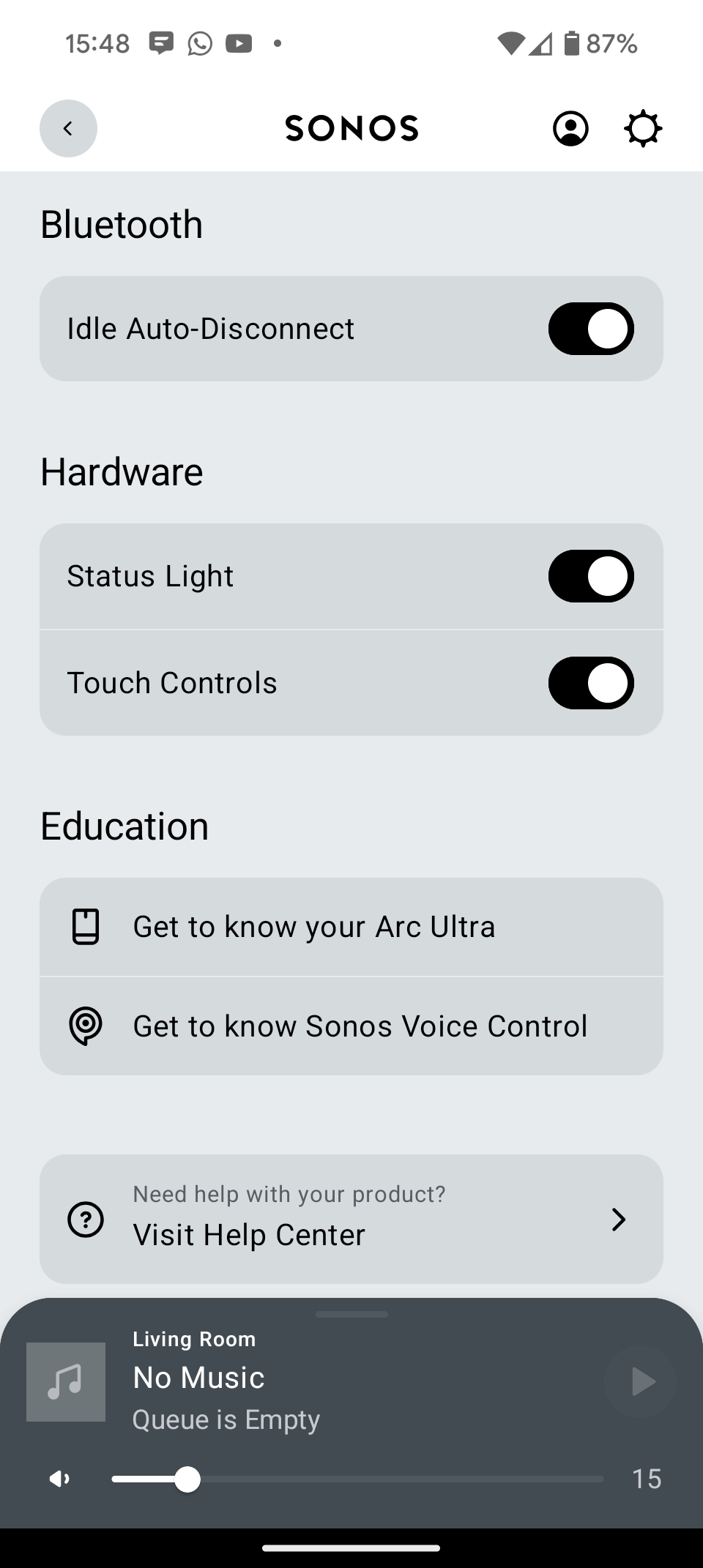
Please also include a screenshot of the app showing that the expected Bluetooth item is not present (“+Pair New Device” should be visible in the Bluetooth section when you tap on the room name in Settings).

Thanks for your assistance.


  • Author
  • Contributor I
  • 3 replies
  • November 7, 2024

Hi,


As requested I have submitted the Support Diagnostic and screenshots of the Bluetooth Settings UI and Diagnostic Submission Number below:


Moderator Note - Removed and recorded diagnostics number.


Corry P
Forum|alt.badge.img+19
  • Sonos Staff
  • 9146 replies
  • November 7, 2024

Hi @Gweezel 

Thank you - I have passed those along for examination. I’ll update you when I can.


  • Author
  • Contributor I
  • 3 replies
  • November 7, 2024

Thanks! Looking forward to a progress update hopefully not too far in the future!


  • Lyricist I
  • 1 reply
  • December 5, 2024

Hi!

Same issue here with both Arc Ultra and Era 100.

Looking forward for an update

Thanks