Bonjour,
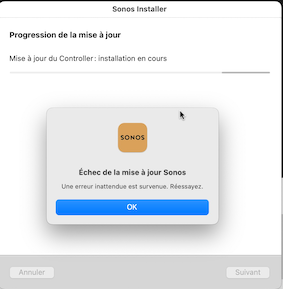
Je n’arrive pas à faire la mise à jour du Contrôler sur mon Mac (MacBook Air M1 2020 avec Ventura 13.0.1).
J’ai toujours ce message d’erreur
Merci de votre aide.
Fabrice

 +1
+1Bonjour,
Je n’arrive pas à faire la mise à jour du Contrôler sur mon Mac (MacBook Air M1 2020 avec Ventura 13.0.1).
J’ai toujours ce message d’erreur
Merci de votre aide.
Fabrice
Best answer by Airgetlam
Delete your current controller from your Mac. Go to the Sonos website and download the ‘new’ version, and install it. When it starts up, be sure to ‘connect to existing system’.
Enter your E-mail address. We'll send you an e-mail with instructions to reset your password.
