
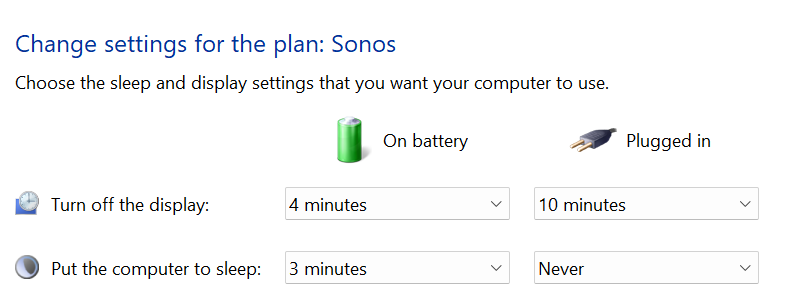
The problem I’m having with playing My Music Files in my Computer is that whenever my laptop is off/black screen, I have no access to my Music in my Computer. The music will not play when I use my app to select music from my Computer. I can still use all the other functions, Spotify, Bandcamp, etc. The laptop goes dark/sleep after about an hour. What settings do I need to set in Power & Sleep mode so I can play music from my laptop? I don’t want the laptop to be on (screen on) 24/7 as my battery will get bad faster. It’s plugged into the outlet 24/7 as I don’t use the laptop at all except for Sonos.

Answered
Keeping SONOS awake in Windows
Best answer by controlav
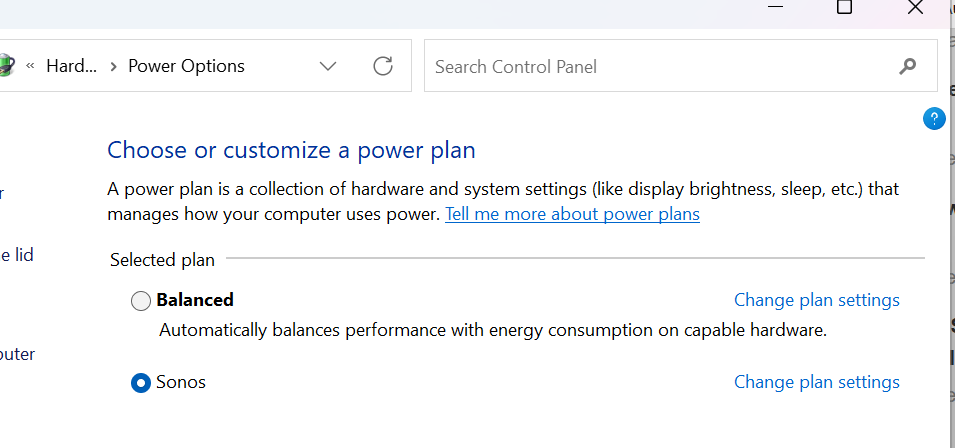
The PC Sonos app actually installs a Power Plan specifically for this:
This topic has been closed for further comments. You can use the search bar to find a similar topic, or create a new one by clicking Create Topic at the top of the page.



Enter your E-mail address. We'll send you an e-mail with instructions to reset your password.