Answered

ghost boxes in sonos favourites in ios app

  • March 25, 2026
  • 8 replies
  • 62 views

Forum|alt.badge.img+3

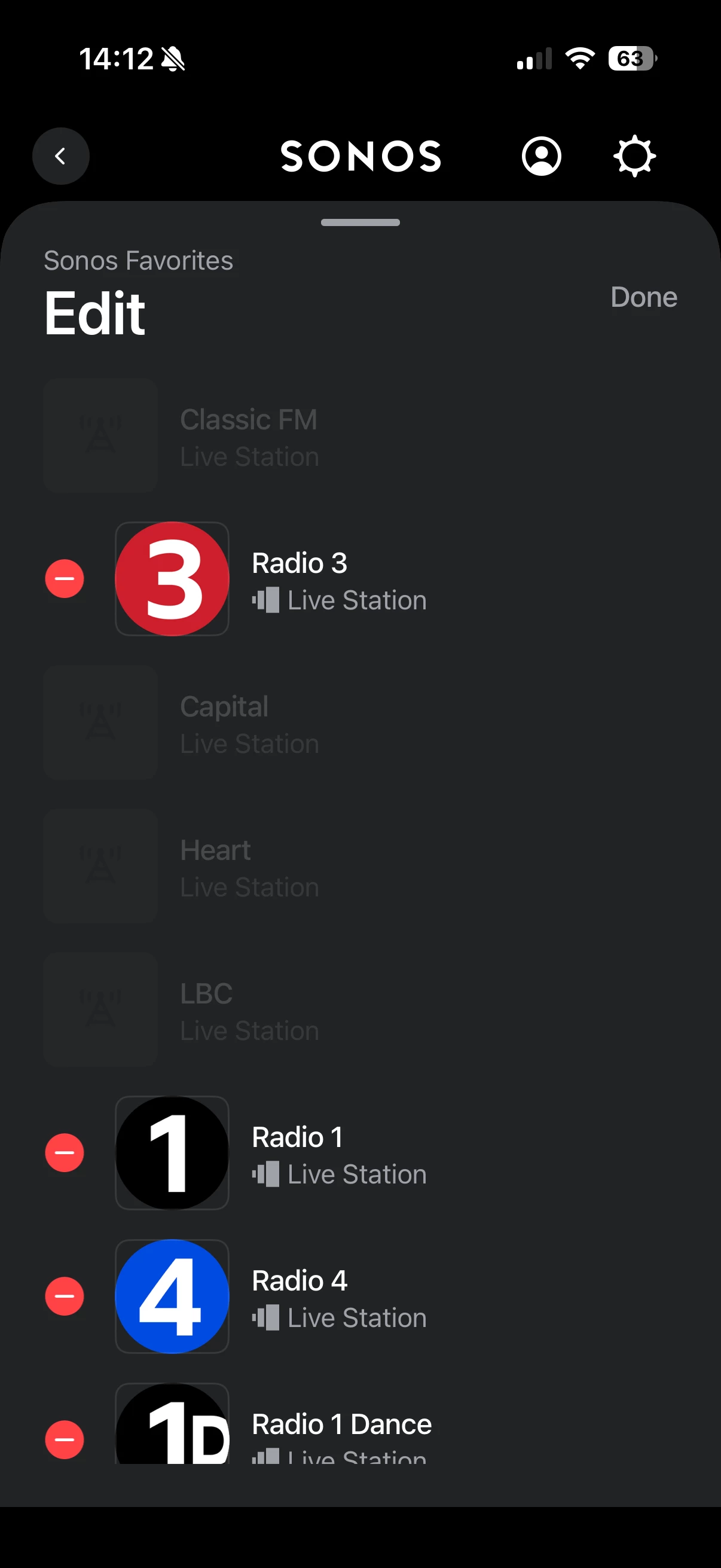
I have some ghost boxes (dimmed out, don’t do anything when touched, can’t be removed when editing the list) in my Sonos favourites in the iOS app. On the web player they are not visible. 
 

anyone know how I can rid of them or can Sonos fix this bug?


tia 

Best answer by Sid-Hartha

Fixed. I re-added Apple music. Removed it about 9 months ago. and I was able to delete those ghost stations. thanks for input everyone

8 replies

MoPac
Forum|alt.badge.img+19
  • Headliner III
  • March 25, 2026

 Can you do this?


Forum|alt.badge.img+3
  • Author
  • Avid Contributor III
  • March 25, 2026

unfortunately not. upon hitting edit there is no minus next button next to the ghosts. I’ve tried deleting and reinstalling app. nothing shifts them.


Airgetlam
  • March 25, 2026

That’s really odd (and thanks for the screenshot!) 

I’d try a couple of things. First, I’d attempt a network refresh. Unplug your Sonos from power (or power down, if it is a battery driven speaker, it should be off), and then reboot the router. Wait two minutes, then plug back in the Sonos devices. Wait another two minutes, then open your controller and see if the ‘ghost’ items are still there.

If they are, then I suspect you’re going to need to call Sonos Support to discuss it. You may need to get through the Chatbot to speak to a representative directly.

When you speak directly to the Support staff, they have tools at their disposal that will allow them to give you advice specific to your network and Sonos system.


Stanley_4
  • Grand Maestro
  • March 25, 2026

Does an App Reset clear that sort of thing? Fast and pretty painless, I'd try it before calling in.


Mr. T
  • March 25, 2026

Which content service were the stations saved from and is that service still installed?


Forum|alt.badge.img+3
  • Author
  • Avid Contributor III
  • March 25, 2026

I am assuming TuneIn or Apple Music. Neither of which are still attached services. Removed them ages ago.


Forum|alt.badge.img+3
  • Author
  • Avid Contributor III
  • Answer
  • March 25, 2026

Fixed. I re-added Apple music. Removed it about 9 months ago. and I was able to delete those ghost stations. thanks for input everyone


MoPac
Forum|alt.badge.img+19
  • Headliner III
  • March 25, 2026

Fixed. I re-added Apple music. Removed it about 9 months ago. and I was able to delete those ghost stations. thanks for input everyone

 Seems like that should not be necessary.  When you drop a service those Favorites should just disappear.