
Feature Request (silly) for a web controller.

  • June 8, 2026
  • 9 replies
  • 74 views

Stanley_4

I'm suggesting a redesign of the web based controller with a new (ok, really old) interface.

Just grab an old CR-100 and duplicate the design as a web page.

Simple, distinct buttons for every feature and not at all confusing.
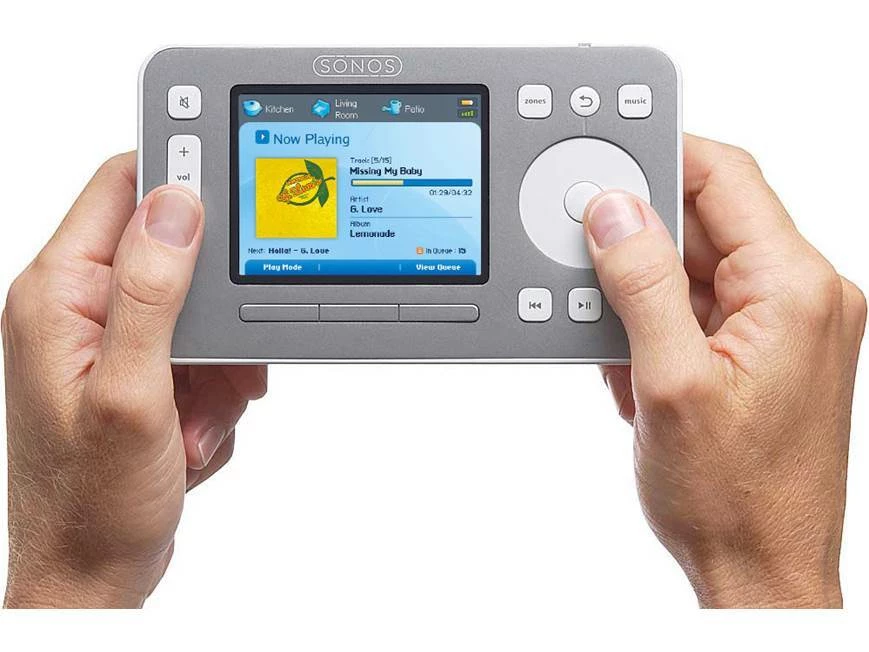
 

Sonos CR-100 Controller


9 replies

  • June 8, 2026

I’ve still got 2 boxed up in the basement. Wish I could use them!


AjTrek1
  • June 9, 2026

OK...time to put grandpa to bed….

I’m just kidding...but I couldn’t resist the opportunity for a bit of light-hearted ribbing 😂


Airgetlam
  • June 9, 2026

It certainly would be interesting to interact with it on a device that allows a touch screen…


melvimbe
  • June 9, 2026

How much would you be willing to pay for this device?  The old one was $400 if I recall correctly.  Perhaps it could be built at a lower cost now?

Is it possible to build a web interface and also have dedicated hard buttons? 

What changes would you make from the original design?  Since the CR100 was built before there was streaming services, there would need to be changes to accommodate for that.  I would also want buttons that are dedicated (or can be configured) for TV audio, Aux source, BT source, etc.

I don’t think I want a touchscreen, since the screen will be necessarily small.  My experience with small touchscreens on other devices has been frustrating.


controlav
Forum|alt.badge.img+24
  • Lead Maestro
  • June 9, 2026

Love the idea, but not sure how well you can do a scroll-wheel interface on a web page.


Forum|alt.badge.img+18
  • Local Superstar
  • June 9, 2026

Love the idea, but not sure how well you can do a scroll-wheel interface on a web page.

https://apps.apple.com/gb/app/retropod/id6450168785


Stanley_4
  • Author
  • Grand Maestro
  • June 9, 2026

Device cost? Don't want a device, I want a web page.

No hard buttons, just buttons on a web page.

Pretty sure I had Napster on my CR-100 controlled Sonos setup.

Wouldn't want a touchscreen design, want a web page. If the device running the web screen had a touch screen then use that as well as a mouse or touchpad.

Size depends on the device you are opening the web page  on, the basic CR-100 layout should work on fairly small phones due to the simplicity and limited number of functions per page.

The scroll wheel was really neat, but yes, hard to do on a web page, probably replace with select, up and down buttons. Save a bit of screen space too.


Once the basic design is functional you could add neat features missing from the original, like a full page now-playing page, maybe full screen pages for other functions too, but all still behind the basic CR-100 info window and buttons home page. Most users would not need to go below that level for normal daily use of their Sonos.

The whole idea is to get away from the current - too much information, too many functions, too busy - design, back to simple, intuitive and obvious, at least for the daily tasks.


Forum|alt.badge.img+18
  • Local Superstar
  • June 9, 2026

Device cost? Don't want a device, I want a web page.

No hard buttons, just buttons on a web page.

If you want a custom web page interface, I would take a look at HA with a custom dashboard, eg:

https://community.home-assistant.io/t/dashboard-sonos-card/393620

HA integrates well with Sonos.


Stanley_4
  • Author
  • Grand Maestro
  • June 9, 2026

I was hoping to inspire someone else to do the work. :--)

If I did it, I'd use one of the AI coding tools, several folks have done Sonos related projects with them.




