
Feature Request - Consolidated Network Status Page

  • August 4, 2026
  • 8 replies
  • 81 views

Stanley_4

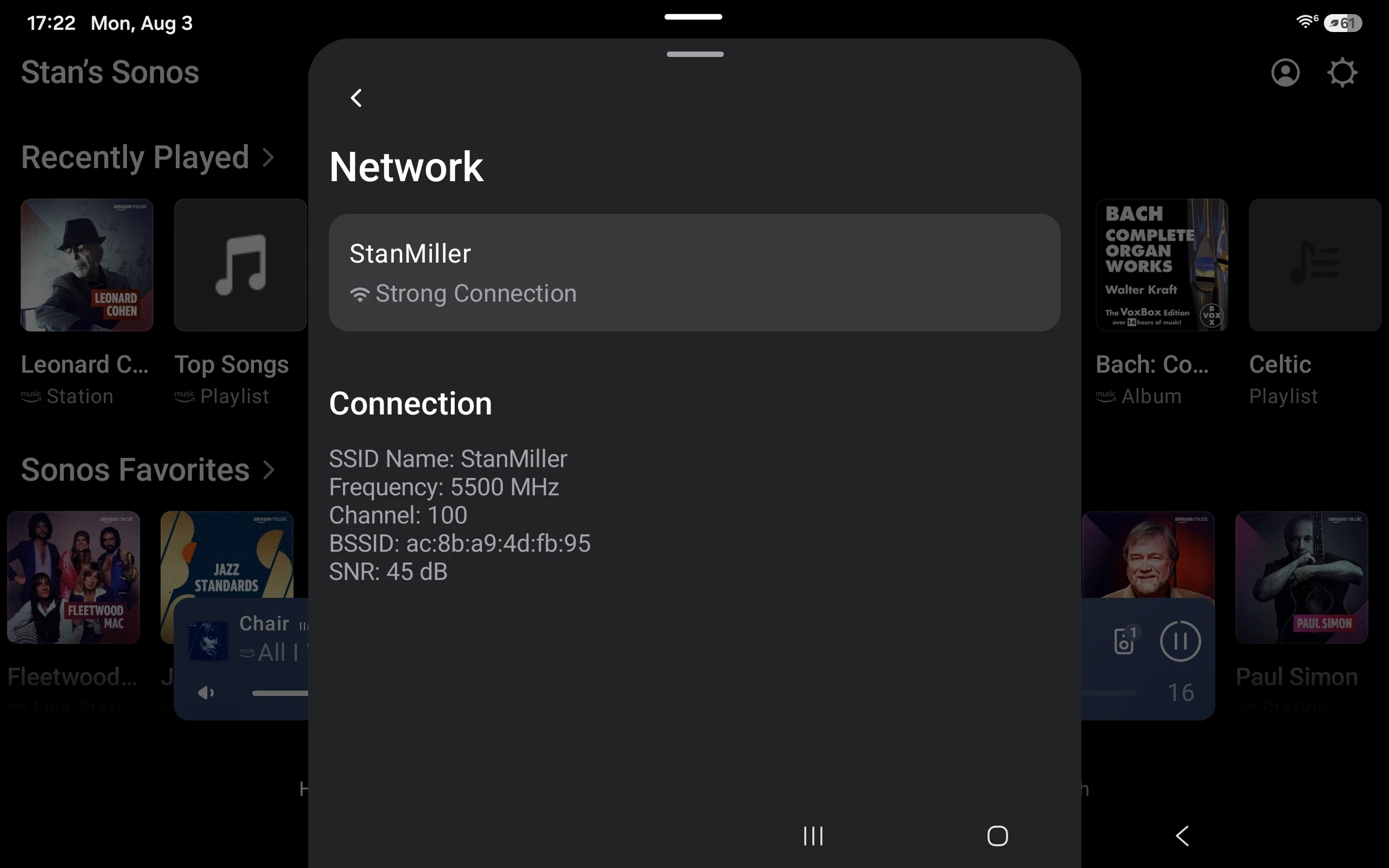
Currently it takes multiple taps to see the radio status for a speaker, then several more to see another, to see all your information takes a lot of clicks and paper/pencil to remember all the results.

A single page consolidating this information for all devices in a system would greatly ease troubleshooting and equipment placement decisions. Putting it under the Network heading would be handy.

If status of the 5 gHz surround links could be included that would be another big plus.


8 replies

Forum|alt.badge.img+18
  • Local Superstar
  • August 4, 2026

You can see this already in your AP management (ie UniFi Network App) . Just go to clients, search Sonos, and you can add the columns you want. Create a group of you Sonos devices if you like.

Currently it takes multiple taps to see the radio status for a speaker, then several more to see another, to see all your information takes a lot of clicks and paper/pencil to remember all the results.


The new 10.5 now gives you a view over time, so no need for lots of clicks and pencil and paper, UniFi will remember for you 😀

https://blog.ui.com/article/introducing-network-10-5

Identity-Centric Observability with Time Machine

Troubleshooting shifts from infrastructure-focused monitoring to a complete client experience view. Time Machine enables administrators to investigate issues from the user's perspective and quickly identify root causes.

  • Replay historical client activity and connectivity events.
  • Analyze WiFi performance and roaming behavior across multiple APs at a glance.
  • Review application usage and traffic flows in a single timeline.
  • Accelerate troubleshooting with complete contextual visibility.


Forum|alt.badge.img+18
  • Local Superstar
  • August 4, 2026

I think this is what you are after ​@Stanley_4 , this is my bedroom Era-100 showing alarm this morning. I can see previous 24 hours signal strength, and the data and destination networks used for BBC Sounds service for the Sonos Alarm on the specific Sonos device. No need for pencil and paper, if you have UI Network App (I recall you use UniFi APs)

This is more useful for devices that roam, eg phones, Move2 etc, as all the roam events are also displayed, that can be correlated on the time line with other events.


Stanley_4
  • Author
  • Grand Maestro
  • August 4, 2026

Sure I can see a lot of network stuff from my Ubiquity gear but that is a topic for the Ubiquity forum.

My request is for Sonos to add a simple consolidated network status page. One showing information already available elsewhere but on a single page.


Forum|alt.badge.img+18
  • Local Superstar
  • August 4, 2026

Currently it takes multiple taps to see the radio status for a speaker, then several more to see another, to see all your information takes a lot of clicks and paper/pencil to remember all the results.

Until (If?) Sonos do this, there are work arounds to get the information your are gathering that don't require lots of clicks or involve a pencil and paper.

Sure I can see a lot of network stuff from my Ubiquity gear but that is a topic for the Ubiquity forum.

My request is for Sonos to add a simple consolidated network status page. One showing information already available elsewhere but on a single page.

Not specific to UI, ISP supplied routers will show the clients and signal strength of clients, possibly in a single pane, via the management App/Web. I agree your suggestion may be useful for a few that don’t have access to their network equipment and require this info.


Stanley_4
  • Author
  • Grand Maestro
  • August 4, 2026

The few? That would be the folks with about every ISP supplied router?

I'm looking for a simple Sonos tool a Sonos user can use, inside the Sonos system, to get to existing information.


Not that it wouldn't be nice to see the same information in a third-party app.


Forum|alt.badge.img+18
  • Local Superstar
  • August 4, 2026

The few? That would be the folks with about every ISP supplied router?

That is my point. To setup an ISP router, you would install the ISP App, the ISP App would show the information you are asking for. If they are in the minority, and not using ISP supplied equipment, then the info you are requesting in Sonos App is already available to the user in the App supplied with the network equipment. I referred to a ‘few’ as those Sonos users that require the info you are requesting, and are unable to get it by other means.


Stanley_4
  • Author
  • Grand Maestro
  • August 4, 2026

Strange, my ISP supplied router offers almost no information or configuration options. Conversations here with other users seem to indicate they are seeing the same on their ISP gear.

I understand you greatly dislike my suggestion so I'll leave it at that.


Forum|alt.badge.img+18
  • Local Superstar
  • August 4, 2026

Strange, my ISP supplied router offers almost no information or configuration options. Conversations here with other users seem to indicate they are seeing the same on their ISP gear.

I understand you greatly dislike my suggestion so I'll leave it at that.

Here in UK, the major ISPs provide an App, that customers can install, to manage their ISP provided equipment. I am not familiar with how the major US ISPs provision their customers.

I don’t disagree with your suggestion. I provided a simple work around for your pencil and paper solution, until Sonos decide to provide the diagnostic info you require.

