Answered

Droputs when streaming — Analog in works perfect

  • March 1, 2026
  • 14 replies
  • 102 views

Forum|alt.badge.img

My speaker groups drop out and come back whenever I start music or skip a track (Apple Music and Spotify). And sometimes just randomly. Based on what I’ve read here, it seemes like a Wi-Fi interface issue, and I have followed every suggestion, to no avail. But today I realized that the problem is nonexistent when playing records via the analog-in on one of the two Fives. I’m praying that this info, in the right hands, might help me finally sort out the dropout issues when streaming. 

Best answer by Airgetlam

Also, I believe local sources (the line in) can use greater bandwidth than streaming does, so it still could be WiFi interference, just experienced at higher data rates/usage. 
 

I suspect ​@AjTrek1 is right, more detail would be helpful. Or, I would recommend that you submit a system diagnostic within 10 minutes of experiencing this problem, and call Sonos Support to discuss it. Don’t post the resulting diagnostic number here, Sonos’ lawyers get sensitive about GDPR, I suspect.

There may be information included in the diagnostic that will help Sonos pinpoint the issue and help you find a solution.

When you speak directly to the Support staff, they have tools at their disposal that will allow them to give you advice specific to your network and Sonos system.

14 replies

AjTrek1
  • March 2, 2026

Streaming and playing your records via line-in to your Fives are vastly different.

Streaming involves an external server (Apple Music or Spotify) sending audio over the internet to your Sonos.

When playing via line-in to your Fives your turntable is the source. The internet is not involved; just your home Wi-Fi. Think of your turntable as a “local” server. That said you can still experience audio issues but the cause may be different such as a bad line-in connection or turntable issues. 

Tell us more about your network as we may be able to offer suggestions regarding drops when streaming with Apple Music or Spotify. There is definitely a local and/or external network issue.


Airgetlam
  • Answer
  • March 2, 2026

Also, I believe local sources (the line in) can use greater bandwidth than streaming does, so it still could be WiFi interference, just experienced at higher data rates/usage. 
 

I suspect ​@AjTrek1 is right, more detail would be helpful. Or, I would recommend that you submit a system diagnostic within 10 minutes of experiencing this problem, and call Sonos Support to discuss it. Don’t post the resulting diagnostic number here, Sonos’ lawyers get sensitive about GDPR, I suspect.

There may be information included in the diagnostic that will help Sonos pinpoint the issue and help you find a solution.

When you speak directly to the Support staff, they have tools at their disposal that will allow them to give you advice specific to your network and Sonos system.


Airgetlam
  • March 2, 2026

Ah, I had your issue backwards…apologies. It could certainly be an issue between your router and the servers sending you the music. Hard for us to tell. If you’ve done a full network reset as you say in your ‘I have followed every suggestion’, then I’d certainly suggest that diagnostic I mentioned. 


Stanley_4
  • Grand Maestro
  • March 2, 2026

With no Sonos info in your profile you will,have to give us that info here.


buzz
  • March 2, 2026

Don’t Factory Reset any SONOS units unless asked to do so by Support because this will destroy diagnostic data.


Forum|alt.badge.img
  • Author
  • Contributor I
  • March 2, 2026

Thanks, friends. Here’s my system info:


2x Fives (stereo pair, living room)

2x Ones (stereo pair, kitchen)

1x One SL (bedroom)

1x Roam (bathroom)


They all connect to a Boost, which is about 4 feet from the router. (for the record, these problems exits with or without the boost. I bought it second hand in an attempt to fix this issue)

I live in an apartment building. All the speakers are within about 20 feet of the router/boost. I do not have plaster walls (no metal lath). But I am bathed in Wifi from all the other apartments. 


Please let me know what other info I can give. Thank you again for the help. 


AjTrek1
  • March 2, 2026

Thanks for the reply

Do you own your router or are you using one provided by your ISP? The Boost should not be necessary but we can review that later. 

Also, if using your own router is it connected to a box provided by your ISP that houses both the router and modem as one footprint? 


  • Prodigy III
  • March 2, 2026

When you say your speaker groups drop out, do you mean the stereo pairs you have defined drop out between left and right, or when you combine for example your two pairs of Fives and Ones that you get dropouts? 


Stanley_4
  • Grand Maestro
  • March 2, 2026

The Boost is old Wi-Fi technology, unless you have a very old Wi-Fi router it is likely a far better option to have your system connect to it rather than the Boost or using Ethernet.

With multiple wifi signals and only three non-conflicting 2.4 gHz channels making use of the 5 gHz band can be a big help, something the Boost can't do.

As a start:

https://support.sonos.com/en-us/article/improve-your-sonos-products-wifi-connection

https://support.sonos.com/en-us/article/switch-sonos-between-a-wireless-and-wired-setup


Forum|alt.badge.img
  • Author
  • Contributor I
  • March 2, 2026

Aj:

I own the router (TP Link Archer AX3000) and it is connected to an ISP-provided cable modem, which does not have a built in router. 

Ian:
I'm realizing that it’s both: Usually the system will drop out everything except one of the Ones in the kitchen. Then the second One in the kitchen pops on after about 10-15 seconds. Then the living room pair catches up shortly after. Those are the only speakers I can hear at the same time so I’m not sure what the bedroom and bathroom are doing. 
Stanley:
Thank you, I will remove the Boost and go back to the router-only setup. The Boost didn’t help anyway. One thing--I can’t seem to find the Network Details screen. I followed the instructions from your link, but I don’t see a “Status” section for any of my products. Any suggestions?


AjTrek1
  • March 2, 2026

Aj:

I own the router (TP Link Archer AX3000) and it is connected to an ISP-provided cable modem, which does not have a built in router. 


Here are a few adjustments you might make if not already done 

  1. Give the same SSID to the 2.4GHz and 5Ghz bands
  2. Turn off Airtime Fairness
  3. Turn off Band Steering wherein the router assigns clients to a particular band

Before doing any of the above follow the steps below in the order given:

  1. Unplug all Sonos including the Boost
  2. Make adjustments in routers admin and reboot  *
  3. Delete the Sonos app from your device 
  4. Reboot your device and connect to Wi-Fi
  5. Plug in all Sonos (except the Boost) and let them comeback
  6. Reinstall the Sonos app
  7. Select “Join an Existing System” and follow prompts
  8. Accept all Options during app setup
  9. Sign in with Sonos credentials 
  10. Start enjoying Sonos

 * Use the SSID for the bands that Sonos is currently using (meaning pick one that they were connecting to; assuming they were different). That will allow Sonos to recognize it quickly.


buzz
  • March 2, 2026

Rather than Grouping Rooms, systematically play each Room alone. Are there any issues while operating in this mode?


Stanley_4
  • Grand Maestro
  • March 2, 2026

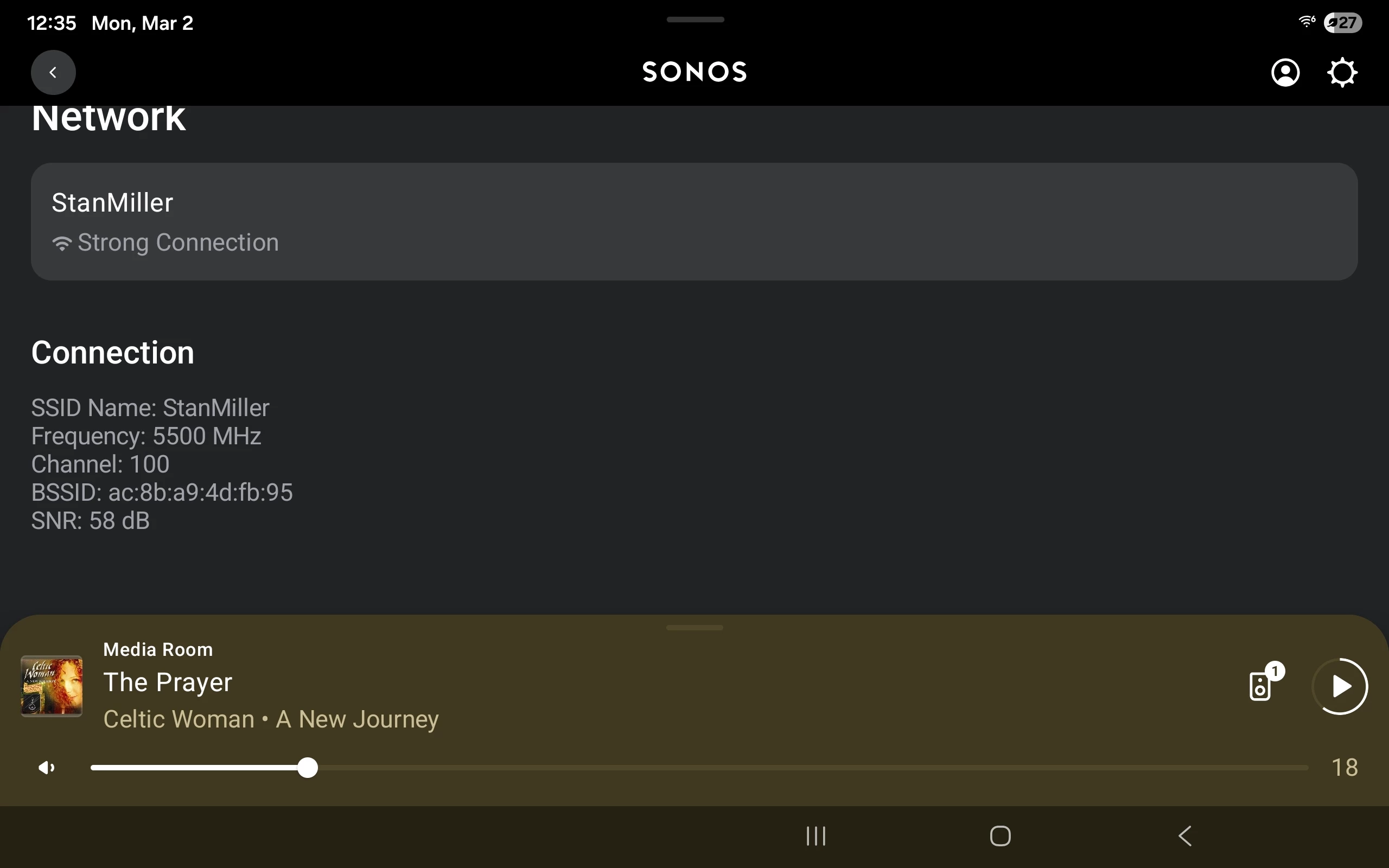
Try: Settings, Room, Product, Network.

As Sonos forbids copy/paste from that screen I'll add a screenshot 


  • Prodigy III
  • March 3, 2026

Try: Settings, Room, Product, Network.

As Sonos forbids copy/paste from that screen I'll add a screenshot 


Oh I do love the excellent use of the extra screen space when in landscape mode on a tablet with the new app…. 😜