Question

Content Services grayed out

  • March 25, 2026
  • 26 replies
  • 130 views

Forum|alt.badge.img

All 7 speakers were working fine on my Eero system. Then my internet went out and the technician said it was because of a programming glitch (Internet service providers recently changed hands). But he fixed it and now internet works and my Eero network is also working and even shows that the Sonos speakers are connected. However, the sonos app will not recognize ANY of them. I have 1 hardwired direct to the Eero hub and it still is not seen. In the sonos app, i am logged in, i have deleted and reinstalled the app, and Content Services in Sonos remains grayed out. When i go to spotify (which also is up to date) and tap the icon to connect to sonos, there is nothing. How do i get content services showing? how do i get this damned nightmare of a system to recognize speakers (and yes i did a factory reset)

26 replies

Stanley_4
  • Grand Maestro
  • March 25, 2026

Start with a network refresh to cure any ills the ISP issues caused.

Power down ALL Sonos, reboot router and wait for it to stabilize, usually 1-2 minutes.

Reboot Controller, once fully up power up your Sonos.


As long as you haven’t shot yourself in the foot with a Factory Reset all should be recoverable, either by this or if needed a couple other tweaks.


Forum|alt.badge.img
  • Author
  • Contributor I
  • March 25, 2026

Thanks, tried and did not work. 

  1. I unplugged router and Eero, all 7 Sonos speakers, then re-plugged 2 mins later.
  2. Deleted and reinstalled Sonos app, followed up prompts to all bluetooth/location/network access and notifications
  3. Tried “Join Existing system” » “We can’t find a sonos system….”
  4. Tried “Add speaker or component” » Searching for nearby products » “We didnt find any new products

Meanwhile, all speakers show up as ONLINE on my Eero network. Nothing changed after trying what you suggested. What else?


Forum|alt.badge.img+19
  • Senior Virtuoso
  • March 25, 2026

If you did factory resets of your speakers, you’ll need to go through and add each of them to your system as if they are new devices. A factory reset is exactly that: it removes all data and reverts the speakers to “as new”, ready to be installed. It’s rarely beneficial to do it. 


Forum|alt.badge.img
  • Author
  • Contributor I
  • March 25, 2026

Thanks but STILL not working.

I did factory reset (MAYBE) on only one speaker. I say maybe, because the speaker never blinked orange then green like this link suggested.

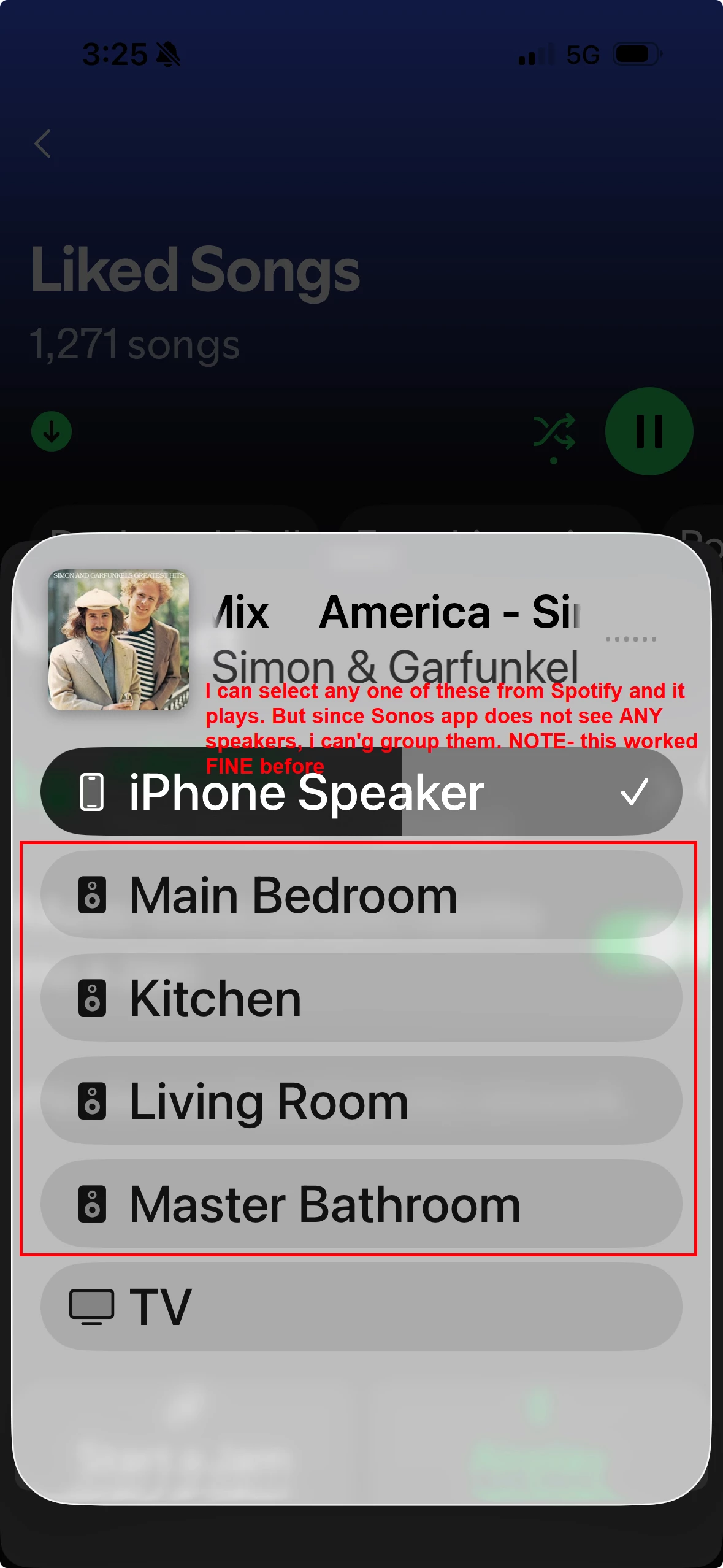
Below is what I see in Spotify. I can now only control one speaker at a time via AirPlay option. They used to all be listed as a “Group” which I setup in Sonos app, but since Sonos app does recognize ANY speakers/System, it does not show up as a Group in spotify.


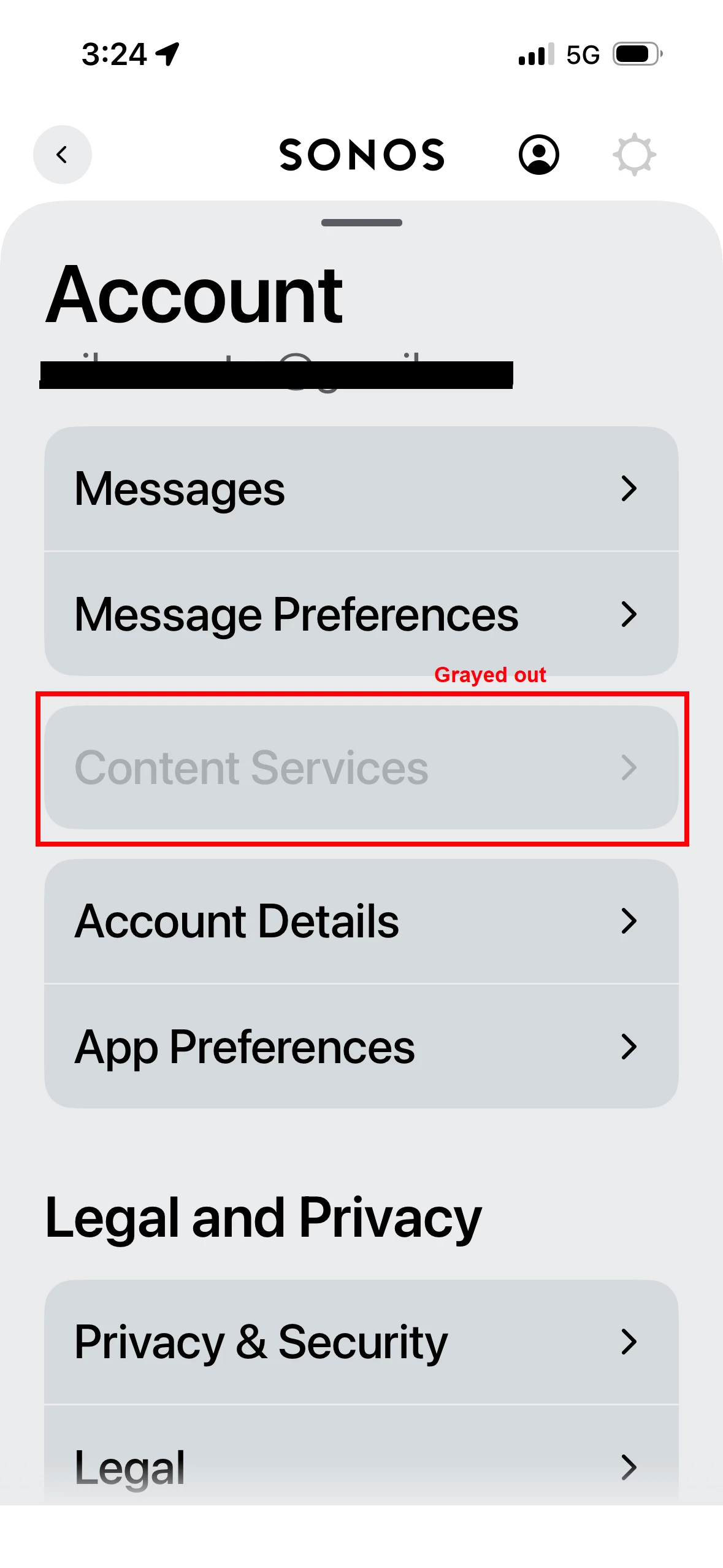
And here is the grayed out that shows in Sonos app. I think if i can just get sonos app to not be grayed out on Content, this will work again.


Forum|alt.badge.img
  • Author
  • Contributor I
  • March 25, 2026

Here’s another update. I can now confirm I did the factory reset correctly to ONE speaker. After blinking green, the speaker was found and i manually entered the Passcode, then password for my Eero network. Sonos app says “Connecting Sonos One to Eeros network” » then “Speaker has been added but may not appear in your System. If so, unplug and re-plug to finish setup from System Settings.

So i did that, and now it can’t be found again.

What am i missing here?


MoPac
Forum|alt.badge.img+19
  • Headliner III
  • March 26, 2026

 When the ISP technician left did you check to see if the ISP modem was still in Bridge Mode?


Forum|alt.badge.img
  • Author
  • Contributor I
  • March 26, 2026


 When the ISP technician left did you check to see if the ISP modem was still in Bridge Mode?

No - i am checking on that. Should the modem/router be in bridge mode or not? 

I’m confused, too, b/c i have a ONT on the wall that connects to the router and then my desktop PC connects to the router.


MoPac
Forum|alt.badge.img+19
  • Headliner III
  • March 26, 2026

 If your ISP provided a Modem/Router ( Gateway ) that you have your own router connected to then it’s a good idea to have the ISP Gateway put in Bridge Mode.  It’s best if you don’t have two WiFi home networks.  Your controller ( Phone or tablet ) has to be connected to the same network as the Sonos devices.  Hopefully your ISP allows you to put their device into Bridge Mode either from the Gateway settings or from an app your ISP provides access to.  I have read somewhere that you might have to ask them to do the Bridge Mode setting for you.

 I use my ISP gateway.  No issues here.  I did reserve all the IP Addresses for all Sonos devices.  Guess that can help with communication stability.

 ??? What’s an ONT?


Stanley_4
  • Grand Maestro
  • March 26, 2026

ONT = basically an optical fiber to Ethernet converter, not actually a modem but gets called that a bit too often.


Airgetlam
  • March 26, 2026

ONT: Optical Network Terminal, according to Google.


Forum|alt.badge.img
  • Author
  • Contributor I
  • March 26, 2026

Your controller ( Phone or tablet ) has to be connected to the same network as the Sonos devices. 


Ok, still don’t understand bridge mode, but i do have the Wifi network provided by my ISP (lets call it ISP-Wifi) and then i have the Wifi network i created on my Eero booster (lets call it Eero-Wifi). BEFORE my tech came out, all Sonos speakers worked fine being connected to Eero-Wifi. 

So, I took your advice above and connected my phone (controller) to ISP-Wifi and then opened Sonos app and it found the system and one speaker started to work. I’m assuming if i went through and updated the other 6, that they would also work; however, I want the Sonos working on the Eero-Wifi because the signal is better.

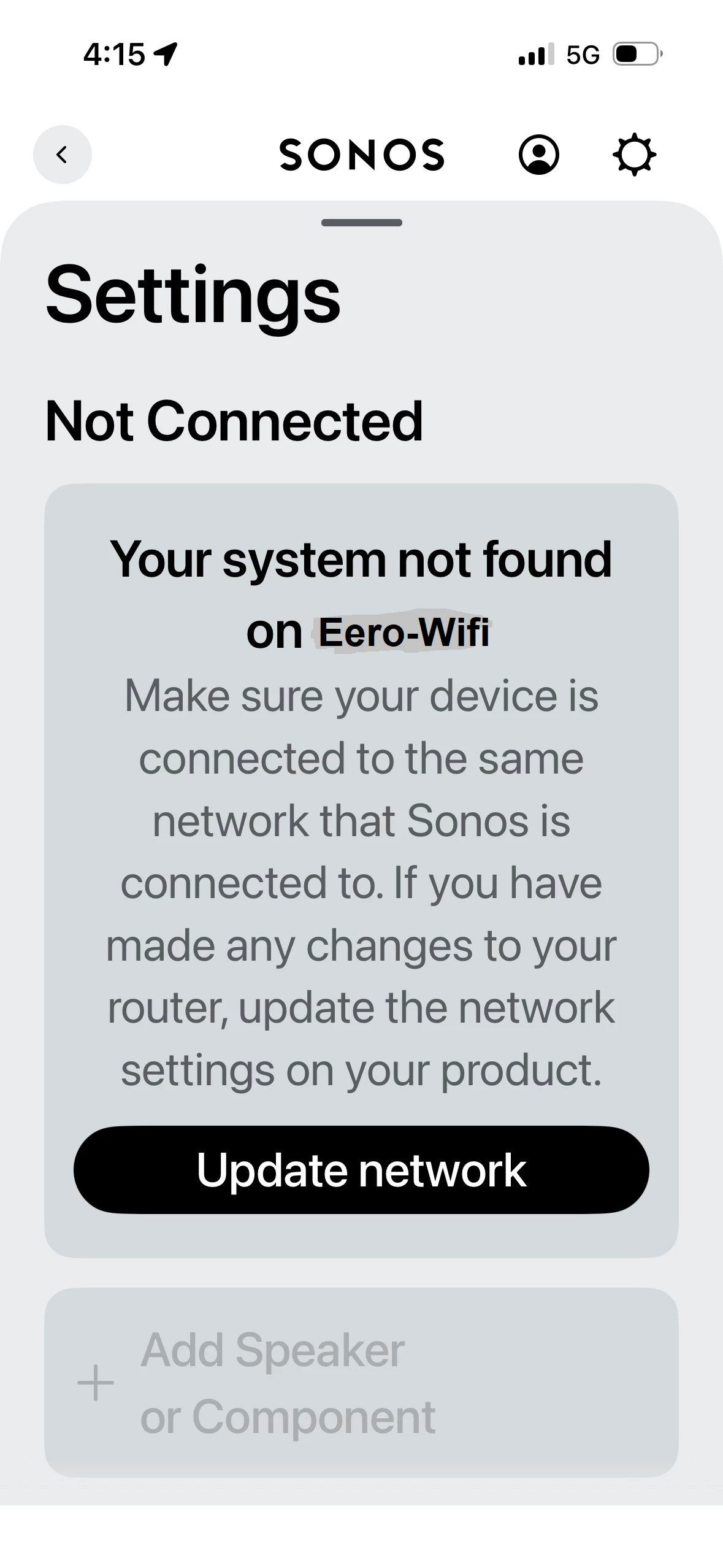
Now, when i switch my phone (controller) back to Eero-Wifi, and open the sonos app, it still shows the Not Connected message below.

When i hit Update Network, the app says “We found multiple Sonos systems. Let’s confirm which one you want to update.” 6 speakers are on one system and 1 speaker is on the other system. (The one on the 2nd system is the one that worked). So, i choose the network with the 6 that dont work and it finds the speaker, plays the chime and says it is now added. But i get the same error above on the app.

I am so lost on this, seems like a simple fix, but i am missing it.


MoPac
Forum|alt.badge.img+19
  • Headliner III
  • March 27, 2026

 Bridge Mode means your ISP router will no longer broadcast its WiFi.  So when you look for WiFi networks on your phone the ISP network you used to see will be missing.  Now you will see your EERO network and neighbors networks if they are close enough.


Forum|alt.badge.img
  • Author
  • Contributor I
  • March 27, 2026

Ok, I was able to login to my centurylink (ISP) and change the WAN settings to “Transparent Bridging” however i still see the router wifi listed on my phone, and of course, the sonos speakers STILL do not work. I still see the same error as in the screenshot above: Your system not found on …..


Mr. T
  • March 27, 2026


Now, when i switch my phone (controller) back to Eero-Wifi, and open the sonos app, it still shows the Not Connected message below.


Your Phone is connected to a 5G network in this screenshot, not Wi-Fi.

You need to be connected to Eero-WiFi if that is the network you have Sonos on.


Stanley_4
  • Grand Maestro
  • March 27, 2026

With your CenturyLink in bridge mode the Wi-Fi SSID it was broadcasting should be gone. If it is still visible could it be that you have the ISP's Wi-Fi pods connected to it and powered on? If so unplug them to get the ISP SSID to go away.

Your personal router should be plugged into your ONT with an Ethernet cable and broadcasting an SSID (hopefully different than the ISP one to avoid future issues) connect your controller to your router's Wi-Fi and see if anything Sonos are visible. If none are try connecting one to your router (not the ISP router or pods) with Ethernet and see if it is visible.

If your router doesn't see the Internet after the Bridge mode swap and removing any Wi-Fi pods try powering down your router then power down the ONT for 30 seconds and power it back up. Wait for it to get ready (my ONT has a blue light when active in bridge mode) you'll need to check your manual for the proper LED colors. Power up the router.. and verify the Internet connection. Then power cycle all Sonos to pick up the change.

More details on the ISP connection and we can give more specific advice.


Mr. T
  • March 27, 2026


This previous screenshot is also connected to the 5G network, so Content Services is greyed out as your phone is not using Wi-Fi.


Forum|alt.badge.img
  • Author
  • Contributor I
  • March 27, 2026


Now, when i switch my phone (controller) back to Eero-Wifi, and open the sonos app, it still shows the Not Connected message below.


Your Phone is connected to a 5G network in this screenshot, not Wi-Fi.

You need to be connected to Eero-WiFi if that is the network you have Sonos on.


IT IS connected EERO-WIFI, i check and see it under Settings » Wi-Fi » Eero network is selected.


Forum|alt.badge.img
  • Author
  • Contributor I
  • March 27, 2026


This previous screenshot is also connected to the 5G network, so Content Services is greyed out as your phone is not using Wi-Fi.


Not true. Its connected to the Eero-Wifi in Settings on my phone.


Forum|alt.badge.img
  • Author
  • Contributor I
  • March 27, 2026


This previous screenshot is also connected to the 5G network, so Content Services is greyed out as your phone is not using Wi-Fi.


Not true. Its connected to the Eero-Wifi in Settings on my phone.


Mr. T
  • March 27, 2026

Your Phone is connected to a 5G network in this screenshot, not Wi-Fi.

You need to be connected to Eero-WiFi if that is the network you have Sonos on.


IT IS connected EERO-WIFI, i check and see it under Settings » Wi-Fi » Eero network is selected.


The 5G showing beside the battery says otherwise and confirmed by the fact your phone can’t find the Sonos system.

Edit: Check if your phone has Wi-Fi Assist enabled and if so, disable it.

https://support.apple.com/en-gb/102228


Forum|alt.badge.img
  • Author
  • Contributor I
  • March 27, 2026


This previous screenshot is also connected to the 5G network, so Content Services is greyed out as your phone is not using Wi-Fi.


Not true. Its connected to the Eero-Wifi in Settings on my phone.

With your CenturyLink in bridge mode the Wi-Fi SSID it was broadcasting should be gone. If it is still visible could it be that you have the ISP's Wi-Fi pods connected to it and powered on? If so unplug them to get the ISP SSID to go away.

Your personal router should be plugged into your ONT with an Ethernet cable and broadcasting an SSID (hopefully different than the ISP one to avoid future issues) connect your controller to your router's Wi-Fi and see if anything Sonos are visible. If none are try connecting one to your router (not the ISP router or pods) with Ethernet and see if it is visible.

If your router doesn't see the Internet after the Bridge mode swap and removing any Wi-Fi pods try powering down your router then power down the ONT for 30 seconds and power it back up. Wait for it to get ready (my ONT has a blue light when active in bridge mode) you'll need to check your manual for the proper LED colors. Power up the router.. and verify the Internet connection. Then power cycle all Sonos to pick up the change.

More details on the ISP connection and we can give more specific advice.

Hey Stanley- i appreciate you trying to help, but i’m lost. I swear to god, i have reset router, ONT, phone, speakers, EVERYTHING. I dont even know what Pods are so doubt i have them. 

Bridge mode did not fix the problem and now my desktop internet runs slower, so i am switching it back. This is honestly a real joke that these speakers are so impossible to setup. I’m not an idiot, but i have no idea what else to do here.


Forum|alt.badge.img
  • Author
  • Contributor I
  • March 27, 2026

Your Phone is connected to a 5G network in this screenshot, not Wi-Fi.

You need to be connected to Eero-WiFi if that is the network you have Sonos on.


IT IS connected EERO-WIFI, i check and see it under Settings » Wi-Fi » Eero network is selected.


The 5G showing beside the battery says otherwise and confirmed by the fact your phone can’t find the Sonos system.

Hey man, i’m not going to argue about it. Settings » Wi-Fi on my phone is EERO-WIFI


Mr. T
  • March 27, 2026

Your phone is not using a Wi-Fi connection. That is a fact.

When Wi-Fi Assist is activated, you’ll see the mobile data icon in the status bar on your device.

I edited post above for you to disable Wi-Fi Assist if that is enabled on your phone.


Forum|alt.badge.img
  • Author
  • Contributor I
  • March 27, 2026

Ok Mr. T. I see what you mean.

I was able to fix this problem and this is what I did.

I simply deleted the eero network I had set up before and started all over with a fresh network. I gave it a different name. As soon as my phone connected to it, the 5G symbol went away, and the Wi-Fi symbol appeared. I had to go around the house and factory reset several of the speakers but now they all show up in the Sonos app and are therefore being played by Spotify. Thank you for everyone’s help. What a pain in the butt, this was. I hope I save somebody else some time.


MoPac
Forum|alt.badge.img+19
  • Headliner III
  • March 27, 2026

@mike12345
I don't even know what Pods are so doubt i have them
 
My ISP is Xfinity.  I have their Gateway ( modem/router ) & one Xfinity Pod.  The Pod extends the WiFi.  There is no control over the Pod.  The idea is the network, Gateway+Pod, looks at the various wireless devices and decides which ones should be connected to the Gateway & which ones should be connected to the Pod and which band ( 2.4-5 ) should be used for each device.  The Pod has 2 Ethernet ports that I use with a dumb switch to connect 3 audio streamers.

 In the Xfinity router settings I have reserved all IP Addresses so they don’t change.