Answered

Can no longer connect to Plex

  • February 21, 2025
  • 44 replies
  • 1807 views

Show first post

44 replies

Forum|alt.badge.img+2
  • Avid Contributor II
  • November 4, 2025

I had the issue that browsing Plex library worked, while playing did not. I learned, that I had to configure Plex “Remote Access” in Plex server configuration as “Manually specified port” and then manually configure my router so that the private port and public port used the same port number (and it was possible to confirm this at Plex server “Remote Access”-configuration.


That is all double Dutch to me, a humble end user :-)

I also cannot play anything from Plex anymore, getting the error ‘No content items available’


nyvram
Forum|alt.badge.img
  • Lyricist I
  • November 24, 2025

this is so frustrating.  same thing here and i’m pretty technical; i bought sonos because it ‘just worked’ but for months this ‘one song works’, ‘no jk, it doesn’t work anymore’, ‘ok now it works’, “jk its not working again’, ‘ok sonos likes this different album so imma play that one for you instead’.

yes i am using a variety of tricks; plexamp on my hard-wired computer where plex is running, trying the windows sonos app on same; using my phone sonos app, using my phone plexamp app…


same issue on all.it was just say ‘sorry’ and blow through all 12 tracks on an album giving me an error for each one.

  • latest plex
  • stereo pair play 1s, using sonosnet connection
  • latest SONOS software updates and controller updates,
  • all music is 44k/FLAC uncompressed (shouldn’t that be the easiest stuff to play???)  right now its playing an eye-watering FLAC/24 bit rip without so much as a single issue.

what is going on sonos??  never had this problem until the last year or so and i’ve been very patient hoping it will go away.


Airgetlam
  • November 24, 2025

Not being a user of Plex myself, I’m not a ton of help, but am curious...what did Sonos Support say, when you callled in with your issue? It’s jhard to tell from your post if you received those responses here in the forums, or via a phone call.


Forum|alt.badge.img+2
  • Avid Contributor II
  • December 2, 2025

Thank you for re-raising this. I too have lost access to my entire NAS music library too, as seen by Plex. I look forward to a resolution. 


Stanley_4
  • Lead Maestro
  • December 2, 2025

Until enough folks CALL Sonos support this won't be a high priority.

Posting here isn't worthless but has far less impact on the developers priority list.


  • Lyricist II
  • December 6, 2025

Somehow I’ve managed to get Plexamp to connect to my Sonos Move speakers via my Android phone.

This kind of doesn’t make sense to me but this is what I did (but I’ve never had to do this in the past for Plexamp to work as it should):

I created a Static IP address for my PC which is where my Music Library sits. I disconnected my VPN.

I then went into my router and created a “Port Forward” rule using Port 32400. I then opened Plex on my PC and checked the box that says “Manually specify public port” (32400) and Plexamp worked streaming music from my PC via my Android phone to my Move Speakers.

I then went into my Sonos App and my Plex library appears there also.

At this stage, I’m not game to turn off my PC to fully test it!


Ken_Griffiths

Plex server working okay here on Sonos - I’d ensure UPnP is enabled on the router and in the Sonos App ‘Privacy & Security’ settings, aswell as perhaps forwarding the usual 32400 TCP only port - I would personally suggest using a different (random) external port for remote access.


  • Lyricist II
  • December 7, 2025

Thanks.

I’ve never had to do anything like this in the past. Plex and Sonos used to work together fine until a couple of months ago, hence all the heartache mentioned on this and other forums.


  • Lyricist III
  • December 31, 2025

Also having this issue. I know there could be a lot of causes for it, but I’m at a loss here
I have a dedicated IP from my ISP to get around the CGNAT, which is what makes my plex server remotely accesible. This works fine on the app.plex.tv website, on the mobile apps, etc. I’m able to use the server fine remotely with this static IP and hardcoded port, so it isn’t a networking issue

However after authorising plex with Sonos for the first time, no media items are visible in the app. It simply says “No content items available”. Neither plexamp nor the plex app itself show sonos as a player in the list either, so I’m at a loss with what to try.

I can play to the speakers just fine via spotify connect, as well as over the local network via Music Assistant (the Home Assistant addon) with my plex library (so that sort of works…?) but just not from any of the plex apps natively, nor the sonos app


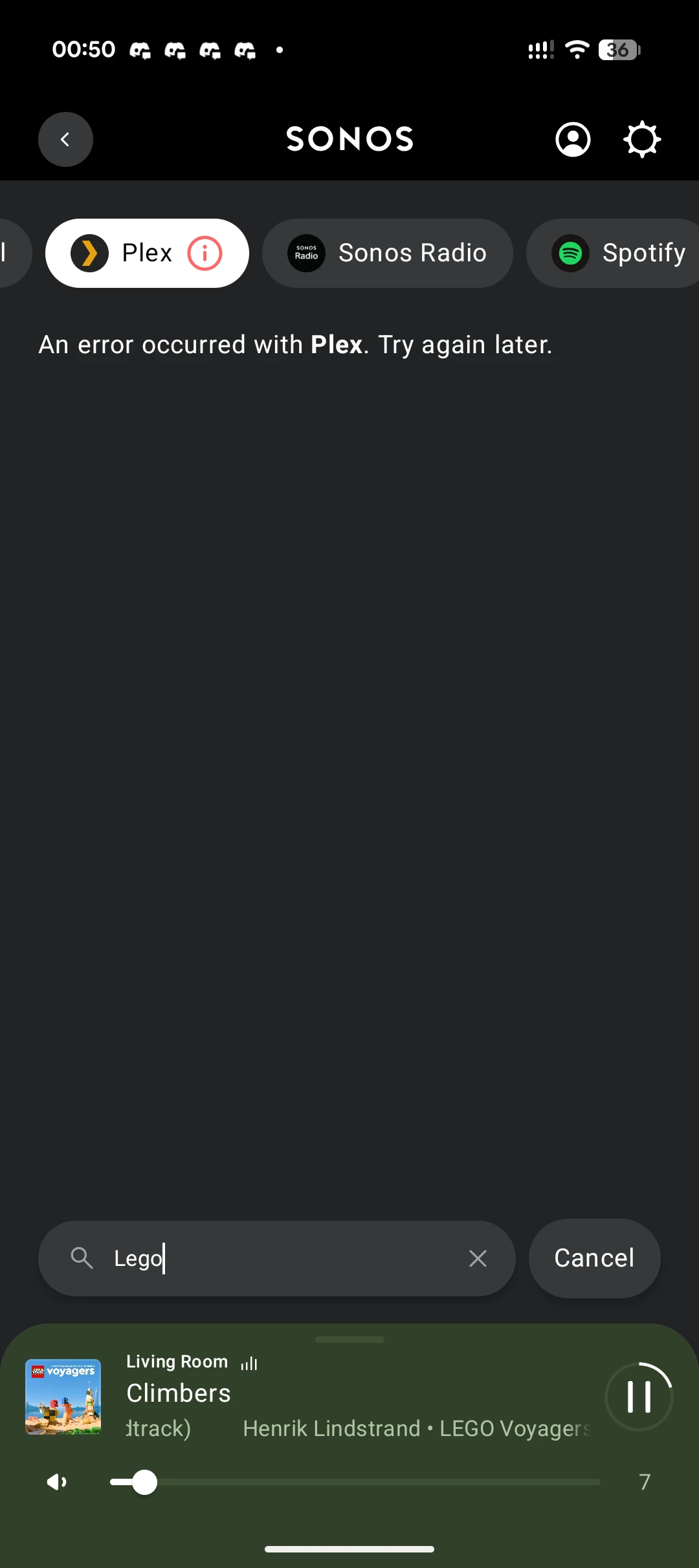
Even when I try to search manually in Sonos it just says "An error occured with Plex trying again later", which tells me nothing? Descriptive error messages would be a good start. Even if a little vague. But better than this.


melvimbe
  • December 31, 2025

I use Plex and have had issues playing content on Sonos from time to time.   One thing that worked for me is to use the Sonos app’s search feature to look for content you know is in your Plex library.  This worked and the content was found.  I could then go back to browse my Plex library directly.

It’s worth noting that although both the plex local content server and Sonos are on likely on the same wifi network, the connection is likely through a cloud server.  Sonos connects to Plex just like any other cloud based music service, it does not use a special api to access content stored locally. I think this is a cause of a lot of issues that we sometimes see with Plex, that may not appear when using the plexamp app on the phone or other sinks.

I also would guess that the ‘no content’ error is likely on the Plex side of things. It makes some sense that plex does not have your content properly cache, or similar functionality, when it receives an api call to browse content.  The search api call perhaps does get the content refreshed on the Plex side, so that everything is now available regardless api call for content.


106rallye
Forum|alt.badge.img+18
  • December 31, 2025

Sonos does seem to give my Plex set up maybe a little to less time to spin up to show content on the app. That’s when it says “no content available”.


  • Lyricist III
  • December 31, 2025

I use Plex and have had issues playing content on Sonos from time to time.   One thing that worked for me is to use the Sonos app’s search feature to look for content you know is in your Plex library.  This worked and the content was found.  I could then go back to browse my Plex library directly.

It’s worth noting that although both the plex local content server and Sonos are on likely on the same wifi network, the connection is likely through a cloud server.  Sonos connects to Plex just like any other cloud based music service, it does not use a special api to access content stored locally. I think this is a cause of a lot of issues that we sometimes see with Plex, that may not appear when using the plexamp app on the phone or other sinks.

I also would guess that the ‘no content’ error is likely on the Plex side of things. It makes some sense that plex does not have your content properly cache, or similar functionality, when it receives an api call to browse content.  The search api call perhaps does get the content refreshed on the Plex side, so that everything is now available regardless api call for content.


Sadly I've tried searching for content I know exists and has been in the library for a while. It just always gives the same error. So it doesn't work from Sonos to Plex.

It also doesn't work in the reverse. Plex to Sonos. Sonos speaker groups don't appear in plexamp as a player


  • Lyricist II
  • December 31, 2025

I have posted some instructions for what worked for me if people are still having problems.


  • Lyricist III
  • December 31, 2025

I have posted some instructions for what worked for me if people are still having problems.

The advice is appreciated. In my case I already have the port manually set and configured in my router with port forwarding. Combined with the static IP, remote access works perfectly fine, just Sonos is having issues.

Every other app works fine on everything, just Sonos doesn't work with Plex


  • Lyricist III
  • January 10, 2026

Is this an acknowledged bug? What should one do? Is there a timeline on when this might be resolved?


Stanley_4
  • Lead Maestro
  • January 10, 2026

Sonos rarely promises future fixes.


  • Lyricist III
  • January 10, 2026

Well, if it's help to anyone I did find something to fix one of my issues. Despite linking my Plex server in Sonos, it turns out you have to link it the other way around too in order to use the speakers as a destination via plexamp. Via this url:

https://plex.tv/users/other-services


It hasn't fixed the fact that my Plex library still errors in the Sonos app, but at least now I can see my speakers in plexamp when I tap cast, so that's something


Maybe Sonos should document this? Or have it be part of the linking flow? It feels like this was kind of forgotten 


Stanley_4
  • Lead Maestro
  • January 10, 2026

Not forgotten with 23300 posts mentioning Plex here.

Does this need updated? The moderators might be able to forward suggestions to the document's owner.

https://support.sonos.com/en-us/services/plex


  • Lyricist III
  • January 11, 2026

It appears that connecting my account via that URL also fixed my library not showing in Sonos. I'm able to browse and select songs, however if I try to search for anything I get an error and it locks me out of the library for a while

After search:


It feels like the plex integration is a little forgotten, but I guess this is better than not working at all. Doesn't really feel very premium though