Alarms time shown incorrectly and Beam balance not working

  • December 29, 2024
  • 6 replies
  • 41 views

Schlumpf
Forum|alt.badge.img+18

Hi everyone and welcome especially ​@Corry P .

I just want to report two low prio bugs of the Android app. (iOS everything fine)
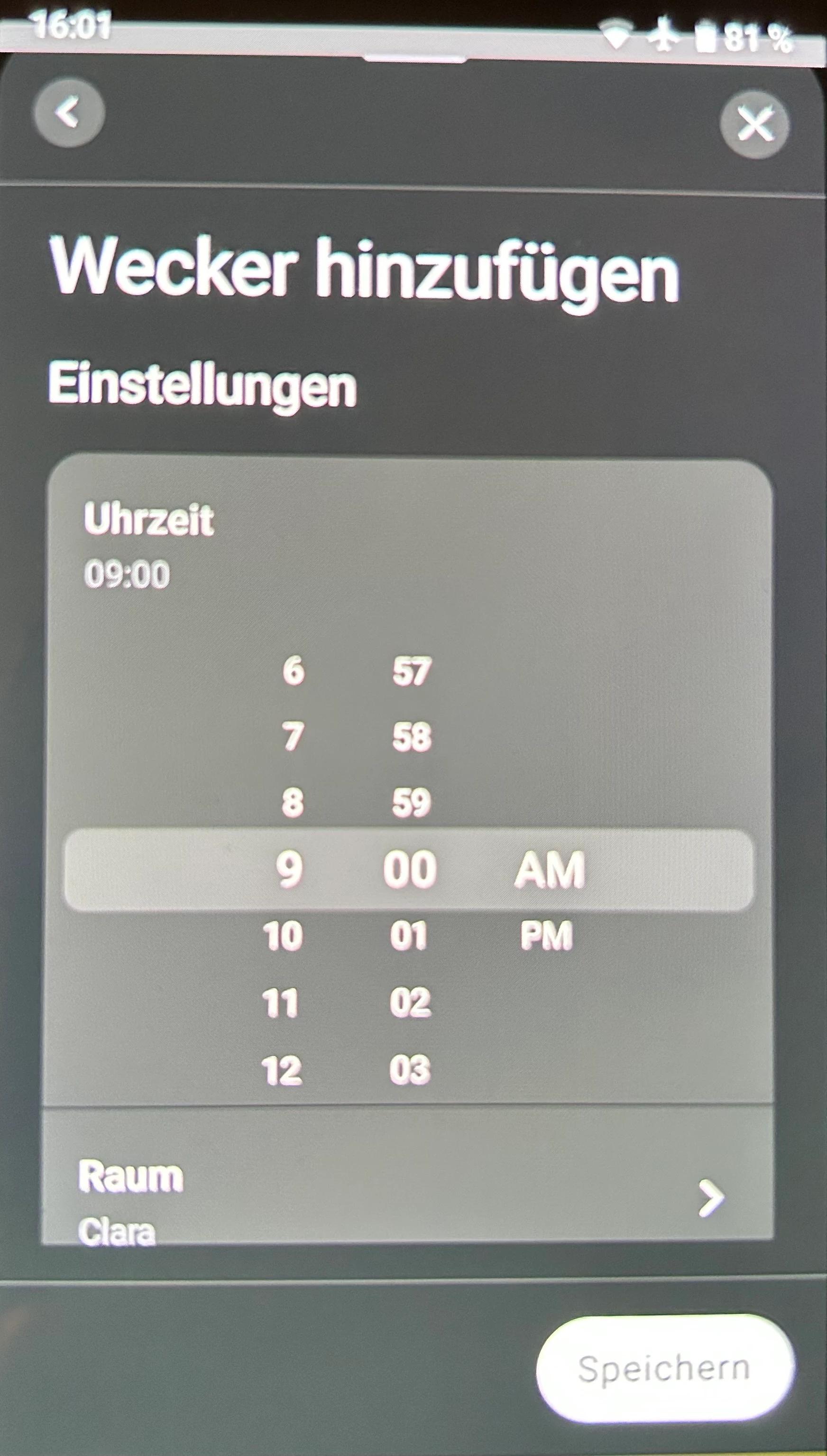
1. edit view of alarm clock settings shows am/pm instead of 24h view for DE users. 
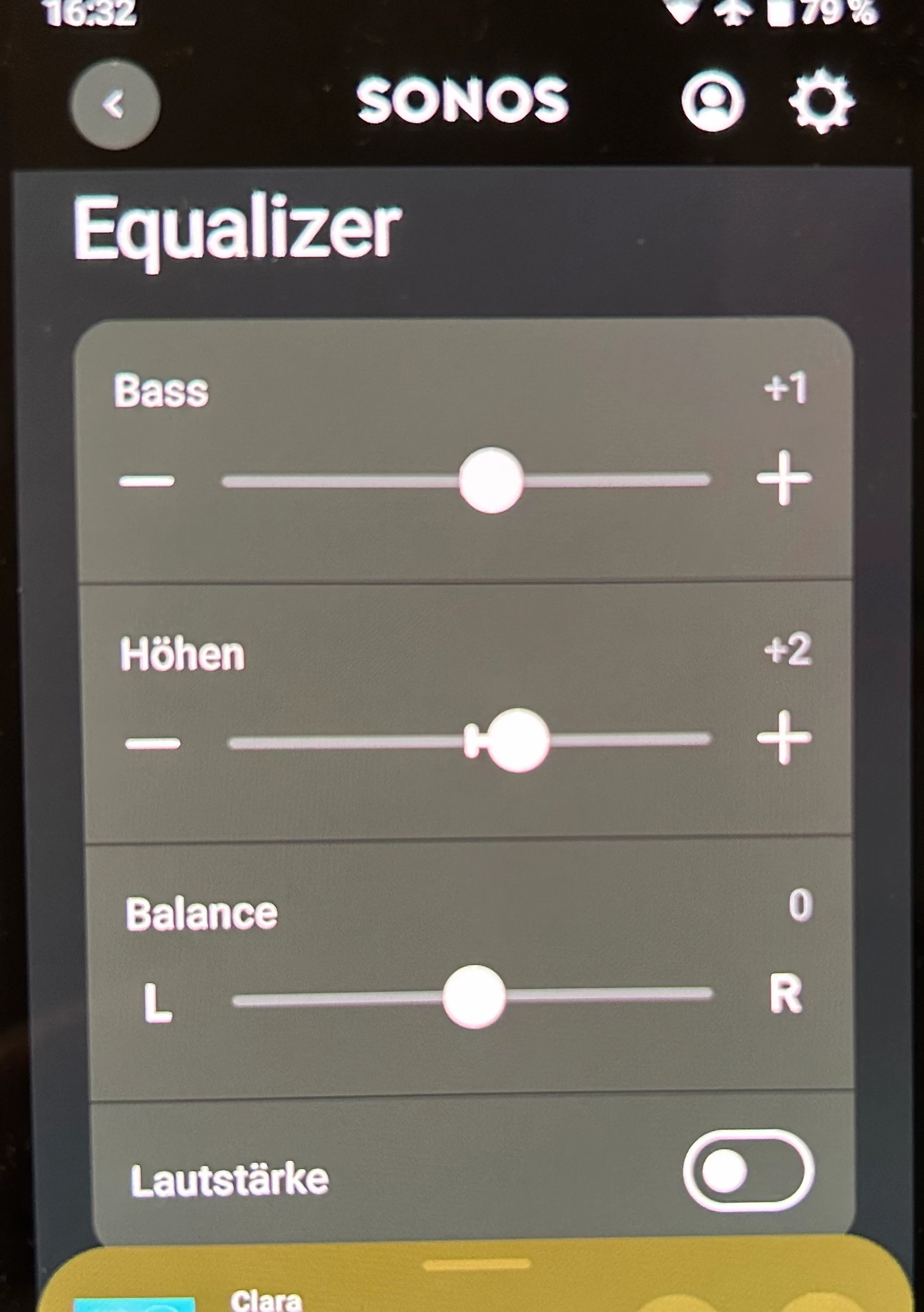
2. EQ settings of Beam2 (I don’t know if other ht devices also are affected) show a balance slider, but it has no effect. 

…latest android app and firmware…
 

This topic has been closed for further comments. You can use the search bar to find a similar topic, or create a new one by clicking Create Topic at the top of the page.

6 replies

Corry P
Forum|alt.badge.img+19
  • Sonos Staff
  • December 30, 2024

Hi ​@Schlumpf 

Thanks for your post!

Sorry to hear of these issue you are having with the Sonos app.

Regarding the AM/PM alarm display, I have asked @Nils S to check to see if he sees the same. If he does, we’ll flag it.

Regarding the balance of the Beam Gen 2, could you please recreate the issue and submit a support diagnostic afterwards? Please let me know here when you have submitted it. Thanks.


Schlumpf
Forum|alt.badge.img+18
  • Author
  • Virtuoso
  • December 30, 2024

@Corry P 

Diag submitted… from within Android App after I used the balance slider in EQ settings without any effect. 

But I wonder if there should be a balance slider for Beam2 at all… because iOS app doesn’t show one. 
 

Do you know if any Sonos soundbar supports balance option? 


Corry P
Forum|alt.badge.img+19
  • Sonos Staff
  • December 30, 2024

Hi ​@Schlumpf 

Thanks!

My Arc Ultra has a balance control that also does not do anything, though I am reasonably sure it used to. I had an Amp before, and it definitely had working balance controls.

Personally, I’m fairly sure that all soundbars should have a working balance control, but my colleague is not so sure and is seeking clarification - we will likely need to wait for the holiday to be over before we hear back. Certainly, there should not be a balance slider if there is no balance control, so something is definitely wrong. The only documentation I can find says that all stereo-capable rooms should have a balance control, and it seems obvious for soundbars to be included in that, though I suppose it’s conceivable that the setting should be disabled with TruePlay Tuning (I have tested and this is not it - balance still has no effect with TruePlay disabled).

We can confirm the AM/PM behaviour, by the way, and have flagged it.

I hope this helps.


Schlumpf
Forum|alt.badge.img+18
  • Author
  • Virtuoso
  • December 30, 2024

Thx ​@Corry P for the feedback. To be honest I can’t remember if my Playbar (replaced with Beam2 long time ago) had a balance option. 
I just can add that Play5 Gen2 (single speaker in horizontal position) works like expected. It shows a balance slider in Android and iOS app and it just works. Era300, 100 and Move2 (also single speakers with stereo capability) don’t show balance option anywhere. That imo is good because a balance option imo wouldn’t make sense for those devices. 
Let‘s wait for 2025 and I‘m curious if the soundbars should support the balance option or not. 
Btw. for the Amp imo it’s a must have and thx for confirming that it’s there. 
Have a great party tomorrow…

Best Regards 


Corry P
Forum|alt.badge.img+19
  • Sonos Staff
  • December 31, 2024

Hi ​@Schlumpf 

I got an answer - it seems I was wrong!

There is an issue, but it is not that the balance control does not work, it is that you can see it in the first place! The only Home Theatre device that should show a balance control is Amp.

Thanks again for flagging!

And have a great New Year!


Schlumpf
Forum|alt.badge.img+18
  • Author
  • Virtuoso
  • December 31, 2024

@Corry P 

Again thx for the quick reply. 
I can confirm this helped. 😉

So I‘m going to mark the line on the Android device display with some Tipp-Ex to „remove“ the balance slider. 😂