
Answered

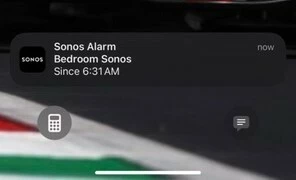
Alarm Notification on phone

  • December 27, 2024
  • 4 replies
  • 277 views

I use the Sonos alarm feature daily and love it.  Recently I noticed a notification showing up on my iPhone for an alarm that I do not have either in the Sonos app on my phone or via the PC application.  Interestingly no alarm is triggered at the time this alarm is set for.  I just get the notification.  

How do locate this alarm and cancel it?  
 

Best answer by Airgetlam

Huh, most odd. I’d try a reboot of all sorts of things, from the speakers, to the router, and finally the iPhone.

If it persists, I would recommend that you submit a system diagnostic within 10 minutes of experiencing this problem, and call Sonos Support to discuss it. But don’t post the resulting diagnostic number here, they get sensitive about GDPR.

There may be information included in the diagnostic that will help Sonos pinpoint the issue and help you find a solution.

When you speak directly to the Support staff, they have tools at their disposal that will allow them to give you advice specific to your network and Sonos system.

This topic has been closed for further comments. You can use the search bar to find a similar topic, or create a new one by clicking Create Topic at the top of the page.

4 replies

Airgetlam
  • Answer
  • December 27, 2024

Huh, most odd. I’d try a reboot of all sorts of things, from the speakers, to the router, and finally the iPhone.

If it persists, I would recommend that you submit a system diagnostic within 10 minutes of experiencing this problem, and call Sonos Support to discuss it. But don’t post the resulting diagnostic number here, they get sensitive about GDPR.

There may be information included in the diagnostic that will help Sonos pinpoint the issue and help you find a solution.

When you speak directly to the Support staff, they have tools at their disposal that will allow them to give you advice specific to your network and Sonos system.


  • Lyricist I
  • January 20, 2025

I have exactly the same problem and no way of stopping these notifications. I think I get three a day.


Airgetlam
  • January 20, 2025

Fascinating. What did Sonos Support say, when you called in?


  • Author
  • Contributor I
  • January 23, 2025

When I called they suggested to delete all the alarm, then re-add them back and that would “re-set the alarm app” Two days ago I did delete them all and waited a day before attempting to add them back.  Interestingly I didn’t see the random 6:31am alarm notification pop up.  Yesterday when I added one it would not stay persistent and today when I tried if they do stay but once you create it you can’t change them.  I tried this on both iPhone and iPad and both with the same result.  But when I use the PC app they stay and you can change them only on the PC app.  I deleted the app on both iOS devices then reinstalled it.  This required me to reinstate my connection to the speakers and all the normal things you do when setting up the app like new.  Thankfully now the alarm edit functions seem to be working, or at lease editable after you create them.  This also fixed a recent issue where my favorite were missing.