Answered

Add a radio station not working

  • January 16, 2026
  • 16 replies
  • 132 views

Good afternoon. 


I’m trying to ad a radio.co (.co, not .com) station to the sonos system without any luck. 

The streaming address is https://s4.radio.co/s7e7b6c165/listen 
 

On Macos, I add it trough “Manage > Add Radio Station” . There is no feedback from the interface on submit, and the station is nowhere to be found. 

How to fix this? 

Thank you. 

Best answer by Sotiris C.

Hello ​@behem0t, welcome to the Sonos Community!

I am sorry to hear you are experiencing an issue adding a Radio station URL to your Sonos system.

Please have a look at our Support Article Use TuneIn to add internet radio station URLs to Sonos and more importantly the below:

  1. Copy the radio station URL from your mobile device’s browser.
  2. Open the TuneIn app for iOS or Android. Check to make sure you’re logged in with your TuneIn account by selecting the account icon at the top right.
  3. Follow TuneIn’s instructions on how to add a custom radio station URL to your TuneIn Favorites.
  4. Before continuing, make sure you can see your custom station in your TuneIn app for iOS or Android under Library > Favorites. The station must be listed in this section in order for it to show up in the Sonos app.

Are you able to see the Radio Station after you add it within the TuneIn App? Can you figure from the above, at which point the process is failing?

If you are still unable to add that URL Radio Station, feel free to reach out to our Support Team. They have tools at their disposal to provide you with information and advice specific to your Sonos system and what it reports.

I hope this helps.

16 replies

Sotiris C.
Forum|alt.badge.img+16
  • Sonos Staff
  • Answer
  • January 19, 2026

Hello ​@behem0t, welcome to the Sonos Community!

I am sorry to hear you are experiencing an issue adding a Radio station URL to your Sonos system.

Please have a look at our Support Article Use TuneIn to add internet radio station URLs to Sonos and more importantly the below:

  1. Copy the radio station URL from your mobile device’s browser.
  2. Open the TuneIn app for iOS or Android. Check to make sure you’re logged in with your TuneIn account by selecting the account icon at the top right.
  3. Follow TuneIn’s instructions on how to add a custom radio station URL to your TuneIn Favorites.
  4. Before continuing, make sure you can see your custom station in your TuneIn app for iOS or Android under Library > Favorites. The station must be listed in this section in order for it to show up in the Sonos app.

Are you able to see the Radio Station after you add it within the TuneIn App? Can you figure from the above, at which point the process is failing?

If you are still unable to add that URL Radio Station, feel free to reach out to our Support Team. They have tools at their disposal to provide you with information and advice specific to your Sonos system and what it reports.

I hope this helps.


  • Author
  • Contributor I
  • January 19, 2026

This did hep out.

thank you


  • Lyricist II
  • April 5, 2026

So I have the TuneIn app installed on my Android.  I added the custom radio station and it’s listed under Library-->Favorites.  I can play it no problem in the TuneIn app. When I go into Sonos app and pick TuneIn, there is no favorite folder option.

If I use the Windows Sonos app and click Manage-->Add Radio Station. I enter in all the information for that station, then it say it will show up under TuneIn>My Radio, but there is no option in TuneIn for My Radio Stations.(Windows or Android)


Airgetlam
  • April 5, 2026

What did the support team say, as suggested in the ‘marked’ reply?


106rallye
Forum|alt.badge.img+18
  • April 6, 2026

@TallGuyNJ Are you using the Sonos S1 or the Sonos app?


  • Lyricist II
  • April 6, 2026

@TallGuyNJ Are you using the Sonos S1 or the Sonos app?

The most current Android and Windows Apps


  • Lyricist II
  • April 6, 2026

What did the support team say, as suggested in the ‘marked’ reply?

I didn’t reach out to support because I didn’t want to have to spend 30+ minutes on a phone call or chat windows on a Sunday.  I wish there was a way to send them an email instead.  The rest of their main instructions didn’t work.


controlav
Forum|alt.badge.img+24
  • Lead Maestro
  • April 6, 2026

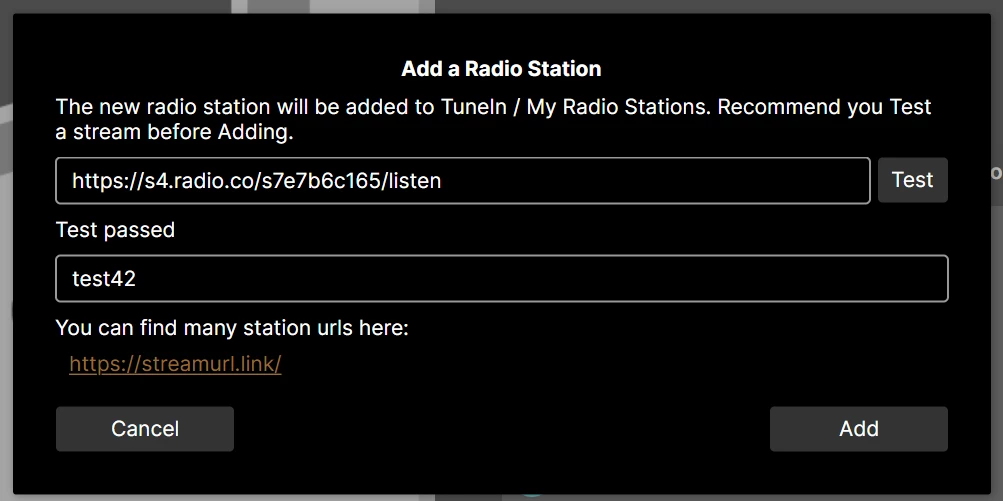
This stream works fine, I added it using my app (see profile) and played it back without issue. Available on Android and MacOS. My app also allows you to Test a stream before adding it.

Phonos Ultimate


  • Lyricist II
  • April 6, 2026

This stream works fine, I added it using my app (see profile) and played it back without issue. Available on Android and MacOS. My app also allows you to Test a stream before adding it.

Phonos Ultimate

Where did you go as I can’t find that anywhere?


  • Lyricist II
  • April 6, 2026

What did the support team say, as suggested in the ‘marked’ reply?

After over an hour of text chats and calls including remote screen sharing, they referring back to all the support documents on their website with fixes that don’t work.  Ultimately, they don't know why none of apps they have work and I should just Bluetooth into the one Roam I have (a non-resolution to the issue)

I believe the new TuneIn app isn’t working as designed and all their documentation was centered around the old TuneIn app.  They claim they will escalate the Windows App to find out why the Add Radio Station say it will show up under TuneIn>My Radio, but there is no My Radio under TuneIn.


106rallye
Forum|alt.badge.img+18
  • April 7, 2026

But it does work when you use the phoen app?

The PC and Mac apps only receive security updates. Maybe they also do not do this part of TuneIn (new)?


  • Lyricist II
  • April 7, 2026

But it does work when you use the phoen app?

The PC and Mac apps only receive security updates. Maybe they also do not do this part of TuneIn (new)?

Nothing on the phone app works.  The closest I get is I can get the TuneIn App to play what I need.  I go into the library section and enter in a custom url.  It will play.  

This is the link to what Sonos says should happen : Sonos support Article

Step One:


Add the station URL to your TuneIn favorites

  1. Copy the radio station URL from your mobile device’s browser.
    Works
  2. Open the TuneIn app for iOS or Android. Check to make sure you’re logged in with your TuneIn account by selecting the account icon at the top right.
    Works
  3. Follow TuneIn’s instructions on how to add a custom radio station URL to your TuneIn Favorites.
    Works
  4. Before continuing, make sure you can see your custom station in your TuneIn app for iOS or Android under Library > Favorites. The station must be listed in this section in order for it to show up in the Sonos app.
    Works, it’s there

Use the Sonos app to play your custom station

  1. Open the Sonos app for iOS or Android, or open the Sonos Web app.
    Open the Android, Web or Windows App
  2. From your Home screen, go to Your services TuneIn.
    Done
  3. Browse to Favorites, then choose your saved station.
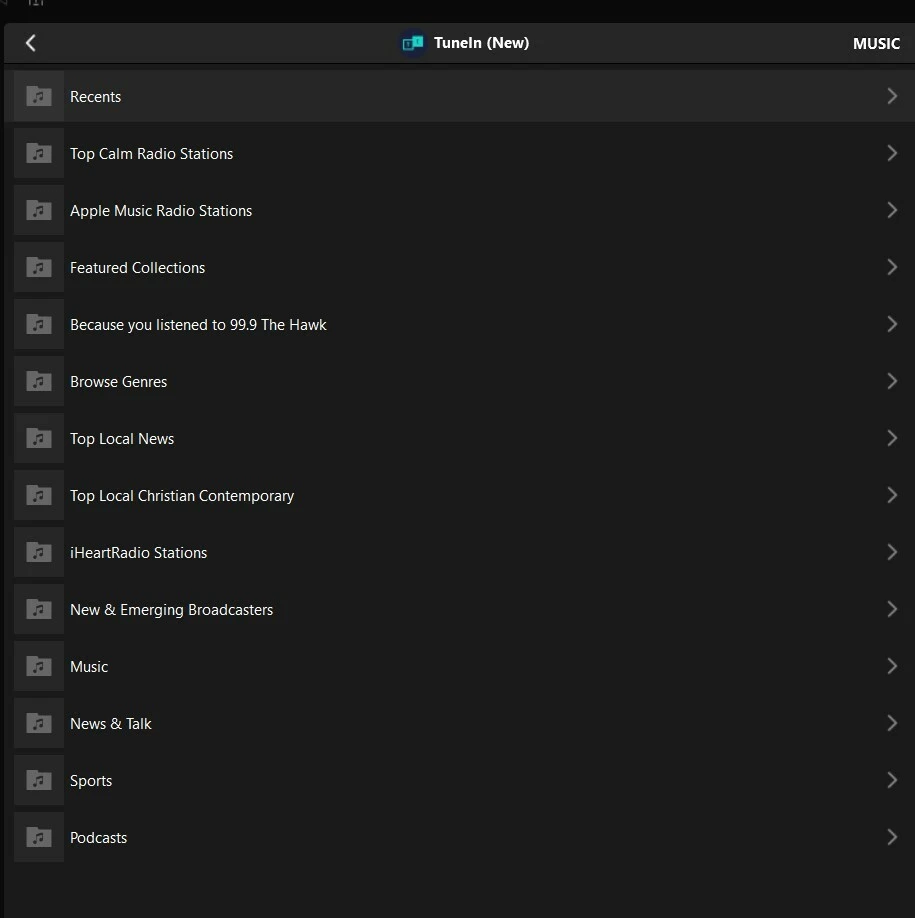
    This may be the issue. There is no Favorite section listed on any of my platform under TuneIn: Android, Web or Windows.  There is just Sonos Favorites, which doesn’t list anything I created.

If anyone has any ideas let me know, but I think either Sonos or TuneIn need to fix the issue. I’m going to blame Sonos since it’s within their app.  My feeling is there was a break when they released the new TuneIn version.

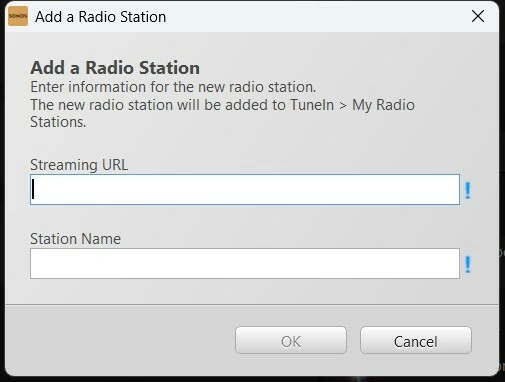
Note: Under the Windows App, If I do go to Manage→Add Radio Station (as mentioned by ​@controlav), I can add the custom URL, through the interface (it doesn’t have a test button so I don’t know where he took that screen shot), but there is no option to Add as Station under Android or Web (that I can find)


It mentions it will add the radio station to TuneIn>My Radio. When I enter the information and click OK, the screen just disappears.  If I do it again with the same name, I get an error that the station name already exist, so it did something.  For reference, here is what TuneIn show under the Windows App, which is match all the options I get on Android and Web.


Sorry for the long post, but I figure I will document everything in case someone at Sonos cares to resolve this issue.


controlav
Forum|alt.badge.img+24
  • Lead Maestro
  • April 7, 2026

This stream works fine, I added it using my app (see profile) and played it back without issue. Available on Android and MacOS. My app also allows you to Test a stream before adding it.

Phonos Ultimate

Where did you go as I can’t find that anywhere?

Its a feature of MY Sonos apps, see profile. The name is in the title of the screenshot.


  • Lyricist II
  • April 7, 2026

This stream works fine, I added it using my app (see profile) and played it back without issue. Available on Android and MacOS. My app also allows you to Test a stream before adding it.

Phonos Ultimate

Where did you go as I can’t find that anywhere?

Its a feature of MY Sonos apps, see profile. The name is in the title of the screenshot.

Are you using the iOS app? Unless I am completely missing something, I can’t find this anywhere in the Sonos Android or WebApp. I don’t own apple products.


  • Lyricist III
  • April 7, 2026

This stream works fine, I added it using my app (see profile) and played it back without issue. Available on Android and MacOS. My app also allows you to Test a stream before adding it.

Phonos Ultimate

Where did you go as I can’t find that anywhere?

Its a feature of MY Sonos apps, see profile. The name is in the title of the screenshot.

Are you using the iOS app? Unless I am completely missing something, I can’t find this anywhere in the Sonos Android or WebApp. I don’t own apple products.

This is from his app Phonos Ultimate available for Android AFAIK. I own his iOS app Phonos+ and it can add radio streams easily just by copy/paste into the app iirc. 
 

I don’t understand why Sonos makes it so difficult with requiring to use TuneIn and set up a TuneIn account or pay for third party apps. Just add it back to the app Sonos. 


  • Lyricist II
  • April 7, 2026

@Mangoe 

Thank you.  That was the missing piece.  Wish there was a trial version, but with all my Rewards credits I don’t mind supporting developers.


Still I agree that Sonos needs to fix their apps.